smew.ai

80s AI Trend: Your 1985 Photo and Home Video

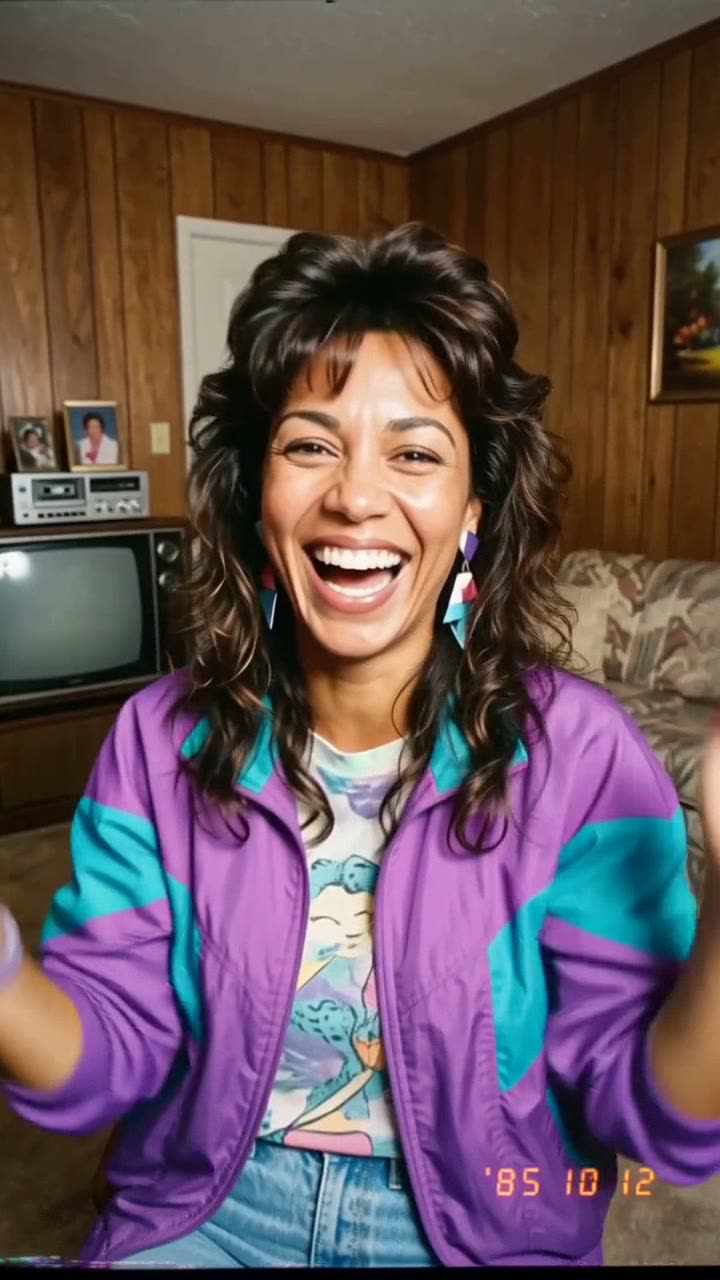
A single selfie transforms into a vintage 1985 photograph with period hair and a date stamp. Keep just the image, or bring it to life as a 10-second VHS-style clip with audio.

The original 80s AI reelOriginal reel
  • 1 photo you add
  • 10 s clip with sound
  • 9:16 for TikTok, Reels, Shorts
  • No watermark

No prompt to write: Add your photo and tap once

Create your own

Ready in a few minutes · From 128 credits

The 80s AI trend (also called "Back in '85") transforms your selfie into what looks like an authentic 1985 photograph: voluminous hair from the mid-80s, a colorful jacket, grainy film texture, harsh direct flash, and a red-orange date stamp. A more recent variant converts that still image into a wobbly camcorder home video. You'll need one sharp selfie. Step 1 by itself produces the photo.

Also called Back in '85 · 80s trend · 1985 trend · 1980s AI photo trend

Step by step

How to make the 80s AI video on Smew AI

Everything happens in your browser. No editing software, no prompt writing, no watermark.

  1. Add your photo

    Tap "Create your own" and upload your selfie. Capture it with your camera or choose from your library.

  2. Press Generate

    The button displays the cost. Smew AI creates the 80s scene from your photo, then Seedance 2.5 brings it to life as a 10-second clip with original audio. No prompt writing needed.

  3. Download or share

    Your video arrives in minutes as a 9:16 MP4. Save it, share from your device, or retrieve it later from your Library.

Which photo works best?

Choose one clear, forward-facing selfie showing your entire face in bright light. The prompt preserves your face while reimagining everything else, so facial clarity matters most.

  • Head and shoulders suffice. The model creates the 80s clothing and background.
  • Remove sunglasses and hats; they obscure facial features the model needs to preserve.
  • Skip heavy beauty filters. An altered face may return as a slightly different person.
  • One person per image. Multiple faces confuse which one to preserve.
  • Choose a photo of yourself or an adult who consented. Never a celebrity or stranger.

Where did the 80s AI trend start?

The 80s AI trend launched as a photo trend on Instagram during early September 2026. Users employed the Instagram Stories "Add Yours" sticker to circulate a ChatGPT prompt asking "show me what I would have looked like around 1985", inviting their followers to create their own versions. BusinessToday featured it on 9 September 2026, and Storyboard18 noted on 10 September that OpenAI had included the 1980s prompt in its own blog entry.

India saw the biggest adoption, with the trend also taking off in the UK, the US, the Philippines and Gulf regions. Our sample of 3,815 TikTok videos included 95 retro "what would I look like" posts, starting from 6 September; the leading post reached 2.4 million views by 29 September. Media outlets issued privacy advisories about submitting selfies to AI platforms.

The video version emerged later in September, as template applications began converting the 1985 photo into brief home videos, appearing as if recorded by a family member on a vintage camcorder. That is the version shown here.

  1. During early September, the 1985 photo prompt circulates on Instagram Stories via the "Add Yours" sticker.

  2. The initial retro "what would I look like in the 80s" AI post shows up in our 3,815-video TikTok dataset. By 29 September the dataset contains 95 such posts.

  3. BusinessToday describes the Instagram 80s photo trend and its ChatGPT prompt origins. BusinessToday

  4. Storyboard18 notes that OpenAI included the 1980s image prompt in one of its blog entries. Storyboard18

  5. A spoof post, "Not 80s AI trend... I'll show you 2040s trend", garners 8,869 upvotes on r/IndiaTech, while the leading TikTok version exceeds 2.4 million views. Reddit

  6. US Google Trends data from the past 30 days shows searches for "ai 80s" running approximately 15 times higher than "ai dog dancing".

Copy and paste

The 80s AI prompts

These are included automatically: the one-tap workflow applies them for you. A photo prompt places your image in the scene, then a video prompt animates the result. To modify them, copy and adjust in AI Photo and AI Video.

1985 home video

1 photo: your selfieSeedance 2.510 s · 720p · 9:16128 credits
Video prompt

Use the uploaded image as the base. Keep the subject's face, facial features, skin tone, and expression exactly the same. Transform the photo into a real 1985 snapshot: bold mid-1980s hair, a bright windbreaker or denim jacket, statement accessories, in a wood-panelled suburban living room with a boxy TV and a cassette player. Analog film grain, faded warm colors, direct flash, soft focus. A small red-orange date stamp in the lower right corner. Vertical 9:16. No modern objects, no phones, no logos.

504 characters

How many credits does it cost?

Videos cost credits, and the create page displays the exact amount on the Generate button before you commit. The one-tap option includes both the scene photo and video in a single charge. A single video requires 128 credits, so the smallest one-time bundle that fits is $14.99 for 150 credits, without a subscription. Lower-cost models are available if you apply the prompts manually in AI Video.

Video modelSettingsCredits
Seedance 2.5 (this template)10 s, 720p + 1 scene photo, one tap128
Seedance 2.0 Fast (by hand in AI Video)10 s, 720p + 1 photo68
Veo 3.1 Fast (by hand in AI Video)8 s, 720p + 1 photo14

One-time packs and plans are on the pricing page. A failed video gives its credits back.

Can you make just the 80s AI photo, without the video?

Absolutely, and that's what most users want. The workflow has two stages, and stage 1 alone delivers the 80s photo trend: submit your selfie to AI Photo using the 1985 photo prompt, and receive a vertical image with period hair, washed-out colors, flash lighting and a date stamp. Save it and you're done. Payment covers only the photo.

Stage 2 is your choice. If the still looks good, tap the film icon and AI Video transforms it into the recent 80s AI video: a 10-second VHS clip with tape noise and a parent's laughter heard off-screen. Many people share both: the photo in a carousel or story, followed by the video as a Reel or TikTok the next day.

What makes a 1985 photo look real?

Successful versions replicate the imperfections of budget 1980s cameras, not merely the clothing. Our photo prompt intentionally requests each element:

DetailWhy it matters
Direct flashCreates flat, overexposed faces and harsh shadows typical of period compact cameras.
Faded warm color and grainAging print film develops orange tones and reduced contrast.
Red-orange date stampThe signature detail from family albums. Instantly signals "1985" to viewers.
Wood panels, boxy TV, cassette playerPeriod-accurate surroundings make the styling credible.
No modern objectsA single smartphone or flat-screen display ruins the illusion.

The video prompt applies similar principles to movement: reduced resolution, color bleeding, tracking artifacts at the bottom, handheld wobble and searching autofocus.

What goes wrong, and how do you fix it?

ProblemFix
The face looks like a different personPick a clearer, forward-facing selfie without any filter, then create the still once more.
The photo looks like a modern costume partyCreate it again. Strong grain, flash, and date stamp are essential; weak versions make it look like 2026.
A phone or a modern logo shows upCreate the still once more before animating. The video keeps whatever appears in that first frame.
The date stamp shows the wrong year or random lettersAI text frequently fails. Either crop it away or leave it; most viewers don't look that closely.
The bike or hands warp in the videoTypical in 10-second clips. Running it again, or choosing a shorter length, usually solves it.
The video model refuses the photoCertain models reject certain real faces. Your credits return; switch to Veo 3.1 Fast.

How do you post the 80s AI trend so it gets views?

This trend works as a comparison, so display the original. Share your actual selfie alongside the 1985 transformation, either sequentially or side-by-side. On Instagram, the "Add Yours" sticker drove the trend's initial growth: attach your 80s photo to it so followers of the sticker discover your post.

For video content, the opening frame should immediately appear vintage. Preserve the natural audio; the tape static and distant laughter create the authentic home video atmosphere. If you overlay a song while posting, keep its volume low beneath the camcorder sounds. A simple caption like "Mom found the tapes" performs better than hashtag lists.

FAQ

80s AI trend questions

What is the 80s AI trend?
This is a September 2026 trend in which people transform a selfie with AI into what appears to be a real 1985 photo, complete with mid-80s hair, clothing, film grain, flash, and a red-orange date stamp. It began on Instagram using a shared ChatGPT prompt. A later variant turns the photo into a camcorder home video.
What is the 1985 trend?
It's an alternate name for the 80s AI trend, referencing the year in the original prompt. A 1985 trend photo presents your face as it might have appeared in a snapshot from roughly 1985, featuring bold hair, vibrant clothing, direct flash and a date stamp. You may also encounter it as the 1985 photo trend.
What is the 80s AI trend prompt?
The circulated prompt instructs the AI to portray you as you might have appeared around 1985, preserving your facial features while adding dramatic mid-80s styling, film grain, washed-out colors, direct flash and a date stamp. Our adaptation appears in the copy box here, alongside the video prompt for stage 2. Some refer to it as the 1985 trend prompt.
What would I look like in the 80s? How do I find out with AI?
Submit one clear selfie to AI Photo using the 1985 photo prompt shown here. Nano Banana 2 preserves your facial features while reimagining your hair, clothing and environment in mid-80s style. Your AI 80s photo generates quickly. Run it multiple times to explore different 80s appearances.
Do I have to make the video, or can I just get the 80s photo?
You can finish after stage 1. That produces the 80s photo, which most users share, and payment covers only that image. Stage 2 converts the photo into a 10-second VHS video if desired.
How do I make an 80s AI video from my photo?
Create the 1985 still first, then tap its film icon. AI Video loads with the still as the starting frame and the VHS prompt pre-filled. It produces a 10-second vertical MP4 with tape static and natural sound, saving to your Library without watermarks.
Is the 80s AI trend safe for my privacy?
Media organizations cautioned users to consider privacy before submitting selfies to AI platforms. Use images you're willing to share, only of yourself or consenting adults. Review the output: AI may alter minor elements like jewelry, fingers and fabric textures.
Can I make a 90s or 70s version instead?
Certainly. The prompts use plain language, so swap "1985" and style references, such as "1996, a flannel shirt, a disposable camera". Retain the grain, flash and modern-object exclusions; those details make any era appear genuine.
Can I use the 80s trend ChatGPT prompt here?
Yes. The Instagram 80s trend used a ChatGPT prompt, and our 80s AI prompt in the box here produces the same 1985 aesthetic. No prompt generator required, and it suits women and men; for couples, generate separate photos.
Where did the 80s AI trend spread?
It gained traction initially on Instagram Stories, then expanded to TikTok, Reddit discussions and news platforms like BusinessToday. The photo generated here functions on any social platform, including Facebook (FB).
Who started the 80s AI trend?
Instagram members launched it in early September 2026: they circulated a ChatGPT prompt through the Stories "Add Yours" sticker, challenging followers to share their own takes. On 10 September, Storyboard18 noted that OpenAI had featured the 1980s prompt in one of its blog entries.
How do I do the 80s AI trend?
Submit one selfie to generate your 80s trend photo, then optionally convert the image into a brief video. Share the results with a caption like "Back in '85". No separate 80s trend AI application needed: this page functions as an 80s AI photo generator and creates videos too.

More trends

Other AI video templates

Template

Bby Wow Guy AI: Insert Your Face Into the Guy Dancing at a Quince Meme

Groove toward the camera at a quinceañera, take a bite of the concha, lock eyes with the lens while chewing with stuffed cheeks, then groove back into the crowd. Upload one photo to star as the bby wow guy, complete with the song.

Read more
Template

Bad Times AI Trend: Turn One Photo Into the Viral Argument Video

The viral argument routine: hands to head, hip pose, stop gestures and that long camera stare, all set to Imael Angel's "Bad Times". Upload a single photo of yourself or your pet and get the complete video with music.

Read more
Template

Hotel Lobby AI: Create the Hotel Lobby Trend Video

Place yourself and a friend, or your two pets, in a bright orange booth where they rap back and forth into a single hanging microphone. Use the actual footage or the popular cat version with authentic audio, or create a fresh 10-second clip with a new beat.

Read more
Template

Tecktonik Dance AI: Step onto the String-Light Stage

Wide arm swings, hands reaching toward the head, both arms shooting upward, followed by rapid, precise arm choreography on a compact stage lit by string lights: the electro dance from the 2000s that Cheba Man revived in 2026. Upload a single photo of yourself or your pet to generate the dance complete with its soundtrack.

Read more
Template

AI Hug Video: Create a Heartfelt Hug from Two Photos

In a bright park, two people walk up to one another and embrace warmly. Upload two images, get an 8-second video with soft original audio.

Read more
Template

AI Baby Generator: Create a Future Baby Home Video

Upload photos of two partners and watch an imagined baby come to life: a retro camcorder sequence featuring first steps, breakfast chaos, and shoulder rides.

Read more

Make your own 80s AI video

Upload one photo and tap once. No prompt writing. 128 credits.

No watermark. A failed video gives its credits back. Secure checkout by Stripe.