smew.ai

Phone on the Train Trend: Put Yourself in the Paris Metro Reel

Perform Training Season on a Paris metro platform, attach your phone to the train window, chase the train down the platform, and watch your phone travel to the Eiffel Tower vista—just like the 7-million-like reel. Upload one photo, get a 33-second video with the reel's audio.

The original Phone on the train reel by @olliemuhlOriginal reel
  • 1 photo you upload
  • 33 s video with audio
  • 9:16 for Reels, TikTok, Shorts
  • No watermark

No prompt to write: Add your photo and tap once

Create your own

Ready in a few minutes · From 192 credits

The phone on the train trend (sometimes called the Training Season train trend or phone taped to the train trend) became a 2026 reel sensation: attach your phone to a metro window, perform on the platform while it records you, then chase the departing train with your phone aboard. This template puts you in the singer's role in the Paris version, the most popular one. Upload one photo.

Also called Training Season train trend · Dua Lipa train trend · Phone stuck to the train · Phone taped to the train · Phone sticking trend · Metro trend · Subway iPhone tape trend

Example

What your Phone on the train video looks like

Made on Smew AI from an AI-made photo with the prompts on this page, not a real person. Your result will differ from run to run.

Made with Smew AI
Made from one AI-made photo with the Your photo, waist up, face close version, Standard option (192 credits). Nobody in it is a real person.
Use this reference
Source reel by @olliemuhl, 33 s
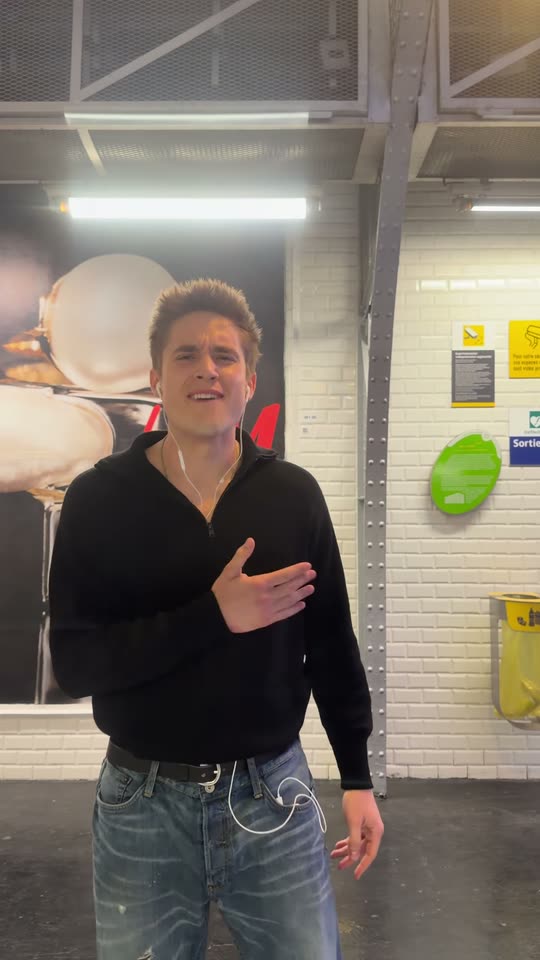
The source reel from @olliemuhl: he performs on the Paris metro platform, attaches his phone to the train window, chases the departing train, and his phone travels toward the Eiffel Tower. Your photo replaces him throughout this reel, complete with its audio.
Use this reference
Step by step

How to create the Phone on the train video on Smew AI

Everything happens in your browser. No editing software, no prompts to write, no watermark.

  1. Upload your photo

    Click "Create your own" and upload your photo, waist up, face visible. Capture it with the camera or select from your library.

  2. Click Generate

    The button displays the cost. Seedance 2.5 places your photo into the Phone on the train trend clip and recreates it frame by frame for 22 seconds, then adds the reel's original ending, complete with the reel's audio. No prompt required.

  3. Download or post

    Your video finishes in several minutes as a 9:16 MP4. Download it, post it from your device, or access it later in your Library.

What kind of photo works best?

Upload one clear photo of yourself, waist up or full body. The video pulls your face, hair and outfit from it, so dress how you want to appear in the final result.

  • Look at the camera, stay in focus, use good lighting, skip sunglasses. The reel features tight close-ups of the performer's face.
  • Avoid distant shots. If your face is too small in the photo, the video might default to the original reel's performer. Waist-up shots with a clear, large face work best.
  • Waist up or full body: your clothing replaces the performer's black sweater and jeans. Costumes work as well.
  • Just you in the frame. Multiple people can confuse the model.
  • Skip filters and hats that cover your hair, unless you want the hat in your video.
  • Upload your own photo, or one from someone who gave permission.

Where did the Phone on the train trend begin?

Musicians launched it to showcase their songs. The earliest version we found dates to 8 June 2026, when Canadian artist Manafest attached his phone to a subway train. August brought widespread adoption: Punjabi singer @iiktaj taped his phone to a train in Jalandhar (13 August), and Russian singer @anisiialen created a metro version (21 August, around 53 million views).

On 26 August @olliemuhl (Ollie Muhl) filmed it on the New York 7 train: "Anyone seen a phone stuck to the train recently?". His caption named the trend, and his TikTok reached 78.7 million plays. On 31 August @nikhilkochar80 shared the Delhi Metro "desi version", which surpassed 135 million views; the Delhi Metro issued a warning to creators on 5 September.

Mid-September brought the trend to Munich, Toronto, London, Istanbul, Berlin and Nigeria, with the live Training Season by Dua Lipa becoming its signature audio. TikTok also calls it the "phone taped on train window trend", and in New York the "subway iPhone tape trend". On 3 October Ollie Muhl filmed it on Paris metro Line 6, featuring a new finale: the phone travels over the Seine toward the illuminated Eiffel Tower. "Wait for the view" is the reel this template recreates.

  1. The earliest version we located: Canadian artist Manafest attaches his phone to a moving subway train and performs his song. Instagram

  2. @iiktaj tapes his phone to a train in Jalandhar, India, performs beside it and runs away: "If someone finds the phone, text @iiktaj". Instagram

  3. @olliemuhl on the New York 7 train: "Anyone seen a phone stuck to the train recently?". 2.3 million likes on Instagram, 78.7 million plays on TikTok. Instagram

  4. @nikhilkochar80 shares the Delhi Metro "desi version": 5.2 million likes and roughly 135 million views. Instagram

  5. The Delhi Metro (DMRC) cautions creators: attaching phones to train windows risks passenger injury and phone damage, and "necessary action shall be taken". Hindustan Times

  6. @olliemuhl shares the Paris version on metro Line 6, "Wait for the view", set to the live Training Season. By 12 October: 7 million likes and 89.4 million views on Instagram. Instagram

Copy and paste

The Phone on the train prompt

You don't need these: the one-click workflow handles them automatically, along with the trend clip. [Image 1] and [Image 2] are your photos, and [Video 1] is the trend clip the video recreates.

Paris metro

1 photo: your photo, waist up, face closeSeedance 2.530 s · 480p · 9:16192 credits
Video prompt

Video editing task: character and outfit replacement. Replace the young man in Video 1 with the person shown in Image 1. STRICT IDENTITY AND OUTFIT RULES: - The person in the output must be the exact same person as in Image 1: the same face, eyes, eyebrows, nose, lips, facial hair or no facial hair, skin tone, and the same hair color, length and hairstyle. - The person wears exactly the clothes from Image 1 in every frame. Where Image 1 does not show the lower body, add plain trousers and shoes that match the outfit. - Remove the black zip sweater, the belt and the light blue jeans of the original man. Remove the white wired earphones completely: no earphones and no cable in any frame. - Do not keep any facial feature or the light brown hair of the original man in Video 1. His face must not appear in any frame: not his eyes, nose, mouth, jaw or skin. - The face, the hair and the outfit must match Image 1 in every frame: close-ups, side views, the back of the head, and fast running. - Do not make the face younger, smoother or more like a model. Keep the real age, skin and face shape of Image 1. KEEP FROM VIDEO 1 EXACTLY THE SAME: - The same body movements, dance moves, gestures, singing mouth movements, running, timing and speed. - The same camera movement, framing, cuts and shot lengths. - The same phone, which the person holds and then sticks on the outside of the train window. - The same Paris metro platform, metro train, passengers, posters, lighting and colors. - The same length as Video 1. Do not add text, captions, logos or new people. Do not change the background. Realistic iPhone footage with natural skin texture.

1652 characters

What's the credit cost?

Videos cost credits, and the create page displays the exact cost on the Generate button before you commit. The one-click price includes the complete video, created in a single step from your photos and the trend clip, billed once. Each video costs 192 credits, so the smallest one-time pack that covers it is $39.99 for 450 credits, no subscription required. The less expensive models are available if you manually run the prompts in AI Video.

Video modelSettingsCredits
Seedance 2.5 (this template)33 s, 480p, recreates the trend clip, one click192

One-time packs and plans are on the pricing page. A failed video gives its credits back.

What happens in the phone on the train video, moment by moment?

Your video recreates the Paris reel by @olliemuhl, with you as the performer:

TimeWhat happens
0-5 sYou walk along the Line 6 platform at Bir-Hakeim at night and perform to the camera, in close-up.
5-9 sYou attach your phone to the outside of the metro window.
9-15 sThe phone now records you from the train: you perform and dance on the platform, hand over your heart.
15-22 sThe train departs. You chase it down the platform, performing, until you exit the frame.
22-33 sThe view: the train exits the station, crosses the Seine at night and travels straight toward the illuminated Eiffel Tower.

The platform, the train, the camera movements, the view and the audio come from the actual reel. Only the performer changes, creating the appearance of authentic phone footage.

Why does it work? It appears you've just lost your phone, which then captures the finest view in Paris.

How does Smew AI create it, and what does it cost?

Seedance 2.5 takes the initial 22 seconds of the reel and your photo, then places you in the performer's position throughout: your face, hair and outfit, without earphones. The movements, edits and pacing match the reel. The reel's Eiffel Tower view and audio are then restored, so the full 33 seconds play like the source. No prompt required.

Standard (default)HDUltra HD
ModelSeedance 2.5Seedance 2.5Seedance 2.5
Quality480p, displayed at 720p720p1080p
Length33 s: 22 s with you + the reel's 11 s view33 s33 s
SoundThe reel's audio, which you can muteSameSame
Photos111

Select the quality on the create page, and the exact cost appears on the Generate button before you commit. HD and Ultra HD cost more because billing is per second of the reel and result, and increases with pixel count. Your video appears in your Library when ready, within several minutes.

How do they attach the phone to the train, and retrieve it?

This question dominates nearly every comment section, and the reels never reveal it. Most creators secure the phone to the window's exterior using packing tape or a suction phone mount; @iiktaj used packing tape in Jalandhar. Most clips are staged: the phone gets taped while the train is stopped, and removed before it moves. A companion inside the train records the chase, and the footage is edited together (viewers noticed the companion in window reflections). Some creators mention a companion retrieved the phone at the following station. The "trend gone wrong" clips reveal the other outcome: doors that slide across the phone and trap it.

Never attach a real phone to a moving train. The Delhi Metro cautioned creators on 5 September 2026 that it risks passenger injury and phone damage, and that "necessary action shall be taken". With this template your phone remains in your pocket: the reel already contains all shots, and only the performer changes.

What caption, audio and hashtags should you use when posting?

Your video includes the reel's audio, the live Training Season by Dua Lipa, making it post-ready. You can mute the audio on the result screen and add different audio when posting.

Captions that work: "Wait for the view", "Anyone seen a phone stuck to the train recently?", "Anyone seen a phone taped to a train lately?", "There goes another phone", "My phone has a better life than me".

Hashtags: as of 12 October 2026, #trainingseason had 104,189 TikTok videos and 1.9 billion views (the song, used for multiple trends), #traintrend 1,794 videos and 27 million views, and #metrotrend 541 videos and 26.8 million views. Include #waitfortheview and #paris for the Paris version, and keep the platform's AI label visible.

Looking for another real-reel trend? Exit arrivals like a celebrity with the AI airport celebrity video, or showcase a car with the Unforgettable car trend.

Common issues and solutions

ProblemSolution
Your face looks less accurate during the chaseThat section is blurry in the source reel too. Choose HD or Ultra HD for better clarity, or upload a sharper photo.
The performer keeps the black sweater or earphonesUpload a photo where your outfit is visible, waist up or full body. Generate again.
Your trousers or shoes don't match yoursYour photo didn't include them. Upload a full-body photo.
The model rejects your photoSome photos get rejected. Your credits return; try a different photo.

Each generation is a fresh attempt, so results vary slightly. If one attempt isn't satisfactory, generate again.

FAQ

Phone on the train trend questions

What is the phone on the train trend?
It's a 2026 reel trend on Instagram and TikTok, also known as the Training Season train trend, phone sticking trend or phone taped to the train trend. You attach your phone to the exterior of a metro or train window, perform on the platform while it records you, then chase the departing train with your phone aboard. The Paris reel by Ollie Muhl, ending with the Eiffel Tower view, is the most popular version.
Which song is used in the phone on the train trend?
Primarily the live "Training Season" by Dua Lipa (Live from the Royal Albert Hall). It's the audio for Ollie Muhl's Paris reel and became the dominant TikTok sound for the trend from mid-September 2026. The Delhi Metro version features "Manma Emotion Jaage" from the film Dilwale. Your Smew AI video includes the Paris reel's audio.
Who created the phone on the train trend?
The earliest version we located is from Canadian artist Manafest, posted 8 June 2026. It gained momentum in August with @iiktaj in India (13 August), @anisiialen (21 August), Ollie Muhl on the New York 7 train (26 August) and @nikhilkochar80 on the Delhi Metro (31 August). Ollie Muhl's Paris reel appeared on 3 October.
How do I create the phone on the train video without a real train?
Click "Create your own", upload one clear photo of yourself and click Generate. The button shows the cost first. You receive a 33-second vertical video with the reel's audio: you on the Paris platform, the chase beside the train and the Eiffel Tower view. No prompt required, and your video appears in your Library when ready.
Must I tape my phone to an actual train?
No. The taping, train, chase and view already exist in the reel. You upload one photo, and the AI places you in the performer's position throughout. Your phone stays in your pocket, and no tape, suction mount or train ride is necessary.
Which Paris station appears in the reel?
Bir-Hakeim, on metro Line 6. Line 6 travels above ground there, and the train crosses the Seine on the Bir-Hakeim bridge toward Passy, with the Eiffel Tower directly beside it. This creates the view at the reel's conclusion.
Can I appear in my own outfit in the video?
Yes. The video takes your outfit from your photo and removes the performer's black sweater, jeans and earphones. A waist-up or full-body photo performs best. Costumes work too: our example features an AI-generated sultan in a turban and kaftan.
Does it work for women?
Yes. The reel's performer is male, but the model uses the face, hair and outfit from your photo, regardless of who you are. The movements, chase and view remain identical.
What's the video length, and does it include audio?
33 seconds, vertical 9:16, as an MP4 file: 22 seconds with you, followed by the reel's 11-second Eiffel Tower view. It includes the reel's audio, and you can mute the audio on the result screen.
Is attaching my phone to a train safe?
No. The Delhi Metro cautioned creators in September 2026 that it risks passenger injury and phone damage, and doors can trap the phone. This template provides the same video without attaching a real phone to a real train.
Does the phone on the train video require credits?
Yes. Videos cost credits, and the create page displays the exact cost on the Generate button before you commit. Standard costs least; HD and Ultra HD offer better clarity and cost more. If a video fails, your credits are refunded.

More trends

Other AI video templates

Template

Bby Wow Guy AI: Insert Your Face Into the Guy Dancing at a Quince Meme

Groove toward the camera at a quinceañera, take a bite of the concha, lock eyes with the lens while chewing with stuffed cheeks, then groove back into the crowd. Upload one photo to star as the bby wow guy, complete with the song.

Read more
Template

Bad Times AI Trend: Turn One Photo Into the Viral Argument Video

The viral argument routine: hands to head, hip pose, stop gestures and that long camera stare, all set to Imael Angel's "Bad Times". Upload a single photo of yourself or your pet and get the complete video with music.

Read more
Template

Tecktonik Dance AI: Step onto the String-Light Stage

Wide arm swings, hands reaching toward the head, both arms shooting upward, followed by rapid, precise arm choreography on a compact stage lit by string lights: the electro dance from the 2000s that Cheba Man revived in 2026. Upload a single photo of yourself or your pet to generate the dance complete with its soundtrack.

Read more
Template

My Ride Is Here: Jump on Your Broom and Soar Past the Car

Walk along a forest road beside a car with your broom, glance back and smile, mount it and soar above the pine trees, just like the viral witch reel. Upload one photo, get a 10-second video with the original reel audio.

Read more
Template

24 Unforgettable Car Trend AI: Flash the 2 and 4, Show Your Car

Step toward the camera, show a 2 and a 4, toss both cards toward the lens, and a sports car sits parked behind you. Upload one photo, include a photo of your preferred car, replace the car with a private jet, or watch the car perform a thruster-powered backflip. 10 to 14 seconds, featuring the song from the viral videos.

Read more
Template

AI Airport Celebrity Video: Exit Arrivals Like a Star

Security clears a path, phones point at you, cameras flash, fans press against the barriers: you exit the arrival gate like a celebrity, acknowledge a fan and climb into your car. Or pull up at a hotel after dark: step from a black luxury sedan onto the red carpet. Upload one photo of yourself or your pet, get a 15-second video with crowd audio.

Read more

Create your own Phone on the train video

Upload one photo and click once. No prompt required. 192 credits.

No watermark. A failed video gives its credits back. Secure checkout by Stripe.