Caught at the Window: AI Commercial Generator for Your Brand
Upload your product photo and logo. The shot glides toward a single lit window at night, two people inside use your product, someone notices the camera and draws the curtains closed, revealing your logo. A single 10-second take at 1080p with audio.
The caught at the window format is October 2026's viral AI ad trend: a camera pushes toward a lit window at night, showing people using a product, someone looks directly at the lens and closes the curtains, then the brand logo appears on the fabric. This AI commercial generator creates your version using two photos: product and logo.
Also called YAKALANDIN trend · Gözün kalmasın ad · Caught at the window · Curtain ad · Neighbor window ad
Example
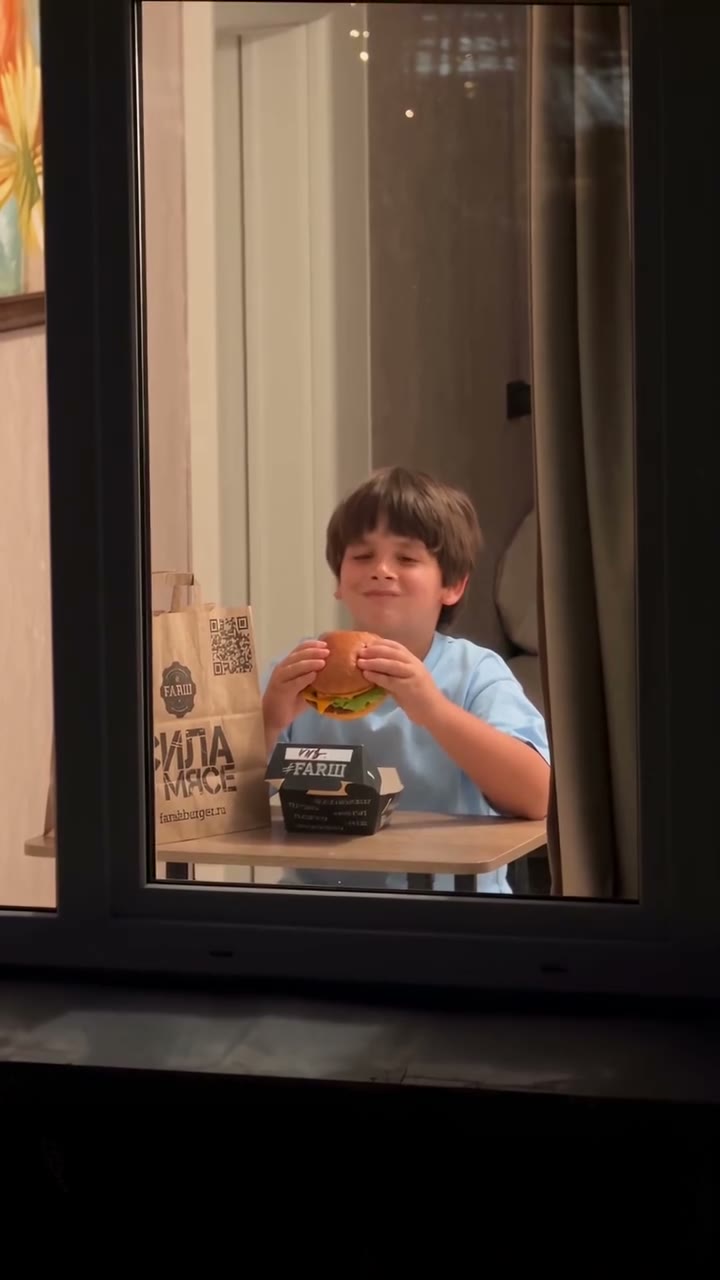
What the Caught at the Window video looks like
Created using prompts from this page. People and animals are AI-generated, not real individuals, with original audio. Each run produces different results.
Original reel by @karina.aicontent, 15 s
@karina.aicontent posted the viral version on 11 October 2026, an unofficial burger chain concept ad using Seedance 2.5: 25.4 million views.
Ülkü KURT's version using the prompt from this template on Omni 1.1 Flash: mineral water six-pack on table, then its logo on curtains. Playing without audio.
How to make the Caught at the Window video on Smew AI
Everything happens in your browser. No editing software needed, no prompt writing, no watermark added.
Add the two photos
Click "Create your own" and upload your product image first, then your logo, packaging or bag. Order matters because it determines what appears in the scene. Capture with camera or choose from your files.
Press Generate
The button displays the cost. Omni 1.1 Flash creates the Caught at the Window scene directly from your images, skipping intermediate steps, producing 10 seconds with original audio. No prompt writing required.
Download or share
Your video renders in minutes as a 9:16 MP4. Download to your device, share from mobile, or access later in your Library.
Which photo works best?
Upload two photos:
Your product: a clear shot with visible label facing forward, ideally against a simple background. Product shots work well.
Your logo against a plain backdrop, or the bag, box or packaging featuring your logo. Packaging will also appear on the table.
Missing a logo file? Take a flat photo of your bag or box with the logo large and in focus.
White logos on transparent PNGs appear invisible: place on a colored background before uploading.
Simple logos work better. Fine text and lengthy taglines may not render correctly.
Works well with food, beverages, beauty products, electronics and shopping bags.
Where did the Caught at the Window trend start?
The format started in Turkey. On 8 October 2026 the Ankara burger shop Sofa Burger posted an ad where a boy eats a burger, sees the camera and pulls the curtain, with the line "gözün kalmasın" ("don't stare at it"). It reached about 46,000 likes, where the shop's posts usually get about 30.
On 11 October the Russian AI creator @karina.aicontent posted her own take: an unofficial concept ad for a burger chain, made with Seedance 2.5 from a photo of a boy, the branded bag and the burger box. It passed 25 million views and 1.7 million likes. Restaurants copied it the same day.
On 12 and 13 October creators shared prompts. @welamall in Baku posted the first public prompt, and the Turkish art director Ülkü KURT named it the YAKALANDIN trend (yakalandın trendi, "you got caught") in a tutorial for Google Flow and its Omni 1.1 Flash model. By 14 October small brands in Turkey, Azerbaijan, Kazakhstan and Russia were making their own: burgers, sausages, mineral water, water filters.
Sofa Burger from Ankara shares the earliest known ad: boy eats burger, sees camera, closes curtain. Roughly 46,000 likes. Instagram
@karina.aicontent shares a burger chain concept ad created with Seedance 2.5. Gets 25.4 million views and 1.76 million likes. Instagram
@welamall releases the first public prompt for this format, designed for a pizza ad, via his Telegram channel. Telegram
Ülkü KURT shares the tutorial "YAKALANDIN trendi" using Google Flow and Omni 1.1 Flash, publishing the complete prompt on her site. Instagram
Copy and paste
The Caught at the Window prompt
No need to use this yourself: the one-tap process handles it automatically. [Image 1] and [Image 2] represent your uploads in the sequence you add them: the model uses them as reference and creates the scene directly from your photos, without generating a still image first.
Your brand
2 photos: your product photo + logo, bag or boxOmni 1.1 Flash10 s · 1080p · 9:1626 credits
Video prompt
Create a photorealistic vertical brand commercial using the uploaded product photo ([Image 1]) as the exact product reference and the uploaded logo photo ([Image 2]) only for the final end frame. Never write the words of this prompt, photo labels or file names as text anywhere in the video.
Nighttime exterior of a modern apartment building. Start very far away, showing most of the building facade with many windows. Only one apartment window is warmly illuminated and subtly attracts attention. All the other windows are dark.
ONE SINGLE CONTINUOUS SHOT, NO CUTS.
The camera begins a slow, smooth, cinematic physical push-in through the night air toward that specific illuminated window. The movement must feel like a real camera physically traveling toward the building: NOT a digital zoom, NOT a sudden crop, NOT a transition. The apartment gradually becomes larger and clearer as the camera approaches.
Through the window, 2 friends are naturally spending time together and casually using / eating / interacting with the exact PRODUCT from the uploaded product reference. If [Image 2] shows a branded package (a bag, a box or a package), that package is on the table. Preserve the product’s real shape, packaging, colors, proportions, branding and label. The product must be clearly recognizable and naturally integrated into the scene.
At first, everyone is completely unaware of the camera. They behave naturally and do NOT look toward the lens.
The camera continues slowly approaching until the people and product are clearly visible through the window.
Then ONE person notices the camera.
IMPORTANT TIMING: He stops what he is doing and looks directly into the camera with a genuinely irritated, suspicious expression, as if realizing a stranger has been watching them.
He does NOT smile. He is NOT surprised or scared. He does NOT immediately close the curtains.
He maintains uncomfortable direct eye contact with the camera for approximately 2 seconds.
Then, still visibly annoyed, he slowly puts down what he is holding, calmly stands up from the table and walks naturally toward the window while maintaining eye contact with the camera.
No rushing. No sudden movements.
When he reaches the window, he pauses briefly and gives the camera one final irritated stare.
Only then, he grabs both curtains and slowly pulls them together from both sides until the window is completely covered.
The curtains physically block the camera’s view of the apartment. The closed curtains stay warmly lit from inside.
After the curtains fully close, hold for a brief beat, then transition naturally to a clean final brand frame that shows only the logo from the uploaded logo photo ([Image 2]), exactly as provided, with no other words around it. Centered logo, premium minimal presentation. Do not redesign, rewrite or distort the logo. Do not substitute any other version of the brand's logo.
VISUAL STYLE: Photorealistic live-action commercial, realistic apartment architecture, realistic humans, subtle natural acting, premium cinematic lighting, warm interior light contrasted with cool blue nighttime exterior, realistic window reflections, natural depth of field, believable camera movement, high-end advertising cinematography, 9:16 vertical.
CRITICAL: The entire approach from distant building exterior to close window view must feel like ONE continuous physical camera movement. The product must remain faithful to the uploaded reference. The people must interact naturally with the product. The person notices the camera ONLY after the camera gets close. After noticing it, he MUST stare angrily for about 2 seconds BEFORE standing up. He must then physically walk from his seat to the window. He closes the curtains ONLY after reaching the window. Curtains close slowly and completely. As soon as the curtain closes, the logo appears, but the curtain remains softly visible in the background.
NO cuts, NO teleporting camera, NO instant zoom, NO morphing faces, NO distorted hands, NO product redesign, NO fake product text, NO extra logos, NO smiling at camera, NO waving, NO comedy, NO exaggerated anger, NO immediate curtain closing, NO character teleportation, NO sudden movements.
Audio: quiet night city ambience, soft sounds from the room, a quick fabric swish when the curtains close, and a short, warm original music sting when the logo appears. No speech, no lyrics.
Payment is per video in credits, with the exact cost displayed on the Generate button before any charge. The one-tap price includes both scene photo and video, billed together. One video costs 26 credits, so the smallest one-time package covering this is $9.99 for 100 credits, no subscription required. Lower-cost models are available if you manually run prompts in AI Video.
Video model
Settings
Credits
Omni 1.1 Flash (this template)
10 s, 1080p, straight from your photos, one tap
26
One-time packs and plans are on the pricing page. A failed video gives its credits back.
What happens in your ad
Your ad matches the trend structure shot for shot, in one unbroken take:
Seconds
What happens
0 to 3
Nighttime. Camera begins distant from an apartment building where a single window is illuminated, moving steadily closer.
3 to 5
Inside through the window, two people consume or use your product at a table, label visible.
5 to 7
One person spots the camera and looks directly at the lens, appearing bothered and wary.
7 to 9
They set down the product, approach the window and slowly draw both curtains closed.
9 to 10
Your logo emerges on the gently lit curtain fabric as the final frame.
The closing moment functions as an AI logo animation: curtains meet and your logo fills the screen.
Omni 1.1 Flash (Gemini Omni Flash) produces the complete ad directly from your two images, the same model trend creators use in Google Flow. The result is vertical 9:16 at 1080p, featuring nighttime ambience, curtain rustle and a brief music cue on the logo. The exact cost appears on the Generate button before any purchase, and the finished video appears in your Library.
How brands post the caught at the window ad
The format succeeds because it feels like real footage from a neighbor, then delivers the punchline with your logo. Restaurants adopted it first, so an AI food ad (a burger, pizza, sushi, a drink) is typical, but any product people use at home works well.
Write the line people say. The original ad's "gözün kalmasın" ("don't stare at it") sets the tone, and Turkish posts refer to the format as the gözün kalmasın reklam: "Stop staring at someone else's burger. Order your own." Then include how to order.
Post it as an ad, not as a real video. Leave the AI label visible. This is a viral AI ad and a viral AI commercial, not actual footage of neighbors.
Make a few takes. Each generation gives you a new take: create two or three and share the best one.
It is among the trending AI ads of October 2026, and the AI ad trend goes by many names: the AI curtain ad, the AI window ad, the AI window trend, the logo curtain ending, a window commercial in AI, a neighbor window AI ad, the AI closing curtains ad, and in Turkey, where searches for yapay zeka reklam ("AI ad") are common, the perde reklamı or perde kapatma reklam ("curtain ad") and "komşu perdeyi kapattı" ("the neighbor closed the curtain"). Russian posts use реклама шторы.
Hashtags (15 October 2026): the trend lacks its own hashtag so far. The tool tags are popular: #googleflow (34,000 TikTok videos), #omniflash (5,200) and #geminiomni (3,600).
What goes wrong, and how do you fix it?
Problem
Fix
The logo comes out with a wrong letter or another version of the logo
Upload a clean, flat logo on a plain background, with no slogan under it, and run it again.
The product looks different from yours
Use a sharp photo with the label facing the camera and nothing else in the frame.
Many windows are lit, not just one
Run it again. The prompt asks for one lit window and all others dark.
The person closes the curtains at once, or both people stare
Run it again. Every run is a new take.
A camera cut breaks the one-take look
Run it again.
The run fails
Some photos get refused. The credits come back; try another photo.
FAQ
Caught at the Window trend questions
What is the caught at the window trend?+
A viral AI ad format from October 2026, known in Turkey as the YAKALANDIN trend. One uncut shot glides toward the sole lit window of a nighttime building, people inside use a product, someone spots the camera, stares and closes the curtains, revealing the brand logo on the fabric. Sofa Burger in Ankara posted the earliest known version on 8 October 2026.
How do I make the caught at the window ad?+
Click "Create your own", upload your product photo as photo 1 and your logo or branded packaging as photo 2, then click Generate. The cost displays first on the button. You receive a 10-second vertical ad at 1080p, available in your Library once complete.
Is this an AI ad generator I can use for my own business?+
Yes. This AI ad maker and AI ad creator focuses on one established format. While a general AI advertisement generator or AI ads generator produces various ad types, this creates one specific AI generated ad that's already trending, among the AI commercials of 2026: you create ads with AI using your product photo and logo, no production crew needed. Only use logos you own or are authorized to use. For other formats, visit the [AI ad generator](/ai-ad-generator) and the [AI product video generator](/tools/ai-product-video-generator).
Which AI model makes the video?+
Omni 1.1 Flash, Google's Gemini Omni 1.1 Flash model (also searched as Google Omni Flash and Omni Flash AI). This is the model trend creators use in Google Flow, accepting your two photos as references. The viral burger original used Seedance 2.5.
Which prompt does this template use?+
Ülkü KURT's prompt (@ulkustyle) from the most-viewed tutorial, used exactly. We simply direct it to your two photos and added four minor improvements: other windows remain dark, curtains stay internally lit, the logo doesn't swap to alternate versions, and a sound instruction. This is the Gemini Omni Flash prompt and Google Flow ad prompt from her tutorial, requiring no writing from you.
Can I make it in Google Flow instead?+
Yes, creators produce the Google Flow AI ad manually: upload two photos, paste the prompt and select 9:16, 10 seconds. This page automates those steps, running the identical Omni Flash commercial on your photos with one click.
Does it work for a burger, a drink or a cosmetic?+
Yes. Food and beverages are standard: the burger window ad AI version launched the trend. Beauty items, electronics and shopping bags also work, provided the product photo is clear with the label facing forward.
How long is the video, and does it have sound?+
It runs 10 seconds, vertical 9:16, at 1080p, featuring quiet night ambience, a curtain swish and a brief music sting when the logo shows. No talking is included, so you can layer your own voice-over or song when posting.
Does the caught at the window ad cost credits?+
Yes. The create page displays the exact cost on the Generate button before any charge. Failed videos return your credits.
Are my photos private?+
Yes. Smew AI never posts your photos or results publicly or shares them with other users. Videos save to your private Library, where you can delete them whenever you choose.