
smew.ai

Knight Sword Swap AI Video: The Tall Knight Takes the Heavy Sword

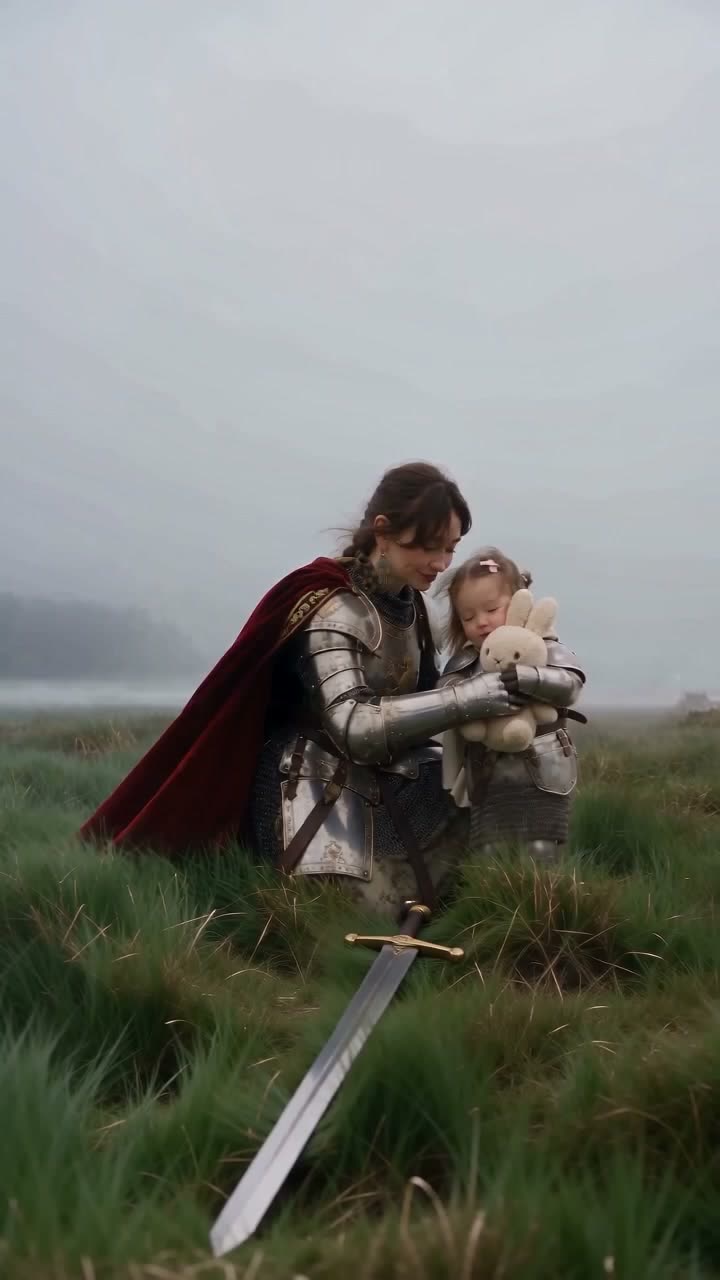
Create your own version of the trending knight clip. Your small knight grips an oversized sword in the wind, then a tall knight kneels down, lifts the heavy blade and hands back a toy, flowers or your choice.

The original Knight Sword Swap reelOriginal reel
  • 2 photos you add
  • 10 s clip with sound
  • 9:16 for TikTok, Reels, Shorts
  • No watermark

No prompt to write: Add your photos and tap once

Create your own

Ready in a few minutes · From 56 credits

The knight sword swap AI video creates your version of a trending knight clip. A small knight stands in the wind holding an oversized sword; a tall knight arrives, kneels down, lifts the sword and offers a toy in return. Add two photos: the small knight first, the tall one second.

Also called Knight takes the sword · The adult I waited for my whole childhood · Inner child knight

Step by step

How to make the Knight Sword Swap video on Smew AI

Everything runs in the browser. No editing app, no prompt writing, no watermark.

  1. Add the two photos

    Press "Create your own" and upload small knight (the child or pet), then tall knight (the adult). The order matters, because it decides who plays which role. Take them with the camera or choose from your library.

  2. Press Generate

    The button displays the price. Seedance 2.5 creates the Knight sword swap scene directly from your photos, skipping the intermediate picture, for 10 seconds with original sound. You write no prompt.

  3. Download or share

    The video arrives in a few minutes as a 9:16 MP4. Download it, share from your phone, or access it later in your Library.

Which photo works best?

You need two photos, the small knight first. Photo 1 becomes the small knight holding the sword, photo 2 the tall knight who takes it.

  • Photo 1, the small knight: a child or pet, with the face or fur visible and in focus. An adult here will appear as a small, child-sized knight.
  • Photo 2, the tall knight: face visible and facing the camera, well lit, full or half body.
  • One person or pet per photo. In group shots the model must guess identities.
  • No sunglasses, hats or beauty filters. They alter the faces the model preserves.
  • Any background is fine: all versions place your knights on a misty field.
  • The object is optional. Leave it blank and the tall knight offers a plush bunny.
  • Use only your own child, or a child whose parent or guardian gave permission.

Where did the Knight Sword Swap trend start?

The swap emerged from the knight cat meme. On 21 August 2026 the AI creator @sickmanai posted a kitten wearing fitted armor holding a sword larger than itself in a storm. On 28 September the collab "Remember your gym bro." placed a giant next to the tiny knight, launching the small knight and giant format.

On 5 October @ray_chieee posted a golden armor version featuring the swap. A crying toddler knight stands alone; a woman in golden armor and ivory cape kneels, lifts the sword and offers a plush toy. The Russian text translates to "The adult I waited for my whole childhood / turned out to be me": the woman is the grown girl. On 7 October @gazizaaz in Kazakhstan posted a red cape version with a mother and toddler, captioned "The daily fight for our children". Here, Red cape follows the @gazizaaz clip and Golden armor follows the @ray_chieee look and narrative.

  1. @sickmanai posts the kitten knight storm scene on Instagram: a kitten wearing fitted armor holds a sword larger than itself in the wind. Instagram

  2. "Remember your gym bro." by @derek.mercer.2006 and @sickmanai places a huge muscular man beside the kitten, launching the tiny knight and giant format, with over 3 million Instagram likes by 8 October. Instagram

  3. @ray_chieee posts the golden armor swap: a grown knight kneels, lifts a crying toddler's sword and offers a plush toy. It receives 230,000 likes and 1,893 comments by 8 October. Instagram

  4. @gazizaaz posts the red cape version featuring a mom and toddler, captioned "The daily fight for our children", with the sound "Outro" by M83 and 5,134 likes by 8 October. Instagram

Copy and paste

The Knight Sword Swap prompts

You won't need this: the one-tap flow handles it. [Image 1] and [Image 2] are your photos, in the order you upload them: the video model uses them as reference and creates the scene directly from them, skipping the photo step.

Red cape

2 photos: little knight (the child or pet) + big knight (the adult)Seedance 2.510 s · 720p · 9:16126 credits
Video prompt

A slow, tender, cinematic scene from a real fantasy film, shot on 35mm with natural film grain and muted grey-green colors, on a wide, misty moor of long, wet, green grass with thick fog hiding the horizon, soft grey light and a strong wind from the left. One continuous shot with no cuts: the camera stays low with a slight handheld sway, at a medium shot, so both faces stay large and clear until the end. The little knight is the one in [Image 1], in every frame: copy the exact face from [Image 1] (the face shape, eye color and eye shape, eyebrows, nose, mouth, cheeks, skin tone, hair color, hair length and hairstyle) and keep their real age and small size. Keep each child's gender from [Image 1]: a boy stays a boy and a girl stays a girl, with the same hair length as in [Image 1], also when the wind blows the hair; no long hair, bow or hair clip unless [Image 1] shows them. If [Image 1] shows a baby, keep the same baby at the same age, with the same face, eyes, nose, mouth, cheeks, skin tone and hair, standing upright as a tiny knight: never an older child. If [Image 1] shows an animal, the little knight is that animal standing upright in small fitted armor, with its own face, fur and markings, never a person. Leave out temporary marks on the skin, like scratches, bruises, stickers or food. The big knight is the adult in [Image 2], in every frame: copy the exact face from [Image 2] (the face shape, eye color and eye shape, eyebrows, nose, mouth, skin tone, age, hair color, hair length and hairstyle, and any beard, moustache, glasses or freckles). The little knight is always the child or the pet, and the big knight is always the adult: if [Image 1] shows an adult and [Image 2] shows a child, the child from [Image 2] is the little knight and the adult from [Image 1] is the big knight. Never put an adult's face on the little knight's small body. Never blend the two faces. Each face stays the same from the first frame to the last, so the family recognizes them at once. The little knight wears small fitted silver plate armor and a short cream cape, with no helmet, no bow and no hair clip. The big knight wears polished silver plate armor with no helmet and a long dark red cape, and holds a big, soft plush bunny toy. The big knight has no sword. At the start the little knight stands in front and grips the hilt of a heavy steel longsword with both hands at chest height, point to the sky, just beside the face; the blade rises far above the head. The little knight keeps the eyes wide open and frowns bravely against the wind with lips pressed together, struggling to hold the heavy, tall sword upright while the wind blows the hair and the cape. The little knight never cries and never screams. The big knight, a few steps behind and to the right, walks slowly forward, kneels on one knee beside the little knight, gently takes the heavy sword from the little hands and gives the little knight a big, soft plush bunny toy. The little knight hugs it tight with a small, relieved smile. The big knight stands up, plants the sword point-down in the grass with one hand and rests the other hand on the little knight's shoulder, standing guard while the long red cape streams in the wind. Both look out into the mist, faces turned three-quarters to the camera. Audio: howling wind, the cape flapping, soft clinks of armor, and an original slow, emotional orchestral score with sweeping strings, epic and tender. No dialogue, no lyrics. Exactly two figures and one sword, nobody in the background, no extra limbs, no morphing, no text, no logos.

3578 characters

Golden armor

2 photos: little knight (the child or pet) + big knight (the adult)Kling 3.010 s · 1080p · 9:1656 credits
Video prompt

Use the two uploaded images as the base. The one in the first image is the little knight. The one in the second image is the big knight. Keep each face, facial features, skin tone and hair (or fur) exactly the same as in their own photo, and keep the little one's age and size. Do not blend the two. If the first image shows an animal, the little knight is that animal standing upright in small fitted armor. If the first image shows a baby, keep the same baby at the same age, with the same face, eyes, nose, mouth, cheeks, skin tone and hair, standing upright as a tiny knight. Leave out temporary marks on the skin, like scratches, bruises, stickers or food, but keep birthmarks, moles and freckles. A still from a real film on a wide, misty moor of long, wet, green grass, with thick fog hiding the horizon, soft grey light and a strong wind from the left. In the front, the little knight stands in small fitted silver plate armor and a short ivory cape that whips in the wind, holding the hilt of a heavy steel longsword with both hands at chest height, point to the sky, just beside the face; the blade rises far above the head. The little knight faces the camera with big, wide-open eyes and a calm, brave little face: small, but brave, not crying. The eyes are open and clearly visible. No bow, no hair clip. A few steps behind and to the right, the big knight stands tall in shining golden plate armor over fine chainmail, with no helmet, and a long, sheer ivory cape with gold embroidery streaming in the wind. The big knight holds a big, soft plush bunny toy and smiles a soft, loving smile, the face turned three-quarters toward the camera. The big knight has no sword. Low camera at the little knight's eye level. Both full body, both faces clear and sharp. Photorealistic, natural film grain, muted grey-green colors, not CGI. Vertical 9:16. Exactly two figures, nobody in the background, no text, no logos.

1921 characters

How many credits does it cost?

You pay per video in credits, and the create page displays the exact price on the Generate button before any charge. The one-tap price includes the scene photo and video, charged once. Each version has its own price: Red cape 126 credits, Golden armor 56 credits. Cheaper models are available if you run the prompts manually in AI Video.

Video modelSettingsCredits
Red cape: Seedance 2.5 (this template)10 s, 720p, directly from your photos, one tap126
Golden armor: Kling 3.0 (this template)10 s, 1080p + 1 scene photo, one tap56

One-time packs and plans are on the pricing page. A failed video gives its credits back.

What happens in the knight sword swap video, shot by shot?

All versions share the same narrative, in one continuous scene:

BeatWhat you seeWhat you hear (Standard)
OpeningYour small knight stands alone in the wind wearing small silver armor and a short cape, eyes open against the wind, holding a sword twice their size.Howling wind.
The walk-inThe tall knight from photo 2 walks through the fog and kneels beside the small one.Armor clinks with each step.
The swapThe tall knight lifts the heavy sword and offers your object instead: a plush bunny, unless you select otherwise.An original slow, gentle orchestral score.
The endingThe small knight holds the object with both arms, while the tall knight stands guard with the sword in the grass.Wind and the score, with no lyrics or dialogue.

A Best clip includes the original sound from the clip. You can disable it on the result screen and add your preferred sound when posting.

Red cape or Golden armor? The two references tell this narrative in two visual styles.

  • Red cape follows the @gazizaaz clip. The tall knight wears silver plate armor and a long dark red cape. This is the default.
  • Golden armor follows the @ray_chieee clip. The tall knight wears golden plate armor over chainmail and a long, sheer ivory cape with gold embroidery.

Standard or Best? On the create page, each reference offers a quality option, with an info button explaining each. Standard is the default and uses fewer credits. Best costs more.

ReferenceStandard (default)Best
Red capeSeedance 2.5 takes your two photos (and object photo, if added) and creates the sword swap directly from them, with no intermediate AI picture, your two knights in silver armor, the tall one in a long dark red cape: 10 s, 720p, vertical 9:16, with original sound. It follows the narrative and style of the clip, not exact shots.Higgsfield Genjutsu motion transfer: the clip itself is the source, and your photos replace its two people. 15 s, 480p, in the clip's own 4:3 frame, with no sound.
Golden armorSmew AI first generates a photo of your two knights in golden armor with your object (Nano Banana 2.1), then Kling 3.0 animates the sword swap: 10 s, 1080p, vertical 9:16, with original sound. It follows the narrative and style of the clip, not exact shots.Genjutsu on the golden armor clip itself: 14 s, 480p, in the clip's own 4:3 frame, with no sound.

Why does Standard generate a new scene? The cheaper models that replicate a clip shot by shot (Seedance 2.0 Mini, Seedance 2.5 and Kling O3) frequently kept the original mom and child instead of the people in photos. Only Genjutsu swapped both faces consistently. So Best replicates the clip with Genjutsu, and Standard builds the same narrative from your photos.

When should you select Best? Choose it when you want the exact movements from the clip and the closest facial match: because the clip is the source, every movement stays the clip's, and Genjutsu preserves faces best. Choose Standard when you want a vertical clip with sound ready to post immediately.

We tested the references on 8 October 2026 and Red cape Standard on 12 and 13 October 2026, with AI-generated photos. On 13 October Red cape Standard shifted to Seedance 2.5 directly from photos: in our face check the faces matched photos much more closely than with the photo-first method. Faces and pets transferred well, and the object appeared large and clear. Most Standard runs look great, though occasionally a face resembles the photo less, or the original clip's style shows through. If that happens, run again or select Best. Results vary each time.

To select a reference, press "Create your own" and choose Red cape or Golden armor, or press the button under an example on this page.

The inner child idea: you as a kid, you today

The golden armor clip introduced a second meaning. Its on-screen text reads "The adult I waited for my whole childhood / turned out to be me", and the kneeling knight is the small girl, grown. Its caption explains the clip began as a test of a video model and ended with its creator crying over the outcome.

You can tell the same narrative with two of your own photos:

  • Photo 1: you as a child. A phone photo of an old print can work if the face is sharp and well lit.
  • Photo 2: you today.
  • The object: something you wanted as a child. Select Teddy bear or Toy car, add a photo of your actual childhood toy, or type it in, for example "a red bicycle bell" or "a stack of comic books".

It works for a birthday, the end of a tough year, or a post about self-care. Write your own caption, or adapt these ideas:

  • "The adult I waited for my whole childhood turned out to be me"
  • "I finally showed up for little me"
  • "You can put the sword down now"
  • "Every little knight needs backup"

The same swap works for other pairings. A parent and child is classic (the mom and baby knight AI video is a version designed just for families). An older sibling can take the sword from a younger one, an owner from a pet, or one friend from another after a long week. If you want the tall one to simply stand beside the small one, with no swap, try the Knight Standing template, which replicates the "Remember your gym bro" clip.

What can the tall knight give instead of the sword?

On the create page, the "Swap the sword for" box is optional. Leave it blank and the tall knight offers a large plush bunny, as in the red cape clip. Or select one of these:

PickWhat the tall knight givesGood for
Toy (default)A large, soft plush bunnyThe classic trend look
Teddy bearA large, soft brown teddy bearKids, and the inner child version
FlowersA large bouquet of red rosesMother's Day, a partner, a thank-you
Gift boxA large gift box in shiny red paper with a gold ribbon bowBirthdays and holidays
Toy carA large, shiny red toy carKids who love cars
Boxing glovesA pair of large red boxing glovesGym friends and sporty kids
BalloonsA bunch of colorful balloons on stringsBirthdays and parties
Ice creamA large ice cream cone with three scoopsSummer, or anyone who needs a treat
RandomSomething funny, selected for youA laugh: a rubber chicken, a long French baguette or a rubber duck as large as a melon

There are two more options:

  • Photo of it: upload a photo of one real object on a plain background, such as your child's own stuffed animal or your dog's favorite ball. The tall knight offers that object.
  • Type it: write up to 60 characters, for example "a pink umbrella" or "a cup of hot cocoa". Keep it to one thing the small knight can hold in both arms.

The prompt requests the object to be large and visible, and the small knight holds it in full view until the end. In our tests the object appeared large and clear.

Is it safe to use my child's photo?

It can be, if you follow a few guidelines.

  • Only your own child, or a child whose parent or guardian requested you make it. Never a child you don't know, and never a photo taken from someone else's account.
  • The result is AI-generated. The armor, the field and the entire scene are generated; none of it is real. Keep the AI label visible when posting, so nobody mistakes it for actual footage.
  • The scene stays gentle. Nobody fights, and the grown-up removes the heavy sword. The golden armor clip opens with a crying toddler, but our Standard prompts request the opposite: the small knight appears brave and serious, squints in the wind and never cries or screams. Best replicates the clip's exact movements, so for a calm opening with a real child, select Golden armor Standard.
  • Your video goes to your Library, not a public feed. Smew AI doesn't post it anywhere, and you can delete it from your Library anytime.
  • Think before posting a child's face publicly. A family chat, a close-friends story or a private account are also good places for it.
  • Real people only with consent. Use your own face, or the face of an adult who agreed. Never a celebrity, and never someone who didn't give permission.
  • Your pet needs no costume. The armor is AI-generated, so there's no reason to dress a real pet in anything.
FAQ

Knight Sword Swap trend questions

What is the knight sword swap trend?
It's an AI video trend from October 2026 that emerged from the knight cat meme. A small knight stands alone in the wind holding an oversized sword, then a tall knight arrives, kneels down, lifts the heavy sword and offers the small one a toy. Two clips set the style: a golden armor version by @ray_chieee and a red cape version by @gazizaaz.
Where did the knight sword swap start?
It originated from the kitten knight posted by AI creator @sickmanai in August 2026, and from the "Remember your gym bro." collab of 28 September, which placed someone large next to the tiny knight. On 5 October @ray_chieee posted a golden armor version with the swap, and on 7 October @gazizaaz posted the red cape version featuring a mom and toddler.
How do I make a knight sword swap video with my own photos?
Press "Create your own" on this page and choose Red cape or Golden armor, then Standard or Best. Upload photo 1 (the small knight) and photo 2 (the tall knight), select an object if desired, and press Generate. The button displays the price first. Standard creates a vertical 9:16 video of 10 seconds with sound, for both styles. You write no prompt, and the video waits in your Library when ready.
Can I use a photo of me as a kid?
Yes, and it's one of the best uses for this trend. Put your childhood photo first and a current photo of yourself second, and you become the grown knight who takes the sword from your younger self. That's the narrative of the golden armor clip, whose on-screen text translates to "The adult I waited for my whole childhood turned out to be me". Use a sharp photo with a clear face.
Can I use my pet, or a friend?
Yes. Photo 1 can be a child, pet or friend, and photo 2 can be anyone who consented to appear. If photo 1 shows an animal, the small knight becomes that animal, standing upright in small fitted armor. In our tests on 8 October 2026, faces and pets transferred well.
What can the tall knight give instead of the sword?
A plush bunny by default. You can also select a teddy bear, flowers, a gift box, a toy car, boxing gloves, balloons or ice cream, or tap Random for something amusing like a rubber chicken or baguette. You can also upload a photo of any object, or type it in with up to 60 characters. The option is optional.
Which song is used in the knight sword swap clips?
The red cape clip by @gazizaaz uses "Outro" by M83. A Standard video from Smew AI doesn't replicate any song: it includes its own original sound, howling wind, armor clinks and a slow, gentle orchestral score with no lyrics. A Best video includes the clip's original sound, and you can disable it on the result screen. To use another trending sound, add it in TikTok or Instagram when posting.
What is the difference between Standard and Best?
Standard is the default and uses fewer credits. It creates a vertical 9:16 video with original sound. Red cape: Seedance 2.5 creates the scene directly from your two photos at 720p. Golden armor: Smew AI generates a photo of your two knights first, then Kling 3.0 animates it at 1080p. Best costs more and uses Higgsfield Genjutsu, which takes the clip itself and puts your photos in place of its two people. It preserves the clip's movements exactly and keeps faces best, but the clip is 480p, in the clip's 4:3 frame, with the clip's original sound, which you can disable.
Will the small knight cry, like in the golden armor clip?
Standard is written to avoid it: the prompts request a brave, serious small knight who frowns in the wind with open eyes and never cries or screams, so the clip stays gentle when the small knight is a real child. Best replicates the clip's exact movements, and in the golden armor clip the toddler cries at the start. For a calm opening, select Standard.
Why does my video look different from the clip?
Your video is built from your photos, so faces, hair, fur and sizes follow them, and with Standard the small knight wears our own outfit, with no bow. Standard also generates a new scene with the same narrative, not a replica of the clip's shots. Every run is a new take, so results vary. If a face drifts, use a sharper photo with one person or pet, run again, or select Best.
More trends

Other AI video templates

Template

La Tormenta de Arena AI Trend: Te He Perdido Entre la Gente

Someone gazes down from a balcony overlooking a crowded club, the view shifts to the dance floor below, and a bright spotlight reveals another person looking upward. Upload two photos or pet images to generate your video with its soundtrack.

Read more
Template

Hotel Lobby AI: Create the Hotel Lobby Trend Video

Place yourself and a friend, or your two pets, in a bright orange booth where they rap back and forth into a single hanging microphone. Use the actual footage or the popular cat version with authentic audio, or create a fresh 10-second clip with a new beat.

Read more
Template

Gas Station Dance AI: Drop You and Your Friends Into the Viral Road Trip Video

Someone dances in golden hour on an empty lot, another films themselves, and a third climbs from the car with hair blowing in the wind—just like the road trip video that went viral again in 2026. Upload three photos, or use one to fill every role. 15 seconds with the song included.

Read more
Template

Mom and Baby Knight AI Video: Turn You and Your Child into Knights

Picture your child in small armor gripping a big sword in the wind. You enter, kneel down, take the blade and pass them a teddy bear. Dads can use this too.

Read more
Template

Knight Cat AI Video: Transform Your Pet Into the Tiny Knight

Watch your pet become a miniature warrior: gleaming silver armor, an enormous sword and a billowing cape on a foggy battlefield. Upload your pet's photo, or add your own picture to join them as their companion knight in the trending videos.

Read more

Make your own Knight Sword Swap video

Upload two photos and tap once. No prompt writing. 126 credits.

No watermark. A failed video gives its credits back. Secure checkout by Stripe.