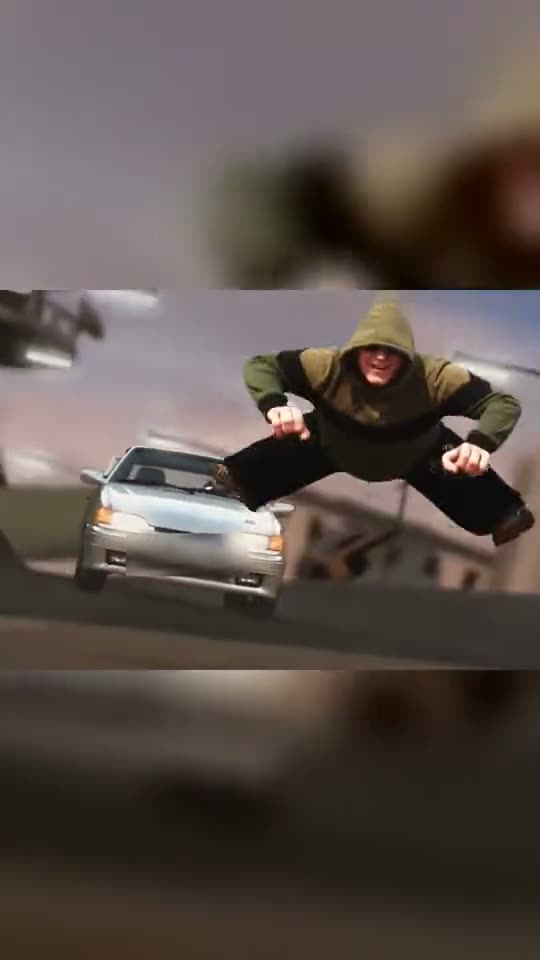
Crazy Frog AI Trend: You on the Invisible Motorbike
Race down a futuristic highway sitting in mid-air with your fists out front while a car pursues you. Upload one photo, two to include a friend driving, or three to add your own vehicle, and AI places you in the viral video with its audio.
The Crazy Frog AI trend brings the 2005 Crazy Frog music video chase to life with real people: you're positioned in the air on an invisible motorbike, fists extended, racing down a futuristic highway with a car in pursuit. Upload one photo, two to feature a friend driving, or three to include your own vehicle.
Also called Crazy Frog trend · Crazy Frog filter · invisible motorbike trend · Crazy Frog IA · trend Crazy Frog IA · Crazy Frog moto invisible
Example
What the Crazy Frog AI video looks like
Here's the original reel. Your photos substitute for its characters, creating your video with matching shots and your faces. Each generation produces unique results.
Original reel by @tonnatusha, 11 s
The original reel by @tonnatusha, the AI video that launched this trend: he and a friend inserted their faces into the chase scene, one riding the invisible motorbike and the other driving the silver car. Your photos replace them. Shown: the wide video in a vertical frame, number plate blurred.
Everything happens in your browser. No editing software, no prompt writing, no watermark.
Add your photo
Click "Create your own" and upload your photo as the rider. Capture it with your camera or choose from your library.
Press Generate
The button displays the cost. Seedance 2.5 places your photos in the Crazy Frog AI trend video and recreates it shot by shot for 11 seconds, including the reel's original audio. No prompt required.
Download or share
Your video completes in up to several minutes as a 16:9 MP4. Download it, share from your device, or access it later in your Library.
Which photo works best?
Upload one photo of you for Just you, two photos for You and a friend (you first, friend second), or three for Plus your car (you, friend, then vehicle).
Waist up or full body, facing the camera. The video displays the rider's entire body floating, and your clothing comes from the photo, so wear what you'd like to appear in.
Clear and well-lit, without sunglasses. The original rider wears sunglasses; AI only adds them if they're in your photo.
One person per photo, helping the AI identify the correct face.
The vehicle photo: full vehicle visible from the front or front angle, taken in daylight. The creator's prompt accepts any vehicle: car, motorbike, bicycle, or scooter.
Only use photos of people who gave permission. Never celebrities or strangers.
Where did the Crazy Frog AI trend start?
On 7 October 2026, @tonnatusha, a TikTok creator from Belarus, uploaded an 11-second AI video recreating the Crazy Frog chase scene from the 2005 music video, starring himself and a friend. In the clip, one person rides the invisible Crazy Frog motorbike—sitting mid-air with fists extended—while the other follows in a silver car. He said he'd reveal the prompt if the video went viral. It did: by 14 October, it reached 196,000 views, 33,100 likes and 17,800 shares.
He delivered on 8 October. The prompt was a lengthy Russian file hosted on Yandex Disk. It instructs the AI to take the original video as a reference and swap the two people and vehicle with three user photos, replacing everything including clothing, while preserving every movement, cut and camera angle. He created the clip using Seedance 2.5 at 720p.
Other versions appeared quickly. A Polish AI video posted on 12 October got 185,500 views within a day, and starting 12 October, CapCut template tutorials spread the trend across Spanish, English and Portuguese communities. Captions featured terms like "Crazy Frog IA" and "Crazy Frog moto invisible" (moto means motorbike in Spanish and Portuguese).
@tonnatusha uploads the initial AI video of the chase featuring himself and a friend; it reaches 196,000 views, 33,100 likes and 17,800 shares by 14 October. TikTok
He releases his prompt in a file on Yandex Disk: using the original video as foundation, three photos for the two people and vehicle, created with Seedance 2.5 at 720p. TikTok
A Polish AI chase video appears and gains 185,500 views within a day. CapCut template tutorials begin the same day in Spanish, English and Portuguese. TikTok
The CapCut template's audio, which launched on 12 October, appears in 145 TikTok videos just a day and a half following the Polish video it originated from.
The #crazyfrogtrend hashtag contains 167 TikTok videos and 436,600 views.
Copy and paste
The Crazy Frog AI prompts
These aren't needed: the one-tap process runs them automatically, along with the trend video. [Image 1] and [Image 2] are your two photos, and [Video 1] is the trend video being copied.
Just you
1 photo: you, the riderSeedance 2.511 s · 720p · 16:9168 credits
Video prompt
Use the reference video [Video 1] as the basis for the result, and the uploaded image [Image 1] as the reference for replacing the person.
[Image 1] is the person to replace: the rider in the olive-green hoodie who rides an invisible motorbike down the futuristic highway, sitting in the air with the knees bent and the fists forward.
Analyze the original video yourself and identify the main person who must be replaced by the reference. Do not ask the user for any extra description of the objects, and do not invent other objects to replace.
Completely replace the rider with the person from [Image 1]. The replacement must be complete, including the head, face, hair, body, build, clothes and visible parts of the body, not only a face swap. Keep the natural anatomy and appearance of the person from the reference.
Keep the original direction of the video. The movements, poses, gestures, facial expressions, actions, trajectories, speed, the interaction between the people and the vehicle, the position of objects in the frame, the timing, the editing, the camera moves, the angles, the perspective and the composition must match the original video as closely as possible.
Do not change the plot, the order of events, the background or the surroundings unless it is necessary. Do not add new characters, objects or actions.
All replaced objects must move naturally and exactly repeat the matching movements of the original objects. Correctly account for perspective, scale, scene depth, overlaps between objects, foreground and background, contact with surfaces and the interaction between the replaced objects.
Keep the identity of the person from the reference for the whole video. Do not allow changes of the face or appearance between frames, identity drift, flicker, random changes of clothes, changes of build, morphing or a gradual return to the original character.
The silver car is not replaced: keep it as in [Video 1]. For the vehicle, also keep a stable look for the whole video. Do not allow deformations, changes of its construction, random changes of the vehicle type, details or size.
Reproduce the lighting of the source video exactly. Keep natural shadows, reflections, highlights, contact shadows and the lighting on the people and the vehicle in line with the surrounding scene.
If after the replacement areas become visible that the original objects hid, use smart inpainting or fill them in only where it is needed for a natural result. This can include body parts, clothes, hair, the vehicle, shadows, reflections, the road surface or small areas of the surrounding background.
When filling in, do not change the existing scene more than needed. New elements must look as if they were really in the scene during filming.
Keep the source quality and visual character of the video: the natural sharpness, grain, compression, motion blur, depth of field and the traits of the source camera. Do not add artificial HDR, too much sharpening, a cinematic filter, a beauty filter or any other new visual style.
The main priority is the closest possible match to [Video 1], with a complete and realistic replacement of the rider by the person from [Image 1].
The result must not look like an AI generation on top of the original video, but like real footage in which the person from [Image 1] was there from the start.
The rider = the person in [Image 1], in EVERY shot, also when small in the wide shots: copy the exact face from [Image 1] - face shape, eye color and eye shape, eyebrows, nose, mouth, skin tone, age, hair color, hair length and hairstyle, and any beard, moustache, glasses or freckles exactly as in the photo. The rider wears the clothes from [Image 1]. NO sunglasses: no glasses of any kind on the rider unless [Image 1] shows glasses. No olive-green hoodie and no hood unless [Image 1] shows them. If [Image 1] shows an animal, the rider is that animal, sitting upright in the air with its front paws forward, with its own face, fur and markings and the natural body volume and proportions of that animal: never flattened, squashed, stretched or merged with anything.
The same real person in every frame, from the first shot to the last, so their friends instantly recognize them. Never morph, never drift back to the original rider's face, never add or remove facial hair. The driver of the silver car is not replaced: he stays the small figure behind the windshield, as in [Video 1], and never gets the face from [Image 1].
Shots, matching the reference:
1. 0 to 3.6 s: low shot on the highway at dusk: the rider ([Image 1]) sits in the air on the invisible motorbike, knees bent, fists forward as if on handlebars, grins and leans into the curve; the silver car chases right behind; at the end the rider kicks off and flies with the legs spread.
2. 3.6 to 8.9 s: wide shots of the curving futuristic highway between giant pillars and towers: the small rider races ahead, the silver car follows and passes the camera.
3. 8.9 s to the end: medium shot: the rider rides straight at the camera on the invisible motorbike, fists forward, with a big grin - clearly the person from [Image 1].
Anatomy rules: one head only, on the rider's shoulders. A face never appears on knees, legs, hands, clothes or the car. The motorbike stays invisible: the rider sits on nothing. Exactly one rider and the one driver in the car. No text, no logos, no readable license plate.
2 photos: you, the rider + your friend, the driverSeedance 2.511 s · 720p · 16:9175 credits
Video prompt
Use the reference video [Video 1] as the basis for the result, and the two uploaded images [Image 1] and [Image 2] as references for replacing the people.
[Image 1] is the first person to replace: the rider in the olive-green hoodie who rides an invisible motorbike down the futuristic highway, sitting in the air with the knees bent and the fists forward. [Image 2] is the second person to replace: the driver in red sunglasses at the wheel of the silver car that chases the rider.
Analyze the original video yourself and identify the two main people who must be replaced by the matching references. Do not ask the user for any extra description of the objects, and do not invent other objects to replace.
Completely replace the first and the second person with the people from [Image 1] and [Image 2] respectively. The replacement must be complete, including the head, face, hair, body, build, clothes and visible parts of the body, not only a face swap. Keep the natural anatomy and appearance of the people from the references.
Keep the original direction of the video. The movements, poses, gestures, facial expressions, actions, trajectories, speed, the interaction between the people and the vehicle, the position of objects in the frame, the timing, the editing, the camera moves, the angles, the perspective and the composition must match the original video as closely as possible.
Do not change the plot, the order of events, the background or the surroundings unless it is necessary. Do not add new characters, objects or actions.
All replaced objects must move naturally and exactly repeat the matching movements of the original objects. Correctly account for perspective, scale, scene depth, overlaps between objects, foreground and background, contact with surfaces and the interaction between the replaced objects.
Keep the identity of the people from the references for the whole video. Do not allow changes of the face or appearance between frames, identity drift, flicker, random changes of clothes, changes of build, morphing or a gradual return to the original character.
The silver car is not replaced: keep it as in [Video 1]. For the vehicle, also keep a stable look for the whole video. Do not allow deformations, changes of its construction, random changes of the vehicle type, details or size.
Reproduce the lighting of the source video exactly. Keep natural shadows, reflections, highlights, contact shadows and the lighting on the people and the vehicle in line with the surrounding scene.
If after the replacement areas become visible that the original objects hid, use smart inpainting or fill them in only where it is needed for a natural result. This can include body parts, clothes, hair, the vehicle, shadows, reflections, the road surface or small areas of the surrounding background.
When filling in, do not change the existing scene more than needed. New elements must look as if they were really in the scene during filming.
Keep the source quality and visual character of the video: the natural sharpness, grain, compression, motion blur, depth of field and the traits of the source camera. Do not add artificial HDR, too much sharpening, a cinematic filter, a beauty filter or any other new visual style.
The main priority is the closest possible match to [Video 1], with a complete and realistic replacement of the two people by the people from [Image 1] and [Image 2].
The result must not look like an AI generation on top of the original video, but like real footage in which the people from [Image 1] and [Image 2] were there from the start.
The rider = the person in [Image 1], in EVERY shot, also when small in the wide shots: copy the exact face from [Image 1] - face shape, eye color and eye shape, eyebrows, nose, mouth, skin tone, age, hair color, hair length and hairstyle, and any beard, moustache, glasses or freckles exactly as in the photo. The rider wears the clothes from [Image 1]. NO sunglasses: no glasses of any kind on the rider unless [Image 1] shows glasses. No olive-green hoodie and no hood unless [Image 1] shows them. If [Image 1] shows an animal, the rider is that animal, sitting upright in the air with its front paws forward, with its own face, fur and markings and the natural body volume and proportions of that animal: never flattened, squashed, stretched or merged with anything.
The driver = the person in [Image 2], in EVERY shot where the driver shows: the close-up at the wheel and the small figure behind the windshield. Copy the exact face from [Image 2] - face shape, eye color and eye shape, eyebrows, nose, mouth, skin tone, age, hair color, hair length and hairstyle, and any beard, moustache, glasses or freckles exactly as in the photo. The driver wears the clothes from [Image 2]. NO red sunglasses: no glasses of any kind on the driver unless [Image 2] shows glasses, and no moustache unless [Image 2] shows one. No white-and-navy track jacket unless [Image 2] shows it.
The same real people in every frame, from the first shot to the last, so their friends instantly recognize them. Never morph, never drift back to the original people's faces, never add or remove facial hair. Both people change: neither person from the video stays anywhere, also in the wide shots and when only a small figure shows. Do not mix the two faces: [Image 1] is only the rider, [Image 2] is only the driver.
Shots, matching the reference:
1. 0 to 0.7 s: close-up of the driver ([Image 2]) at the wheel, both hands on the wheel, a cool stare.
2. 0.7 to 4.3 s: low shot on the highway at dusk: the rider ([Image 1]) sits in the air on the invisible motorbike, knees bent, fists forward as if on handlebars, grins and leans into the curve; the silver car chases right behind, with the driver ([Image 2]) behind the windshield; at the end the rider kicks off and flies with the legs spread.
3. 4.3 to 9.6 s: wide shots of the curving futuristic highway between giant pillars and towers: the small rider races ahead, the silver car follows and passes the camera.
4. 9.6 s to the end: medium shot: the rider rides straight at the camera on the invisible motorbike, fists forward, with a big grin - clearly the person from [Image 1].
Anatomy rules: one head per person, on that person's own shoulders. A face never appears on knees, legs, hands, clothes or the vehicle. The motorbike stays invisible: the rider sits on nothing. Exactly two people. No text, no logos, no readable license plate.
Payment is per video in credits, with the exact cost displayed on the Generate button before any charge. The one-tap cost includes the video, created in a single step from your photos and the trend video, billed once. Each option has its own cost: Just you 168 credits, You and a friend 175 credits, Plus your car 175 credits. Lower-cost models are available if you manually run the prompts in AI Video.
Video model
Settings
Credits
Just you: Seedance 2.5 (this template)
11 s, 720p, copies the trend clip, one tap
168
You and a friend: Seedance 2.5 (this template)
11 s, 720p, copies the trend clip, one tap
175
Plus your car: Seedance 2.5 (this template)
11 s, 720p, copies the trend clip, one tap
175
One-time packs and plans are on the pricing page. A failed video gives its credits back.
What happens in the Crazy Frog AI video, shot by shot?
Smew AI places you directly into @tonnatusha's original AI video. The highway setting, the chase sequence, the edits and camera work remain identical to the original:
Time
What you see
0 to 0.7 s
Close-up of the driver behind the wheel in the silver car: your friend in two- and three-photo options. Just you begins with the following shot.
0.7 to 4.3 s
You're seated in mid-air on the invisible motorbike, knees bent with fists extended forward, smiling and leaning through the curve. The car pursues closely, and you finish by pushing off and soaring with legs apart.
4.3 to 9.6 s
Wide views of the winding highway between massive towers at dusk: you speed ahead while the car follows and speeds past the camera.
9.6 to 11.4 s
You ride directly toward the camera, fists forward, grinning widely.
How it works: Seedance 2.5, the model used by the trend's creator, modifies the original video. It replaces the people—and in Plus your car, the vehicle—with those from your photos while preserving everything else. You receive 11 seconds (approximately 10.5 in Just you) at 720p, with the original audio restored after generation. Audio can be disabled on the results screen. Generation takes 5 to 15 minutes, and the precise cost appears on the Generate button before any charge. Each generation is unique, producing different results.
Why is it wide? The source video is wide format, so your video is too (16:9). In chase shots, the car and rider appear side by side, meaning a vertical crop would eliminate one.
Just you, a friend, or your own car: which one should you make?
Just you (1 photo): you ride the invisible Crazy Frog bike throughout. The car continues to chase with its driver visible as a small figure through the windshield, and the video begins with your first floating shot.
You and a friend (2 photos): photo 1 rides, photo 2 drives the pursuing car, and the video opens with a close-up of your friend driving. This matches the original: the creator with a friend.
Plus your car (3 photos): identical to You and a friend, with photo 3 replacing the silver car with your vehicle. This is the creator's complete formula: his prompt uses two people and a vehicle.
All three versions use identical video, audio and model. Want to switch roles? Create You and a friend twice with reversed photo order, and post both versions.
What goes wrong, and how do you fix it?
Problem
Fix
A face looks like someone else
Use a clear, front-facing photo with good lighting, no sunglasses. Generate again.
The original rider's sunglasses or green hoodie come back
The prompt excludes them unless present in your photo. Generate again.
The two faces mix
Use one person per photo, each face visible. Verify order: photo 1 rides, photo 2 drives.
Your car looks different in some shots
Use a photo showing the complete vehicle from the front or front angle, taken in daylight.
The number plate is blurred
This is intentional: we blurred the plate in the source video, and the prompt requests no legible plates.
The model refuses a photo
Some photos get rejected. Credits are refunded; try a different photo.
Which sound, caption and hashtags fit the Crazy Frog trend?
Hashtags: #crazyfrogtrend had 167 TikTok videos and 436,600 views on 14 October 2026. Include #crazyfrog, the major one with over 106,000 videos, plus #crazyfrogai. Maintain the platform's AI label.
Caption ideas: "No license, no problem", "Me and the bestie on the way to work", "Late again", or a joke about who's chasing whom. Or create your own.
Sound: the video includes the original audio, matching the video duration exactly, so it's ready to upload. Audio can be disabled on the results screen and you can select different audio when posting. The music is owned by its rights holders, and Smew AI grants you no rights to it. Music regulations vary by platform, so review them before using the video in advertisements or sponsored content.
FAQ
Crazy Frog AI trend questions
What is the Crazy Frog AI trend?+
It's a TikTok trend where users insert themselves into the chase from the 2005 Crazy Frog music video using AI: one person sits floating on an invisible motorbike with fists extended, racing down a futuristic highway while a friend chases in a car. It originated in Belarus on 7 October 2026, and by 12 October, a Polish version and CapCut tutorials in Spanish, English and Portuguese had emerged.
Who started the Crazy Frog AI trend?+
TikTok creator @tonnatusha from Belarus, with a video uploaded on 7 October 2026 featuring himself and a friend in both roles. It accumulated 196,000 views, 33,100 likes and 17,800 shares by 14 October.
What is the Crazy Frog AI prompt?+
The creator released his prompt on 8 October 2026 in a file on Yandex Disk. It instructs the AI to take the original video as foundation and completely replace the people and vehicle with uploaded photos, including clothing, while maintaining every movement, edit and camera angle. This template applies that prompt in English, specifies which photo is the rider and driver, and includes rules preserving your facial features from eye color to hairstyle. You don't write any prompt.
How do I make the Crazy Frog AI video with my photo?+
Select a version, click "Create your own" and upload your photo: one for Just you, two for You and a friend, three for Plus your car. Click Generate; the cost displays first. You receive an 11-second video with original audio, available in your Library when complete.
Can my friend chase me in the video?+
Yes. In You and a friend, photo 1 shows you on the invisible motorbike and photo 2 shows your friend driving the car in the Crazy Frog car chase, opening with a close-up of your friend driving.
Can I put my own car in it?+
Yes. Plus your car accepts a third photo, the vehicle, replacing the silver chase car. The creator's prompt accepts any vehicle, including cars, motorbikes, bicycles or scooters. Use a photo showing the complete vehicle in daylight.
Does the video show the Crazy Frog?+
No. You're the rider. Your video contains no frog, cartoon or logo: the trend only borrows the invisible motorbike chase concept.
Why does Crazy Frog ride an invisible motorcycle?+
In the 2005 music video, the cartoon frog sits floating on an unseen motorbike, making the Crazy Frog motorcycle invisible. In this trend, you ride the Crazy Frog invisible bike in an AI video with no frog present.
Does the video have the Crazy Frog song?+
It includes the original audio, matching the video duration exactly, restored after generation. Audio can be disabled on the results screen. The music belongs to its owners, and Smew AI provides no rights to it.
Is this the Crazy Frog CapCut template?+
No. The Crazy Frog AI template in CapCut that spread from 12 October is a different app effect with its own video. Here, AI inserts you into the original AI video that launched the trend, with your actual face and clothing, requiring no CapCut.
How long is the video and what format is it?+
11 seconds (approximately 10.5 in Just you) as an MP4 at 720p, wide 16:9 format like the source video, with its audio. It works on TikTok, Reels and Shorts, with no watermark.
Can I put a celebrity in it?+
No. Use your own photo, or a friend who gave permission. Some viral versions feature famous people; we don't create those.
Is the Crazy Frog trend AI?+
Yes. The people and car are inserted into an AI video from still photos—nobody filmed this. Keep the AI label when posting.