
smew.ai

Damon Salvatore AI Trend: Enter the Church and Smirk Like Damon

See yourself in Damon's black blazer: walk through a sunlit church doorway as everyone in the pews looks back, finishing with his signature slow smirk. Or choose the original viral version—the smirk in dim lighting. Upload one photo, get the original clip with audio.

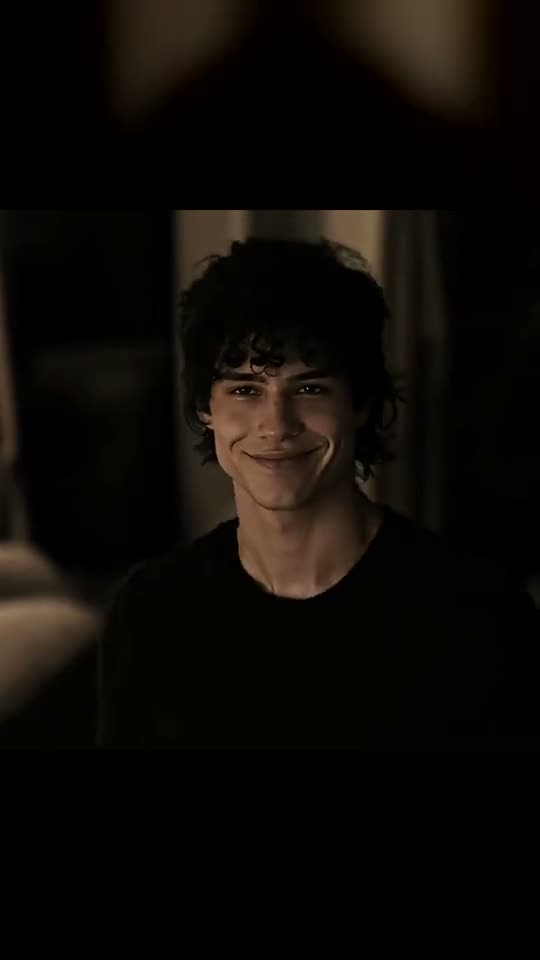
The original Damon Salvatore AI reel by @salvatorchikOriginal reel
  • 1 photo you add
  • 11 to 15 s clip with sound
  • 9:16 for TikTok, Reels, Shorts
  • No watermark

No prompt to write: Add your photo and tap once

Create your own

Ready in a few minutes · From 168 credits

The Damon Salvatore AI trend places your face onto Damon Salvatore in his iconic moments. Church: enter a church as people in the pews look back, make a casual sign of the cross, and smirk. Smirk: smile in low light, then cut to his night scenes, car shots, and kitchen moments. Just upload one photo.

Also called Put me as Damon · Vampire Damon · Damon Salvatore church entrance trend

Example

Preview of the Damon Salvatore AI video

Made on Smew AI from an AI-made photo with the prompts on this page, not a real person. Your result will differ from run to run.

Made with Smew AI
Made from one AI-made photo with the You, face clear version, Church option (168 credits). Nobody in it is a real person.
Use this reference
Original reel by @salvatorchik, 15 s
The original viral version by @salvatorchik (26 September 2026, 1.8 million views): an AI-generated face smiles in low light, followed by cuts to nighttime, car, and kitchen scenes. Smirk inserts your face instead. Shown: square footage in a vertical layout.
Use this reference
Original reel by @daamonnx, 11 s
The church arrival by @daamonnx (16 October 2026, 621,700 views): he enters through the doorway, people turn in the pews, he makes the sign of the cross and smirks. Church replaces him with you. Shown: square footage in a vertical layout.
Use this reference
Step by step

Steps to create the Damon Salvatore AI video on Smew AI

Works entirely in your browser. No editing software, no prompts, no watermark.

  1. Upload your photo

    Click "Create your own" and upload a clear face shot. Capture with your camera or choose from your gallery.

  2. Click Generate

    The cost appears on the button. Seedance 2.5 integrates your photo into the Damon Salvatore AI trend footage and recreates it frame by frame for 11 seconds, keeping the original audio. No prompts required.

  3. Save or post

    Your video finishes in a few minutes as a 9:16 MP4. Save it, post from your device, or access it later in your Library.

Best photo practices

Upload one clear photo showing your face.

  • Look at the camera, well-lit, from chest level up. Both options end with a tight shot of your smirk, so facial clarity is essential.
  • Skip sunglasses, hats, and filters. Your hairstyle comes from your photo; the black blazer and dark shirt come from the footage.
  • One individual per photo. Works for any gender: the output reflects whoever is in your picture.
  • Upload your own picture or one of an adult who gave permission. Never use celebrities, strangers, children, or the original actor.

For optimal results matching Damon Salvatore's look: a slight angle of your head and a calm, self-assured expression help the smirk come through.

Origins of the Damon Salvatore AI trend

The Damon Salvatore AI trend launched on TikTok in late September 2026. On 26 September, @salvatorchik shared "Im Damon Salvatore": an AI-edited sequence featuring Damon's moments with a computer-generated face, a gradual smirk in darkness and rapid transitions. It surpassed 1.8 million views. @daamonnx's "Replace with me" hit 1.4 million two days after, and by 29 September tutorials demonstrated the single-photo templates in PixVerse and CapCut; #damonsalvatoretutorial appeared on 30 September.

The larger second surge began on 14 October featuring the church moment: Damon enters a church, people look around, and he smirks. Two church videos from that date exceeded 2.1 and 1.5 million views, a guide for the "Vampire Damon" template reached 260,000 views on 15 October, and @daamonnx's church version surpassed 600,000 on 16 October. In the US, "damon salvatore" receives 110,000 monthly Google searches (September 2026).

  1. @salvatorchik shares "Im Damon Salvatore", an AI Damon Salvatore edit featuring a computer-generated face: a smirk in darkness and rapid transitions. It exceeds 1.8 million views. TikTok

  2. @daamonnx shares "Replace with me", a Damon Salvatore AI clip showing a different face in his moments; it exceeds 1.4 million views. TikTok

  3. Damon Salvatore tutorials begin featuring a single-photo template for the trend; one reaches 229,000 views, and #damonsalvatoretutorial appears the following day. TikTok

  4. The church arrival format gains momentum: two church videos from that date surpass 2.1 million and 1.5 million views.

  5. A tutorial for the "Vampire Damon" church template reaches 260,000 views. TikTok

  6. @daamonnx's church video "Replace my namesake with me" surpasses 600,000 views; by 17 October, #damonsalvatore contains 1.6 million TikTok videos and 40.6 billion views. TikTok

Copy and paste

Damon Salvatore AI prompts used

No need to handle these: the single-tap workflow applies them automatically, along with the trend footage. [Image 1] and [Image 2] represent your photos, and [Video 1] is the trend footage being replicated.

Church

1 photo: you, face clearSeedance 2.511 s · 720p · 9:16168 credits
Video prompt

Recreate the reference video [Video 1] shot for shot: the same sunlit white wooden church with tall white double doors at the back, the same rows of dark wooden pews full of guests in dark formal clothes, the same warm, soft film look, the same camera angles, cuts, timing and moves. The ONLY change: the man with dark, tousled shoulder-length hair in the black blazer and the open white shirt who walks in through the doors is now the person in [Image 1]. The man in black = the person in [Image 1], in EVERY shot where he appears: copy the exact face from [Image 1] - face shape, eye color and eye shape, eyebrows, nose, mouth, skin tone, age, hair color, hair length and hairstyle, and any beard, moustache, glasses or freckles exactly as in the photo. The same real person from the doorway to the last close-up, so their friends recognize them at once, also while they smirk. Never morph, never drift back to the original man's face: NO goatee, NO moustache, NO earring and NO pale grey-blue eyes unless [Image 1] shows them, and the age of [Image 1]. They wear the black blazer over the open white shirt from [Video 1], never the clothes from [Image 1]. If [Image 1] shows an animal, that animal walks in upright in the same place, with its own face, fur and markings. THE SHOTS, at the same times as [Video 1]: 0.0-1.1 s: a wide shot from the pews toward the open double doors: the person in black steps into the bright doorway, small in the frame; seated guests in the foreground. 1.1-2.0 s: a close shot of a blonde woman and two men in a pew; they turn their heads to look back at the door. 2.0-3.1 s: a man in a pew looks back over his shoulder toward the door. 3.1-4.2 s: a close shot of a hand in a black sleeve dipping two fingers into a stone bowl of holy water by the door. 4.2-9.0 s: a medium shot: the person walks in through the doors, glances to the side, touches the forehead and then the chest with two fingers in a quick, lazy sign of the cross, rolls the fingers at the chest and walks slowly toward the camera. 9.0-11.25 s: a close shot from the chest up: they stop, look around the room and give a slow, cocky smirk. The face is large and sharp: exactly the face from [Image 1]. The guests in the pews stay the guests of [Video 1] and never take the face from [Image 1]. Anatomy rules: one head only, on the shoulders of the person in black. Two arms and two hands with five fingers each. No text, no captions, no logos, no watermark.

2463 characters

Smirk

1 photo: you, face clearSeedance 2.515 s · 720p · 9:16228 credits
Video prompt

Recreate the reference video [Video 1] shot for shot: the same dark, moody film look with soft grain, the same places, camera angles, cuts, timing and moves. The ONLY change: the young man with dark curly hair in the black T-shirt, who is in every shot, is now the person in [Image 1]. The young man = the person in [Image 1], in EVERY shot: copy the exact face from [Image 1] - face shape, eye color and eye shape, eyebrows, nose, mouth, skin tone, age, hair color, hair length and hairstyle, and any beard, moustache, glasses or freckles exactly as in the photo. The same real person from the first frame to the last, so their friends recognize them at once, also in the quick cuts and while they grin with the teeth showing. Never morph, never drift back to the original young man's face: NO dark curly hair unless [Image 1] shows it, and the age of [Image 1]. They wear the black T-shirt and the dark jackets from [Video 1], never the clothes from [Image 1]. If [Image 1] shows an animal, that animal is in every shot in the same place, with its own face, fur and markings. THE SHOTS, at the same times as [Video 1]: 0.0-8.5 s: a dim room at night, warm light, dark curtains behind. A close shot from the chest up: the person looks at someone just off camera with a straight face, then a slow, cocky smile that grows into a wide grin, then talks softly with a smug look, a smirk and a slow blink. The face is large and sharp the whole time: exactly the face from [Image 1]. 8.5-9.6 s: night outdoors next to a dark car; they look up and to the side. 9.6-10.6 s: a backlit close-up against a bright light: they turn the head with a dark grin. 10.6-11.7 s: daylight under a wooden porch roof, trees behind: they look down, then talk. 11.7-13.25 s: in the driver's seat of a black convertible on a sunny street, sunglasses on, they turn and grin back over the shoulder. 13.25-14.8 s: a white kitchen: they walk past a woman with long brown hair seen only from behind, turn and grin, then stand facing the camera in a lamp-lit room. The woman in the kitchen stays as in [Video 1] and never takes the face from [Image 1]. Anatomy rules: one head only, on the person's shoulders. Two hands with five fingers each. No text, no captions, no logos, no watermark.

2261 characters

Credit cost breakdown

Videos cost credits, with the exact amount displayed on the Generate button before any charge. The single-tap price includes the complete video, created in one process from your photos and the trend footage, billed once. Each option has separate pricing: Church 168 credits, Smirk 228 credits. Lower-cost models are available if you manually run the prompts in AI Video.

Video modelSettingsCredits
Church: Seedance 2.5 (this template)11 s, 720p, replicates the trend footage, single tap168
Smirk: Seedance 2.5 (this template)15 s, 720p, replicates the trend footage, single tap228

One-time packs and plans are on the pricing page. A failed video gives its credits back.

Frame-by-frame breakdown of each option

Each option replicates one viral clip frame by frame, replacing the original person with you.

TimeChurch (11 s)Smirk (15 s)
StartYou appear in the lit doorway of a white church; people are seated in the pews (0-1 s).Tight shot of you in darkness at night: neutral expression, then a gradual smile building to a grin (0-5 s).
MiddlePeople look back, a hand goes into holy water, then you enter, touch your forehead and chest in a casual sign of the cross and roll your fingers at your chest (1-9 s).You speak quietly with a smug expression and a slow blink (5-8.5 s).
EndTight shot: you pause, glance around and deliver the slow, confident smirk (9-11 s).Rapid transitions: nighttime near a car, a backlit smile, a porch, a black convertible, a kitchen (8.5-15 s).

The Church option shows the Damon Salvatore church moment people look up as "damon salvatore entering church", "damon salvatore walking in church" or "damon salvatore church entry". The gesture people wonder about is the casual sign of the cross. The Smirk option captures the Damon Salvatore smirk, the expression behind every damon salvatore smirk meme and smirk GIF.

Choosing between Church and Smirk: details and pricing

Click "Create your own" and select an option, or use the button beneath its footage on this page. Your photo remains when switching.

ChurchSmirk
The clipThe church arrival by @daamonnx (October 2026, the later wave)The original viral version, by @salvatorchik (September 2026)
What you wearThe black blazer and open white shirt from the footageThe black T-shirt and dark jackets from the footage
Length11 s15 s
FrameSquare format like the trend footage, 720pIdentical
SoundOriginal audio from the footage, optional to disableIdentical
PriceDisplayed on the buttonMore expensive (extended duration)

Both utilize Seedance 2.5, which reconstructs the footage with your face while preserving location, transitions, camera work, and timing. Generation takes 5 to 15 minutes. Exact cost displays on the Generate button before any charge. No prompts needed.

Common issues and solutions

ProblemFix
Your face resembles the original personUpload a sharper, forward-facing photo with better lighting, then generate again. Photos already similar to him may retain his features: a distinct, close photo works better.
A person in the pews gets your faceThe prompt preserves the crowd as-is. Generate again.
Your face appears less clear in rapid transitions (Smirk)Some transitions last half a second, and the backlit frame obscures all faces. The opening 8 seconds feature the extended close-up.
A goatee or earring appearsThe original person in the Church footage has both. The prompt removes them unless your photo includes them; generate again if they reappear.
The footage is squareBoth options maintain the square format of the trend footage. TikTok and Reels display it with bars, or automatically crop when posting.
The video model rejects the photoCertain photos get declined. Credits are refunded; try a different photo.

Each generation produces a fresh version, so outcomes vary between attempts.

Posting tips for your Damon Salvatore AI video

Captions matching the trend: "Replace Damon with me", "Damon who?", "Walking into family dinner like", "POV: you showed up late on purpose" or "Hello, brother". On TikTok, popular clips were brief, with atmospheric audio and no overlaid text on the face.

Hashtags: #damonsalvatore (1.6 million TikTok videos and 40.6 billion views on 17 October 2026), #damonsalvatoreatrend and #damonsalvatore. Maintain the platform's AI disclosure: the footage is AI-created, and numerous comments on viral clips questioned whether the person was authentic.

Additional clips starring you: perform the "Fergie Baby" confident walk in the Fergie Baby AI trend, make a celebrity entrance in AI Airport Star Arrival, or receive a call from a masked villain in the Ghostface trend.

FAQ

Frequently asked questions about the Damon Salvatore AI trend

What is the Damon Salvatore AI trend?
It's a TikTok trend using AI to place your face onto Damon Salvatore, the vampire character from The Vampire Diaries, in his iconic moments: the church arrival with people looking back and his signature smirk. The Damon Salvatore AI trend launched on 26 September 2026, with a later wave featuring the church moment starting on 14 October. Here you create your own Damon Salvatore AI video using one photo.
Can I put myself in Damon's place?
Absolutely, that's the point. Upload one photo and select Church or Smirk: your face takes his place in every frame, wearing his dark clothing, copying his movements and his smirk. Users share it as "Replace Damon with me".
What happens in the Damon church moment?
The Damon church moment shows Damon entering a church during worship: he appears in the doorway, people in the pews look back, he touches the holy water, makes a casual sign of the cross and smirks. It's the Damon Salvatore church gif widely shared, and the Church option puts you in it.
Does a Damon Salvatore AI filter exist?
On TikTok it's called the Damon Salvatore filter or the Damon AI filter, but it's not a real-time camera effect. It's a Damon Salvatore AI filter as a video: you submit a photo and receive a complete clip. This page provides that Damon AI video creator, right in your browser.
Which prompt does this template use?
No creator published a Damon Salvatore prompt: the viral clips originated from private single-photo templates. There's no Damon Salvatore Gemini prompt or Vampire Diaries AI prompt to duplicate. Smew AI employs its own Damon Salvatore AI prompt that reconstructs the trend footage frame by frame with your face, requiring no input from you.
Is this face swapping?
It functions like a Damon Salvatore face swap, but does more: a typical AI face swap overlays a face, while this rebuilds the entire clip with your face, hair and expression, making the smirk uniquely yours. It's a Damon Salvatore AI face swap with the original movements.
Are there Damon Salvatore templates or tutorials available?
The Damon Salvatore tutorial videos on TikTok demonstrate a Damon Salvatore template in PixVerse and CapCut; #damonsalvatoretutorial contains 33 videos and 130,000 views. No Damon Salvatore AI tutorial needed here: this page is the Damon Salvatore AI template, requiring one photo and one tap. Many seeking a damon salvatore pixverse template arrive at the same solution.
Is this considered a Damon Salvatore edit?
It began as one. Damon Salvatore edits using series footage have been TikTok favorites for a while (#damonsalvatoreedit contains 57,877 videos). The AI trend transformed the Damon Salvatore edit into a Damon Salvatore edit TikTok creators can feature themselves in. Our clips are AI-generated, containing no actual series footage.
How can I achieve the Damon Salvatore look?
The fastest method to see how to look like Damon Salvatore: create the video. You receive his dark blazer or black T-shirt, his movements and his smirk with your actual face. Damon Salvatore look alike content is also part of this trend.
Is this a Vampire Diaries AI trend?
Yes, it's a Vampire Diaries AI trend, and the Damon trend exists in multiple languages: Spanish and Portuguese tutorials refer to it as "tendencia Damon Salvatore" and "Damon Salvatore IA". Our clips are AI-generated and contain no footage, performers or branding from the series.
What audio is used in the Damon Salvatore TikTok?
Each footage has its own audio: the Damon Salvatore TikTok sound from the creator's upload. Your video includes the audio from the footage it replicates, and you can disable it on the result page. The Damon Salvatore trend TikTok clips feature various audio tracks, so you can substitute your own when posting.
Are the people in the examples actual individuals?
The faces in both example clips are the creators' AI-generated appearances, not the actual actor. Numerous comments on viral clips questioned their authenticity. Your AI Damon Salvatore video uses your actual photo, so never present it as genuine footage.
Does this work for female users?
Yes. The video reflects whoever is in your photo, so a female user gets the identical arrival and smirk wearing the black blazer. The crowd and locations remain unchanged.
What's the video duration, and what's the credit cost?
Church produces 11 seconds and Smirk 15 seconds, square format at 720p, as an MP4 with audio. Each video requires credits: the create page displays the exact cost on the Generate button before any charge. Failed videos return credits.
More trends

Other AI video templates

Template

Bby Wow Guy AI: Insert Your Face Into the Guy Dancing at a Quince Meme

Groove toward the camera at a quinceañera, take a bite of the concha, lock eyes with the lens while chewing with stuffed cheeks, then groove back into the crowd. Upload one photo to star as the bby wow guy, complete with the song.

Read more
Template

Bad Times AI Trend: Turn One Photo Into the Viral Argument Video

The viral argument routine: hands to head, hip pose, stop gestures and that long camera stare, all set to Imael Angel's "Bad Times". Upload a single photo of yourself or your pet and get the complete video with music.

Read more
Template

Tecktonik Dance AI: Step onto the String-Light Stage

Wide arm swings, hands reaching toward the head, both arms shooting upward, followed by rapid, precise arm choreography on a compact stage lit by string lights: the electro dance from the 2000s that Cheba Man revived in 2026. Upload a single photo of yourself or your pet to generate the dance complete with its soundtrack.

Read more
Template

Ghostface AI Trend: Put Yourself in the 90s Horror Phone Call

Picture yourself lying on satin sheets with a chunky 90s telephone to your ear, while a hooded figure in a black robe and white ghost mask stands in the shadowy doorway. Upload a selfie and get a grainy film photograph, or a brief video where you look back.

Read more
Template

Fergie Baby Trend: Your AI Swagger Walk Out of the Park Gate

Upload one photo and star in the viral Fergie Baby walk: step through the chain-link gate, then swagger-walk down the park path in a slow, bouncing rhythm toward the camera, with the song included.

Read more
Template

AI Airport Celebrity Video: Exit Arrivals Like a Star

Security clears a path, phones point at you, cameras flash, fans press against the barriers: you exit the arrival gate like a celebrity, acknowledge a fan and climb into your car. Or pull up at a hotel after dark: step from a black luxury sedan onto the red carpet. Upload one photo of yourself or your pet, get a 15-second video with crowd audio.

Read more

Create your own Damon Salvatore AI video

Upload one photo and tap once. No prompts required. 168 credits.

No watermark. A failed video gives its credits back. Secure checkout by Stripe.