
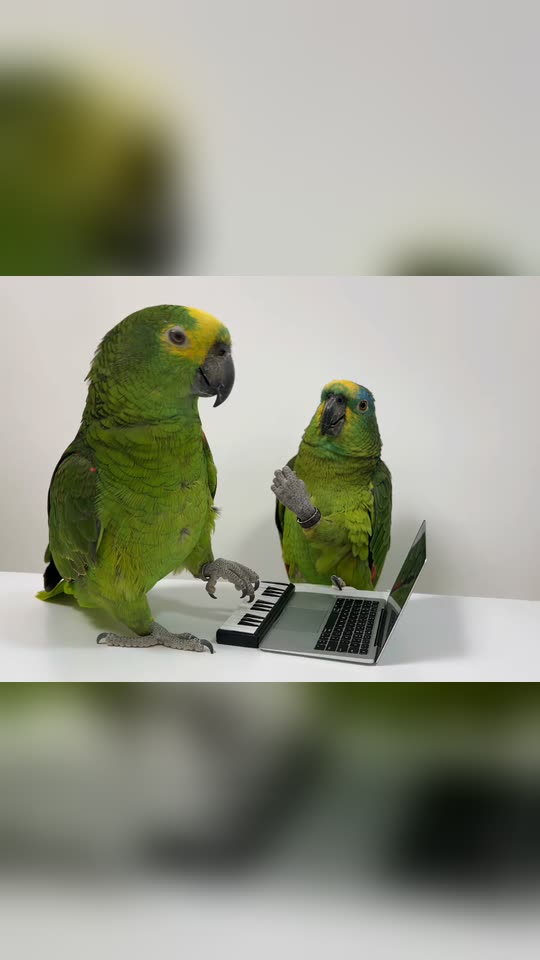
What happens in the Alors On Danse AI video, shot by shot?
Each template creates a viral AI reel of the sketch, replacing its two subjects with your two photos. The table, laptop, mini keyboard, white studio and camera angles come from the reel. Your video follows this structure:
| Beat | Human | Pet |
|---|---|---|
| The beat | The DJ plays the mini keyboard and nods. The MC stands near the laptop, claps, moves to the beat and gestures at the screen (around 6 s). | The pet at the keyboard plays the keys. The other pet stands near the laptop, waves a paw to the beat and gestures (around 12 s). |
| The lean-in | No lean-in: Human transitions from the beat directly to the movement forward. | The second pet moves close to the lens, and the clip finishes on its face (around 3 s). |
| The ending | Both move together toward the camera as it pulls far back into the empty white studio (around 5 s). | No forward movement: the parrot reel finishes on the lean-in. |
Human or Pet? Human recreates the reel by Marta e Gianluca, with the forward movement at the finish. Pet recreates the parrot reel by @kennyslowbird, which achieved the most viral reach. Click "Create your own" and select one, or click the button beneath its reel on this page. Your two photos remain in place when you switch.
Which model, and what's the cost?
| Human | Pet | |
|---|---|---|
| Model | Seedance 2.5 places you both into the reel | Seedance 2.5 places your pets into the reel |
| Duration | 11 s | 15 s |
| Frame | The reel's nearly square frame, 720p | The reel's 4:3 frame, 720p |
| Audio | The reel's source audio, which you can disable | The same |
The precise cost of each template appears on the Generate button before any charge.
Both templates use Seedance 2.5 because it recreates the reel shot by shot and, in our testing, preserved the faces and pets from the photos throughout every shot, including in large close-ups. A lower-cost reference model retained the reel's original subjects in the Human reel, so we removed it.