smew.ai

AI Lion Friend: A Lion Approaches You on a Dark Road at Night

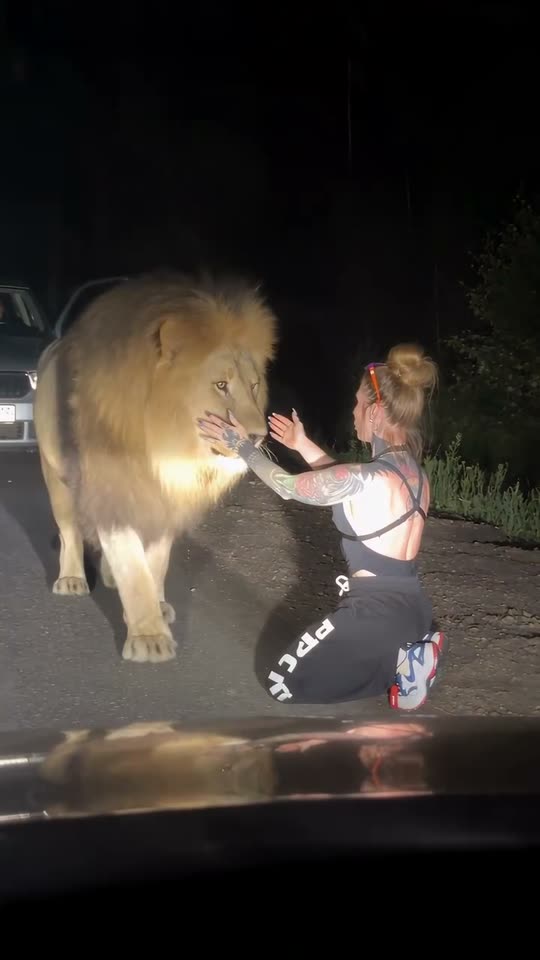
Shot from inside a car through the windshield after dark: you're beside your car with the door open, a massive lion emerges from the shadows, and rather than threatening you it nuzzles you with its mane as if greeting an old companion. Upload your photo, get a 10-second video with ambient night audio.

The original AI Lion Friend reel by @ten4icOriginal reel
  • 1 photo you upload
  • 10 s clip with sound
  • 9:16 for TikTok, Reels, Shorts
  • No watermark

No prompt to write: Add your photo and tap once

Create your own

Ready in a few minutes · From 56 credits

The AI lion trend features a nighttime video shot through a vehicle windshield: you're standing next to your car on a deserted road with the door ajar, a large male lion walks toward you from the darkness, and instead of behaving aggressively, it approaches you affectionately while you run your hand through its mane. All you need is one good photo of yourself.

Also called ai lion friend · ai lion trend · lion reunited with caretaker · woman hugs lion · sher wali video

Example

Preview of the AI Lion Friend video

Here's the original reel that launched the trend. Your clip will be a fresh take using your photo in this style, not identical shots. Each generation produces unique results.

Original reel by @ten4ic, 12 s
The original reel from @ten4ic: shot from inside a vehicle at night, a lion rushes toward her on an empty road, she drops to her knees, cradles its head and embraces it as it settles down. Includes original audio.
Use this reference
Step by step

How to create your AI Lion Friend video on Smew AI

The process happens entirely in your browser. No editing software needed, no prompt writing, no watermark.

  1. Upload your photo

    Click "Create your own" and upload your photo. Capture it with your camera or select from your gallery.

  2. Click Generate

    The button displays the cost. Smew AI creates the AI lion friend scene using your photo, then Kling 3.0 turns it into a 10-second animation with natural sound. No prompt writing needed.

  3. Download or share

    Your video renders in minutes as a 9:16 MP4. Save it to your device, share directly from your phone, or access it later in your Library.

Which photo works best?

Choose one clear photo of yourself, preferably full-body, or at minimum from your knees upward. The scene positions you beside a vehicle on an unlit road under headlights, so the AI needs to see your face, body shape and clothing.

  • Look toward the camera with visible eyes, no sunglasses. The scene is shot from several meters away, making facial clarity important.
  • Your clothing remains as shown in your photo, so choose an outfit you want to appear in.
  • Include only one person. Multiple people may confuse the AI or result in someone being omitted.
  • A relaxed, natural photo works well: this trend shows you as the person who isn't afraid.
  • Only use your own photo, or an image of an adult who gave permission. Never use a celebrity or stranger.

Where did the AI Lion Friend trend originate?

The scene started with one AI reel. On 20 August 2026 Tanya, a creator who posts in Russian as @ten4ic and puts herself into AI videos with animals, shared a clip on Instagram: filmed from a car at night, a lion runs up to her on a dark road, she kneels, holds its face and hugs it as it lies down. By 12 October it had 1.17 million likes.

The next day an X account shared it as "The lion reuniting with its old caretaker years later", and the reunion story spread with it. On 26 August the fact-checking site Lead Stories rated the video AI-generated.

On 5 September the CapCut template designer @k760z published a one-photo template of the same scene: you stand by your car at night and a lion walks up to be petted. By 12 October it had been used 3.9 million times. From 6 October, tutorials in Turkish, Urdu and French took it across TikTok; a French one, "how to make the video where you become friends with a lion", passed 1.3 million views.

  1. @ten4ic shares the AI reel on Instagram: a lion rushes toward her on a dark road and she embraces it. By 12 October it reaches 1.17 million likes. Instagram

  2. A "Real or AI?" TikTok account reposts the video claiming she raised the lion from infancy. By 12 October this repost has 197,200 views. TikTok

  3. Lead Stories identifies the "lion reuniting with its old caretaker" video as AI-generated: a watch on her right wrist vanishes mid-clip. Lead Stories

  4. Template creator @k760z releases a CapCut AI template recreating the scene: upload one photo of yourself beside a vehicle at night, a lion approaches and you pet it. By 12 October it has 3.9 million uses. CapCut

  5. A French CapCut tutorial titled "Comment créer cette vidéo où tu deviens ami avec un lion ?" goes live. By 12 October it accumulates 1.3 million views and 67,400 likes. TikTok

Copy and paste

The AI Lion Friend prompts

You don't need these: the single-tap workflow handles them automatically. A photo prompt places you into the scene, then a video prompt brings it to life. Want to modify them? Copy and adjust them in AI Photo and AI Video.

Lion friend

1 photo: your photoKling 3.010 s · 1080p · 9:1656 credits
Video prompt

Use the uploaded image as the base. Keep the person's face, facial features, skin tone, hair, age, body shape and clothes exactly the same as in the photo. Dashcam-style night footage: one frame of a real phone video filmed through the windshield of a car stopped on an empty two-lane country road at night, with the dark dashboard and the hood across the bottom of the frame. A few meters ahead, a plain light-colored car is stopped on the road with its red rear lights on and its door open. The person has just stepped out of that car and stands on the road beside the open door, full body in view, lit by our headlights, calm and relaxed, looking down the road. Farther down the road, at the edge of the headlight beam, a big adult male lion with a thick golden mane walks slowly out of the dark toward the person, calm, with its head low. Dark trees and tall grass on both sides of the road, a black sky, warm headlight glow and a light haze. Photorealistic, grainy low-light phone footage, not CGI, not a cartoon. Vertical 9:16. Exactly one person and one lion. No other people or animals, no readable license plates, no car badges, no text, no logos.

1156 characters

What's the credit cost?

Videos are priced per generation in credits, and the create page displays the precise cost on the Generate button before any charge. The single-tap price includes both the scene photo and video, billed together. One video costs 56 credits, so the smallest one-time pack covering it is $9.99 for 100 credits, no subscription required. Lower-cost models are available if you manually run the prompts in AI Video.

Video modelSettingsCredits
Kling 3.0 (this template)10 s, 1080p + 1 scene photo, one tap56
Seedance 2.0 Fast (by hand in AI Video)10 s, 720p + 1 photo68
Veo 3.1 Fast (by hand in AI Video)8 s, 720p + 1 photo14

One-time packs and plans are on the pricing page. A failed video gives its credits back.

What happens in the AI lion video, moment by moment?

Your video is one unbroken shot, captured through the windshield of a vehicle parked behind yours, similar to a phone recording by a passenger:

TimeWhat happens
0-4 sYou're on the unlit road next to your car with its door open. A large male lion emerges from darkness down the road and walks toward you, moving calmly.
4-7 sYou smile and extend your hand. The lion reaches you and nuzzles its large head and mane against you, behaving like a domestic cat.
7-10 sYou run your fingers through its mane and scratch near its ears. It closes its eyes and presses against you, peaceful and content.

The audio captures nighttime ambience: an idling engine, cricket sounds, a gentle rumble from the lion and your laughter. No music track.

Why is it effective? The opening second suggests threat: a wild lion, nighttime, isolated road. What follows is the reverse, and this reversal drives repeat viewing. The original also included a backstory about a lion recognizing the woman who raised it, which became the dominant sharing narrative. In comments under the French tutorial, the top-liked responses joke about not wanting lion companionship.

How does Smew AI create it, and what's the cost?

The template operates in two phases, preserving your facial features and clothing:

  1. The still. Nano Banana 2.1 takes your photo and positions you on an unlit rural road at night, next to the open door of a parked vehicle, illuminated by headlights. Further down the road, a lion walks from the darkness.
  2. The video. A video model brings the still to life for 10 seconds: the approach, the greeting, the affection and ambient night sounds.
Standard (default)Best
Video modelKling 3.0Seedance 2.5
Length10 s10 s
FrameVertical 9:16, 1080pVertical 9:16, 720p
SoundNight sounds, no musicThe same
PriceLowerHigher

The precise cost appears on the Generate button before any charge, and your finished video waits in your Library. No prompt writing required.

Where do the prompts originate? No public prompt exists for this trend. The original creator asks followers to comment for her technique, and the CapCut template conceals its prompt. Our prompts recreate the scene with clear descriptions: the windshield perspective, the open vehicle door, the lion emerging from darkness, and a peaceful, affectionate encounter.

Common issues and solutions

ProblemFix
The clip switches to a different angleThe prompt specifies one continuous shot. Generate again, or choose Best: Seedance maintains single takes more consistently.
The lion moves unnaturally or appears oddLarge animals challenge AI video systems. Generate again or select Best.
You look different from your photoUpload a sharper photo in good lighting, facing the camera directly. A full-body shot helps the AI maintain your physique.
The lion doesn't reach youGenerate again. Each generation produces a fresh take.
Your clothing changesThe still preserves clothing from your photo. Select a photo showing the outfit you want.
The video model rejects the photoCertain photos get rejected. Your credits are refunded; try a different photo.

How to share your lion video

Disclose it as AI. The original spread as authentic footage until fact-checkers intervened. Enable the platform's AI-generated content label, or include "AI" in your caption, and never present it as genuine footage.

Caption ideas: "He remembered me", "POV: you stop on the road to say hi to an old friend", or "When your cat is just a small lion".

Hashtags: #ailion (1,164 TikTok videos and 10.7 million views total, as of 12 October 2026; this tag also includes the 2025 AI lion pet filter) and #ailiontrend. The trend's original creator is @ten4ic; tag her to acknowledge the original.

Want more personalized scenes? Check out the AI hug video or the Unforgettable car trend.

FAQ

AI Lion Friend trend questions

What is the AI lion trend?
It's a viral AI video from 2026. Shot through a vehicle windshield at night, someone stands beside their car on an empty road with the door open, a large lion walks toward them from the darkness, and instead of threatening them, it greets them affectionately while they stroke its mane. On this page you generate it using your own photo.
Is the lion video real?
No, it's AI-generated. Lead Stories fact-checking site identified the original video as AI on 26 August 2026, after it circulated as a lion meeting its former caretaker. One indicator: a watch on the woman's wrist vanishes mid-clip.
Who created the original AI lion video?
Tanya, who posts in Russian as @ten4ic and creates AI videos featuring herself with animals. She shared the clip on Instagram on 20 August 2026, and by 12 October it accumulated 1.17 million likes. The CapCut template that expanded the trend came later, on 5 September, from template designer @k760z.
How do I create the AI lion video with my photo?
Click "Create your own", upload one clear photo of yourself and click Generate. Smew AI first creates a still showing you on an unlit road beside a vehicle, with a lion in the distance, then animates it: the lion approaches, greets you and leans in while you pet it. You receive a 10-second vertical clip with ambient night audio, no prompt writing needed.
Is there an original prompt for the lion trend?
Not publicly available. The original creator asks followers to comment for her technique, and the CapCut template doesn't reveal its prompt. Our prompts recreate the scene with straightforward descriptions, maintaining a calm and affectionate lion throughout.
Is this the CapCut lion template?
It recreates the same scene. The CapCut AI template by @k760z, released on 5 September 2026, reached 3.9 million uses by 12 October. Smew AI generates the scene in your browser from one photo, using Kling 3.0 or Seedance 2.5, and delivers the MP4 file.
Does the lion attack in the video?
No. The prompts maintain a calm and gentle lion throughout, excluding roaring, jumping, biting and claw displays. It approaches slowly, nuzzles its head against you and leans into you while you stroke its mane.
Is this the same as the AI lion pet filter?
No. The AI lion pet filter was a 2025 trend adding a lion beside you in a still photo; two TikTok tutorials for it exceeded 300,000 views each in October and November 2025. The 2026 lion friend trend is a video: a lion approaches you on a night road and greets you.
What's the length and audio of the lion video?
10 seconds, vertical 9:16, as an MP4 file: 1080p with Standard, 720p with Best. It includes original audio: an idling engine, cricket sounds, a gentle rumble from the lion and your laughter, without music.
Does the AI lion video require credits?
Yes. Each video requires credits, and the create page displays the precise cost on the Generate button before any charge. Standard (Kling 3.0) costs less than Best (Seedance 2.5). Failed videos return the credits.
Does a woman really embrace a lion, or is the lion AI?
The lion is AI-generated. The lion hug trend originated with an AI video showing a woman kneeling on an unlit road and cradling the lion's head, which Lead Stories identified as AI-generated.
Is it the same as the lion on the road AI video or the lion friend AI video?
Yes, it's the same scene. Some call it the lion reunion AI video, referencing the false narrative about the lion meeting its former caretaker, and a French tutorial calls it the video where you become friends with a lion.
Do I need the lion CapCut template or an AI effect?
No. The lion isn't a camera effect: Smew AI generates the complete clip in your browser from one photo, without CapCut.
Where did the lion trending video on TikTok and Instagram originate?
On Instagram, from the reel @ten4ic shared on 20 August 2026. The lion trend spread across TikTok through CapCut tutorials beginning 6 October. Mark your own lion video as AI when sharing it.

More trends

Other AI video templates

Template

Bby Wow Guy AI: Insert Your Face Into the Guy Dancing at a Quince Meme

Groove toward the camera at a quinceañera, take a bite of the concha, lock eyes with the lens while chewing with stuffed cheeks, then groove back into the crowd. Upload one photo to star as the bby wow guy, complete with the song.

Read more
Template

Bad Times AI Trend: Turn One Photo Into the Viral Argument Video

The viral argument routine: hands to head, hip pose, stop gestures and that long camera stare, all set to Imael Angel's "Bad Times". Upload a single photo of yourself or your pet and get the complete video with music.

Read more
Template

Tecktonik Dance AI: Step onto the String-Light Stage

Wide arm swings, hands reaching toward the head, both arms shooting upward, followed by rapid, precise arm choreography on a compact stage lit by string lights: the electro dance from the 2000s that Cheba Man revived in 2026. Upload a single photo of yourself or your pet to generate the dance complete with its soundtrack.

Read more
Template

24 Unforgettable Car Trend AI: Flash the 2 and 4, Show Your Car

Step toward the camera, show a 2 and a 4, toss both cards toward the lens, and a sports car sits parked behind you. Upload one photo, include a photo of your preferred car, replace the car with a private jet, or watch the car perform a thruster-powered backflip. 10 to 14 seconds, featuring the song from the viral videos.

Read more
Template

AI Hug Video: Create a Heartfelt Hug from Two Photos

In a bright park, two people walk up to one another and embrace warmly. Upload two images, get an 8-second video with soft original audio.

Read more
Template

AI Airport Celebrity Video: Exit Arrivals Like a Star

Security clears a path, phones point at you, cameras flash, fans press against the barriers: you exit the arrival gate like a celebrity, acknowledge a fan and climb into your car. Or pull up at a hotel after dark: step from a black luxury sedan onto the red carpet. Upload one photo of yourself or your pet, get a 15-second video with crowd audio.

Read more

Create your own AI Lion Friend video

Upload one photo and click once. No prompt writing. 56 credits.

No watermark. A failed video gives its credits back. Secure checkout by Stripe.