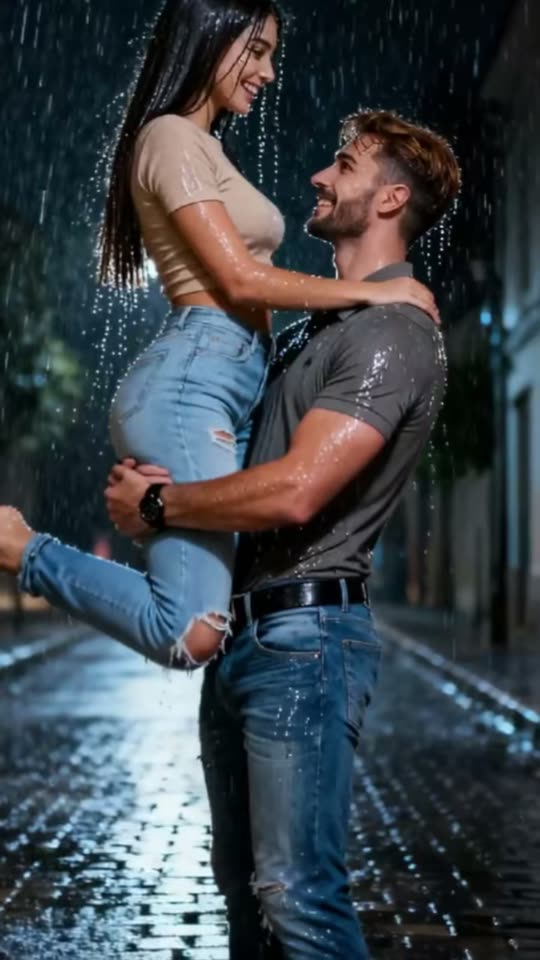
Gemini Rain AI Effect: Place Yourself, or Both of You, in Dramatic Rain
Nighttime downpour, soaked hair, water on your skin, blue light across your face. Upload one selfie for a solo rain scene, or add two photos to dash through the rain together and embrace.
Gemini rain is an AI rain effect that transforms an ordinary photo into a dramatic nighttime rain scene: wet hair, droplets on your face, gentle blue lighting, eyes shut and face turned upward. The couple option shows two people together in the rain. You'll need one good selfie, or a pair of photos for the couple mode.
Also called Google Gemini Rain AI Effect · AI Couple Embrace in the Rain · AI rain sad photo · Rain photoshoot effect
Example
What the Gemini Rain AI video looks like
Here's the original reel that launched this trend. Your video will be a fresh clip created from your photo following this style, not a duplicate of these frames. Every generation is unique.
Original reel by @dop7qijpi2, 4 s
The clip that launched the Gemini rain trend, from @dop7qijpi2's tutorial on 7 October 2025: an AI-generated couple dashes hand in hand through rain at night, then he picks her up. Cuts to the AI segment. The Couple option creates a running scene and a rain embrace from your pair of photos.
@pearl.akdnzz's reel from 9 October 2025, shared with the Gemini prompt this template employs: AI-generated portraits under heavy rain, eyes shut, faces turned skyward. The Solo option produces this aesthetic as your video.
Everything happens in your browser. No editing software, no prompt writing, no watermark.
Add the two photos
Click "Create your own" and upload partner 1, clear face (holds), then partner 2, clear face (leans in). Upload them in this sequence, as the order determines roles in the scene. Capture them with your camera or select from your library.
Press Generate
The button displays the price. Seedance 2.5 creates the Gemini Rain AI Effect scene directly from your photos, skipping the intermediate image step, for 10 seconds with included audio. No prompt writing needed.
Download or share
Your video arrives in a few minutes as a 9:16 MP4. Download it, share from your device, or retrieve it later from your Library.
Which photo works best?
Upload one selfie for Solo or Rain photo, or two photos for Couple: photo 1 is who holds, photo 2 is who leans in.
Face toward the camera, in focus and properly lit, no sunglasses. Rain obscures details, so a distinct face is especially important here.
From the chest or waist up. Your hair color and clothing remain, just made wet by rain.
One person per photo for Couple, ensuring each face matches the correct person.
Your hair: loose hair appears best when wet, though any style works.
Use your own photos, or images of someone who gave permission. Adults only: never a child, a celebrity or a stranger.
Where did the Gemini Rain AI trend start?
The trend began on TikTok in October 2025. The hashtag #rainaieffect was created on 6 October, and on 7 October @dop7qijpi2 posted the first big clip, a tutorial for a couple in the rain: an AI-made couple runs hand in hand down a wet street at night, then he lifts her up (396,500 views by October 2026). Two days later came a solo tutorial called "Google Gemini Rain AI Effect Filter" by @tranghxhxbxb2 (1.7 million views by October 2026), and @pearl.akdnzz shared the Gemini prompt behind the look with a reel of rain portraits.
The name comes from Google's Gemini app, where people pasted that prompt to make the photo. The video effect most people used is a CapCut AI template, pushed by tutorial accounts as "The AI Couple Embrace in the Rain". It came back again and again: a couple tutorial of December 2025 that shows a lovers in the rain prompt has 3.3 million views, and new promoter posts started on 14 October 2026.
The hashtag #rainaieffect launches on TikTok; by 17 October 2026 it contains 1,266 videos totaling 30.3 million views. TikTok
@dop7qijpi2 shares the first major clip of this trend, a tutorial for a romantic couple photo in rain; it reaches 396,500 views by 17 October 2026. TikTok
@tranghxhxbxb2 shares the "Google Gemini Rain AI Effect Filter" tutorial (1.7 million views by 17 October 2026), and @pearl.akdnzz reveals the Gemini prompt for solo rain portraits (343,800 views). TikTok
@uet6k8bbt5 shares an "AI Couple Embrace in the Rain" tutorial displaying a "Lovers in the rain" prompt on screen; it reaches 3.3 million views by 17 October 2026. TikTok
Tutorial accounts promote the couple effect once more; by 17 October a new trend audio gains roughly 55 videos daily.
Copy and paste
The Gemini Rain AI prompts
No need to handle this: the one-tap workflow does it for you. [Image 1] and [Image 2] are your photos, uploaded in sequence: the video model uses them as reference and creates the scene directly from them, skipping the photo generation stage.
Couple
2 photos: partner 1, face clear (holds) + partner 2, face clear (leans in)Seedance 2.510 s · 720p · 9:16126 credits
Video prompt
Ultra-realistic portrait photography: On a deep blue rainy night, the one in [Image 2] leans into the arms of the one in [Image 1], eyes closed, cheek against their chest, while the one in [Image 1] holds them close and rests the chin on their head. Rain runs down their hair, face and neck, soaking their clothes. The background is a blurred, cool-toned rainy night, filled with a moist atmosphere and a lazy, mellow mood. The lighting is delicate, with transparent water-droplet texture, featuring a cinematic blue tone. 8K resolution, 9:16 aspect ratio.
The one who holds is the person in [Image 1], in every frame: copy the exact face from [Image 1] (the face shape, eye color and eye shape, eyebrows, nose, mouth, skin tone, age, hair color, hair length and hairstyle, and any beard, moustache, glasses or freckles). The one who leans in is the person in [Image 2], in every frame: copy the exact face from [Image 2] (the face shape, eye color and eye shape, eyebrows, nose, mouth, skin tone, age, hair color, hair length and hairstyle, and any beard, moustache, glasses or freckles). Never blend their faces and never swap them. Each face stays the same from the first frame to the last, so their friends recognize them at once. Each keeps the hair color and length from their own photo, only wet, and the clothes from their own photo, darkened by the rain, fully clothed and never see-through. Both are adults. If an image shows an animal, that one is the animal with its own face, fur and markings, not a person.
One slow-motion film take at night on a wet cobblestone street under glowing streetlights, heavy rain in long silver streaks, puddles that mirror the lights. Vertical 9:16, both faces large and sharp.
0-3 s: the two run toward the camera hand in hand through the pouring rain, laughing, wet hair flying, splashes at their feet.
3-6 s: they stop; the one in [Image 1] pulls the other into a tight hug and they turn slowly once on the spot; raindrops burst off their shoulders.
6-10 s: a close shot from the chest up: the one in [Image 2] leans into the arms of the one in [Image 1], eyes closed, cheek on their chest; the one in [Image 1] rests the chin on their head and smiles softly; then they rest their foreheads together for a moment, rain running down their faces. The camera circles slowly. A few raindrops land on the lens.
Sound: heavy rain, splashing footsteps, soft distant thunder, one slow romantic piano melody. No speech.
Tender and romantic, never sexual: no kiss on the mouth, no body focus. Exactly two people. No umbrella. No text, no subtitles, no logos, no watermark.
1 photo: you, face clearSeedance 2.58 s · 720p · 9:16101 credits
Video prompt
A cinematic portrait of the person in [Image 1] standing in the rain, their eyes closed and face lifted peacefully towards the sky. Their hair is wet, with delicate water droplets glistening on their skin. Blue light reflects softly on their face, creating a dramatic and emotional atmosphere. High detail, 4K resolution, studio lighting, artistic rain photoshoot style.
The person is the one in [Image 1], in every frame: copy the exact face from [Image 1] (the face shape, eye color and eye shape, eyebrows, nose, mouth, skin tone, age, hair color, hair length and hairstyle, and any beard, moustache, glasses or freckles), so their friends recognize them at once. The face stays the same from the first frame to the last; never morph. The hair keeps the color, length and style from [Image 1], only wet. They wear the clothes from [Image 1], darkened by the rain, fully clothed and never see-through. If [Image 1] shows an animal, it is that animal sitting in the rain with its own face, fur and markings, not a person.
One continuous slow-motion shot at night, vertical 9:16, a medium close-up from the chest up, the face large and sharp, a dark background with soft blue bokeh. Heavy rain falls in long silver streaks.
0-2 s: the person looks straight into the camera with a calm, soft face, drops running down the cheeks.
2-6 s: they slowly lift the face towards the sky and close the eyes, at peace; rain hits the forehead and cheeks and runs down the neck; wet strands of hair cling to the face; the camera pushes in very slowly.
6-8 s: they lower the chin, open the eyes and look back into the lens with a small, soft smile. A few raindrops land on the lens.
Sound: heavy rain, soft distant thunder, one slow piano melody. No speech.
Exactly one person. No umbrella. No text, no subtitles, no logos, no watermark.
You pay per video using credits, and the create page displays the exact price on the Generate button before any charge. The one-tap price includes both scene photo and video, billed once. Each version has distinct pricing: Couple 126 credits, Solo 101 credits, Rain photo 3 credits. Less expensive models are available if you run prompts manually in AI Video.
Video model
Settings
Credits
Couple: Seedance 2.5 (this template)
10 s, 720p, straight from your photos, one tap
126
Solo: Seedance 2.5 (this template)
8 s, 720p, straight from your photos, one tap
101
Rain photo: Nano Banana 2.1 (this template)
2K photo, 9:16, one tap
3
One-time packs and plans are on the pricing page. A failed video gives its credits back.
What does the Gemini rain AI effect make?
Three options, all created from your own photos:
Version
Photos
What you get
Couple
2
10-second video. 0 to 3 s: running toward camera holding hands down a wet cobblestone street at night. 3 to 6 s: stopping to pull each other into a close hug while turning slowly. 6 to 10 s: a tight shot of the embrace, eyes shut, foreheads touching, rain streaming down faces.
Solo
1
8-second video. You gaze into the lens, gradually lift your face skyward with closed eyes as rain streams down, then look back with a slight smile.
Rain photo
1
A still image, vertical 9:16: the signature AI rain sad photo, closed eyes, wet hair, blue lighting.
Videos arrive vertical at 720p with included audio: heavy rain, distant thunder and slow piano. Seedance 2.5 creates them directly from your photos, skipping the intermediate image, keeping faces faithful to yours. The photo uses Nano Banana 2.1. Exact pricing appears on the Generate button before any charge, and each generation is a fresh take.
Which Gemini rain prompt does this template use?
The creators' original prompts, preserved in their wording and structure:
Solo and Rain photo: the Gemini rain photo prompt @pearl.akdnzz revealed on 9 October 2025: "A cinematic portrait of a young woman standing in the rain, her eyes closed and face lifted peacefully towards the sky. Her wet hair is braided, with delicate water droplets glistening on her skin. Blue light reflects softly on her face, creating a dramatic and emotional atmosphere. High detail, 4K resolution, studio lighting, artistic rain photoshoot style." We replace "a young woman" with the person from your photo and preserve your actual hairstyle rather than the braid.
Couple: the "Lovers in the rain" prompt displayed on screen in the most-viewed couple tutorial (3.3 million views): ultra-realistic portrait photography on a deep blue rainy night, one partner leaning into the other's arms, rain soaking their clothes, a blurred, cool-toned rainy night and a cinematic blue tone.
We add the movements from the trend's clips, rules ensuring each face derives from its own photo, and blocks on text, logos and umbrellas. You paste no prompt yourself: choose a version, upload your photos, press Generate.
What goes wrong, and how do you fix it?
Problem
Fix
The face looks like someone else
Use a sharp, front-facing photo in good light, without sunglasses, and generate again.
The two faces look alike in the hug
Use two photos where each face is large and distinct. Swap the photos to reverse who holds whom.
The face turned up to the sky looks less like you
That's the trend's signature pose; the clip opens and closes with your face toward camera. Choose Rain photo for the still aesthetic.
Your clothes look different
Rain intentionally makes them darker and wetter. Choose a photo showing your top clearly.
An umbrella or a third person appears
The prompt blocks both, but it can occur. Generate again.
The model refuses a photo
Some photos get rejected. Credits are refunded; try a different photo.
Captions, hashtags and where the name comes from
Caption ideas: "Some people feel the rain, others just get wet", "Our rainy night", "Main character in the rain". Or compose your own.
Hashtags: #rainaieffect is the primary one, with 1,266 TikTok videos and 30.3 million views (17 October 2026). #geminirain has 286 videos and #coupleintherain 70. Include #airain and maintain the platform's AI label.
The name: "Gemini" originates from Google's Gemini app, where users entered the rain prompt; the rain filter on TikTok and the rain filter CapCut template are additional methods people use. Smew AI is not affiliated with Google or CapCut, and neither app is required to use this page.
FAQ
Gemini Rain AI trend questions
What is the Gemini rain trend?+
It's an AI rain effect placing you in heavy nighttime rain: wet hair, water droplets on your face, gentle blue lighting, eyes shut and face turned skyward. A couple option places two people in rain, dashing hand in hand and embracing. The ai rain trend launched on TikTok during October 2025 and continues resurfacing.
How do I make the Gemini rain AI effect with my photo?+
Choose Couple, Solo or Rain photo, click "Create your own" and upload your photo, or two photos for Couple. Click Generate; the button displays the price first. The video appears in your Library when complete. You don't need a separate ai rain video generator, ai rain photo generator or gemini rain app: this page creates the Gemini rain AI effect video or photo.
What is the Gemini rain prompt?+
The most recognized Gemini rain prompt is what @pearl.akdnzz revealed on 9 October 2025: "A cinematic portrait of a young woman standing in the rain, her eyes closed and face lifted peacefully towards the sky..." (complete text appears above). This template incorporates it, so no ai rain prompt, ai rain photo prompt, gemini rain effect prompt or ai rain effect prompt is needed from you, and no gemini rain trend prompt from comment sections.
Is there a Gemini rain couple prompt?+
Yes. Couple tutorials employ a "Lovers in the rain" prompt: a deep blue rainy night, one partner leaning into the other's arms, rain soaking their clothes, a cinematic blue tone. The Couple version incorporates it, so a Gemini couple in rain prompt, a Google Gemini rain couple prompt, a Gemini AI rain couple prompt or a Gemini rain couple photo prompt is already integrated. Users also search it as a gemini rain photo prompt couple, an ai rain couple prompt, a couple in rain ai prompt or a romantic couple in rain ai prompt.
Can I make a couple in the rain video with two photos?+
Yes. That's the Couple version: photo 1 holds, photo 2 leans in. You dash hand in hand through rain, then embrace closely: couple hugging in the rain, couple cuddling in the rain, a couple embrace in the rain from the trend's tutorials. It's an ai couple in rain clip of 10 seconds, and remains tender: no mouth kissing. For an embrace without rain, visit the AI hug page.
Is there a Gemini rain prompt for boys, or a girl prompt?+
The same Gemini rain girl prompt works for everyone: the template derives the person from your photo, so it functions as a Gemini rain prompt for boys and men too. Users search for Gemini prompts for girl in rain, a Gemini prompt girl in rain, rain AI photo editing prompts for girls or an AI girl in rain look; here you simply upload your photo.
Can I get just a photo, without the video?+
Yes. Rain photo creates one still: the ai rain photo effect, the ai rain photoshoot look, the rain photoshoot AI style called the AI rain sad photo. It's the most affordable version, no rain photoshoot AI app needed, and you can create the Solo video afterward.
How do I put an AI rain effect on a photo?+
Upload the photo to Rain photo for the ai rain effect on photo, or to Solo for a video. That's the entire ai rain photo editing process: no editing software, no masks. If you searched for a rain ai photo editing prompt or a couple rain ai photo editing prompt, both are built in.
Is this the CapCut rain AI effect filter?+
No. The rain AI effect filter on TikTok is a CapCut template; users search it as rain filter CapCut, rain filter TikTok, the rain ai effect tiktok template, a rain ai effect app or an ai rain filter app, and view a rain ai effect filter tutorial or a gemini rain ai effect tutorial to apply it. This page produces the same style of ai rain filter result on Smew AI without tutorials, Gemini rain AI effect filter tutorial or template links. Smew AI is not affiliated with CapCut.
Is the Gemini rain filter made by Google?+
No. Google's Gemini app inspired the trend's name because users entered the rain prompt there, but the gemini rain filter and the gemini ai rain filter on TikTok are templates created by content creators. Gemini rain AI and the gemini rain effect are simply the trend's names. Smew AI is not affiliated with Google.
How long is the video and what format is it?+
Couple runs 10 seconds and Solo runs 8 seconds, vertical 9:16 MP4 at 720p, with rain, distant thunder and slow piano audio. The ai rain effect video works on TikTok, Reels and Shorts, without watermarks. Generation can take 5 to 15 minutes.
Is it a real photo shoot in the rain?+
No. It's ai in the rain: a couple in rain ai clip or a rain sad photo generated from your still photos, and nobody gets wet. Maintain the AI label when posting.
Can I use a photo of someone else?+
Only with their permission, and only adults. Never a child, a celebrity or a stranger. Couple photos should feature two adults who both consented.