Ghost Prank Filter: A Spooky Ghost Appears Behind You
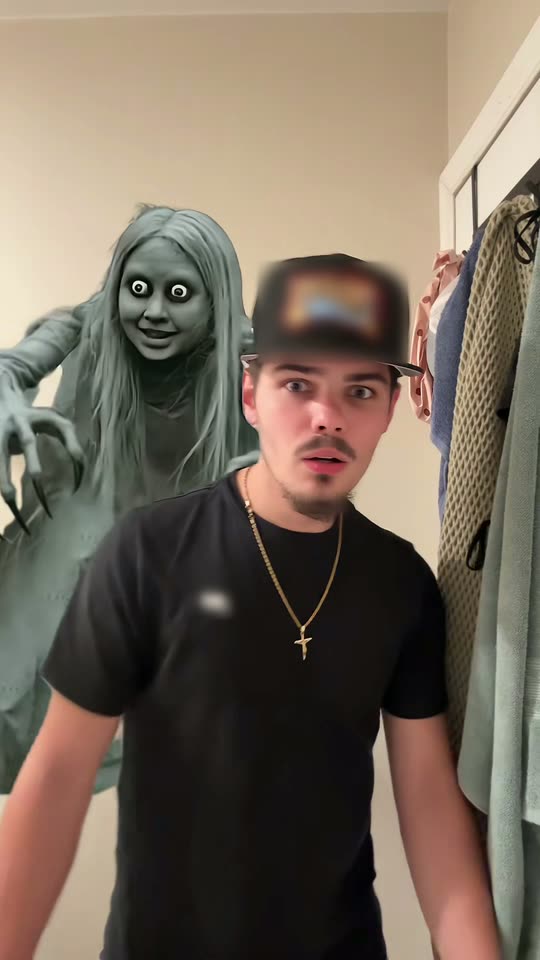
A grey ghost with long hair, big white eyes and a creepy smile slowly appears behind you as you face the camera, vanishing when you turn around. This is the ghost prank that went viral on TikTok. AI creates it from a single photo, so make sure to tell people it's AI-generated when posting.
The ghost filter is a TikTok prank video where a spooky grey ghost with long hair, big white eyes and sharp claws appears behind someone while they're looking at their phone, and their shocked reaction becomes the content. AI creates this ghost prank clip from a single photo of you, either in the viral video or in your own space.
Also called Ghost prank · Ghost filter prank · Ghost behind you · TikTok ghost filter · Ghost prank filter · Ghost behind you filter · Ghost filter challenge · Scary ghost filter
Example
What the Ghost Prank Filter video looks like
Here's the original reel. Your photo replaces the person in it, so your clip follows the same sequence with your face. Each run produces unique results.
Original reel by @maeveplusryan, 12 s
The original reel from @maeveplusryan: she pranks her boyfriend, who is "super scared of ghosts". A grey ghost with long hair and big white eyes appears behind him as he talks, disappearing whenever he turns to look. Original clip version puts your face where his appears. Cap and T-shirt logos are blurred out.
How to create the Ghost Prank Filter video on Smew AI
Everything happens in your browser. No editing app required, no prompt to write, no watermark added.
Add your photo
Tap "Create your own" and upload your photo with a clear face. Snap it with your camera or choose from your library.
Press Generate
The button displays the credit cost. Seedance 2.5 places your photo into the Ghost Prank Filter trend video and recreates it frame by frame for 12 seconds, using the reel's original audio. No prompt needed.
Download or share
Your video renders in up to several minutes as a 9:16 MP4. Download it, post from your phone, or access it later in your Library.
Which photo works best?
Upload one photo of yourself; it works for both clip versions.
Face the camera, with sharp focus and good lighting, framed from chest up or waist up. No sunglasses, hats or hair covering your eyes.
Original clip: any background is fine, since the hallway, ghost and camera movement come from the original video. Your clothing and hairstyle come from your photo, not the cap shown in the clip.
Your room: photograph yourself where you want the ghost to appear, with open space behind your shoulders, like a hallway, doorway or dimly lit bathroom. The prompt tells the AI to incorporate the room from your photo.
One person per photo.
Use your own photo, or a photo of an adult friend with their permission. Never use a child, celebrity or stranger.
Where did the Ghost Prank Filter trend start?
Ghost prank clips and ghost filter videos have existed for years. In August 2022 an influencer's ghost filter video featuring her four-year-old son reached 23 million views, and by September 2022 a trauma therapist on TikTok warned parents that frightening children this way isn't harmless fun.
In early October 2026 the ghost filter trend returned with a different ghost: a grey ghost woman with long hair, huge white eyes, a wide smile and long clawed fingers floating behind the person on screen. It's not a camera effect but a CapCut ghost filter template, with tutorials appearing from 6 October. That same week, South African news outlet Briefly covered a ghost filter prank on a grandmother who asked the ghost for blessings; the headline describes the ghost as a tokoloshe, a spirit from Southern African folklore. People also pranked their partners: @maeveplusryan's "Trying the ghost filter on my boyfriend who's super scared of ghosts", posted 8 October, is the video shown on this page.
Many viral posts feature children, and some top comments criticize that as cruel. The ghost prank trend on this page is designed for adults pranking other adults who understand it's a joke, or for creating your own ghost clip using AI.
Mothership reports an influencer's ghost filter video with her four-year-old son reached 23 million views, with viewers accusing her of traumatizing him. Mothership
A trauma therapist on TikTok cautions parents against pranking children with the ghost filter; the #ghostprank hashtag surpasses 165 million views. YourTango
A ghost filter prank on a South African grandmother, who asks the grey, grinning ghost for blessings, receives 19.4K likes on TikTok; tutorials for the new ghost template begin appearing the same day. Briefly News
@maeveplusryan posts "Trying the ghost filter on my boyfriend who's super scared of ghosts"; it reaches 32.4K views and 2,631 likes by 14 October. TikTok
The #ghostprank hashtag contains 8,822 TikTok videos with 306.5 million views, while #ghostfilter has 4,527 videos with 89.2 million views. TikTok
Copy and paste
The Ghost Prank Filter prompts
You don't need these: the one-tap process runs them automatically, along with the trend video. [Image 1] and [Image 2] are your two photos, and [Video 1] is the trend video being copied.
Original clip
1 photo: your photo, face clearSeedance 2.512 s · 720p · 9:16183 credits
Video prompt
Recreate the reference video [Video 1] shot for shot: the same narrow cream-colored hallway beside an open white door hung with towels, at night, the same handheld front phone camera, the same framing, timing, head turns, steps and mouth moves, and the same grey ghost behind the person. The ONLY change: the young man in the black T-shirt is now the person in [Image 1].
The person = the person in [Image 1], in EVERY frame: copy the exact face from [Image 1] - face shape, eye color and eye shape, eyebrows, nose, mouth, skin tone, age, hair color, hair length and hairstyle, and any beard, moustache, glasses or freckles exactly as in the photo. The person wears the clothes and the hair from [Image 1]; if [Image 1] shows only the head or the upper body, invent the rest so it matches naturally. The same real person in every frame, from the first second to the last, so their friends instantly recognize them, also when they look back over the shoulder and when they crouch. Never morph, never drift back to the original man's face. NO black cap, NO goatee and NO gold chain unless [Image 1] shows them. If [Image 1] shows an animal, the person is that animal, with its own face, fur and markings and the natural body volume and proportions of that animal: never flattened, squashed, stretched or merged with anything.
THE GHOST stays exactly as in [Video 1]: a creepy grey ghost woman with long, straight grey hair, grey skin, oversized round white eyes with tiny dark pupils, a wide eerie grin and long thin grey fingers with dark claws, behind the person's shoulder. It appears and disappears at the same moments as in [Video 1]: when the person looks back over the shoulder it is gone, when they face the camera again it is back. It always stays behind the person and never covers the face.
THE PERFORMANCE, beat by beat, exactly as in [Video 1]:
00:00-00:01: turns to face the camera and steps toward it; the ghost rises behind the shoulder on the right of the frame.
00:01-00:01.6: very close to the camera, eyes wide.
00:01.6-00:04.1: stares into the camera, scared, mouth half open, while the ghost peers over the shoulder on the left of the frame with its claws raised.
00:04.1-00:05.3: looks back over the shoulder: the ghost is gone.
00:05.3-00:08.9: faces the camera again, frozen and wide-eyed, talking under the breath; the ghost is back behind the left shoulder, grinning.
00:08.9-00:09.5: glances back over the shoulder again: the ghost is gone.
00:09.5-00:10.3: faces the camera, the ghost back behind the shoulder, then ducks forward.
00:10.3-00:12: crouches down low, only the head and shoulders in frame, while the ghost looms tall behind.
FACIAL EXPRESSION: scared, confused and wide-eyed the whole time, never smiling. LIP SYNC: the mouth opens and closes exactly when the original man's mouth does in [Video 1], and is closed when his is.
Real live-action phone footage, clear facial features, no distortion. Anatomy rules: one head only, on the person's shoulders. Two arms and two hands, five fingers on each hand. Exactly one real person and one ghost. No text, no captions, no logos, no watermark, no blurred patches on the clothes.
1 photo: your photo, face clearSeedance 2.510 s · 720p · 9:16126 credits
Video prompt
Make a creepy grey ghost appear behind the person in [Image 1], build suspense with a slow reveal: a spooky ghost filter prank video, filmed like a real front-camera phone video at home, in one continuous shot with no cuts. Photorealistic, fine phone-camera grain.
The person is the one in [Image 1], in every frame: copy the exact face from [Image 1] (the face shape, eye color and eye shape, eyebrows, nose, mouth, skin tone, age, hair color, hair length and hairstyle, and any beard, moustache, glasses or freckles) and the clothes from [Image 1]. Keep the person in front recognizable while the spooky reveal builds: the same face from the first frame to the last, so their friends recognize them at once, also in the dim light and when the person turns. Never morph. If [Image 1] shows an animal, the person is that animal, with its own face, fur and markings.
The place is the room behind the person in [Image 1], with the same walls, doors, furniture and light; if [Image 1] shows little of the room, a dim home hallway at night with a half-open door behind the person. The person stands close to the camera, framed from the chest up, the face large and sharp, with empty space behind both shoulders.
A grey, long-haired ghost slowly rising in the background: a creepy grey ghost woman with long, straight grey hair, grey skin, oversized round white eyes with tiny dark pupils, a wide eerie grin and long thin grey fingers with dark claws, in a long grey dress.
0-3 s: the person talks to the camera with a relaxed smile, unaware; a subtle flickering light.
3-6 s: a slow entrance: the ghost slowly rises behind one shoulder, staring into the camera.
6-8 s: a sudden peek: the ghost leans out right beside the person's head with an eerie grin and lifts its clawed fingers.
8-10 s: the person stops talking, eyes wide, and spins around to look behind: nothing is there. The person turns back to the camera, frozen.
A creepy grey ghost with long hair and oversized white eyes emerging slowly behind the person. A stable camera, a consistent face, and a brief suspenseful reveal.
Audio: quiet room tone, a low eerie hum that slowly rises, the person's own casual chatter, then a sharp gasp. No music, no lyrics.
A static camera, realistic room lighting, a ghost placed clearly behind the subject, and a short gradual reveal. The ghost never overlaps the person and never covers the face. Exactly one real person and one ghost. No blood, no gore, no text, no captions, no logos, no watermark.
Videos are paid per creation in credits, with the exact cost shown on the Generate button before you commit. The one-tap price includes the complete video, created in a single step from your photos and the trend video, billed once. Each version has different pricing: Original clip 183 credits, Your room 126 credits. Lower-cost models are available if you run the prompts manually in AI Video.
Video model
Settings
Credits
Original clip: Seedance 2.5 (this template)
12 s, 720p, copies the trend clip, one tap
183
Your room: Seedance 2.5 (this template)
10 s, 720p, straight from your photos, one tap
126
One-time packs and plans are on the pricing page. A failed video gives its credits back.
What happens in the ghost prank filter video, second by second?
Both versions create the classic ghost behind you meme clip: your face on the person being haunted. They differ in location and audio:
Time
Original clip (12 s)
Your room (10 s)
Start
You turn toward the camera in a tight hallway; the ghost emerges behind your shoulder.
You speak to the camera in the room from your photo; the lighting flickers slightly.
Middle
You stare wide-eyed at the camera while the ghost peers over your shoulder with claws raised. You glance back: nothing there. You face forward: it's returned.
The grey, long-haired ghost gradually emerges behind you, then appears right beside your head with a creepy smile.
End
You crouch down while the ghost towers above you.
You notice something, freeze and whip around: the space is empty.
How it works: Original clip uses Seedance 2.5 to modify the actual trend video: your face and clothing replace the boyfriend's throughout, while the hallway, ghost and camera stay identical. The original clip's audio returns after processing (his voice from the source); you can mute it on the result screen. Your room uses Seedance 2.5 to generate a fresh 10-second video from your photo, with its own spooky audio. Both render as vertical 720p. Processing takes 5 to 15 minutes, with exact pricing shown on the Generate button beforehand. Each run creates a unique version, so outcomes vary.
Original clip or Your room: which one should you make?
Original clip matches the viral prank exactly: authentic phone footage, the same creepy ghost appearance and scared expression, with you replacing the boyfriend. Choose it to recreate the trend as people recognize it.
Your room places the ghost in your actual location, making it work as a genuine prank: the ghost appears in your hallway or bathroom, not someone else's. Choose it when the location is important, like pranking friends familiar with your home during Halloween.
Caption ideas for the prank: "Tried the ghost filter and I'm never turning around again", "Is she still behind me?", "POV: you said ghosts aren't real", or "Made this with AI, don't worry". Hashtags from the trend's TikTok posts: #ghostfilter, #ghostprank and #ghostfilterchallenge.
Looking for the sheet-ghost photos with sunglasses? That's a separate trend: check the AI ghost photoshoot. For masked killer photos, see the Ghostface AI trend.
How do you do the ghost prank without hurting anyone?
The ghost filter prank went viral with children, and many viewers, including therapists, argue that's not appropriate: young kids can't distinguish a filter from an actual ghost. Keep it fun for everyone:
Adults only. Never show the video to a child to frighten them, and never create one using a child's photo.
Only people who enjoy a scare. Avoid anyone with anxiety, heart conditions or genuine fear of ghosts.
Use their photo only with their yes. Create it with your own face, or with a friend who approved.
Reveal the joke fast. Explain it's an AI video immediately after the scare.
Say it is AI when you post it. Label it an AI ghost prank and keep the platform's AI label visible, so no one mistakes it for a genuine ghost sighting.
What goes wrong, and how do you fix it?
Problem
Fix
You get a black cap, a goatee or a gold chain (Original clip)
The man in the video wears all three. The prompt blocks them unless your photo includes them. Use a clear photo showing your face and hair, then generate again.
The voice does not fit you (Original clip)
The original clip's audio is his voice. Mute the sound on the result screen and add your own audio.
The ghost covers your face
The prompts position the ghost behind you. Generate again; a photo with space behind your shoulders helps.
The room is not your room (Your room)
The AI only processes what your photo captures. Take the photo showing more of the room.
Your face changes in the dark or when you turn
Use a sharp, front-facing photo with good lighting. Each run creates a new version.
The model refuses a photo
Some photos get rejected. The credits are refunded; try a different photo.
FAQ
Ghost Prank Filter trend questions
What is the ghost filter prank?+
It's a TikTok prank where a spooky ghost appears behind someone on their phone screen while they're talking to the camera. The October 2026 version features a grey ghost woman with long hair, big white eyes, a wide smile and sharp claws, with the person's reaction becoming the content.
Where does the ghost filter prank come from?+
Ghost filter pranks went viral on TikTok in 2022, primarily targeting children, and faced criticism from therapists. In early October 2026 they returned with the new grey long-haired ghost from a CapCut template, with tutorials starting 6 October; people pranked their children, partners and grandparents.
What is the ghost filter on TikTok called?+
Most people simply call it the ghost filter or the ghost prank filter. It's not a native TikTok effect: the October 2026 ghost originates from a CapCut template, and creators share the result using #ghostfilter.
Is there a ghost filter app?+
The ghost originates from a CapCut template, so the TikTok ghost filter people search for is actually in CapCut. Smew AI operates in the browser and creates an AI ghost video for the prank from your photo, with no app installation needed.
Can I use the ghost filter online, without the ghost filter CapCut template?+
Yes. This AI version of the prank works online: it generates a new video from one photo, so no template, effect or editing is required.
Can I try the ghost filter on my boyfriend or girlfriend?+
Yes, if they're adults who enjoy a scare: the video on this page shows a ghost prank on a boyfriend by @maeveplusryan. Use your own photo, or your partner's photo with their permission.
Can I make a ghost filter prank AI video from a photo?+
Yes. Tap "Create your own", select Original clip or Your room and upload one clear photo of your face. Tap Generate; the button displays the cost first. You receive a vertical video with audio where the ghost appears behind you. No prompt required.
Is the ghost real, or is it AI?+
The ghost is not real. In viral videos it comes from a phone template, and on this page the entire video is AI-generated from your photo. Disclose this when sharing it, and keep the platform's AI label visible.
Is the man from the original clip in my video?+
No. In Original clip, your face and clothing replace him throughout; only the hallway, ghost, camera movement and original audio remain. In Your room, nothing from the original clip is included.
Which prompt does this template use?+
No trend creator published a prompt: viral videos use a closed CapCut template. Your room uses the published AI-video prompt for the trend: a spooky grey ghost with long hair and oversized white eyes slowly emerging behind the person, stable camera, consistent face and a quick suspenseful reveal, with guidelines that preserve your face from the photo. Original clip replicates the trend video frame by frame.
Can I do the ghost prank on my kids?+
We ask you not to. Young children can't distinguish an AI ghost from reality, and child therapists cautioned against this prank when it first went viral in 2022. Use it with adults who understand it's a joke, or create your own ghost video.
How long is the video, and does it have sound?+
Original clip runs 12 seconds with the original clip's audio restored after processing; you can mute it on the result screen. Your room runs 10 seconds with its own eerie audio generated by the AI. Both render as vertical 720p.
How much does an AI ghost filter prank cost?+
The create page displays the exact cost on the Generate button before you commit. Original clip costs more than Your room, since it modifies a 12-second video. If a run fails, credits are refunded.
Can I post my ghost video on TikTok or Instagram?+
Yes. It's a vertical MP4 without a watermark. Keep the AI label visible, use #ghostfilter or #ghostprank, and only post someone else's face with their permission.