smew.ai

Headbop Trend AI: Watch Your Family's Heads Bob in Sequence

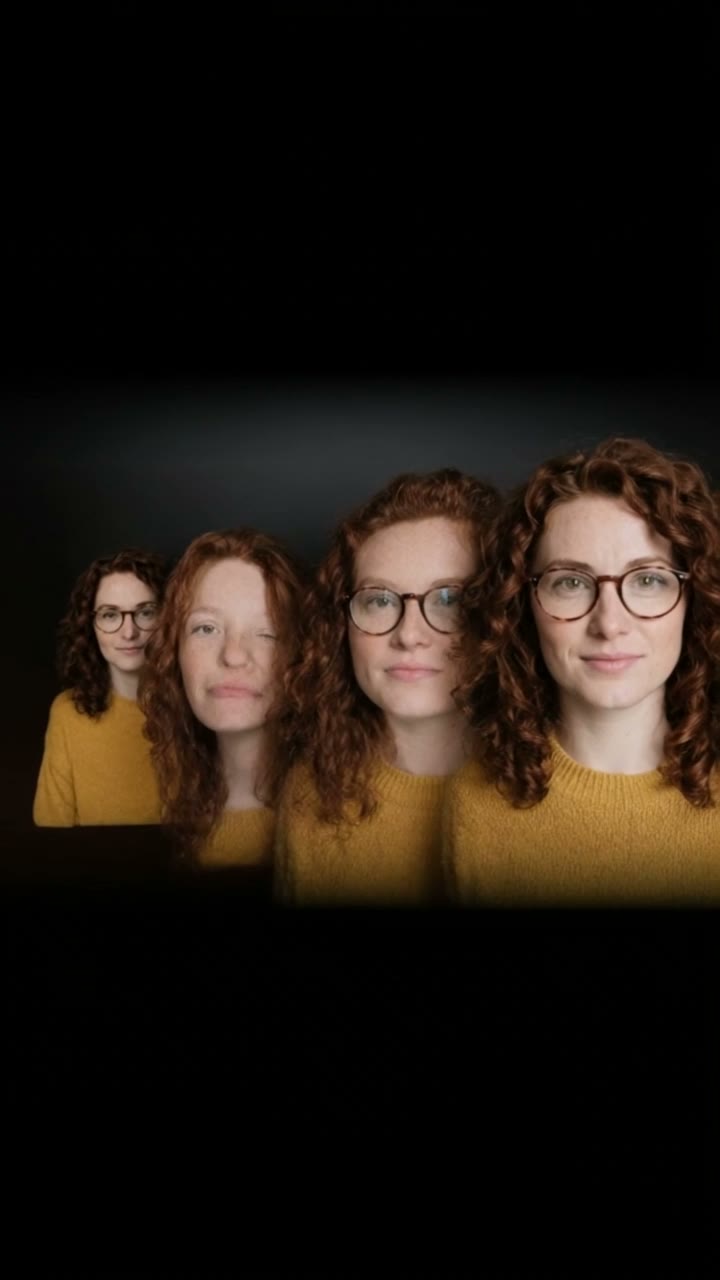
Heads arranged on a black backdrop, smallest to largest, bobbing one after another to music. Upload a single photo to feature yourself repeatedly, three photos for loved ones or friends, or one pet photo. The AI handles the editing and adds the trend's audio—no manual cutting or animation required.

The original Headbop Trend reelOriginal reel
  • 1 photo you add
  • 11 s clip with sound
  • 9:16 for TikTok, Reels, Shorts
  • No watermark

No prompt to write: Add your photo and tap once

Create your own

Ready in a few minutes · From 44 credits

The headbop trend features cut-out heads arranged in a row against black, bobbing to phonk music from smallest to largest on TikTok. AI now creates this from your uploads: a single photo repeats you across the row, three photos show your loved ones or friends, or one pet photo features your animal.

Also called Head bop edit trend · Headpop

Example

See what the Headbop Trend video looks like

These people and pets are AI-generated, not actual individuals. Reel versions replicate the source clip and include its soundtrack, which you can mute; other versions feature original audio. Your output will vary with each generation.

Original reel by @popo_hrtz, 11 s
The source reel from @popo_hrtz, the CapCut headbop template: four meme cats bob in sequence on black, then reappear mirrored. Your heads replace the cats. Displayed: a vertical crop of the upload.
Use this reference
Step by step

Create the Headbop Trend video on Smew AI

All processing happens in your browser. No editing software, no prompt writing, no watermark.

  1. Upload your photo

    Click "Create your own" and upload your photo with a visible face. Capture with your camera or select from your gallery.

  2. Click Generate

    The button displays the cost. Kling 3.0 Omni inserts your photos into the Headbop trend clip and recreates it frame by frame for 11 seconds, including the reel's soundtrack. No prompt needed.

  3. Save or share

    Your video renders in minutes as a 9:16 MP4. Save it, share from your device, or retrieve it later from your Library.

What photo gives the best results?

Upload one photo of yourself for "Just you", three photos for "Family" (separate faces), or one pet photo for "Pet".

  • Head and shoulders, facing forward. Since the clip displays heads only, close-up shots work better than full-body images.
  • Clear and well-lit. Avoid sunglasses. Hats and hoods alter the head shape in the sequence.
  • Single face per image. Remove other people and animals from the frame.
  • Family sequence: photo 1 becomes the largest head, photo 2 the middle size, and photo 3 the smallest at the row's end.
  • Pets: a distinct facial shot with both ears visible.
  • Only use photos of people who gave permission.

How did the Headbop Trend trend begin?

The headbop is an editing technique, not an AI creation. Video editors cut out heads, arrange them on black backgrounds, and animate each one to bob on beat using CapCut or Alight Motion. Anime editors have created these for years: the #headbopanimation tag appeared on TikTok in May 2022.

The current wave began on 28 September 2026, when @.carvaa shared a "family" of fighter jets bobbing in sequence. That post reached 1.9 million views and 300,900 likes by 13 October, and its audio appeared in roughly 3,500 videos, gaining about 290 daily. A second audio dropped on 5 October featuring cartoon ponies in a row (1.8 million views), and creators posted sequences of cars, vegetables and meme cats similarly.

On 10 October @popo_hrtz shared a CapCut template with four meme cats (589,500 views and 107,300 likes by 13 October), and tutorial videos demonstrated inserting cut-out photos into the sequence. A "family's headpop" tutorial from 4 October garnered 516,200 views. Manual cutting was still required for every head. This template automates the editing with AI, working directly from regular photos.

  1. The #headbopanimation tag appears on TikTok; it contains 3,523 videos and 53.3 million views by 13 October 2026.

  2. @.carvaa shares a "family" of fighter jets bobbing in sequence, the first upload using the trend's primary audio; it reaches 1.9 million views and 300,900 likes by 13 October. TikTok

  3. A "family's headpop" tutorial demonstrates the editing with black-and-white portraits; it reaches 516,200 views by 13 October. TikTok

  4. @popo_hrtz shares the CapCut headbop template featuring four meme cats; it reaches 589,500 views and 107,300 likes by 13 October. TikTok

  5. The trend's primary audio appears in roughly 3,500 TikTok videos, growing by about 290 daily, and the #headbop tag contains 76,500 videos and 615 million views.

Copy and paste

The Headbop Trend prompts

These aren't necessary: the single-tap process executes them automatically, along with the trend clip. [Image 1] and [Image 2] represent your two photos, and [Video 1] represents the trend clip being recreated.

Just you

1 photo: your photo, face clearKling 3.0 Omni11 s · 720p · 9:1644 credits
Video prompt

Replace each of the four cats in the video with the person in the first image: the small striped cat, the black-and-white cat, the grey cat with the big round eyes and the orange cat in the black hoodie all become the head and shoulders of this same person. Keep the original actions, facial expressions, poses, body movements, camera movement, background, lighting and timing. Only replace the cats and keep everything else unchanged. The video is a headbop: a row of cut-out heads on a black background, from small to big, that bop to the beat while the camera slides along the row. Timing, second by second, as in the original video: 0-3.2 s: four heads in a row, the smallest on the left and the biggest at the right edge of the frame, partly out of the frame. They bop in turn to the beat. 3.2-5.3 s: the camera moves closer to the three heads on the left. The biggest head is out of the frame. 5.3-5.7 s: a quick fade to black and back. 5.7-9.2 s: the same row, mirrored: the biggest head slides in at the left edge of the frame, then the others down to the smallest on the right. All four heads are the person again, no cat. They bop in turn to the beat. 9.2-11 s: the camera moves closer to the three heads on the right. The biggest head is out of the frame. Every head is the person from the first image, in every frame: the same face, eye color, eyebrows, nose, mouth, skin tone, age, hair color and hairstyle, and any glasses, beard or freckles as in the first image. Only the size changes from head to head, so their friends recognize them at once. Each head is a clean cut-out of the head, neck and shoulders, in the clothes from the first image. No cat in any frame, also after the fade to black: not the small striped cat, not the black-and-white cat, not the grey cat with the big round eyes, not the orange cat in the hoodie. No cat ears, no fur, no whiskers and no cat face anywhere. No hoodie, no badge, nothing in the mouth. One head in each place, no extra heads. The black background stays black above and below the row. No text, no logos, no watermark.

2078 characters

What's the credit cost?

Each video costs credits, and the create page displays the precise amount on the Generate button before any purchase. The single-tap cost includes the video, created in one operation from your photos and the trend clip, billed once. A single video costs 44 credits, so the smallest one-time package covering it is $9.99 for 100 credits, without subscription. Lower-cost models exist if you execute the prompts manually in AI Video.

Video modelSettingsCredits
Kling 3.0 Omni (this template)11 s, 720p, copies the trend clip, one tap44

One-time packs and plans are on the pricing page. A failed video gives its credits back.

What occurs in the headbop video, moment by moment?

Smew AI modifies the trend's original headbop reel and inserts your heads into the sequence. The camera movement, bobbing motion and timing match the reel:

TimeWhat you see
0 to 3 sThe sequence on black, from smallest to largest head. Each head bobs in turn with the beat.
3 to 5 sThe camera zooms toward the heads.
5 to 6 sA brief fade to black and return.
6 to 9 sThe sequence reappears mirrored, starting with the largest head.
9 to 11 sThe camera zooms again until completion.

Technical details: Kling 3.0 Omni modifies the reel directly: it replaces the reel's cat heads with heads from your photos while preserving all other elements. The clip runs 11 seconds at 720p, vertical 9:16, with the sequence centered on a black frame, matching the TikTok headbop aesthetic. The trend's audio is restored after processing. The precise cost appears on the Generate button before spending. Each generation is unique, so outputs vary.

Just you, Family or Pet: which headbop option should you choose?

  • Just you (1 photo): every head in the sequence is you, from smallest to largest. It's the fastest to create, and the humor is immediate: an entire family of you.
  • Family (3 photos): three heads, one from each photo, how people share their family or friend group. Photo 1 becomes the largest head, photo 3 the smallest, so place whoever should be most prominent first.
  • Pet (1 photo): every head is your cat or dog. Since the trend's most famous sequences feature meme cats, a pet sequence fits naturally.

All three options use identical reels, audio and duration. Want your pet in the family sequence? Create both the Family and Pet versions, then share them as a set.

Common problems and solutions

ProblemFix
A cat ear or whiskers stay on a headThe reel's heads are feline. Generate again; a close photo showing hair helps.
The face looks like someone elseUpload a sharp, forward-facing photo with good lighting, without sunglasses.
Two faces in the Family row look alikeUpload photos with one distinct face each, captured close up. Generate again.
A fourth head shows up in the Family rowThe reel contains four heads, and this version removes one. Generate again.
Your pet looks flat or stretchedUpload a frontal photo of the pet's face with both ears visible.
The model refuses a photoSome photos are rejected. Credits are refunded; upload a different photo.

What caption and hashtags suit a headbop?

Caption suggestions: "The family group chat", "Me, myself, I and also me", "Rate the lineup", "The cats were replaced". Or create your own.

Hashtags: #headbop is the primary one, with 76,500 TikTok videos and 615 million views on 13 October 2026, and #headboptrend works too. Maintain the platform's AI disclosure.

The clip includes the trend's audio, a fast phonk remix, making it post-ready. You can disable the audio on the results screen and select different audio during posting. The song is owned by its rights holders, and Smew AI grants no license to it. Music regulations vary by platform, so review them before using the clip in advertisements or sponsored content.

FAQ

Headbop Trend trend questions

What is the headbop trend?
It's a TikTok editing style where cut-out heads arranged from small to large bob sequentially on black to fast phonk music. The current wave launched on 28 September 2026 with fighter jets in a row that reached 1.9 million views by 13 October, and creators now share their cars, pets, favorite characters and families similarly.
Who started the headbop trend?
Headbop animations of anime characters date back years: the #headbopanimation tag existed on TikTok since May 2022. This wave launched on 28 September 2026 with @.carvaa's "family" of fighter jets, the first upload using the trend's primary audio. A CapCut template from @popo_hrtz featuring four meme cats appeared on 10 October.
How do I make a headbop with my family?
Select the Family version, click "Create your own" and upload three photos with separate faces. Photo 1 becomes the largest head, photo 3 the smallest at the end. Click Generate; the button displays the cost first. You receive an 11-second clip with the trend's audio, and the video appears in your Library when complete.
Can I make a headbop of just me?
Yes. The Just you version requires one photo, and every head in the sequence becomes you, from smallest to largest, like four versions of you as a family.
Can I put my cat or dog in the headbop?
Yes. The Pet version requires one distinct photo of your pet's face, and every head in the sequence becomes your pet. Since the trend's most famous sequences feature meme cats, a pet matches the aesthetic.
Do I need CapCut or cut-out photos?
No. In CapCut you manually cut out each head and animate each bob with keyframes, or use a template with pre-cut photos. Here you upload regular photos, and Kling 3.0 Omni inserts the heads into the trend's original headbop reel automatically.
What prompt does the headbop template use?
The trend involves no AI prompt: it's a keyframe edit, and none of its creators or tutorials published one. This template employs Kling's recreation system, which swaps the heads in the reel while maintaining the motion, camera work, background and timing. You write no prompt.
What song is in the headbop trend?
The trend's primary audio is a fast phonk remix, and the clip includes matching seconds of it from the reel, restored after processing. You can mute it on the results screen. The song is owned by its rights holders, and Smew AI grants no license to it.
Will the faces look like us?
That's the goal. Each head retains the face, hair and skin tone from its photo; only the size varies across the sequence. A sharp, forward-facing photo with good lighting preserves facial accuracy best.
Is the headbop video real?
No. The heads are AI-generated from still photos and inserted into a reel of cat heads, and the people shown never recorded this. Maintain the AI disclosure when posting it.
How long is the video and what format is it?
11 seconds, as an MP4 at 720p in vertical 9:16, with the head sequence centered on a black frame and the trend's audio. It works for TikTok, Reels and Shorts, and includes no watermark.
Is it headbop or head bop?
Both spellings are common, as in headbop animation or head bop edit, and both refer to the same head bop trend. Some write head bob instead, but the trend's TikTok tags use bop.
Is there a head bop animation app?
You don't need one: this page creates the head bop animation from your photos in your browser. Some call it the head bobbing trend, and before AI it required a head bop tutorial in CapCut and extensive cutting.
Is there a head bop AI video?
Yes, this one. The headbop meme originated as a keyframe animation, and this template produces the same head sequence with AI from your photos.
Is the family headpop the same as the family headbop?
Yes. The "family's headpop" tutorial from 4 October uses that spelling for the identical head sequence.

More trends

Other AI video templates

Template

Bby Wow Guy AI: Insert Your Face Into the Guy Dancing at a Quince Meme

Groove toward the camera at a quinceañera, take a bite of the concha, lock eyes with the lens while chewing with stuffed cheeks, then groove back into the crowd. Upload one photo to star as the bby wow guy, complete with the song.

Read more
Template

Bad Times AI Trend: Turn One Photo Into the Viral Argument Video

The viral argument routine: hands to head, hip pose, stop gestures and that long camera stare, all set to Imael Angel's "Bad Times". Upload a single photo of yourself or your pet and get the complete video with music.

Read more
Template

Tecktonik Dance AI: Step onto the String-Light Stage

Wide arm swings, hands reaching toward the head, both arms shooting upward, followed by rapid, precise arm choreography on a compact stage lit by string lights: the electro dance from the 2000s that Cheba Man revived in 2026. Upload a single photo of yourself or your pet to generate the dance complete with its soundtrack.

Read more
Template

Halay AI Trend: Join Two Friends for a TV Stage Halay Dance

Three friends perform a halay together on a Turkish TV music show set: the lead dancer swings a white handkerchief, drops into deep knee bends and throws high kicks while the davul drummer plays up front. Upload three photos or only yours, 15-second video, complete with halay music.

Read more
Template

Squishy Face AI Trend: Transform Your Face Into a Squishy Toy With One Photo

Watch your face transform into a glossy silicone squishy resting on a wooden table. Two hands press your cheeks, squish you like dough, release, and your face springs back into shape. Upload one photo, get an 8-second video with squish sounds.

Read more
Template

Clapping Cat: Turn Your Pet Into the Grinning, Clapping Black Cat

Your cat or dog sits upright, gets two tiny human hands, shows a big human smile and claps slowly with sound, just like the black cat clapping meme. Upload one pet photo and get a 6-second video with clapping sounds.

Read more

Create your own Headbop Trend video

Upload one photo and click once. No prompt required. 44 credits.

No watermark. A failed video gives its credits back. Secure checkout by Stripe.