smew.ai

Popstar AI: Turn Your Photo Into the Popstar Music Video

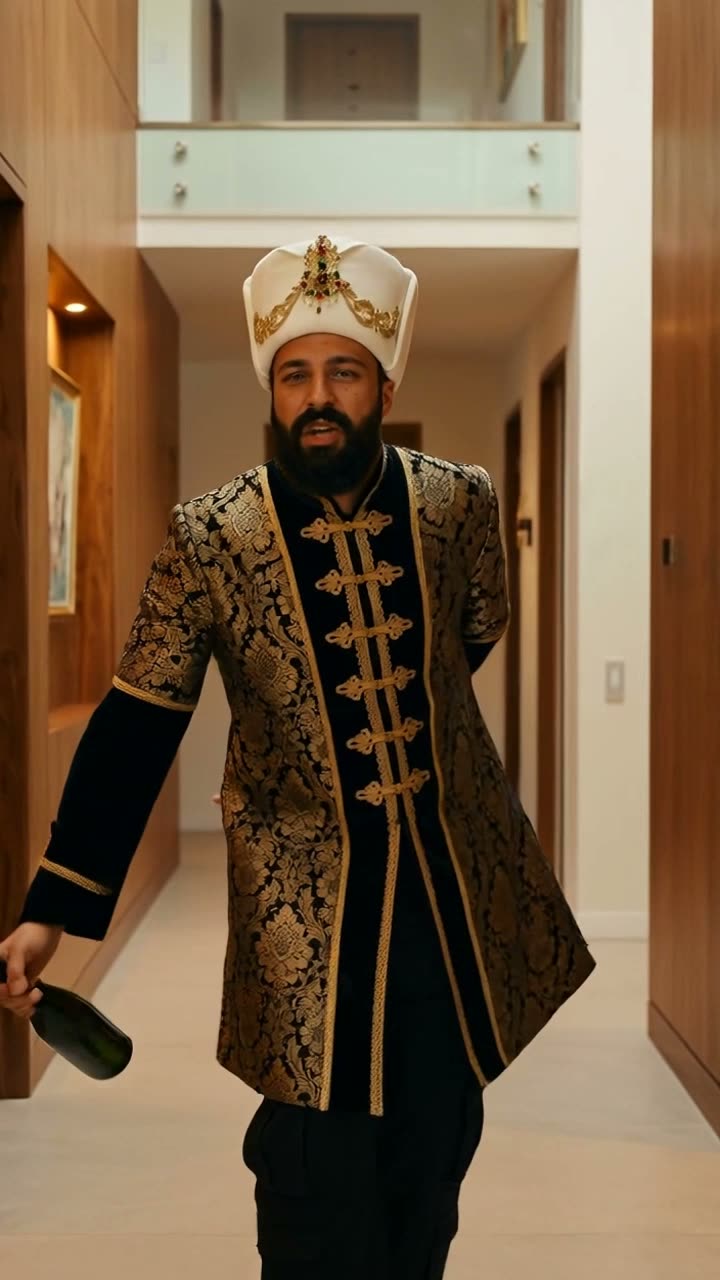
Step into a luxurious mansion hallway, bottle of champagne in hand, and stride toward the camera with confident arm swings while rapping directly at the lens. Upload a single photo, get a 10-second video with the trend's audio.

The original Popstar AI reelOriginal reel
  • 1 photo you add
  • 10 s clip with sound
  • 9:16 for TikTok, Reels, Shorts
  • No watermark

No prompt to write: Add your photo and tap once

Create your own

Ready in a few minutes · From 42 credits

The Popstar AI trend casts you as the star of the Popstar music video: stride through a mansion's elegant wood-panelled hallway with a bottle of champagne, throw your arms out wide, and deliver the verse straight to camera. Upload a single clear photo of yourself and receive the video complete with the trend's audio.

Also called Popstar trend · Popstar music video trend

Example

What the Popstar AI video looks like

The people and pets are AI-made, not real persons. The reel versions copy the original clip and come with its original song, which you can turn off; the other versions have original sound. Your result will differ from run to run.

Original reel by @panchos_seafood, 10 s
The original reel by @panchos_seafood: his AI take on the trend, created using a CapCut template. He advances through the mansion hallway toward the camera, extends his arms wide and delivers the verse, with a bodyguard beside him. Shown: a vertical cut of his post.
Use this reference
Step by step

How to make the Popstar AI video on Smew AI

Everything runs in the browser. No editing app, no prompt to write, no watermark.

  1. Add your photo

    Press "Create your own" and upload a photo of yourself, face visible. Capture it with the camera or select from your library.

  2. Press Generate

    The button displays the cost. Kling 3.0 Motion Control applies the movements from the Popstar AI clip to the person in your photo, keeping your photo's setting, for approximately 10 seconds, with the reel's original audio. No prompt required from you.

  3. Download or share

    Your video completes in a few minutes as a 9:16 MP4. Download it, share from your device, or retrieve it later from your Library.

Which photo works best?

Upload one clear photo of yourself. The initial stage places you in the mansion hallway holding the champagne bottle, so your photo determines the star's identity and wardrobe.

  • Face sharp and turned to the camera, with adequate lighting. Your face appears in close-up during the rap delivery.
  • Waist up or full body works best. Selfies also work: the still adds the remaining parts.
  • Wear what you want in the video. Your shirt, hat, glasses and accessories transfer over, and the prompt preserves a long robe or costume exactly.
  • Only you in the photo. With multiple people, the model might select the wrong individual.
  • Use your own photo or one from an adult who gave permission. Never a celebrity or stranger.

Where did the Popstar AI trend start?

The trend recreates a single shot from Popstar, a 2020 rap music video featuring a pop star lip-syncing a rapper's verse while enjoying mansion life: champagne bottle in hand with a bald, bearded bodyguard beside him. The video received Best Video at the 2020 MTV Europe Music Awards.

Six years later, Popstar music video AI recreations made the role accessible to anyone. The earliest AI adaptation we located on TikTok was posted on 30 September 2026. On 2 October a Brazilian football star shared an AI version starring himself, created by AI creator @downey.ai using Higgsfield Genjutsu. Sports channels reposted it that same evening, with one repost reaching 688,300 views by 13 October.

Additional versions created with Higgsfield Genjutsu, Genematic, CapCut and Dreamina appeared starting 4 October. On 10 October a major rap news channel on TikTok posted a version featuring the rapper from the verse in the starring role, accumulating 324,600 views and 25,600 likes by 13 October. That same day, US Google searches for "popstar video" reached their peak for the previous 30 days.

  1. The Popstar music video releases on YouTube: a pop star lip-syncs a rapper's verse inside a mansion, champagne in hand, with a bodyguard beside him.

  2. The video receives Best Video at the 2020 MTV Europe Music Awards.

  3. A Brazilian football star shares an AI version starring himself; a Brazilian sports account's repost reaches 688,300 views by 13 October. TikTok

  4. Initial CapCut templates for the trend surface on TikTok, two days following a Genematic app tutorial; a Dreamina template arrives on 7 October.

  5. A rap news channel on TikTok posts an AI version starring the rapper from the verse: 324,600 views and 25,600 likes by 13 October. US Google searches for "popstar video" reach their peak that day. TikTok

  6. Starrd releases a tutorial with the prompt they use for the mansion still, and @panchos_seafood shares the CapCut version shown as the original reel on this page. Starrd

Copy and paste

The Popstar AI prompt

You do not need these: the one-tap flow runs them for you, together with the trend clip. [Image 1] and [Image 2] are your two photos, and [Video 1] is the trend clip the video copies.

Popstar

1 photo: you, face clearKling 3.0 Motion Control10 s · 720p · 9:1642 credits
Video prompt

One continuous handheld take, vertical video. Recreate the reference video, but the performer is the person from the reference image: the same face, hair, skin tone, clothes and jewellery, in the mansion hallway from the reference image. The person walks the warm wood-panelled hallway toward the camera with the champagne bottle in the right hand, lip-syncing the verse straight to the camera, arms swinging wide, and the shot ends out on the glass balcony. Every step toward the lens, every time the arms swing wide, every point of the champagne bottle, on the same beats as the reference video. The mouth copies the performer's mouth frame by frame. No white T-shirt, no black curly wig, no tattoos and no light jeans unless the reference image shows them. Exactly one person: no bodyguard, no other people. No cuts, no text, no captions, no logos, no label on the bottle.

875 characters

How many credits does it cost?

You pay per video in credits, with the exact cost displayed on the Generate button before any charge. The one-tap price includes the video, created in one step from your photos and the trend clip, billed once. Each video costs 42 credits, so the smallest one-time pack covering it is $9.99 for 100 credits, with no subscription. Less expensive models are available if you manually run the prompts in AI Video.

Video modelSettingsCredits
Kling 3.0 Motion Control (this template)10 s, 720p, copies the moves of the trend clip, one tap42

One-time packs and plans are on the pricing page. A failed video gives its credits back.

What happens in the Popstar AI video, second by second?

Your video replicates a 10-second segment of the trend's hallway scene, in a single continuous shot as the camera retreats before you:

SecondsWhat you do
0 to 2You stand facing the camera in the hallway, arms relaxed at your sides, and begin rapping.
2 to 5You advance toward the lens, arms extended low, delivering each line directly to camera.
5 to 7Your arms sweep out wide, champagne bottle held to one side.
7 to 10You pivot toward the glass balcony and glance back over your shoulder at the camera.

How it works: to place you in a music video, AI requires two stages. Initially, Nano Banana 2.1 creates a still image from your photo: you're positioned in a warm, wood-panelled mansion hallway holding a champagne bottle in your right hand. Next, Kling 3.0 Motion Control applies the movements, camera work and mouth motions from the trend clip to you, within that hallway setting. The trend's audio is restored following the generation. The clip runs approximately 10 seconds at 720p, vertical 9:16. The precise cost appears on the Generate button before any payment.

Who is not in it: Motion Control animates a single person, so the bodyguard from the trend clip doesn't appear. Your video features a solo journey through the mansion.

What goes wrong, and how do you fix it?

ProblemFix
The face looks less like your photoYour face undergoes two stages. Upload a sharp, front-facing photo with adequate lighting, then generate again.
The mouth moves, but not on every wordNormal: the clip replicates the mouth movements from the performer in the trend clip, not the actual words, so lip sync isn't precise.
A white T-shirt, a black curly wig or tattoos show upThe performer in the trend clip wears these. The prompt excludes them unless present in your photo; generate again.
The hands or the bottle blur when the arms swing wideCommon during rapid arm movements. A second generation produces different results.
The clip ends a moment before 10 secondsMotion Control occasionally stops slightly early; the audio fades with it.
The model refuses the photoCertain photos get rejected. Your credits are returned; attempt a different photo.

Which caption and hashtags fit the Popstar AI trend?

Caption ideas: "Entering my popstar era", "Security, he's with me", "Living like a popstar for 10 seconds", "Me after one paycheck". Or feature a friend with their permission and tag them.

Hashtags: the Popstar AI TikTok tags are still early: #popstartrend had 23 TikTok videos and 127,636 views on 13 October 2026, and #popstarai had 12 videos. The broad #popstar tag had 272,918 videos. Keep the platform's AI label on.

The clip includes the trend's audio, trimmed to the same 10 seconds, so it synchronizes with the actions. You can disable it on the result screen and select different audio when posting instead. The audio belongs to its owners, and Smew AI provides no usage rights. Music regulations vary by platform, so review them before using the clip in advertisements or sponsored posts.

Want more star treatment? Try the AI airport star arrival, or rap at a chandelier party in the Burning Bridges AI trend.

FAQ

Popstar AI trend questions

What is the Popstar AI trend?
It's a viral AI video format from October 2026. Users cast themselves as the star of the Popstar music video from 2020: they stride through a mansion hallway holding a champagne bottle, extend their arms wide and rap the verse to camera, with a bodyguard following. The major surge began on 2 October, when a Brazilian football star shared his AI version.
How do I make the Popstar AI video with my photo?
Press "Create your own" and upload one clear photo of yourself, waist up or full body works best. Press Generate; the button displays the cost first. You receive a vertical clip of approximately 10 seconds with the trend's audio. No prompt required, and the video appears in your Library when complete.
Is it the real Popstar music video house?
No. The initial stage of generation creates a new setting: Nano Banana 2.1 illustrates you in a warm, wood-panelled hallway resembling the Popstar mansion music video location, holding a champagne bottle in your right hand, based on your photo. Kling 3.0 Motion Control then executes the trend clip's movements in that hallway. Your actual room or background isn't used.
Does my video have the Popstar bodyguard?
No. Kling 3.0 Motion Control animates a single person, so your video presents a solo journey through the mansion: the advance toward camera, the extended arms and the backward glance, without the bodyguard from the trend clip.
Will my mouth lip sync to the song?
Approximately, but not precisely. As a Popstar lip sync AI clip, it replicates the mouth movements from the performer in the trend clip, who delivers the verse, so your mouth moves on identical beats. It doesn't track every word, so precise lip sync isn't achieved.
What sound does the Popstar AI video have?
The trend's original audio: the identical 10 seconds of the rap verse used in the trend clip, restored after generation so it aligns with the movements. You can disable it on the result screen. The audio belongs to its owners, and Smew AI provides no usage rights.
What prompt does the Popstar AI template use?
The initial viral versions were created with proprietary tools (Higgsfield Genjutsu, a Popstar CapCut template and a Dreamina template) that don't reveal prompts. The sole published Popstar AI prompt is the mansion still prompt from Starrd's tutorial of 12 October 2026, which this template employs. It's modified only where our generation requires it: the room is described with text rather than a frame from the music video, and costumes from your photo remain unchanged. You don't write any prompt.
What is the Popstar music video story?
A pop star lip-syncs a rapper's verse while experiencing mansion star life, holding a champagne bottle with a bald, bearded bodyguard beside him. The AI trend replicates a single hallway shot from it.
Is this a way to put yourself in a music video?
Yes, for one iconic shot. Upload a single photo to create an AI music video of yourself in the Popstar mansion hallway, placing your face in a music video without any filming.
Can I put a celebrity in the Popstar video?
Do not. Many viral versions feature famous faces, but fabricated videos of real individuals can violate platform guidelines and personal rights, and some video models reject recognizable faces. Use your own photo or one from a consenting adult.
Does a costume work?
The initial stage is instructed to preserve the clothing, hat, glasses and accessories from your photo, and to maintain a long robe, dress or costume exactly. A photo showing the complete outfit clearly provides the model maximum information. Each generation is a fresh attempt, so generate again if details change.
How long is the video and what format is it?
Approximately 10 seconds, occasionally slightly shorter, as an MP4 at 720p, vertical 9:16, with the trend's audio. It's prepared for TikTok, Reels and Shorts, and includes no watermark.

More trends

Other AI video templates

Template

Bby Wow Guy AI: Insert Your Face Into the Guy Dancing at a Quince Meme

Groove toward the camera at a quinceañera, take a bite of the concha, lock eyes with the lens while chewing with stuffed cheeks, then groove back into the crowd. Upload one photo to star as the bby wow guy, complete with the song.

Read more
Template

Bad Times AI Trend: Turn One Photo Into the Viral Argument Video

The viral argument routine: hands to head, hip pose, stop gestures and that long camera stare, all set to Imael Angel's "Bad Times". Upload a single photo of yourself or your pet and get the complete video with music.

Read more
Template

Tecktonik Dance AI: Step onto the String-Light Stage

Wide arm swings, hands reaching toward the head, both arms shooting upward, followed by rapid, precise arm choreography on a compact stage lit by string lights: the electro dance from the 2000s that Cheba Man revived in 2026. Upload a single photo of yourself or your pet to generate the dance complete with its soundtrack.

Read more
Template

Phone on the Train Trend: Put Yourself in the Paris Metro Reel

Perform Training Season on a Paris metro platform, attach your phone to the train window, chase the train down the platform, and watch your phone travel to the Eiffel Tower vista—just like the 7-million-like reel. Upload one photo, get a 33-second video with the reel's audio.

Read more
Template

Burning Bridges AI Trend: Step Into the "Where She At?" Party

Join a crowded party beneath crystal chandeliers: silver cup in hand, you rap toward the lens, then cover your eyes with one hand as you search the room for her. Upload one photo for a 15-second clip with audio.

Read more
Template

AI Airport Celebrity Video: Exit Arrivals Like a Star

Security clears a path, phones point at you, cameras flash, fans press against the barriers: you exit the arrival gate like a celebrity, acknowledge a fan and climb into your car. Or pull up at a hotel after dark: step from a black luxury sedan onto the red carpet. Upload one photo of yourself or your pet, get a 15-second video with crowd audio.

Read more

Make your own Popstar AI video

Add one photo and tap once. No prompt to write. 42 credits.

No watermark. A failed video gives its credits back. Secure checkout by Stripe.