smew.ai

Thank You Baby Meme: Transform One Photo of Your Baby Into the Thank You Babeh Dance

The TikTok LIVE chant "thank you baby, thank you babeh" is now a dance trend. Upload a single picture of your baby and receive a 15-second video where they bounce, shrug, and finish with a heart gesture, set to the trending audio. You can also put your pet in the iconic wig.

The original Thank You Baby AI reel by @packofpinschersOriginal reel
  • 1 photo you add
  • 10 to 15 s clip with sound
  • 9:16 for TikTok, Reels, Shorts
  • No watermark

No prompt to write: Add your photo and tap once

Create your own

Ready in a few minutes · From 60 credits

The thank you baby meme comes from a TikTok LIVE by the 50/50 Twins, where they sing "thank you baby, thank you babeh." The AI version transforms a single picture of your baby into a 15-second dancing video with the trending audio. A Pet option dresses your pet in the famous wig.

Also called Thank you baby, thank you babeh · Thank you babeh trend · Thank you baby 50/50 Twins

Example

Preview of the Thank You Baby AI video

Here's the source reel. Your pictures take the place of its subjects, creating a video with identical shots but featuring your faces. Each generation produces unique results.

Original reel by @packofpinschers, 10 s
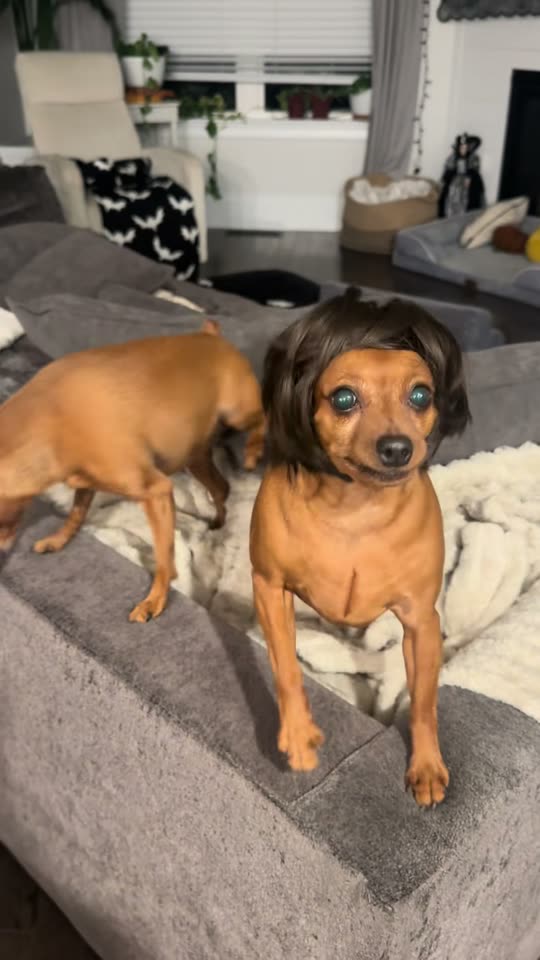
The pet variant by @packofpinschers: a little dog wearing a dark bob wig moves its head to the chant while sitting on a couch, then looks directly at the camera. Pet replicates this reel.
Use this reference
Step by step

Creating the Thank You Baby AI video on Smew AI

The entire process happens in your browser. No editing software needed, no prompt required, no watermark added.

  1. Upload your picture

    Click "Create your own" and upload your baby's picture. Capture it with your camera or select one from your gallery.

  2. Click Generate

    The cost appears on the button. Kling 3.0 Motion Control transfers the Thank You Baby clip's movements onto your photo's subject, keeping your original scene, creating roughly 15 seconds of video with the original audio. No prompt needed.

  3. Save or post

    Your video arrives in minutes as a 9:16 MP4. Save it to your device, post it directly from your phone, or access it later in your Library.

What makes a good photo?

You'll need one photo: your baby for Baby, your pet for Pet.

  • Baby: standing or sitting works best. Since the dance happens upright, a picture of your baby standing or sitting straight produces more realistic movement. Lying-down shots may result in strange leg positions.
  • Full body visible when possible, with face toward the camera, well-lit. Baby maintains your original setting and framing, so a vertical shot in a clean space looks most natural.
  • Just one baby, no one else. Remove any parent hands, siblings, or pets from the frame.
  • Pet: a focused shot showing face and complete body. Any pet type works; the wig appears during generation.
  • Use only pictures of your own child, or one whose parent or guardian gave permission. Never use a stranger's picture.

Origins of the Thank You Baby AI trend

The thank you baby trend started on a TikTok LIVE. On 23 September 2026 the 50/50 Twins, a duo who perform in rapper costumes with grills, gold chains and long nails, bounced on camera and thanked their viewers for gifts with a sing-song "thank you baby, thank you babeh". The stream is gone, but screen recordings spread. The one posted by @drebabygums on 24 September had 5.1 million views by 20 October, and its sound carries most of the memes. The twins' own "POV: You joined our live" of 30 September reached 38.4 million views, and on 12 October they released the full song, "Thank You Babeh".

The dance came next. On 6 October the producer @prodpoodee put the chant on a bouncy beat, with people dancing a loose two-step to it; one dance to that remix, posted on 7 October, passed 948,000 views. From 14 October, CapCut AI baby templates set to the remix made babies dance, and US tutorials for the thank you baby AI trend took off. On 20 October a dog in a dark bob wig reached 214,900 views.

  1. The 50/50 Twins stream live on TikTok, thanking viewers with the melodic "thank you baby, thank you babeh." The original stream gets deleted, but screen captures circulate. Know Your Meme

  2. @drebabygums posts a screen capture of the LIVE that becomes viral: 5.1 million views plus 653,100 likes by 20 October. This audio track dominates thank you baby memes. Know Your Meme

  3. The twins share "POV: You joined our live" on their account; it accumulates 38.4 million views and 5.8 million likes by 20 October. TikTok

  4. @prodpoodee creates a bouncy beat version featuring the chant with dancers. AI baby templates use this remix. TikTok

  5. American how-to videos for a CapCut AI baby template using the remix begin appearing; the top one reaches 222,800 views and 2,705 shares by 20 October.

  6. A little dog wearing a dark bob wig moves its head to the chant on a couch: 214,900 views plus 55,100 likes on day one. TikTok

Copy and paste

The Thank You Baby AI prompts

These aren't necessary: the single-tap workflow executes them automatically, along with the trend clip. [Image 1] and [Image 2] represent your pictures, while [Video 1] is the trend clip being replicated.

Baby

1 photo: your babyKling 3.0 Motion Control15 s · 720p · 9:1660 credits
Video prompt

One continuous single take, steady camera, vertical video. Recreate the reference video exactly, but the dancer is the baby from the reference image instead of the man: the same baby with the same face, hair, skin tone and clothes, standing upright in the place from the reference image. The baby reproduces the man's full dance frame by frame with the same timing, on the beat: the loose, bouncy two-step with bent knees and a little kick, the steps toward the camera and back, the shrug with both palms up, the arms swinging wide, a hand to the forehead, both hands behind the head, the point to the side, one arm thrown up high, and at the very end both hands making a heart in front of the chest. Above all his big, happy facial acting: a wide grin, raised brows and cheeky looks into the camera. Very expressive, joyful baby face. The baby keeps real baby anatomy: a small chubby body, a big round head, short arms and legs and small baby hands, never an adult body, no jewelry, even when it throws an arm up or steps toward the lens. No cuts, no text, no captions or labels on screen. No olive-green T-shirt, no camouflage trousers, no belt, no tan boots, no glasses, no wristwatch, no tattoos and no uniform of any kind unless the reference image shows them. Exactly one baby, no extra people.

1300 characters

Pet

1 photo: your petSeedance 2.510 s · 720p · 9:16152 credits
Video prompt

Recreate the reference video [Video 1] shot for shot: the same living room with the grey sofa and the cream fluffy blanket, the same evening lamp light, the same handheld phone camera, framing, timing and head moves. The ONLY change: the small dog in the dark brown bob wig is now the pet in [Image 1], and the pet wears that same dark brown bob wig on its head in every frame. The pet = the pet in [Image 1], in EVERY frame: the same species and breed, head shape, face, eyes, ears, muzzle, fur colors, fur length and markings as in [Image 1], with the natural body volume and proportions of that animal: never flattened, squashed, stretched or merged with anything, so its owner instantly recognizes it. Whether [Image 1] shows a dog, a cat or another animal, it stays that animal. Never drift back to the dog in the wig of the original video: not the coat, the ears or the face of the dog in the video unless [Image 1] shows them. The other small dog, the one with no wig on the sofa behind it, stays exactly as in the video and never takes the look of [Image 1]. The pet in the wig grooves to the chant like a little rapper. Matching the reference second by second: 1. 0-2 s: on the edge of the sofa it shakes its head hard from side to side, so the wig flips and swings. 2. 2-5 s: it turns on the blanket, tosses the wig with another head shake and sniffs the sofa. 3. 5-8 s: it steps to the front edge of the sofa, faces the camera and bobs its head under the wig. 4. 8-10 s: it stares into the lens with the wig on, sticks its tongue out, then shakes its head again. Anatomy rules: one head only, one muzzle, natural teeth and tongue, four legs with real paws. The wig sits on top of the head like a real wig and never merges with the fur. No text, no logos, no watermark, no people.

1794 characters

Credit cost breakdown

Videos cost credits, with the exact amount displayed on the Generate button before any charge. The one-tap cost includes the complete video, created in a single step from your pictures and the trend clip, billed once. Each option has individual pricing: Baby costs 60 credits, Pet costs 152 credits. Less expensive models are available if you manually execute the prompts in AI Video.

Video modelSettingsCredits
Baby: Kling 3.0 Motion Control (this template)15 s, 720p, copies the moves of the trend clip, one tap60
Pet: Seedance 2.5 (this template)10 s, 720p, copies the trend clip, one tap152

One-time packs and plans are on the pricing page. A failed video gives its credits back.

The thank you baby dance sequence, moment by moment

The Baby option performs the dance using the baby from your picture, maintaining your original setting. The camera remains fixed with continuous footage:

TimeWhat your baby does
0 to 2 sA relaxed, bouncy two-step matching the rhythm, with a small kick.
2 to 4 sMoves closer to the camera with a big smile, then steps back with a shrug, palms facing up.
4 to 9 sArms sweep out wide, one hand touches the forehead, hands go behind the head, then points to one side.
9 to 13 sBounces with both hands raised near the head, then throws one arm high.
13 to 15 sBoth hands form a heart shape at chest level.

The Pet option (10 seconds) recreates the popular dog-in-wig video: your pet appears on a gray couch wearing a dark bob wig, shakes its head making the wig move, turns on the blanket, then looks straight at the camera. A second small dog without a wig remains visible, matching the source video.

How it works: Baby transfers only an adult dancer's movements from the remix, never their appearance or clothing, and applies them to your baby using advanced AI video technology. Pet places your pet into the actual dog-in-wig video, using cutting-edge AI video models like Seedance 2.5. Both receive the trending audio after generation. The precise cost displays on the Generate button beforehand. Every generation creates a fresh interpretation, producing varied outcomes.

Who are the 50/50 Twins, and what is the thank you baby song 2026?

The 50/50 Twins (known on TikTok as @fiftyfifty082, sometimes written 5050 twins) are a creator pair who stream live in exaggerated rapper outfits. The thank you baby 50/50 moment comes from one of those 50 50 twins TikTok LIVE sessions: they bounce together, arms around each other's shoulders, thanking viewers for gifts in a melodic chant. Know Your Meme documented the meme in October 2026.

Three audio versions exist. Most memes feature the thank you baby TikTok song from the actual LIVE, via the @drebabygums recording (over 240,000 videos by 20 October). On 12 October, the twins dropped the complete track "Thank You Babeh"; their announcement post reached 9.6 million views by 20 October, making it what people reference as the "thank you baby song 2026". AI baby templates rely on @prodpoodee's beat remix of the chant.

The thank you baby 50 50 twins lyrics people search for mainly consist of the hook, "thank you baby, thank you babeh", repeated rhythmically throughout; the thank you baby lyrics on TikTok rarely extend beyond that phrase. This page doesn't reproduce the song, and the thank you baby voice in your video is the trend's audio: it remains the property of its creators, and Smew AI grants you no license to it.

Safety considerations for creating an AI video of my baby

Yes, when you follow these guidelines.

  • Only your own child, or a child whose parent or guardian gave you permission. Never grab a picture from another person's account.
  • The output is AI-generated. Your baby didn't actually perform these actions. Maintain the AI label when posting, preventing people from mistaking it for authentic footage.
  • Your video saves to your Library, not a public gallery. Smew AI doesn't publish it anywhere, and deletion is available anytime.
  • Consider carefully before publicly posting a baby's face. Family messaging, close-friends stories, or private accounts make appropriate alternatives.
  • The movements are lighthearted. A bounce, a shrug, a big smile and a heart gesture at the finish: the dance contains nothing inappropriate.

Common issues and solutions

ProblemFix
The baby appears older, or develops long legs and an adult-like bodyUpload a complete-body shot with the baby clearly visible and upright. The prompt preserves baby proportions; try generating again.
An olive shirt, camouflage pants or eyeglasses appearThe source clip's dancer wears these items. The prompt excludes them unless present in your picture; generate again.
The hands become blurry or show extra fingersThis happens with rapid arm movements. A new generation will differ.
The clip stops slightly before 15 secondsBaby videos occasionally end a bit early; audio fades accordingly.
The pet's wig disappears, or the original dog returnsGenerate again using a focused picture with your pet's face and fur clearly visible.
The second couch dog also changesThe prompt should preserve it, but occasionally it changes; generate again.
The model rejects the pictureSome pictures get rejected. Credits return automatically; attempt a different picture.

Caption suggestions and hashtags for the thank you baby trend

Caption suggestions: "Thank you baby, thank you babeh", "When the baby joins the LIVE", "POV: you sent a gift", "Thank you for the follow, babeh". Or create your own.

Hashtags (20 October 2026): #thankyoubaby shows 31,116 TikTok videos with 271.7 million views, #5050twins shows 4,273 videos with 188 million views, #thankyoubabytrend has 847 videos. For the AI baby trend on TikTok, #aibaby (292,557 videos, 12.9 billion views) and #aibabydance (75,387 videos) dominate. Maintain the platform's AI label. The same video works for Instagram Reels and YouTube Shorts.

Looking for more baby dances? The AI baby dance page features the sassy dance and Toc Toc dance from a single picture. For pets without wigs, check the AI dancing pet video.

FAQ

Thank You Baby AI trend questions

What is the thank you baby meme?
A TikTok meme based on a 50/50 Twins LIVE from September 2026: the pair dances on camera while thanking viewers with the melodic "thank you baby, thank you babeh." Screen captures became viral, people recreated it in rapper outfits, and by mid-October it evolved into a dance trend featuring AI babies and pets. Some spell it the thank you babe meme.
What is the thank you baby AI trend?
The AI adaptation of the meme: a single baby picture transforms into a short dancing video set to the chant. CapCut AI baby templates using @prodpoodee's remix launched it, with American tutorials starting 14 October 2026. Here the ai baby thank you clip generates from one picture of your baby, requiring no app or template search.
How do I make the thank you baby AI video?
Click "Create your own" on this page, select Baby or Pet, and upload one clear picture: your baby upright with complete body visible, or your pet. Click Generate; the cost displays first. That's how to make the thank you baby AI video without editing: the thank you baby AI baby dance generates as a vertical video with trending audio, stored in your Library.
Do I need the thank you baby CapCut template?
No. The thank you baby CapCut template is a locked AI template without visible prompts. This page produces the same style of thank you baby AI template video in your browser: upload one picture and click Generate.
Can I make the thank you baby trend with my dog or cat?
Yes. The Pet option recreates the thank you baby meme dog video, the little dog wearing a dark bob wig from 20 October 2026. Your dog, cat or other pet replaces it while wearing the wig, so a thank you baby AI dog or thank you baby AI cat both function. Many search for it as the thank you babeh dog.
Where does the background of the video come from?
For Baby, your picture provides it: the video preserves your original room, outdoor space or nursery, transferring only the dance movements. For Pet, the source clip provides it: your pet appears on the identical gray couch in the same room.
Does the video come with the thank you baby sound?
Yes. Baby receives the same remix segment used in AI baby templates, while Pet receives the thank you baby song TikTok memes feature, restored after generation. Sound can be muted on the result screen. The audio belongs to its creators, and Smew AI grants you no license to it.
What is the original thank you baby video?
The thank you baby original was a 50/50 Twins TikTok LIVE from 23 September 2026. The original LIVE was deleted; the most-viewed thank you baby video is the @drebabygums screen capture (5.1 million views by 20 October). This page doesn't feature the twins: our videos generate from your own picture.
Is this the same as the AI baby dance?
Same concept, different dance. The AI baby dance thank you baby variant features the bouncy two-step to the thank you remix, finishing with a heart gesture. Our [AI baby dance](/templates/ai-baby-dance) page offers two additional baby dances, the sassy dance and Toc Toc dance. All require one baby picture.
Is the baby dancing real or AI?
It's AI. The baby in the video originates from one still picture, and your baby didn't actually perform these actions. Maintain the AI label when posting, preventing people from mistaking it for authentic footage.
Is it safe to upload my baby's photo?
Upload only pictures of your own child, or a child whose parent or guardian gave permission. Smew AI doesn't publish your video: it saves to your Library with deletion available anytime. Consider your audience before publicly posting your baby's face.
How long is the video, and what format is it?
Baby runs roughly 15 seconds, occasionally slightly shorter, while Pet runs 10 seconds, as 720p MP4 with trending audio. Baby preserves your picture's framing, so vertical pictures produce vertical 9:16 videos for TikTok, Reels or Shorts; Pet always outputs vertical. No watermark appears.

More trends

Other AI video templates

Template

Bby Wow Guy AI: Insert Your Face Into the Guy Dancing at a Quince Meme

Groove toward the camera at a quinceañera, take a bite of the concha, lock eyes with the lens while chewing with stuffed cheeks, then groove back into the crowd. Upload one photo to star as the bby wow guy, complete with the song.

Read more
Template

Bad Times AI Trend: Turn One Photo Into the Viral Argument Video

The viral argument routine: hands to head, hip pose, stop gestures and that long camera stare, all set to Imael Angel's "Bad Times". Upload a single photo of yourself or your pet and get the complete video with music.

Read more
Template

Tecktonik Dance AI: Step onto the String-Light Stage

Wide arm swings, hands reaching toward the head, both arms shooting upward, followed by rapid, precise arm choreography on a compact stage lit by string lights: the electro dance from the 2000s that Cheba Man revived in 2026. Upload a single photo of yourself or your pet to generate the dance complete with its soundtrack.

Read more
Template

Phone on the Train Trend: Put Yourself in the Paris Metro Reel

Perform Training Season on a Paris metro platform, attach your phone to the train window, chase the train down the platform, and watch your phone travel to the Eiffel Tower vista—just like the 7-million-like reel. Upload one photo, get a 33-second video with the reel's audio.

Read more
Template

AI Dog Dancing Video: Turn Your Pet Into a Dancer

Watch your dog or cat rise up on two legs and perform a joyful, energetic dance at home. Upload one pet photo, get back a 10-second video with its own beat.

Read more

Create your own Thank You Baby AI video

Upload one picture and tap once. No prompt needed. 60 credits.

No watermark. A failed video gives its credits back. Secure checkout by Stripe.