smew.ai

The End AI Trend: Your Dog or Cat Waving Goodbye, Then It Runs Off

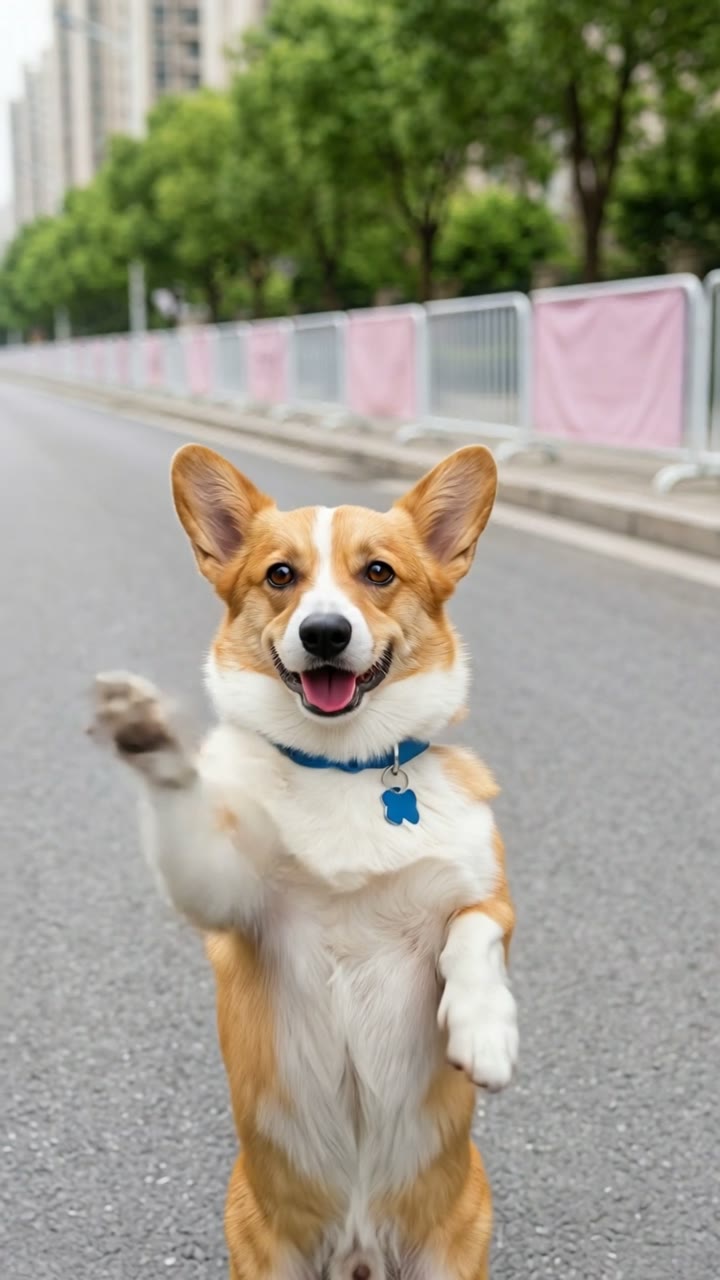
Watch your pet approach the camera standing upright, wave a paw, then spin around and dash down a city street with pink-paneled barriers. Upload one photo and receive an 8-second video with a soft "The end" voiceover.

The original The End: Wave Bye reelOriginal reel
  • 1 photo you add
  • 8 s clip with sound
  • 9:16 for TikTok, Reels, Shorts
  • No watermark

No prompt to write: Add your photo and tap once

Create your own

Ready in a few minutes · From 46 credits

The End is an AI trend that turns your cat waving goodbye or dog into a short film: your pet approaches upright on two legs, lifts a paw in farewell, then dashes away down an urban street while a gentle voice whispers "The end." Upload one sharp photo of your pet or yourself.

Also called dog waving bye · dog waving goodbye · the end trend · the end ai trend · pet waving goodbye

Step by step

How to make the The End: Wave Bye video on Smew AI

Everything happens in your browser. No editing software, no prompt writing, no watermark.

  1. Add your photo

    Tap "Create your own" and upload your pet's full-body photo. Capture it with your camera or choose from your library.

  2. Press Generate

    The button displays the cost. Smew AI assembles the The End scene using your photo, then Kling 3.0 creates an 8-second animation with original audio. No prompt needed.

  3. Download or share

    Your video arrives in minutes as a 9:16 MP4. Save it, share from your device, or access it anytime in your Library.

Which photo works best?

Upload one clear photo: your pet for Pet mode, yourself for Human mode.

  • Pet: full animal visible from ears to paws, taken in daylight with eyes showing. The system needs to see legs, paws and markings to place your pet upright. Your pet doesn't need to be standing in the original photo.
  • Works with dogs and cats. One animal per photo.
  • Human: full body or at least waist-up, face unobstructed and well-lit. Your clothing and hairstyle carry over from your photo.
  • Use photos of your own pet, yourself, or an adult who gave permission. Never use celebrities or strangers.

Where did the The End: Wave Bye trend start?

The End didn't begin with a creator's post. It appeared on 12 October 2026 in TikTok advertisements for an AI video app: a fluffy apricot-colored dog approaches upright down an empty city street, pauses at the camera, lifts one paw in greeting, then dashes off. On 13 October the app's ads featured a brown spaniel and a grey-and-white cat in the same sequence, and by 14 October we'd tracked 18 such advertisements. Each uses identical scenery: a broad street shot from low angle, white barrier fencing with pink panels and banners, with trees and high-rise buildings in the background.

We located no creator post and no public prompt for it on TikTok, YouTube or AI template platforms (verified 15 October), so Smew AI reconstructed the environment from the ground up. We chose the name: since the sequence works as a natural conclusion, it closes with a whispered "The end." Pets standing like humans were already popular on TikTok: #standingcat shows 2,551 videos with 114.2 million views.

  1. An AI video app launches TikTok advertisements for a single-photo template: a fluffy apricot dog approaches upright down a city street, waves a paw at the camera, spins and dashes away.

  2. The app expands its ads with two additional pets, a brown spaniel and a grey-and-white cat, both walking upright along the same street with pink fencing.

  3. 18 TikTok advertisements for the template have appeared since 12 October, all from a single app.

  4. On TikTok, #standingcat has 2,551 videos with 114.2 million views, while #standingdog shows 1,191 videos with 18.8 million views. TikTok

Copy and paste

The The End: Wave Bye prompts

You won't need these: the one-tap workflow handles them automatically. A photo prompt places your image into the environment, then a video prompt brings it to life. Want to customize? Copy and modify them in AI Photo and AI Video.

Pet

1 photo: your pet, whole bodyKling 3.08 s · 1080p · 9:1646 credits
Video prompt

Use the uploaded image as the base. 9:16 vertical photo, like a real phone photo taken from low down, at the height of a small dog. The pet from the uploaded image stands upright on its two hind legs in the middle of a wide, empty city road of smooth grey asphalt in bright, soft daylight, with a low curb and a sidewalk on the far side; along the sidewalk runs a white metal barrier fence hung with soft pink panels and a few plain pink banners; behind it, green trees and tall city apartment buildings. It stands a few steps from the camera, facing the camera, its front paws held up in front of its chest, ears up, looking into the lens with a cheeky, happy face. Its whole body is in view, from the ears to the hind paws, with its tail. Realistic photo with natural colors and a soft, shallow depth of field. Exactly one animal and no people, no cars. No clothes on the pet. No text, no logos, no watermark, no writing on the banners.

938 characters

Human

1 photo: you, full bodySeedance 2.58 s · 720p · 9:16101 credits
Video prompt

A playful "the end" clip in one continuous shot with no cuts, like a real phone video filmed from about waist height in bright, soft daylight. Photorealistic. The person in the clip is the person in [Image 1], in every frame: copy the exact face from [Image 1] (the face shape, eye color and eye shape, eyebrows, nose, mouth, skin tone, age, hair color, hair length and hairstyle, and any beard, moustache, glasses or freckles) and the clothes from [Image 1], so their friends recognize them at once. The face stays the same from the first frame to the last; the hair and the clothes stay the same from the back and in the distance. If [Image 1] shows an animal, the performer is that animal standing upright on its hind legs, with its own face, fur and markings, not a person. The place: a wide, empty city road of smooth grey asphalt in bright, soft daylight, with a low curb and a sidewalk on the far side; along the sidewalk runs a white metal barrier fence hung with soft pink panels and a few plain pink banners; behind it, green trees and tall city apartment buildings. 0-3 s: the person walks toward the camera down the middle of the road with light, playful steps, from a full-body view to a close shot of the face and chest. 3-5 s: they stop right in front of the lens, look into the camera with a cheeky smile and wave one hand from side to side: bye-bye. The whole face is large and sharp: exactly the face from [Image 1]. Never morph. 5-8 s: they turn around and run away down the road with a happy skip, getting smaller and smaller until they are far away. The camera stays at the same height and almost still. Audio: a light, playful original tune and quick footsteps on the road; at the very end, a soft, warm off-screen voice whispers: "The end." The person never speaks. Exactly one performer, no other people, no cars, no extra limbs. No text, no subtitles, no logos, no watermark.

1904 characters

How many credits does it cost?

Videos are priced in credits per generation, with the exact cost displayed on the Generate button before any charge. The one-tap price includes both scene photo and video, billed once. Each mode has its own pricing: Pet 46 credits, Human 101 credits. Lower-cost models are available if you run prompts manually in AI Video.

Video modelSettingsCredits
Pet: Kling 3.0 (this template)8 s, 1080p + 1 scene photo, one tap46
Human: Seedance 2.5 (this template)8 s, 720p, straight from your photos, one tap101
Seedance 2.0 Fast (by hand in AI Video)8 s, 720p + 1 photo55
Veo 3.1 Fast (by hand in AI Video)8 s, 720p + 1 photo14

One-time packs and plans are on the pricing page. A failed video gives its credits back.

What happens in The End video, second by second?

The template recreates the trend's signature look: a wide, empty urban street in gentle daylight, white barrier fencing with pink panels across the way, trees and tall buildings beyond, shot from low angle like a phone at pet height.

TimePetHuman
0-3 sYour pet approaches upright on hind legs, taking short, bouncy strides toward the camera.You walk down the center of the street toward the camera with cheerful, light steps.
3-5 sIt halts just in front of the lens and lifts one front paw: goodbye.You pause near the lens, smile and raise one hand: goodbye.
5-8 sIt pivots and dashes off down the street, still upright, growing smaller in the distance.You spin around and skip off joyfully down the street.
The endA gentle off-camera voice whispers "The end."Same.

Audio is generated with the video: a cheerful, light melody, paw or footstep sounds on pavement, and the closing whisper. No song licensing required.

Why does it work? A pet standing and walking upright is inherently funny. The playful wave and dash create a perfect exit, so the video serves as the final statement in a post, reply or group message. It's a dog behaving like a person, then simply vanishing.

Pet or Human, Standard or Best: what is the difference?

Pet or Human? Tap "Create your own" and choose. Pet matches the trend as seen in ads: your dog or cat standing upright. Human places you in the same street. Both require one photo.

Pet: Standard (default)Pet: BestHuman
How it worksNano Banana 2.1 places your pet upright in a still scene, then Kling 3.0 animates the approach, wave and dashSame still scene, then Seedance 2.5 animates itSeedance 2.5 creates the video directly from your photo without an intermediate image, preserving your facial features
Length8 s8 s8 s
FrameVertical 9:16, 1080pVertical 9:16, 720pVertical 9:16, 720p
SoundCheerful melody, paw sounds, closing whisperSameCheerful melody, footstep sounds, closing whisper
PriceLowerHigherDisplayed on button

Exact pricing appears on the Generate button before any charge, and no prompt writing is needed.

So is it a dog walking on two legs meme or a cat walking on two legs meme? Both: one template for any pet. Because it's AI, your dog walking on two legs in the video never stood up in real life, and the same applies to a cat walking on two legs or a cat walking on hind legs. This precise sequence isn't on TikTok as a dog walking on two legs video yet: the dog walking on two legs TikTok content there mostly shows real dogs, while this AI variant appears only in app advertisements currently.

What goes wrong, and how do you fix it?

ProblemFix
Your pet drops onto four legs when it runs offUpright pets challenge AI video. Generate again, or select Best.
Your pet looks less like its photo from the backChoose a photo showing markings and tail clearly, then regenerate.
The wave is too small or comes lateEach generation is unique. Generate again.
The whisper is missing or says something elseAudio is created with the video, so it varies between runs. Generate again.
A second animal, a person or a car appearsThe prompt specifies one pet on an empty street. Generate again or select Best.
The video model refuses the photoCertain photos get rejected. Credits refund automatically; try a different photo.

Output varies between generations, so a second attempt often resolves minor issues.

How should you post it?

Your video includes its own melody and whispered "The end", so it's ready to share as-is. It works best as the final clip in a post or as a response.

Captions that fit: "Me leaving the group chat", "When the walk is over", "Bye, I'm off to the treat shop", "My cat when the vet says hello", or "Weekend is over. The end."

Hashtags: #theend, #byebye and #standingcat (2,551 TikTok videos with 114.2 million views on 15 October 2026) or #standingdog (1,191 videos, 18.8 million views). Maintain the platform's AI disclosure: a pet walking upright isn't real footage.

Want more pet videos? Your dog or cat stands and dances in the AI dancing pet video, grins and claps in the clapping cat meme, or lectures you in Hit the Road Dude.

FAQ

The End: Wave Bye trend questions

Can I make a video of my dog or cat waving goodbye?
Yes. Choose Pet and upload one photo of your pet. The AI places it upright, walks it toward the camera, makes it wave one paw in farewell, then has it dash down the street. Works with both dogs and cats.
What is the end trend?
It's an AI pet video from October 2026: a dog or cat approaches upright down a city street, waves goodbye at the camera, spins and dashes away. We named it The End because of the whispered closing. You can create the end trend with a dog, cat or yourself.
Is this an AI cat video or an AI dog video?
Both. The template creates an AI cat video from a cat photo and an AI dog video from a dog photo, with the same street, wave and dash.
Can AI show my dog walking on hind legs?
Yes. In the video your dog walking on hind legs appears like a dog walking like a human: upright with short strides, front paws raised, then an upright dash. It's an AI effect, so your dog doesn't need to stand for the photo. A clear full-body photo works best.
Can I use it as a dog waving goodbye meme?
Yes. Share it as a dog waving bye meme in messages, replies or story endings. Any cute dog waving goodbye works, as does any other animal waving goodbye: a cat or another pet with visible legs in the photo. It functions as a funny dog waving bye bye clip or a "waving dog, bye" response.
Can I get a waving dog GIF?
The template produces a video, not a GIF: an 8-second MP4 of your dog waving, with audio. If you want a dog waving goodbye GIF, use a GIF converter to transform the video. It's also a cat waving clip when using a cat photo.
Is there a CapCut template for the end trend on TikTok?
Searching "the end trend" on TikTok mainly returns CapCut outro templates: a "The End" title card that concludes a photo montage. That's different. This video isn't a CapCut template; you simply upload one photo and tap Generate.
Can I make an AI dog walking video or an AI cat walking video?
Yes. AI dog walking and AI cat walking describe what this template creates: your pet walks upright up the street, waves, then walks or dashes away. The approach takes the first three seconds, the dash the final three.
Is this the dog walks away meme?
It's similar: the dog walks away at the conclusion, like a dog runs away meme, but first it says goodbye. The dog waves farewell and dashes down the road, where the video ends. Think of it as a dog that deliberately says bye and leaves.
Is this an AI pet video generator?
For this particular AI pet trend, yes. It's both an AI dog video generator and an AI pet video generator in one template: upload one photo, receive an AI pet video. For other AI dog trends and pet trends, check the related templates below.
How do I make an AI video of my dog?
Tap "Create your own", choose Pet, select Standard or Best and upload one clear dog photo. Tap Generate; the button displays the cost first. Smew AI creates a still of your dog standing in the street, then the 8-second video: the AI makes my dog walk, wave and dash, in one sequence. It waits in your Library when ready.
Can I be in the video myself?
Yes. Choose Human and upload one photo of yourself, full body or waist-up. You walk up the street, wave goodbye at the camera and dash off, with your face and outfit from your photo. Use your own photo or one of an adult who gave permission.
How long is the video, and does it have sound?
8 seconds, vertical 9:16, as an MP4 file: 1080p with Pet Standard, 720p with Pet Best and Human. It includes original audio: a cheerful, light melody, paw or footstep sounds, and a gentle voice whispering "The end" at the close. It's an AI waving goodbye video, so maintain the AI disclosure when posting.
Can I use a photo of someone else's pet or a celebrity?
Use your own pet, your own photo or an adult's photo with permission. Never celebrities or strangers. The video can appear realistic, so never present it as real footage.
Does The End video cost credits?
Yes. Each video costs credits, with the exact amount displayed on the Generate button before any charge. Pet Standard (Kling 3.0) costs less than Pet Best (Seedance 2.5). If generation fails, credits are refunded automatically.

More trends

Other AI video templates

Template

La Tormenta de Arena AI Trend: Te He Perdido Entre la Gente

Someone gazes down from a balcony overlooking a crowded club, the view shifts to the dance floor below, and a bright spotlight reveals another person looking upward. Upload two photos or pet images to generate your video with its soundtrack.

Read more
Template

Bby Wow Guy AI: Insert Your Face Into the Guy Dancing at a Quince Meme

Groove toward the camera at a quinceañera, take a bite of the concha, lock eyes with the lens while chewing with stuffed cheeks, then groove back into the crowd. Upload one photo to star as the bby wow guy, complete with the song.

Read more
Template

Bad Times AI Trend: Turn One Photo Into the Viral Argument Video

The viral argument routine: hands to head, hip pose, stop gestures and that long camera stare, all set to Imael Angel's "Bad Times". Upload a single photo of yourself or your pet and get the complete video with music.

Read more
Template

Hit the Road Dude: Become the Private Property Meme Driver

"State? This? It ain't. Hit the road, dude. This ain't no state property. This is private property." Upload a single photo, and put yourself, your dog or your cat in the driver's seat of the viral pickup truck, complete with authentic audio.

Read more
Template

AI Dog Dancing Video: Turn Your Pet Into a Dancer

Watch your dog or cat rise up on two legs and perform a joyful, energetic dance at home. Upload one pet photo, get back a 10-second video with its own beat.

Read more
Template

Clapping Cat: Turn Your Pet Into the Grinning, Clapping Black Cat

Your cat or dog sits upright, gets two tiny human hands, shows a big human smile and claps slowly with sound, just like the black cat clapping meme. Upload one pet photo and get a 6-second video with clapping sounds.

Read more

Make your own The End: Wave Bye video

Upload one photo and tap once. No prompt writing. 46 credits.

No watermark. A failed video gives its credits back. Secure checkout by Stripe.