Walk It Like I Talk It AI: Your Crew in the Carpool Rap
You're up front leading the rap while your crew drives and raps from the other seats, complete with head bops, lip sync and quick cuts from the viral carpool video. Upload three photos, two, or one of your pet.
The Walk It Like I Talk It AI trend places you and your crew into the viral carpool rap video: you're leading from the front passenger seat, one friend drives, another raps from the back, complete with head bops, lip sync and quick cuts. Upload three photos, two, or a single photo of your pet.
Also called Walk It Talk It · Migos carpool karaoke · Carpool karaoke AI · Walk it like you talk it · Walk it like i talkit
Example
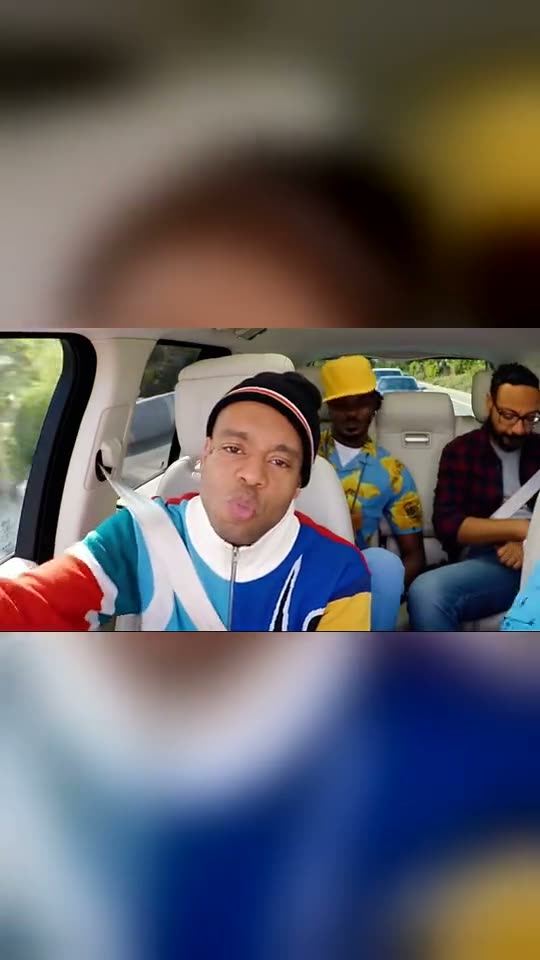
What the Walk It Like I Talk It video looks like
Here's the original reel. Your photos take the place of its characters, so your video matches the same shots with your faces. Each run produces different results.
Original reel by @brilliantfella, 15 s
An original AI reel of the trend by @brilliantfella: four AI-generated friends occupy the carpool seats, complete with head bops, lip sync and cuts. The 3 friends and 2 friends options place your faces into this video. Shown: the first 15 seconds of the wide clip in a vertical frame.
An original AI reel by @aisiamese.ai: a Siamese cat wearing round sunglasses leads the rap, joined by a cat in a red cap and two dogs. The Pet option places your pet in the lead seat. The cap's logo is blurred.
How to make the Walk It Like I Talk It video on Smew AI
Everything happens in the browser. No editing app, no prompt writing, no watermark.
Upload the three photos
Click "Create your own" and upload you, front seat (lead), then friend 2, the driver, then friend 3, back seat behind you. Upload them in this sequence, since the order determines who sits where. Capture them with the camera or choose them from your library.
Click Generate
The button displays the price. Seedance 2.5 places your photos into the Walk It Like I Talk It trend video and recreates it shot by shot for 15 seconds, using the reel's original song. No prompt writing required.
Download or share
The video finishes in up to several minutes as a 16:9 MP4. Download it, share it from your device, or retrieve it later from your Library.
Which photo works best?
Upload one photo per person, in seat order: photo 1 is you, the front passenger leading the rap who appears in close-ups, photo 2 drives, and photo 3 sits behind you. For Pet, upload one photo of your pet.
Chest up, face toward the camera, sharp and well-lit. Close-ups show the lead large, while wide shots show all faces smaller.
One person per photo, so faces don't get mixed.
Wear what you want to appear in. Each person retains the clothes, hair and glasses from their photo, so skip sunglasses and hats unless you want them in the video.
Pets: a clear front-facing photo of the face, eyes open.
Use photos of friends who gave permission. Never a celebrity or stranger.
Where did the Walk It Like I Talk It trend start?
The video behind the trend is Migos' appearance on Carpool Karaoke, the car segment of The Late Late Show on CBS, broadcast on 13 November 2018. The group kicked off the segment rapping the "walk it like I talk it" hook with the host driving, and the four seats, head bops and rapid cuts became the format.
In September 2026, creators began swapping other faces into the same 20 seconds using AI video tools such as Higgsfield Genjutsu, preserving every move, cut and mouth shape. Early versions featured famous athletes: a UFC version on TikTok from 20 September reached 70,300 views by 14 October. On 24 September, Lewis Hamilton posted an AI version with four Formula 1 drivers, created by Instagram creator @dan.directed, to his Instagram story, and motorsport press covered it.
By October the trend had expanded to sports teams, friend groups, AI-generated characters and pets. The largest TikTok version we located, from 11 October, reached 545,500 views and 83,700 likes three days later.
Migos appear on Carpool Karaoke on The Late Late Show (CBS) and kick off the segment with the "walk it like I talk it" hook. The Fader
An AI version swapping four UFC fighters into the video appears on TikTok; it reaches 70,300 views by 14 October. TikTok
Lewis Hamilton posts an AI version with four Formula 1 drivers, created by @dan.directed with Higgsfield Genjutsu, to his Instagram story. GPFans
AI pet versions appear: a Siamese cat leads the rap while a cat in a cap and two dogs ride along. TikTok
The largest TikTok version we located, featuring American football players in the seats, appears; it reaches 545,500 views and 83,700 likes by 14 October. TikTok
Copy and paste
The Walk It Like I Talk It prompts
You don't need these: the one-tap flow runs them automatically, along with the trend video. [Image 1] and [Image 2] are your two photos, and [Video 1] is the trend video it replicates.
3 friends
3 photos: you, front seat (lead) + friend 2, the driver + friend 3, back seat behind youSeedance 2.515 s · 720p · 16:9228 credits
Video prompt
STRICT THREE-CHARACTER REPLACEMENT: VIDEO EDITING
Replace ONLY the three target characters in the original video [Video 1]:
- Replace the driver (front seat, on the RIGHT of the frame, both hands on the steering wheel, in round dark sunglasses, a black cap and a light-blue patterned jacket) with [Image 2].
- Replace the front passenger (front seat, on the LEFT of the frame, who leads the song, in a black beanie and a blue, red, yellow and white track jacket) with [Image 1].
- Replace the rear-seat left character (behind the front passenger, in a yellow cap and a blue shirt with yellow roses) with [Image 3].
- Do NOT replace the rear-seat right character (behind the driver): the bearded man with glasses in the red plaid shirt stays exactly as in the video.
Use [Image 1], [Image 2], and [Image 3] strictly as the ONLY identity references for the replacement characters. For each one, preserve that image's exact face, facial identity, hairstyle, hair color, skin tone, gender, body proportions, clothing appearance, and recognizable features. Do NOT blend any image with the original character in that seat.
Each replacement character must inherit the original character's (in the same seat): exact position and body placement, exact scale and proportions in frame, exact pose and posture, exact head direction and eye direction, exact mouth movement and lip-sync, exact facial expressions, exact hand and body movements, exact speaking performance, exact movement timing and trajectory, exact interaction with the car interior and other characters.
The replacement characters must follow the original characters' movements naturally and accurately throughout the ENTIRE video.
Preserve the original mouth shapes, speech timing, lip-sync, facial performance, and pose of each character. Do NOT change the speaking rhythm, mouth opening patterns, or dialogue timing.
Preserve EVERYTHING ELSE from the original video exactly: camera movement, zoom and camera motion, framing and composition, lighting and shadows, background, car interior, environment outside the car, timing and duration, objects and props, scene transitions, depth of field, motion blur.
Do NOT alter the background. Do NOT alter the car interior. Do NOT alter the camera. Do NOT alter the composition. Do NOT change the characters' original poses or actions. Do NOT create additional people. Do NOT change the number of people in the scene.
IMPORTANT: ONLY replace the driver with [Image 2], the front passenger with [Image 1] and the rear-seat left character with [Image 3].
Keep the original lip-sync, mouth movement, posture, and performance unchanged. Everything else must remain identical to the original video.
In EVERY shot, also when small in the wide shots, copy each new face exactly from its own photo: face shape, eye color and eye shape, eyebrows, nose, mouth, skin tone, age, hair color, hair length and hairstyle, and any beard, moustache, glasses or freckles. Each new person wears the clothes from their own photo. NO black beanie and NO track jacket on [Image 1], NO round dark sunglasses and NO black cap on [Image 2], NO yellow cap on [Image 3], unless their own photo shows them.
The same three real people in every frame, so their friends instantly recognize them. Never morph, never drift back to the original faces, never add or remove facial hair. Do not mix the faces: each photo is one seat only, and no photo face goes onto the bearded man in the plaid shirt.
Shots, matching the reference: 0-1.2 s the whole cabin from the dashboard, the front passenger ([Image 1]) on the left, the driver ([Image 2]) on the right; 1.2-2.4 s the back seat: [Image 3] on the left, the bearded man in the plaid shirt on the right; 2.4-3.9 s the whole cabin; 3.9-6.1 s close-up of [Image 1] rapping to the camera; 6.1-7.2 s the back seat from the side; 7.2-8.3 s close-up of [Image 1]; 8.3-9.6 s the whole cabin; 9.6-10.6 s the back seat; 10.6-12.8 s close-up of [Image 1]; 12.8-13.7 s the back seat; 13.7 s to the end close-up of [Image 1].
Anatomy rules: one head per person, on that person's own shoulders. A face never appears on hands, clothes, seats or headrests. Exactly four people. No text, no logos.
2 photos: you, front seat (lead) + friend 2, the driverSeedance 2.515 s · 720p · 16:9228 credits
Video prompt
STRICT TWO-CHARACTER REPLACEMENT: VIDEO EDITING
Replace ONLY the two target characters in the original video [Video 1]:
- Replace the driver (front seat, on the RIGHT of the frame, both hands on the steering wheel, in round dark sunglasses, a black cap and a light-blue patterned jacket) with [Image 2].
- Replace the front passenger (front seat, on the LEFT of the frame, who leads the song, in a black beanie and a blue, red, yellow and white track jacket) with [Image 1].
- Do NOT replace the two rear-seat characters: the man in the yellow cap and the shirt with yellow roses (left) and the bearded man with glasses in the red plaid shirt (right) stay exactly as in the video.
Use [Image 1] and [Image 2] strictly as the ONLY identity references for the replacement characters. For each one, preserve that image's exact face, facial identity, hairstyle, hair color, skin tone, gender, body proportions, clothing appearance, and recognizable features. Do NOT blend any image with the original character in that seat.
Each replacement character must inherit the original character's (in the same seat): exact position and body placement, exact scale and proportions in frame, exact pose and posture, exact head direction and eye direction, exact mouth movement and lip-sync, exact facial expressions, exact hand and body movements, exact speaking performance, exact movement timing and trajectory, exact interaction with the car interior and other characters.
The replacement characters must follow the original characters' movements naturally and accurately throughout the ENTIRE video.
Preserve the original mouth shapes, speech timing, lip-sync, facial performance, and pose of each character. Do NOT change the speaking rhythm, mouth opening patterns, or dialogue timing.
Preserve EVERYTHING ELSE from the original video exactly: camera movement, zoom and camera motion, framing and composition, lighting and shadows, background, car interior, environment outside the car, timing and duration, objects and props, scene transitions, depth of field, motion blur.
Do NOT alter the background. Do NOT alter the car interior. Do NOT alter the camera. Do NOT alter the composition. Do NOT change the characters' original poses or actions. Do NOT create additional people. Do NOT change the number of people in the scene.
IMPORTANT: ONLY replace the driver with [Image 2] and the front passenger with [Image 1].
Keep the original lip-sync, mouth movement, posture, and performance unchanged. Everything else must remain identical to the original video.
In EVERY shot, also when small in the wide shots, copy each new face exactly from its own photo: face shape, eye color and eye shape, eyebrows, nose, mouth, skin tone, age, hair color, hair length and hairstyle, and any beard, moustache, glasses or freckles. Each new person wears the clothes from their own photo. NO black beanie and NO track jacket on [Image 1], NO round dark sunglasses and NO black cap on [Image 2], unless their own photo shows them.
The same two real people in every frame, so their friends instantly recognize them. Never morph, never drift back to the original faces, never add or remove facial hair. Do not mix the two faces: [Image 1] is only the front passenger, [Image 2] is only the driver, and no photo face goes onto the two men in the back seat.
Shots, matching the reference: 0-1.2 s the whole cabin from the dashboard, the front passenger ([Image 1]) on the left, the driver ([Image 2]) on the right; 1.2-2.4 s the back seat: the man in the yellow cap on the left, the bearded man in the plaid shirt on the right; 2.4-3.9 s the whole cabin; 3.9-6.1 s close-up of [Image 1] rapping to the camera; 6.1-7.2 s the back seat from the side; 7.2-8.3 s close-up of [Image 1]; 8.3-9.6 s the whole cabin; 9.6-10.6 s the back seat; 10.6-12.8 s close-up of [Image 1]; 12.8-13.7 s the back seat; 13.7 s to the end close-up of [Image 1].
Anatomy rules: one head per person, on that person's own shoulders. A face never appears on hands, clothes, seats or headrests. Exactly four people. No text, no logos.
You pay per video in credits, and the create page displays the exact price on the Generate button before any charges. The one-tap price includes the video, created in one step from your photos and the trend video, charged once. One video costs 228 credits, so the smallest one-time pack covering it is $39.99 for 450 credits, no subscription required. The cheaper models are available if you run the prompts manually in AI Video.
Video model
Settings
Credits
Seedance 2.5 (this template)
15 s, 720p, replicates the trend video, one tap
228
One-time packs and plans are on the pricing page. A failed video gives its credits back.
What happens in the Walk It Like I Talk It AI video, shot by shot?
The car, street, camera angles and cuts remain as in the viral AI video. Only the people from your photos change:
Time
What you see
0 to 1.2 s
The entire cabin from the dashboard: you in the front passenger seat on the left, driver on the right, back seat between you.
1.2 to 2.4 s
The back seat: photo 3 on the left beside an AI-generated passenger, who throws a fist forward.
2.4 to 3.9 s
The entire cabin again: you dance in your seat, driver gestures along.
3.9 to 6.1 s
Close-up of you rapping directly into the camera, back seat behind you.
6.1 to 10.6 s
The back seat from the side, you again, the entire cabin, back seat up close.
10.6 to 15 s
Mostly you: an extended close-up, two brief back-seat shots, and you to the finish.
How it works: Seedance 2.5 modifies the AI video itself. It places each photo into its seat and replicates the head bops, hand movements, mouth shapes and cuts of the person who occupied that seat. You receive 15 seconds at 720p with the video's own audio restored after the run, so lips match the rap. You can mute the sound on the result screen. A run requires 5 to 15 minutes, and the exact price appears on the Generate button before any charges. Every run is a fresh take, so results vary.
Why is it wide? The video is wide, and so is yours (16:9). In wide shots all four seats appear side by side, so a vertical crop would eliminate the front seats.
3 friends, 2 friends or your pet: which one should you make?
3 friends (3 photos): you lead from the front passenger seat, a friend drives and a friend raps behind you. The fourth seat retains an AI-generated passenger in a plaid shirt. It replicates the AI version by @brilliantfella shown above.
2 friends (2 photos): you and a friend in the front seats, two AI-generated passengers rap along in the back. Same video as 3 friends.
Pet (1 photo): your pet occupies the lead seat with chains on and raps into the camera, while an AI cat in a red cap and two AI dogs ride along. It replicates the AI pet version by @aisiamese.ai.
All three provide 15 seconds with the video's audio. Maintain the same photo order and you can switch between them without re-uploading.
What goes wrong, and how do you fix it?
Problem
Fix
A face resembles someone else
Use a sharp, front-facing photo in good light, no sunglasses. Run it again.
Two faces mix
Use one person per photo, each face clear. Verify the order: photo 1 leads from front passenger seat, photo 2 drives.
Someone sits in the wrong seat
Seats follow photo order. Swap the photos and run it again.
The beanie, sunglasses or yellow cap from the AI video reappear
The prompt excludes them unless your photo includes them. Run it again.
Your pet looks slightly different
Use a close front-facing photo of its face, eyes open. Run it again.
The model rejects a photo
Some photos get rejected. Credits are refunded; try a different photo.
Which sound, caption and hashtags fit the trend?
Hashtags: #walkittalkit had 2,795 TikTok videos and 52.2 million views on 14 October 2026, and #carpoolkaraoke over 136,000 videos. Include #walkitliketalkit and #carpoolkaraokeai, and keep the platform's AI label visible.
Caption ideas: "The group chat heading to brunch", "Who let him drive?", "POV: we finally got our own carpool karaoke", or tag the friend who never remembers the words. Or create your own.
Sound: the video includes its own audio, the same 15 seconds, so it's ready to share. You can mute it on the result screen and select audio when posting instead. The music is owned by its rights holders, and Smew AI grants you no rights to it. Music rules vary by platform, so review them before using the video in an ad or sponsored post.
FAQ
Walk It Like I Talk It trend questions
What is the Walk It Like I Talk It AI trend?+
It's an AI video trend where people place themselves and their friends into the viral carpool rap video: one leads from the front passenger seat, one drives, two rap from the back, with the video's head bops, lip sync and quick cuts. It gained traction in September 2026, also known as Migos carpool karaoke AI and 4-person carpool AI.
Where does the Walk It Like I Talk It trend come from?+
From Migos' Carpool Karaoke appearance on The Late Late Show, broadcast on 13 November 2018 and beginning with the "walk it like I talk it" hook. In September 2026 AI video tools began swapping new faces into the first 20 seconds of that appearance, and on 24 September Lewis Hamilton posted a version with four Formula 1 drivers to his Instagram story.
How many photos do I need?+
Up to three, one per seat: you, the driver and the friend behind you. The fourth seat retains an AI-generated passenger. With two photos you occupy the front seats and two AI-generated passengers rap in the back. Pet requires one photo of your pet.
Which photo goes in which seat?+
Photo 1 is the front passenger leading the rap who appears in close-ups, so that's typically you. Photo 2 drives. Photo 3 sits in the back behind photo 1.
Can I make it with my pet?+
Yes. Pet requires one photo of your dog, cat or other pet and places it in the lead seat of an AI pet version: it raps into the camera with chains on while an AI cat and two AI dogs ride along.
What prompt does the Walk It Like I Talk It AI trend use?+
No creator published a prompt, so this template begins from the seat-by-seat replacement prompt AI template sites use for this trend: each photo replaces the person in one designated seat, and every move, cut and mouth shape remains. We added the seat for each photo and rules preserving each face, from eye color to hairstyle. No prompt writing required.
Does the video have the original sound?+
It includes the video's own audio, the same 15 seconds, restored after the run, so lips match the rap. You can mute it on the result screen. The music is owned by its rights holders, and Smew AI grants you no rights to it.
How long is the video and what format is it?+
15 seconds as an MP4 at 720p, wide 16:9 like the original video, with its audio. It plays on TikTok, Reels and Shorts, and there's no watermark.
Can I put celebrities or athletes in it?+
No. Most viral versions feature famous faces; we don't create those. Use your own photo and photos of friends who gave permission.
Do I need CapCut or another app?+
No. Select a version, click "Create your own", upload your photos and click Generate. The video waits in your Library when ready.
Is the video real?+
No. The people and pets are placed into the video with AI from still photos, and nobody filmed this ride. Keep the AI label visible when you post it.
Is Walk It Like I Talk It a meme?+
Yes. The Walk It Like I Talk It meme is a 20-second car video people fill with new faces, from Formula 1 drivers to friend groups and pets. Here you create that Walk It Like I Talk It video with your own photos.
What is the Walk It Like I Talk It song?+
The line is the hook from the Migos song the group raps at the beginning of the video. Your video includes the video's own audio, and the music is owned by its rights holders.
What is the Walk It Like I Talk It meaning?+
It means you back up your words with actions: what you say matches what you do. In the trend, the line is simply the hook opening the carpool rap.
Is Migos carpool karaoke the same as the Walk It Like I Talk It car trend?+
Yes. The trend replicates Migos' 2018 appearance on Carpool Karaoke, so many people refer to the AI version as Migos carpool karaoke.
Is there a carpool karaoke AI video generator for this trend?+
Yes, this page: upload your photos and it creates the carpool karaoke AI video. It accepts up to three faces, so a 4 person carpool AI video with four of your own faces isn't possible yet, and pets work with one photo.
Is there a Walk It Like I Talk It dance?+
Not in this trend: it's a carpool lip sync with head bops and quick cuts, not a dance routine. Your video arrives ready as a Walk It Like I Talk It TikTok edit, with the original video's audio.
Do I need a Walk It Like I Talk It template or tutorial?+
No. This page is the template: upload your photos, click Generate, and the prompt is handled for you.