Car Jump AI Video: A Truck Soars Above You, You Stay Relaxed
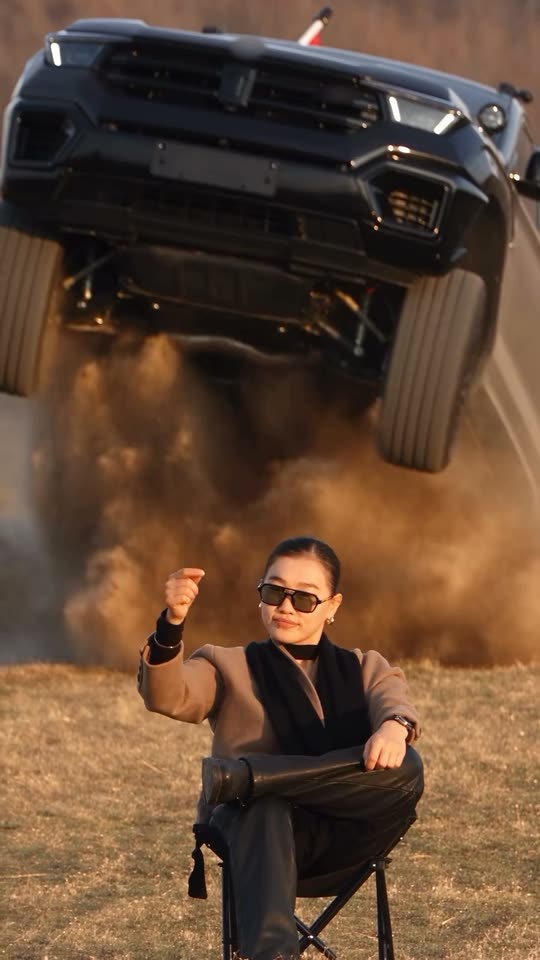
Relax in your folding camp chair with crossed legs, lift one fist in the air, and watch as a black truck soars across the field behind you before landing at your back. You don't look back. Upload a selfie, or add both a selfie and a picture of your vehicle.
The car jump AI video captures the "unbothered" trend: relax in your folding camp chair set in a golden field, lift one fist, and watch a black truck soar in slow motion across the field behind you before landing at your back. Upload one clear selfie, and add a picture of your vehicle to feature your own ride.
Also called unbothered car trend · unbothered car stunt · camp chair car jump
Example
What the Car Jump AI video looks like
Here's the original reel. Your pictures take the place of its subjects, creating a video with matching sequences and your face. Every generation is unique.
Original reel by @ya_danilova01, 10 s
The original reel by @ya_danilova01, the AI video that launched this trend: she inserted her own face. A black truck soars across the field behind her before landing at her back as she remains composed. Your picture replaces her. Shown: the final 10 seconds, with badges blurred.
Everything happens in your browser. No editing software needed, no prompt required, no watermark added.
Upload your picture
Click "Create your own" and upload your picture. Snap it with your camera or select from your gallery.
Click Generate
The button displays the cost. Seedance 2.5 inserts your pictures into the Car Jump trend video and recreates it sequence by sequence for 10 seconds, using the reel's original audio. No prompt needed.
Download or share
Your video arrives in several minutes or less as a 9:16 MP4. Download it, share directly from your device, or retrieve it later from your Library.
Which picture works best?
Upload one picture of yourself for Any car, or two pictures for Your car (yourself first, then your vehicle).
Waist up or full body, facing the camera. You remain seated throughout the video and retain the outfit from your picture, so choose what you want shown.
Clear and well lit, no sunglasses. The original creator wears sunglasses; AI only adds them if your picture includes them.
One person per picture, ensuring AI selects the correct face.
The vehicle picture: entire vehicle visible, photographed from the front or front corner, in daylight. The reel displays the truck's front throughout most of the jump. Badges and license plates appear blurred or empty.
Use your own picture, or one from a friend who gave permission. Never use a celebrity or stranger.
Where did the Car Jump AI trend originate?
This trend launched on 26 September 2026 with an Instagram reel by @ya_danilova01, who identifies as an AI creator. She relaxes in a folding camp chair set in a golden field at sunset, legs crossed, and lifts a fist. A black truck bursts over the ridge behind her, hangs airborne in slow motion through a dust cloud, lands behind her and rolls past. She doesn't turn her head. Her caption: "In parallel worlds…". By 14 October the reel reached 95,100 likes, 1,446 comments and 3.6 million views.
Recreations followed quickly. On 28 September TikTok creator @stevenwommack shared a tutorial crediting her and recreating the video with Higgsfield's Genjutsu motion transfer (98,500 views by 14 October). In India, YouTube tutorials for the "Instagram viral car jumping video" appeared on 27 September, and from 29 September multiple tutorials shared an identical short prompt for Google Flow: replicate the camera work, framing and movements from the video, while preserving the face and outfit from the picture. Another tutorial incorporated a second picture to include your own vehicle. By mid-October AI video platforms offered it as a pre-made "Unbothered" template.
@ya_danilova01 shares the original AI reel on Instagram; it reaches 95,100 likes, 1,446 comments and 3.6 million views by 14 October. Instagram
@stevenwommack shares a TikTok tutorial crediting her and recreating the video with Higgsfield's Genjutsu; it reaches 98,500 views by 14 October. TikTok
The top-viewed YouTube tutorial (Hindi, 32,800 views by 14 October) includes the trend's prompt for Google Flow; this identical prompt appears verbatim in additional tutorials from 29 September. YouTube
A tutorial incorporates a second picture with a prompt that replaces the truck with your vehicle; it reaches 10,600 views by 14 October. YouTube
Global YouTube searches for "car jump ai video" peak from 30 September, when they first appear, through 2 October, then decline (Google Trends).
Copy and paste
The Car Jump AI prompts
No need for these: the one-tap workflow executes them automatically, along with the trend video. [Image 1] and [Image 2] represent your two pictures, and [Video 1] represents the trend video being replicated.
Any car
1 photo: your photoSeedance 2.510 s · 720p · 9:16152 credits
Video prompt
Track the exact camera movement, framing, facial expressions, and body movements from the reference video [Video 1]. Keep the face, hairstyle, body, clothing, and overall appearance exactly the same as in the reference image [Image 1], with no changes or distortion. Use the video's background and environment. Output in 9:16 vertical format.
Recreate the reference video [Video 1] shot for shot: the dry golden field at sunset with the rusty autumn bushes behind, the black folding camp chair, the black pickup truck that bursts over the low ridge behind the chair, flies in slow motion over the space just behind it in a huge cloud of dust, lands at the back of the chair and rolls past, the same long-lens handheld camera, the same framing, quick cuts and timing. The ONLY change: the woman in the camp chair is now the person in [Image 1]. The black pickup stays as in [Video 1], with no badges.
The one in the camp chair = the person in [Image 1], in EVERY shot: copy the exact face from [Image 1] - face shape, eye color and eye shape, eyebrows, nose, mouth, skin tone, age, hair color, hair length and hairstyle, and any beard, moustache, glasses or freckles exactly as in the photo. They wear the clothes from [Image 1]; if [Image 1] shows only the head or the upper body, invent the rest so it matches naturally. The same real person in every frame, from the first second to the last, so their friends instantly recognize them, also in the close shots at the end when the truck passes behind the chair. Never morph, never drift back to the original woman's face, never add or remove facial hair. NO sunglasses: no glasses of any kind unless [Image 1] shows glasses. No slicked-back bun, no black scarf, no taupe wool coat, no black leather trousers and no earrings unless [Image 1] shows them. If [Image 1] shows an animal, the one in the chair is that animal, sitting upright in the camp chair, with its own face, fur and markings and the natural body volume and proportions of that animal: never flattened, squashed, stretched or merged with anything.
The moves, matching the reference second by second:
0-1.3 s: sits calm in the camp chair, legs crossed, one forearm resting on the knee, and glances around.
1.3-3.3 s: raises one hand to shoulder height in a loose fist, as if snapping the fingers, and holds it while the black pickup bursts over the low ridge behind (from 1.8 s) in a cloud of dust.
3.3-6.8 s: the black pickup hangs in the air in slow motion just behind the chair, front to the camera, wheels hanging, in a huge cloud of dust. The person lowers the hand, rests both forearms on the crossed knee and stays perfectly still and calm, with a small, cool look, never turning around.
6.8-8.8 s: quick cuts: the black pickup lands right behind the chair and rolls toward the camera.
8.8-10 s: the black pickup passes close behind the chair; the person stays seated and looks into the camera, unbothered.
Anatomy rules: one head only, on the person's own shoulders. Two arms and two hands. The vehicle never touches the person or the chair. No badges, emblems or lettering on the vehicle, no readable number plate, no flag on the vehicle, no text, no logos, no watermark, no extra people.
2 photos: your photo + your car, whole vehicle in viewSeedance 2.510 s · 720p · 9:16152 credits
Video prompt
Use the reference video [Video 1] as-is. Replace the person with the person from [Image 1]. Replace the vehicle with the vehicle from [Image 2] (same model, color, design).
Track the exact camera movement, framing, facial expressions, and body movements from the reference video [Video 1]. Keep the face, hairstyle, body, clothing, and overall appearance exactly the same as in the reference image [Image 1], with no changes or distortion. Use the video's background and environment. Output in 9:16 vertical format.
Recreate the reference video [Video 1] shot for shot: the dry golden field at sunset with the rusty autumn bushes behind, the black folding camp chair, the black pickup truck that bursts over the low ridge behind the chair, flies in slow motion over the space just behind it in a huge cloud of dust, lands at the back of the chair and rolls past, the same long-lens handheld camera, the same framing, quick cuts and timing. The ONLY changes: the woman in the camp chair is now the person in [Image 1], and the black pickup is now the vehicle from [Image 2].
The one in the camp chair = the person in [Image 1], in EVERY shot: copy the exact face from [Image 1] - face shape, eye color and eye shape, eyebrows, nose, mouth, skin tone, age, hair color, hair length and hairstyle, and any beard, moustache, glasses or freckles exactly as in the photo. They wear the clothes from [Image 1]; if [Image 1] shows only the head or the upper body, invent the rest so it matches naturally. The same real person in every frame, from the first second to the last, so their friends instantly recognize them, also in the close shots at the end when the truck passes behind the chair. Never morph, never drift back to the original woman's face, never add or remove facial hair. NO sunglasses: no glasses of any kind unless [Image 1] shows glasses. No slicked-back bun, no black scarf, no taupe wool coat, no black leather trousers and no earrings unless [Image 1] shows them. If [Image 1] shows an animal, the one in the chair is that animal, sitting upright in the camp chair, with its own face, fur and markings and the natural body volume and proportions of that animal: never flattened, squashed, stretched or merged with anything.
The vehicle = the vehicle in [Image 2], in EVERY shot where the truck shows in [Video 1]: the same body shape, size, paint color, grille, headlights, wheels and roof as in [Image 2], whatever kind of vehicle it is. It takes the same path at the same moments as the truck in [Video 1]: over the ridge, through the air behind the chair in slow motion, the landing and the pass. Never the black pickup from [Video 1]. Nobody rides on it or stands next to it; if [Image 2] shows people, leave them out. No badges, emblems or lettering on it and no readable number plate, even if [Image 2] shows them.
The moves, matching the reference second by second:
0-1.3 s: sits calm in the camp chair, legs crossed, one forearm resting on the knee, and glances around.
1.3-3.3 s: raises one hand to shoulder height in a loose fist, as if snapping the fingers, and holds it while the vehicle from [Image 2] bursts over the low ridge behind (from 1.8 s) in a cloud of dust.
3.3-6.8 s: the vehicle from [Image 2] hangs in the air in slow motion just behind the chair, front to the camera, wheels hanging, in a huge cloud of dust. The person lowers the hand, rests both forearms on the crossed knee and stays perfectly still and calm, with a small, cool look, never turning around.
6.8-8.8 s: quick cuts: the vehicle from [Image 2] lands right behind the chair and rolls toward the camera.
8.8-10 s: the vehicle from [Image 2] passes close behind the chair; the person stays seated and looks into the camera, unbothered.
Anatomy rules: one head only, on the person's own shoulders. Two arms and two hands. The vehicle never touches the person or the chair. No badges, emblems or lettering on the vehicle, no readable number plate, no flag on the vehicle, no text, no logos, no watermark, no extra people.
Videos are priced per creation in credits, with the exact cost displayed on the Generate button before any charges. The one-tap cost includes the video, created in a single step from your pictures and the trend video, billed once. A single video costs 152 credits, meaning the smallest one-time pack that covers it is $39.99 for 450 credits, with no subscription required. Lower-cost models are available if you execute the prompts manually in AI Video.
Video model
Settings
Credits
Seedance 2.5 (this template)
10 s, 720p, copies the trend clip, one tap
152
One-time packs and plans are on the pricing page. A failed video gives its credits back.
What happens in the car jump AI video, second by second?
Smew AI places you directly into @ya_danilova01's original AI reel. The field, chair, jump, cuts and camera movements remain identical to the reel:
Time
What you see
0 to 1.3 s
You're seated in the folding camp chair set in a golden field at sunset, legs crossed, glancing around.
1.3 to 3.3 s
You lift one hand in a relaxed fist, like snapping, as the black truck bursts over the ridge behind you.
3.3 to 6.8 s
The truck hovers airborne directly behind you in slow motion, front facing the camera, surrounded by a massive dust cloud. You rest your arms on your knee and remain composed.
6.8 to 8.8 s
Rapid cuts: it lands behind you and rolls toward the camera.
8.8 to 10 s
It passes closely behind your chair. You gaze at the camera, unbothered.
How it works: Seedance 2.5 modifies the reel directly and replaces the seated person with the individual from your picture, and in Your car replaces the truck with your vehicle. You receive 10 seconds at 720p, vertical format, with the reel's original audio restored after processing. Audio can be disabled on the result screen. Processing takes 5 to 15 minutes, with the exact cost shown on the Generate button before any charges. Each generation is a fresh take, so outcomes vary.
Any car or your car: which should you create?
Any car (1 photo): you're seated in the chair while the reel's black truck soars over you, with badges blurred. This matches the original trend.
Your car (2 photos): picture 1 shows you, picture 2 shows your vehicle. Your vehicle replaces the truck: it bursts over the ridge, soars across the field behind you and lands at your back. A YouTube tutorial popularized this variation days after the original.
Both versions use identical reels, audio and models, and cost the same. Your car accepts any vehicle in the picture; badges, text and license plates appear blurred or empty intentionally.
What problems occur, and how do you solve them?
Problem
Fix
The face resembles someone else
Use a clear, front-facing picture with good lighting, no sunglasses. Generate again.
The creator's sunglasses, black scarf or slicked-back bun reappear
The prompt prevents these unless your picture includes them. Generate again.
Your vehicle appears inconsistent across shots
Use a picture showing the entire vehicle from the front or front corner, in daylight.
The vehicle's badge appears blurred or absent
This is intentional: we blurred badges in the reel, and the prompt excludes badges, text or plates.
The truck collides with the chair
Each generation is unique: generate again.
The model rejects a picture
Some pictures are declined. Credits are refunded; attempt a different picture.
Which caption, audio and hashtags suit the car jump trend?
Caption ideas: "Unbothered.", "In parallel worlds…" (the creator's original caption), "Waiting for my ride", "Monday can't touch me". Or create your own.
Hashtags: this trend thrives on Instagram Reels; on TikTok, #carjumpai launched on 2 October 2026 and remains niche. Include #carjump and #aivideo, and maintain the platform's AI label.
Sound: the video includes the reel's original audio, matching the video duration, so it's post-ready. Audio can be disabled on the result screen and replaced with different audio during posting.
Safety: this is an AI effect. Never attempt this with an actual vehicle.
FAQ
Car Jump AI trend questions
Do I need car jump video editing?+
No. Smew AI creates the complete video from your picture, eliminating any car jump AI video editing requirement: upload a picture and click Generate.
Is the car jump video a meme, and is it on TikTok?+
Yes. The car jump meme originated on Instagram Reels, with a TikTok tutorial appearing on 28 September, though the TikTok tag remains niche. The trending format consistently features a composed person as a truck soars overhead.
Is there a car jump AI video generator with the trending prompt?+
Yes, this page provides one: upload a picture and click Generate. The car jumping prompt shared in tutorials is integrated, requiring no prompt from you.
What is the AI car jump trend?+
It's a viral AI video showing you relaxed in a folding camp chair set in a golden field, raising a fist, while a black truck soars in slow motion across the field behind you and lands at your back as you remain facing forward. It originated on Instagram on 26 September 2026, with YouTube and TikTok tutorials spreading it from 27 September.
Who started the car jump AI trend?+
Instagram creator @ya_danilova01, an AI creator, with a reel shared on 26 September 2026 featuring her own face. It reached 95,100 likes, 1,446 comments and 3.6 million views by 14 October.
What prompt does the car jump AI video use?+
The creator disclosed no prompt. Tutorials circulated one for Google Flow starting 29 September: replicate the precise camera movement, framing, facial expressions and body movements from the video, while preserving the face, hairstyle, body and clothing from the picture. Another tutorial included a line replacing the truck with the vehicle from a second picture. This template employs those prompts sequentially, plus guidelines preserving your face from eye color through hairstyle. No prompt is required from you.
How do I make the car jump AI video with my photo?+
Select Any car or Your car, click "Create your own" and upload your picture, plus a vehicle picture for Your car. Click Generate; the button displays cost first. You receive a 10-second vertical video with the reel's audio, available in your Library when complete.
Can I put my own car in it?+
Yes. Your car requires a second picture of your vehicle, placing it where the black truck appears: it soars across the field behind you and lands at your back. Use a picture showing the entire vehicle in daylight, from the front or front corner.
Will my car's logo show in the video?+
No. We blurred badges in the reel, and the prompt excludes badges, text or readable license plates, including on your vehicle.
Can I use a photo of my pet?+
You can attempt it. When the picture features an animal, the prompt seats that animal upright in the camp chair. The reel was designed for a person, so pet results vary more significantly.
Is this the Higgsfield or CapCut car jump template?+
No. Those are independent applications with their own videos and effects. Here AI places you into the original AI reel that launched the trend, with your own face and outfit, requiring no additional application.
How long is the video and what format is it?+
10 seconds as a vertical 9:16 MP4 at 720p, with the reel's original audio. It works on TikTok, Reels and Shorts, with no watermark.
Is the video real?+
No. You're inserted into an AI video from a still picture, and no truck actually jumps over anyone. Maintain the AI label when posting it, and never attempt this with an actual vehicle.
Can I put a celebrity in it?+
No. Use your own picture, or one from a friend who gave permission. Never use a celebrity or stranger.