smew.ai

Airplane Flying Over Head AI Trend: A Jet Right Above You

Picture yourself perched on an airport viewing deck's railing at dusk, waving upward as a massive jet passes so close overhead that its underside, engines, and landing gear dominate the frame. Upload one photo of yourself or your pet, get an 8-second video with jet audio.

The original Plane Over Your Head reel by @hoaithuong034Original reel
  • 1 photo you add
  • 8 s clip with sound
  • 9:16 for TikTok, Reels, Shorts
  • No watermark

No prompt to write: Add your photo and tap once

Create your own

Ready in a few minutes · From 46 credits

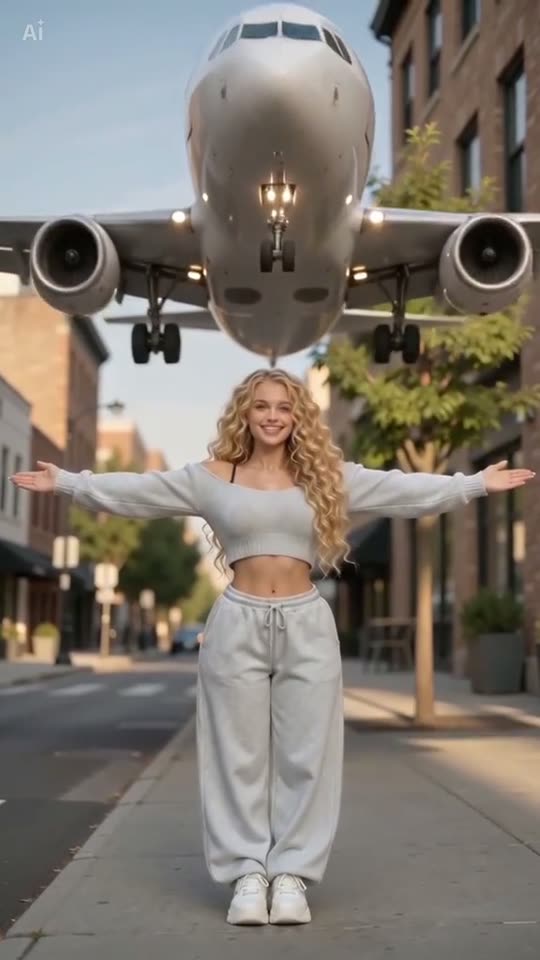
The airplane flying over head AI trend creates a video from a single photo where you're positioned at an airport observation area during sunset, waving skyward as a massive jet passes so close that its underside and landing gear fill your view. All you need is one clear photo of yourself or your pet.

Also called plane over head · plane flying over head · airplane flying over your head trend · airplane flyover effect

Example

What the Plane Over Your Head video looks like

Here's the original reel that launched the trend. Your clip will be a fresh creation from your photo in this style, not a duplicate of these frames. Each generation produces unique results.

Original reel by @hoaithuong034, 10 s
The source reel by @hoaithuong034, created using a CapCut AI template: an AI-generated woman takes a step backward on an urban street, extends her arms wide as a plain white jet passes directly above. Uploaded on 28 September 2026 with custom AI audio.
Use this reference
Step by step

How to make the Plane Over Your Head video on Smew AI

Everything happens in your browser. No editing software needed, no prompts to type, no watermarks added.

  1. Add your photo

    Click "Create your own" and upload your photo. Capture a new one with your camera or select from your gallery.

  2. Press Generate

    The button displays the credit cost. Smew AI constructs the Plane over your head scene using your photo, then Kling 3.0 creates an 8-second animation with authentic audio. No prompts required from you.

  3. Download or share

    The video is ready in a few minutes as a 9:16 MP4. Download it, share it from your phone, or find it later in your Library.

Which photo works best?

You need one sharp photo: of yourself for Human, of your pet for Pet.

  • Human: waist up or full body, well-lit, face clearly shown. The scene positions you in profile with one hand raised, so avoid photos where hats, sunglasses or hands obscure your face.
  • Your clothing and hairstyle remain as shown in your photo. Choose an outfit you want in the final video.
  • Pet: complete view of the animal from ears to paws, photographed in daylight. Your pet appears seated beside the railing, looking skyward as the aircraft approaches.
  • Include only one person or one animal per photo.
  • Upload your own photo, an image of a consenting adult, or your own pet. Never use celebrity images or strangers' photos.

Where did the Plane Over Your Head trend start?

Clips of planes flying very low went viral on TikTok in late summer 2026. On 27 August a hairdresser posted "I still can't believe how low this plane was", a joke that ends with a paper plane advertising her salon; it reached 26.9 million views. On 10 September @livelyiqra, who posts aviation videos from London, filmed a selfie as a double-decker airliner passed low over her head. It got 4.9 million views and 529,000 likes, and its sound later played under many of the AI tutorials.

The AI version took off in late September as a one-photo CapCut AI template: you upload a picture and a jet flies right over your head. The first tutorials we found are from 25 September, in Vietnamese and English, then came a Filipino one with 838,300 views and a Burmese one with 796,800, whose screen showed the template at 301,900 uses. On 28 September ByteDance's Dreamina added a "Sunset-Aviation" skill with the same look: you on the guardrail of an airport viewing deck at dusk, waving at a low airliner. A second wave of Russian and Spanish tutorials passed 1.1 million and 947,800 views on 10 October.

  1. @livelyiqra shares a London selfie as a double-decker jet passes just overhead. The video reaches 4.9 million views and 529,000 likes by 13 October. TikTok

  2. Initial tutorials for the single-photo CapCut AI template emerge in Vietnamese and English, labeled the "Airplane Flyover Effect". TikTok

  3. A Filipino template tutorial achieves 838,300 views and 25,300 likes, while a Burmese version hits 796,800 views. The Burmese tutorial displays the template at 301,900 uses. TikTok

  4. Dreamina introduces the "Sunset-Aviation" skill: someone positioned on an airport observation platform railing, waving toward a low-altitude jet at twilight. The photo generation phase of this template employs that description. Dreamina

  5. A Russian template tutorial achieves 1.1 million views and 19,100 likes, with a Spanish version reaching 947,800 views. TikTok

  6. The audio from @livelyiqra's video appears in 2,100 TikTok videos, while #airplanetrend contains 576 videos totaling 8.2 million views (all time). TikTok

Copy and paste

The Plane Over Your Head prompts

You won't need these: the single-tap process executes them automatically. A photo prompt integrates your image into the scene, followed by a video prompt for animation. Want customization? Copy and modify them in AI Photo and AI Video.

Human

1 photo: your photoKling 3.08 s · 1080p · 9:1646 credits
Video prompt

Use the uploaded image as the base. Keep the person's face, facial features, skin tone, hair, age, body shape and clothes exactly the same as in the photo. 9:16 vertical travel portrait. Character from reference image sits on guardrail at airport viewing platform, smiling in profile and waving one hand up. Low wide-angle shot with a low-flying airliner overhead. Warm golden dusk rim light, strong perspective, 8K realistic photo with film texture. Exactly one person. The airliner is plain white with no airline name, no logo, no tail emblem, no lettering and no registration number. No other people, no text, no logos, no watermark.

636 characters

Pet

1 photo: your pet, whole bodyKling 3.08 s · 1080p · 9:1646 credits
Video prompt

Use the uploaded image as the base. Keep the animal's species, breed, face, eye color, fur color, fur length, markings and body size exactly the same as in the photo. 9:16 vertical travel portrait. The pet from the reference image sits on the wide ledge of the guardrail at airport viewing platform, in profile, looking up at the sky with its ears up. Low wide-angle shot with a low-flying airliner overhead. Warm golden dusk rim light, strong perspective, 8K realistic photo with film texture. Exactly one animal and no people. No clothes on the pet. The airliner is plain white with no airline name, no logo, no tail emblem, no lettering and no registration number. No text, no logos, no watermark.

700 characters

How many credits does it cost?

Payment is per video using credits, with the create page displaying the precise cost on the Generate button before any charges. The single-tap price includes both the scene photo and video, billed once. Each video requires 46 credits, making the smallest one-time package that covers it $9.99 for 100 credits, no subscription needed. More affordable models are available when you manually execute the prompts in AI Video.

Video modelSettingsCredits
Kling 3.0 (this template)8 s, 1080p + 1 scene photo, one tap46
Seedance 2.0 Fast (by hand in AI Video)8 s, 720p + 1 photo55
Veo 3.1 Fast (by hand in AI Video)8 s, 720p + 1 photo14

One-time packs and plans are on the pricing page. A failed video gives its credits back.

What happens in the plane over your head video, second by second?

The template creates the signature aesthetic this trend is recognized for: an airport observation platform at golden hour dusk, shot from a low perspective so the sky dominates.

TimeWhat happens
0-2 sYou're seated on the railing, smiling in profile view, with one arm extended toward the sky. A large jet is already positioned low above you.
2-6 sThe aircraft passes directly overhead. Its underside, engines, landing gear and lights dominate the upper frame, while wind moves through your hair.
6-8 sThe plane continues past the top edge of the frame as you gaze upward with an excited, astonished expression.

The audio captures the actual scene: a powerful jet engine roar reaching peak volume during the pass, rushing wind effects and an amazed laugh. No background music.

Why does it work? Capturing this shot in reality requires traveling to a renowned plane-watching location, precise timing and considerable luck, and a London version went viral in September 2026. The AI approach delivers that same awe-inspiring moment from a single photo, with the aircraft appearing touchably close.

Human or Pet, Standard or Best: what is the difference?

Human or Pet? Click "Create your own" and choose one. Human positions you on the railing, waving toward the aircraft. Pet places your cat or dog beside the railing, with ears blown backward as the jet passes overhead. The trend typically features people; Pet is our adaptation of this scene.

Both options work through two phases:

  1. The still. Nano Banana 2.1 positions you or your pet at the airport observation deck during dusk, with a low jet overhead. It employs the description from Dreamina's "Sunset-Aviation" skill verbatim, plus an additional line preserving your facial features and prohibiting airline names and logos.
  2. The video. A video model renders the 8-second flyover from that image, complete with authentic audio.
Standard (default)Best
Video modelKling 3.0Seedance 2.5
Length8 s8 s
FrameVertical 9:16, 1080pVertical 9:16, 720p
SoundJet roar and wind, no musicThe same
PriceLowerHigher

The precise cost appears on the Generate button before any charges, and you write no prompts.

What goes wrong, and how do you fix it?

ProblemFix
The plane flies backwards, sideways or too slowlyAircraft pose challenges for AI video. Generate again, or select Best.
A second plane appears, or the shot cutsThe prompt specifies one aircraft and continuous footage. Generate again or choose Best.
The plane shows an airline name or logoThe prompt prohibits them, but models can still generate one. Generate again before posting.
Your face looks less like youUpload a sharp photo with your face well-lit, then generate again.
Your pet looks small or blurryUpload a photo showing the complete animal, positioned close to the camera.
The video model refuses the photoCertain photos get rejected. Credits are refunded; upload a different photo.

Each generation produces a unique take, so outcomes vary.

How should you post it?

Your video includes integrated jet and wind audio, making it ready to post immediately. Numerous trend tutorials feature the audio from @livelyiqra's London video; you can select it in TikTok during posting.

Captions that work: "I still can't believe how low this plane was", "Me waiting for my holiday flight", "When the pilot waves back", or for pets, "My dog meeting his first airplane".

Hashtags: #airplanetrend (576 TikTok videos totaling 8.2 million views on 13 October 2026) and #planetrend (322 videos, 14.3 million views). Maintain the platform's AI designation: an aircraft this close isn't real, so never share it as authentic footage.

Interested in similar scenes? Walk through airport arrivals like a celebrity in the AI airport celebrity video, or encounter a peaceful lion on a dark highway in the AI lion friend video.

FAQ

Plane Over Your Head trend questions

Can I make a plane flyover AI video of me or my dog?
Yes. Select Human for an aircraft passing overhead, AI-generated from your photo, or Pet for a dog version of this low-flying plane trend.
Is there an airplane flying over head CapCut template?
Yes, a closed template, which most tutorials reference. With Smew AI you need no template: upload one photo and click Generate.
Is the plane over head trend a meme, and what is the sound?
Yes. The airplane flying over head meme references how close the aircraft gets, echoing the viral phrase "I still can't believe how low this plane was". Many tutorials feature audio from @livelyiqra's London video, while your video includes its own jet audio.
Can I put a plane flying over my head in a video?
Yes. Upload one photo, and AI generates an aircraft passing low overhead at an airport during sunset. Since it's an AI creation, never share it as genuine footage.
What is the AI plane over head trend?
It's a viral AI video from September 2026: a single photo becomes a scene where a massive jet passes so close that its underside, engines and landing gear dominate your view. It spread as an AI airplane effect, a single-photo CapCut AI template with tutorials in Vietnamese, English, Filipino, Burmese, Russian and Spanish, following viral videos of very low aircraft from August and September.
Is the plane over your head video real?
No. In this airplane trend, AI generates the aircraft, sky and wind effects from one photo. The trend references viral videos of low-altitude planes, like a London selfie from 10 September 2026, an authentic low flying plane video showing an airliner just overhead, which accumulated 4.9 million views.
Which app makes the airplane over your head video?
Most tutorials reference a closed CapCut AI template by "Michelle luo". Dreamina offers a "Sunset-Aviation" skill with identical aesthetics. Smew AI creates it from one photo: a scene of you at an airport observation deck, then an 8-second video of the aircraft passing overhead.
Which prompt does this template use?
The photo step uses the public description of Dreamina's "Sunset-Aviation" skill from 28 September 2026, word for word, with a line that keeps your face and a ban on airline names and logos. The CapCut template shows no prompt, and no video prompt for this trend was shared anywhere, so the video step uses Smew AI's own prompt for the flyover.
How do I make my own plane over your head video?
Click "Create your own", select Human, choose Standard or Best and upload one clear photo of yourself. Click Generate; the button displays the cost first. Smew AI generates a scene of you at the airport observation deck, then an 8-second video of the jet passing overhead, with audio. It appears in your Library when complete.
Can my cat or dog sit under the plane?
Yes. Select Pet and upload a complete photo of your pet. It appears seated beside the railing, gazing upward as the jet passes overhead, with ears and fur blown by wind. The viral videos feature people, so Pet is our own adaptation of this scene.
How long is the video, and does it have sound?
8 seconds, vertical 9:16, as an MP4 file: 1080p with Standard, 720p with Best. It includes integrated audio: a jet engine roar peaking as the aircraft passes, rushing wind and an amazed laugh. No background music.
Is this the CapCut airplane template?
No. The CapCut template is closed and reveals no prompt. This is Smew AI's proprietary template for an identical scene, constructed from the Dreamina "Sunset-Aviation" skill description. You don't need CapCut or Dreamina to use it.
Can I use a friend's photo or a celebrity's photo?
Upload your own photo, or an image of a consenting adult. Never celebrities or strangers. The video can resemble authentic footage, so maintain the AI designation when posting and never present it as a genuine event.
Does the plane over your head video cost credits?
Yes. Videos require credits, with the create page showing the precise cost on the Generate button before any charges. Standard (Kling 3.0) costs less than Best (Seedance 2.5). Failed videos receive credit refunds.

More trends

Other AI video templates

Template

Bby Wow Guy AI: Insert Your Face Into the Guy Dancing at a Quince Meme

Groove toward the camera at a quinceañera, take a bite of the concha, lock eyes with the lens while chewing with stuffed cheeks, then groove back into the crowd. Upload one photo to star as the bby wow guy, complete with the song.

Read more
Template

Bad Times AI Trend: Turn One Photo Into the Viral Argument Video

The viral argument routine: hands to head, hip pose, stop gestures and that long camera stare, all set to Imael Angel's "Bad Times". Upload a single photo of yourself or your pet and get the complete video with music.

Read more
Template

Tecktonik Dance AI: Step onto the String-Light Stage

Wide arm swings, hands reaching toward the head, both arms shooting upward, followed by rapid, precise arm choreography on a compact stage lit by string lights: the electro dance from the 2000s that Cheba Man revived in 2026. Upload a single photo of yourself or your pet to generate the dance complete with its soundtrack.

Read more
Template

24 Unforgettable Car Trend AI: Flash the 2 and 4, Show Your Car

Step toward the camera, show a 2 and a 4, toss both cards toward the lens, and a sports car sits parked behind you. Upload one photo, include a photo of your preferred car, replace the car with a private jet, or watch the car perform a thruster-powered backflip. 10 to 14 seconds, featuring the song from the viral videos.

Read more
Template

AI Airport Celebrity Video: Exit Arrivals Like a Star

Security clears a path, phones point at you, cameras flash, fans press against the barriers: you exit the arrival gate like a celebrity, acknowledge a fan and climb into your car. Or pull up at a hotel after dark: step from a black luxury sedan onto the red carpet. Upload one photo of yourself or your pet, get a 15-second video with crowd audio.

Read more
Template

AI Lion Friend: A Lion Approaches You on a Dark Road at Night

Shot from inside a car through the windshield after dark: you're beside your car with the door open, a massive lion emerges from the shadows, and rather than threatening you it nuzzles you with its mane as if greeting an old companion. Upload your photo, get a 10-second video with ambient night audio.

Read more

Make your own Plane Over Your Head video

Upload one photo and click once. No prompts to type. 46 credits.

No watermark. A failed video gives its credits back. Secure checkout by Stripe.