smew.ai

AI Crying Video: Create the Tears Effect From a Single Photo

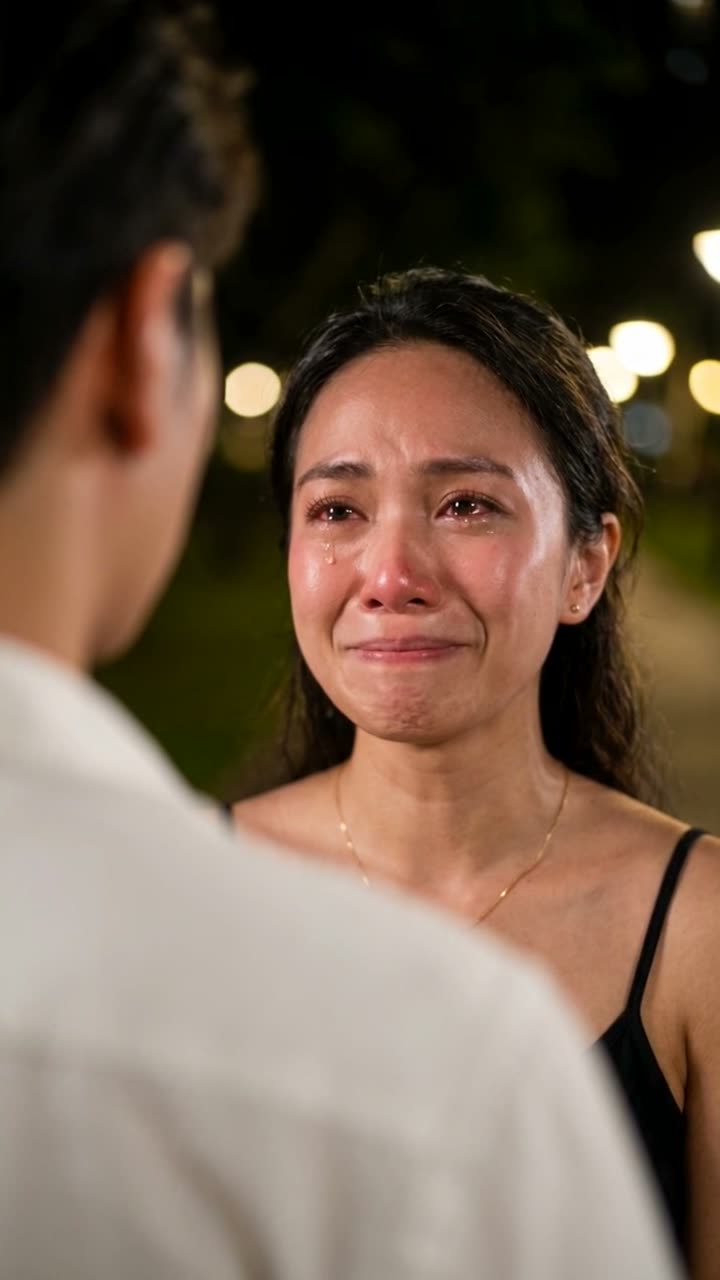
Your photo transforms into a cinematic nighttime goodbye: facing someone special, tears glistening as you try to smile, the expression crumbling, then turning to leave.

The original AI Crying reelOriginal reel
  • 1 photo you add
  • 8 to 10 s clip with sound
  • 9:16 for TikTok, Reels, Shorts
  • No watermark

No prompt to write: Add your photo and tap once

Create your own

Ready in a few minutes · From 56 credits

The AI crying effect creates a 10-second cinematic moment from a single image. You're captured at night opposite a soft-focus figure, attempting a smile as tears well in reddened eyes, the expression faltering, tears streaming, before you pivot and disappear into darkness—all set to melancholy music. All you need is one good face photo.

Also called Cinematic Emotional Farewell · Crying trend · AI nangis · AI menangis · Filter wajah sedih

Step by step

How to make the AI Crying video on Smew AI

Everything happens in your browser. No editing software, no prompt writing, no watermark added.

  1. Add your photo

    Click "Create your own" and upload a clear face photo. Capture with your camera or select from your gallery.

  2. Press Generate

    The button displays the credit cost. Smew AI constructs the crying scene using your photo, then Seedance 2.5 creates a 10-second animation with original audio. You don't write any prompt.

  3. Download or share

    Your video arrives within minutes as a 9:16 MP4. Save it, share directly from your device, or access it later in your Library.

Which photo works best?

Upload a clear, forward-facing image of your face with both eyes visible and open. The tears effect depends on eye detail.

  • A head-and-shoulders selfie is ideal. The photo stage recreates the nighttime setting, lighting and the figure facing you.
  • Begin with a gentle smile or neutral expression. The video starts with a delicate smile.
  • Balanced lighting across your face. Heavy shadows or sunglasses obscure eyes and tears.
  • Background doesn't matter: the photo stage replaces it with the night park setting.
  • Only use photos of yourself or adults who gave permission. Never strangers, celebrities or children.

Where did the AI Crying trend start?

The trend centers on a CapCut template called Cinematic Emotional Farewell. A tutorial from 25 September showed it had already hit 17.6 million uses. Every viral clip features the same composition: nighttime over-the-shoulder framing, a blurred figure in white ahead, warm bokeh behind, and a face transitioning from fragile smile to silent tears. Most versions then show the person walking off.

Indonesia and the Philippines saw the fastest adoption. An Indonesian tutorial on 25 September, "Cara buat filter wajah sedih, AI nangis di CapCut", reached 6.8 million views and 174,000 likes. Tagalog guides demonstrating the same in Dreamina AI appeared in October, hitting 688,000 and 678,000 views.

We analyzed the top 10 "AI crying" TikTok videos frame by frame using Gemini on 4 October and reconstructed the framing, performance and editing. The prompts here derive from that breakdown.

  1. A "cry face" AI clip appears on TikTok, accumulating roughly 960,000 views; crying-effect content rises from this point. TikTok

  2. Initial CapCut farewell videos with the nighttime over-the-shoulder framing emerge; one featuring a hijab hits 295,000 views. TikTok

  3. An Indonesian guide for the template is published and surpasses 6.8 million views; the template displays 17.6 million uses in the video. TikTok

  4. Tagalog guides demonstrate the same technique in Dreamina AI and achieve 688,000 views. TikTok

  5. Every one of the 10 top "AI crying" TikTok videos features the identical over-the-shoulder night composition in our frame-by-frame analysis.

Copy and paste

The AI Crying prompts

These aren't required: the one-tap workflow handles them automatically. A photo prompt places your face into the scene, then a video prompt brings it to life. Want to modify them? Copy and adjust them in AI Photo and AI Video.

Farewell scene

1 photo: a clear face photoSeedance 2.510 s · 720p · 9:16128 credits
Video prompt

Use the uploaded image as the base. Keep the person's face, facial features, skin tone, hair, makeup and outfit exactly the same. Turn the photo into a cinematic still from the farewell scene of a romantic drama. Tight over-the-shoulder close-up at night, framed from the chest up: the face fills the upper middle of the frame. In the left foreground, the back of another person's head and shoulder in a white shirt, heavily blurred into a soft shape. The person from the photo faces them and looks at them, just off camera to the left. Their face is in sharp focus: eyes red-rimmed, glossy and brimming with tears, flushed nose and cheeks, a small, fragile smile. Dark night background, a park or street with warm round bokeh lights, soft warm key light on the face, Korean drama film look, very shallow depth of field, 85mm lens at f/1.4. Photorealistic, vertical 9:16. No text, no logos.

890 characters

Rainy night scene

1 photo: your selfieSeedance 2.58 s · 720p · 9:16103 credits
Video prompt

Use the uploaded image as the base. Keep the subject's face, facial features, skin tone, and hair exactly the same. Transform the photo into a cinematic still from an emotional drama: the subject stands alone on a city street at night in the rain, wet hair, soft neon bokeh behind, teal and orange color grade, eyes glossy with held-back tears. Medium close-up, shallow depth of field, film look. Vertical 9:16. No text, no logos.

430 characters

How many credits does it cost?

You pay in credits per video, and the create page displays the exact cost on the Generate button before any charge. The one-tap price includes both the scene photo and video, billed once. Each variation has its own cost: Farewell scene 128 credits, Rainy night scene 103 credits. Lower-cost models are available when you run prompts manually in AI Video.

Video modelSettingsCredits
Farewell scene: Seedance 2.5 (this template)10 s, 720p + 1 scene photo, one tap128
Rainy night scene: Seedance 2.5 (this template)8 s, 720p + 1 scene photo, one tap103
Seedance 2.0 Fast (by hand in AI Video)10 s, 720p + 1 photo68
Veo 3.1 Fast (by hand in AI Video)8 s, 720p + 1 photo14

One-time packs and plans are on the pricing page. A failed video gives its credits back.

What does the AI crying video look like, shot by shot?

We examined the top 10 AI crying TikTok clips frame by frame. All follow this structure:

TimeWhat you see
0 to 2 sNighttime over-the-shoulder close-up. A blurred figure in white shirt ahead. You gaze at them with reddened, glistening eyes.
2 to 4 sYou attempt a smile despite the tears. The smile wavers and collapses.
4 to 6 sYou blink, tears stream down each cheek, your chin trembles, your gaze drops.
6 to 10 sA cut: you pivot and walk into the night, warm bokeh glowing behind.

A melancholy ballad plays throughout. The "Farewell scene" prompt here requests all four moments in one 10-second generation.

Why do people post AI crying videos?

Mainly for dramatic effect, often humorously. The clip delivers ten seconds of film-quality emotion on a recognizable face, making it perfect as a reaction: "me when the group chat leaves me on read", "me after one sad song", "when my favourite cafe closes". The contrast between trivial captions and K-drama intensity creates the humor. A Turkish caption in the trend captures it: "I wish I cried this beautifully in real life".

Some use it sincerely. Creators match the scene with breakup lines, moving stories or homesickness, and viewers respond in comments. The format requires only your face, explaining its rapid spread across languages.

Farewell scene or rainy night scene: which one should you make?

Farewell sceneRainy night scene
StepsTwo: a photo prompt creates the night setting, then a video prompt animates itTwo, identical process
Length10 seconds8 seconds
ShotOver-the-shoulder of a blurred figure, then cutting to you walking offYou alone on a rain-soaked neon street
MoodThe recognized trend format: a dramatic goodbyeSolitary, cinematic, no other person visible
Best forParticipating in the trend, reaction contentStory updates, photo series, longer text

Choose the farewell scene for the classic trend version. Select the rainy night scene when you want a solo moment without another person.

What goes wrong with the AI crying face, and how do you fix it?

ProblemFix
The face changes into someone elseUpload a clearer, larger facial photo. Retain "exactly the same" in the prompt.
The crying looks cartoonish or loudMaintain "real, subtle acting, never exaggerated" in the prompt. A second generation often produces calmer results.
The person in front is too sharpPreserve "heavily blurred into a soft shape" in the photo prompt, or regenerate the photo stage.
Makeup, a hijab or glasses shiftSpecify them in the prompt: "keep the pink hijab and the round glasses".
The video model refuses the photoSome models reject certain real faces. Credits are refunded; try Veo 3.1 Fast.

Is it okay to make someone cry with AI?

Keep it lighthearted and respectful. The AI crying effect is dramatic performance, and the best posts are clearly playful. Create it with your own face or with an adult who consented and knows where it will appear.

Don't use it to fabricate someone's distress: no videos pretending a real person had a breakdown, no "evidence" in disputes, no content designed to manipulate or frighten someone. That causes harm and violates platform policies. When the clip might seem real, label it as AI in the caption. Many platforms also provide AI-generated content labels.

FAQ

AI Crying trend questions

What is the AI crying trend?
It's a short-video phenomenon from September 2026. A single photo transforms into a nighttime goodbye scene: you face a soft-focus person, smile through tears, the smile fails, and you walk into darkness, accompanied by a sad ballad. It's based on the CapCut template "Cinematic Emotional Farewell" and gained traction fastest in Indonesia and the Philippines.
How do I make an AI crying video from my photo?
Click "Make this video" on this page. Add one clear face photo, verify the credit cost on the button and click Generate. The photo stage constructs the nighttime scene with you, then the video stage creates 10 seconds of the farewell. The result appears in your Library as a 9:16 MP4 with audio.
What is the AI crying prompt?
Two prompts work together: a photo prompt converts your selfie into an over-the-shoulder nighttime close-up with reddened, teary eyes and a delicate smile, and a video prompt animates the smile breaking into tears before cutting to you walking away. Both appear on this page to copy, and the one-tap button executes them automatically.
Is there an AI crying filter I can use?
Camera app filters typically overlay tears on a live face. This template functions differently: it constructs a complete cinematic scene from your photo and animates it, so the expression evolves and tears move realistically. You receive a shareable file with no watermark, not a filter limited to one app.
Can I add a trending sad song to my AI crying video?
Yes, in your posting app. The Smew AI file includes original audio, a melancholy piano and strings composition, so there's no copyrighted music. On TikTok, Instagram or YouTube you can layer a trending sound from their licensed collections and lower the original volume.
Can I make an AI crying video of someone else?
Only of an adult who gave consent and understands your intended use. Never fake a real person's emotional distress, deceive anyone or mock someone without permission. Never use children's photos. Keep it playful.
More trends

Other AI video templates

Template

Bby Wow Guy AI: Insert Your Face Into the Guy Dancing at a Quince Meme

Groove toward the camera at a quinceañera, take a bite of the concha, lock eyes with the lens while chewing with stuffed cheeks, then groove back into the crowd. Upload one photo to star as the bby wow guy, complete with the song.

Read more
Template

Bad Times AI Trend: Turn One Photo Into the Viral Argument Video

The viral argument routine: hands to head, hip pose, stop gestures and that long camera stare, all set to Imael Angel's "Bad Times". Upload a single photo of yourself or your pet and get the complete video with music.

Read more
Template

Hotel Lobby AI: Create the Hotel Lobby Trend Video

Place yourself and a friend, or your two pets, in a bright orange booth where they rap back and forth into a single hanging microphone. Use the actual footage or the popular cat version with authentic audio, or create a fresh 10-second clip with a new beat.

Read more
Template

Tecktonik Dance AI: Step onto the String-Light Stage

Wide arm swings, hands reaching toward the head, both arms shooting upward, followed by rapid, precise arm choreography on a compact stage lit by string lights: the electro dance from the 2000s that Cheba Man revived in 2026. Upload a single photo of yourself or your pet to generate the dance complete with its soundtrack.

Read more
Template

Storm AI Trend: Stay Still as the Crowd Bows

Picture yourself motionless at the center in white. A sea of figures in black suits surrounds you, snapping and bowing to a hard beat. Upload one photo, get a 10-second video with audio.

Read more
Template

AI Hug Video: Create a Heartfelt Hug from Two Photos

In a bright park, two people walk up to one another and embrace warmly. Upload two images, get an 8-second video with soft original audio.

Read more

Make your own AI Crying video

Upload one photo and tap once. No prompt writing needed. 128 credits.

No watermark. A failed video gives its credits back. Secure checkout by Stripe.