smew.ai

Storm AI Trend: Stay Still as the Crowd Bows

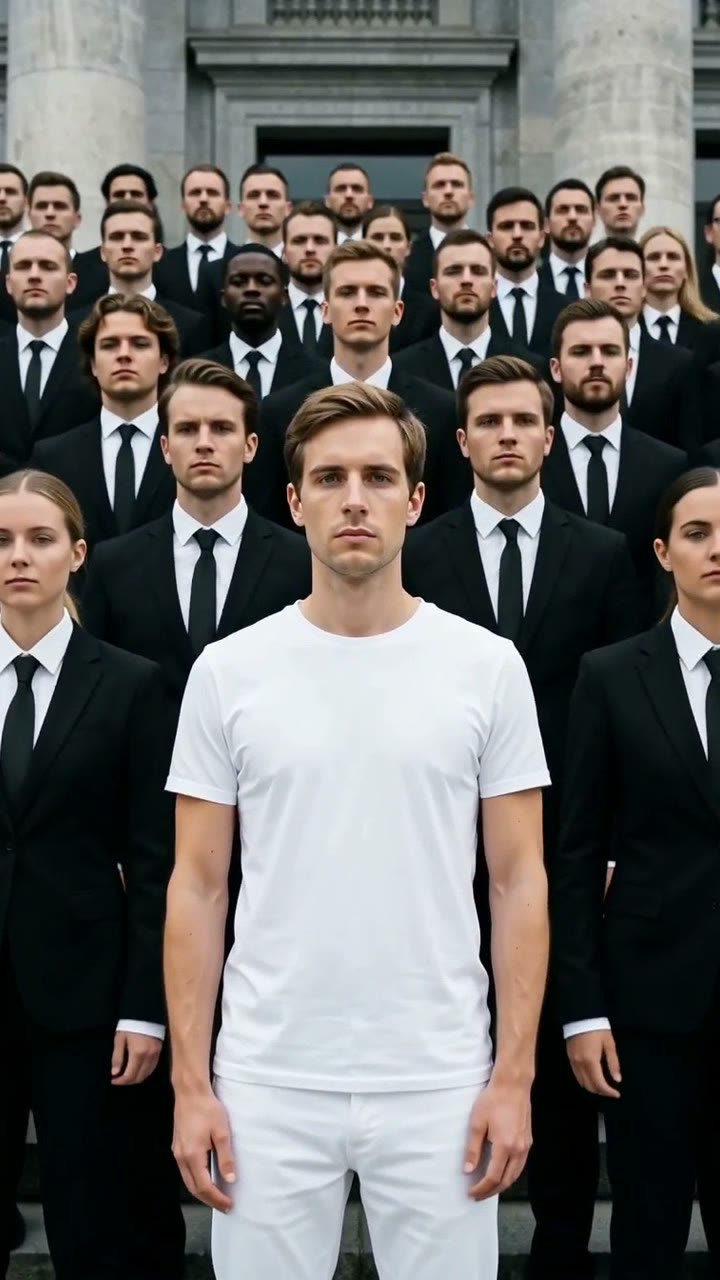
Picture yourself motionless at the center in white. A sea of figures in black suits surrounds you, snapping and bowing to a hard beat. Upload one photo, get a 10-second video with audio.

The original Storm reelOriginal reel
  • 1 photo you add
  • 10 s clip with sound
  • 9:16 for TikTok, Reels, Shorts
  • No watermark

No prompt to write: Add your photo and tap once

Create your own

Ready in a few minutes · From 126 credits

The Storm AI trend creates a video where you wear white and stay completely still at the center of a sea of people in black suits. The crowd snaps their heads, grabs their ties, and bows deeply to a pounding beat while you remain frozen. All you need is one good photo of your face.

Also called Storm II trend · Storm 2 trend · Storm dance trend · Yung Lean Storm trend · GENER8ION Storm trend

Step by step

Creating the Storm video on Smew AI

The whole process happens in your browser. No editing software needed, no prompt writing, no watermark added.

  1. Upload your photo

    Click "Create your own" and upload your photo. Snap a new one with your camera or choose from your library.

  2. Click Generate

    The button displays the cost. Seedance 2.5 creates the Storm crowd scene directly from your photo without generating an intermediate image first, producing 10 seconds with original audio. No prompt writing required.

  3. Save or post

    The video is ready in a few minutes as a 9:16 MP4. Download it, share it from your phone, or find it later in your Library.

What kind of photo should you use?

Choose a clear, forward-facing photo showing your face and upper body. The prompt will dress you in white and place you on stone steps, so your actual clothing and backdrop aren't critical. Your face is what matters: sharper and closer produces better resemblance in the final video.

  • Face the camera directly with a calm or neutral expression. Since the point is your stillness, a wide grin undermines the effect.
  • Make sure your face is well-lit. Avoid sunglasses or hats that cover your eyes.
  • Use a solo photo. Multiple people confuse which face should be the lead.
  • Avoid photos showing cigarettes, drinks, or visible logos. The prompt blocks these, and starting clean produces better output.
  • Only use photos of yourself or adults who've given permission. Never use celebrities or strangers.

Origin of the Storm trend

This aesthetic traces back to a music video. French DJ Surkin and director Romain Gavras, performing as GENER8ION, dropped "STORM" featuring Swedish rapper Yung Lean on 24 April 2026. The video takes place at a British boys' boarding school. "STORM II", the second segment, closes with students in dark uniforms performing a precision dance routine on stone steps, with choreography by Damien Jalet.

AI recreations emerged in September 2026. From the TikTok posts we examined, the earliest AI version appeared on 10 September, and 88 more followed by month's end. A Thai how-to from 14 September hit 1.6 million views. One AI tool blog pegs the real explosion to 15 September and notes the trend spread to Korean, Japanese, Thai, Indonesian and Ukrainian audiences in 4 days.

The popular Reddit prompt features the lead with a cigarette. Our version omits that detail and generates an original beat rather than using the song.

  1. GENER8ION drops the "STORM" music video featuring Yung Lean, directed by Romain Gavras, concluding with a synchronized crowd dance on school steps in the second section, "STORM II". The FADER

  2. The earliest AI crowd-formation recreation appears in our TikTok sample. By late September, the sample contains 88 such posts.

  3. A Thai TikTok how-to for the AI version accumulates 1.6 million views and 39,100 likes.

  4. A Reddit user tests the "STORM" trend using Seedance 2.5 and posts the complete prompt, which features a cigarette. r/ImagineAiArt

  5. "The Ukrainian take on the viral STORM II trend" receives 927 upvotes on r/ukraine. r/ukraine

  6. A French adaptation surpasses 584,100 views on TikTok as the format continues spreading globally.

Copy and paste

Storm prompt details

No need to use this directly: the one-tap workflow handles it automatically. [Image 1] is your uploaded photo: the video model uses it as reference to film the scene directly, skipping the intermediate photo generation step.

Crowd formation

1 photo: your photoSeedance 2.510 s · 720p · 9:16126 credits
Video prompt

A cinematic music-video shot in one continuous take. The lead is the person in [Image 1], in every frame: copy the exact face from [Image 1] (the face shape, eye color and eye shape, eyebrows, nose, mouth, skin tone, age, hair color, hair length and hairstyle, and any beard, moustache, glasses or freckles), so their friends recognize them at once. The lead wears a clean all-white outfit and stands perfectly still in the exact center of wide grey stone steps in front of a large building, looking straight into the camera for the whole clip. Around and behind the lead stand forty to sixty people in identical black suits, in tight rows like a wall, all facing the camera. The lead is the only person in white. Overcast daylight, slight film grain. The camera starts at a medium shot of the lead, from the waist up, with the crowd behind, and slowly pushes in. On a heavy beat, the whole crowd in black suits explodes into one sharp synchronized move: they clutch their ties, twist and snap their heads to the side, then fold into a deep, fast bow and snap back up. They repeat the bow once more and freeze. Only the crowd moves; the lead never moves and keeps the same face from the first frame to the last. Audio: an original dark, heavy electronic beat with deep drums. No cigarettes, no text, no logos.

1311 characters

Credit cost breakdown

Payment is per video in credits, with the exact cost shown on the Generate button before any charge. The one-tap workflow price includes both scene generation and video, billed as one transaction. A single video costs 126 credits, so the smallest one-time package that covers it is $14.99 for 150 credits with no subscription required. Lower-cost models are available if you manually run the prompts through AI Video.

Video modelSettingsCredits
Seedance 2.5 (this template)10 s, 720p, straight from your photos, one tap126

One-time packs and plans are on the pricing page. A failed video gives its credits back.

It's all about contrast. The entire crowd moves together in sharp, synchronized motions while the center figure remains completely motionless. That stillness conveys power, and anyone can take that role: a student, an executive, a grandparent, an infant. An early viral example on 13 September featured a baby and reached 315,300 views.

The format also encourages replays. The bow hits precisely on beat, the lead stays composed, and viewers loop it to watch the crowd drop again.

Search behavior confirms its spread. On 29 September 2026, Google Ads data showed about 50 monthly US searches for "storm trend", while Google Trends data for the previous 30 days revealed "yung lean storm" searched significantly more than "storm trend". Most users identify it by the artist and song rather than a trend label.

Why doesn't my Storm video match the music video exactly?

Because it is not a motion copy. Most viral versions use a video-reference swap: an app takes a clip of the original dance, then swaps the lead's face for yours. That keeps the exact choreography, and it also reuses a copyrighted video and song.

Smew AI works from one image. Since 13 October 2026 Seedance 2.5 takes your photo as a reference and films a new scene of you in white on the steps, with no AI picture in between, so your face stays yours. The crowd does its own synced clutch, head snap and bow, written in plain words, so the moves are close in spirit but not the same steps. You cannot upload a dance clip to copy. In return, your file has no frames from the music video and no song, so you can post it without borrowing someone else's work.

Common Storm prompt issues and solutions

ProblemFix
The lead moves or dances with the crowdMaintain "the lead never moves" in your video prompt. Delete any words that assign actions to the lead.
The crowd moves out of syncSynchronized crowd motion challenges all models. Generate again; simple moves timed to single beats work better than complex sequences.
Faces in the crowd melt during the bowExpected at frame edges. Try another generation.
The lead is not in the exact centerGenerate again; the prompt specifies exact center placement.
Your face changes during the push-inUpload a sharper, closer source photo. Failed videos refund their credits.
More than one person wears whiteGenerate again. The prompt designates the lead as the sole white-clad figure, and a second attempt typically corrects this.

Adding the real Storm song when posting

Not in the Smew AI file itself. The video prompt requests an original dark electronic beat, so your download includes no copyrighted music. If you want the trending audio, select it from the licensed music library within TikTok, Instagram or YouTube during posting. Your clip's bow won't automatically sync with the song's beat, so align the timing in the posting app, or keep the original beat and reference the trend in your caption.

Caption suggestions that work with this format: "me walking into Monday", "the only calm person in the group chat", or "when you finally understand the assignment". Tag friends who'd be in the crowd.

FAQ

Storm trend FAQs

What is the Storm AI trend?
It's a viral AI video format from September 2026. A person dressed in white stands motionless surrounded by a crowd in black suits who clutch their ties, snap their heads and bow to a heavy beat. It recreates the aesthetic of the choreographed dance from GENER8ION's "STORM II" music video featuring Yung Lean.
What is the Yung Lean Storm trend?
It's the identical trend. Users search by the artist's name because the choreography originates from "STORM", a 2026 music video by GENER8ION with Yung Lean. The AI adaptation places your face on the composed center figure surrounded by the bowing crowd. Our prompts don't use any frames or audio from the original video.
How do I create the Storm AI video using my photo?
Click "Create your own" on this page, upload one clear, forward-facing photo and click Generate. Seedance 2.5 uses your photo as reference to film you dressed in white on the steps with the crowd bowing around you, creating 10 seconds with audio. No prompt writing needed.
Can I create a bowing crowd AI video with different clothing or location?
Yes, by modifying the wording: the prompt uses plain English and appears on this page to copy. In the one-tap workflow, the Make it yours fields adjust the outfit and beat. Replace "all-white outfit" with your preferred color, or change the stone steps to a school hall, stadium tunnel or office lobby. Keep the lead as the only differently colored person and preserve "the lead never moves", or the contrast disappears.
Why did the original Storm prompt include a cigarette?
The Reddit-circulated prompt recreates the music video's opening where the lead is smoking. We eliminated that element. Smoking imagery can violate platform policies on certain apps, and it contributes nothing essential to the concept. The contrast between the composed lead and bowing crowd carries the video by itself.
What are the Storm video length and format specifications?
The default is 10 seconds, vertical 9:16, 720p, with an original beat, as an MP4 with no watermark that you can post straight to TikTok, Reels or Shorts. The create page shows the exact price on the Generate button before you spend anything.
Can I feature a celebrity at the center of the crowd?
Don't do that. Creating fake videos of real people may violate platform policies and that individual's rights, and certain video models block recognizable faces. Only use your own photo or photos of adults who've provided consent.
More trends

Other AI video templates

Template

Bby Wow Guy AI: Insert Your Face Into the Guy Dancing at a Quince Meme

Groove toward the camera at a quinceañera, take a bite of the concha, lock eyes with the lens while chewing with stuffed cheeks, then groove back into the crowd. Upload one photo to star as the bby wow guy, complete with the song.

Read more
Template

Bad Times AI Trend: Turn One Photo Into the Viral Argument Video

The viral argument routine: hands to head, hip pose, stop gestures and that long camera stare, all set to Imael Angel's "Bad Times". Upload a single photo of yourself or your pet and get the complete video with music.

Read more
Template

Hotel Lobby AI: Create the Hotel Lobby Trend Video

Place yourself and a friend, or your two pets, in a bright orange booth where they rap back and forth into a single hanging microphone. Use the actual footage or the popular cat version with authentic audio, or create a fresh 10-second clip with a new beat.

Read more
Template

Tecktonik Dance AI: Step onto the String-Light Stage

Wide arm swings, hands reaching toward the head, both arms shooting upward, followed by rapid, precise arm choreography on a compact stage lit by string lights: the electro dance from the 2000s that Cheba Man revived in 2026. Upload a single photo of yourself or your pet to generate the dance complete with its soundtrack.

Read more
Template

80s AI Trend: Your 1985 Photo and Home Video

A single selfie transforms into a vintage 1985 photograph with period hair and a date stamp. Keep just the image, or bring it to life as a 10-second VHS-style clip with audio.

Read more
Template

AI Dog Dancing Video: Turn Your Pet Into a Dancer

Watch your dog or cat rise up on two legs and perform a joyful, energetic dance at home. Upload one pet photo, get back a 10-second video with its own beat.

Read more

Create your Storm video

Upload one photo and click once. No prompt writing required. 126 credits.

No watermark. A failed video gives its credits back. Secure checkout by Stripe.