smew.ai

Split Face Trend: Half Your Face, Half Your Parent's

Upload your photo and one of your mom, dad or other family member. AI merges the left side of your face with the right side of theirs into one black-and-white portrait, showing who you resemble.

The original Split Face Trend reel by @idatravels05Original reel
  • 2 photos you add
  • 2K photo you can turn into a video
  • 9:16 for TikTok, Reels, Shorts
  • No watermark

No prompt to write: Add your photos and tap once

Create your own

Ready in a few minutes · From 3 credits

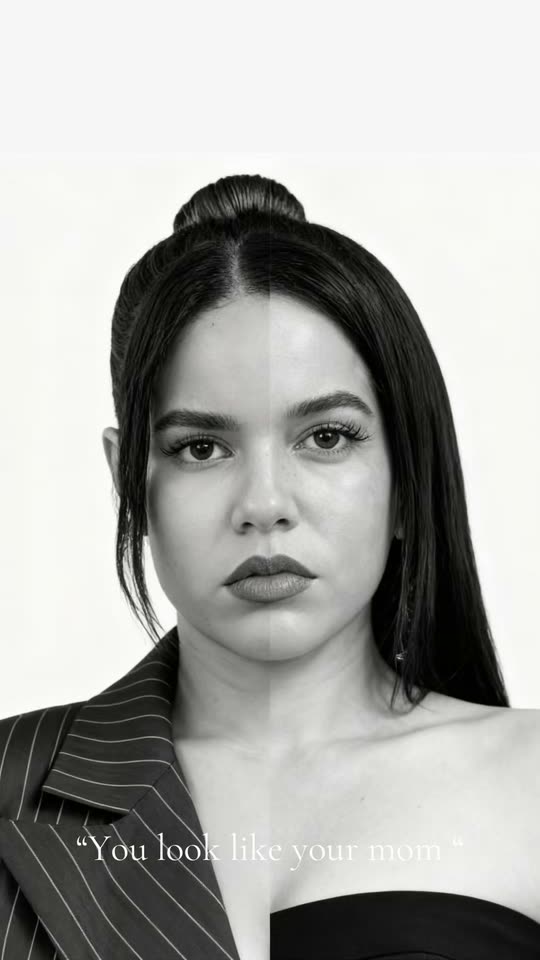
The split face trend is a TikTok and Instagram trend that creates one black-and-white portrait combining the left side of your face with the right side of your mom's or dad's, split straight down the center. It shows "Do I look like my mom or dad?" instantly. Two photos needed: yours and your parent's.

Also called half face trend · look alike trend · parent split face trend · face split trend · family resemblance trend · you look like your mom trend · mom effect trend · dad effect trend

Example

What the Split Face Trend photo looks like

Here's the original reel that launched the trend. Your video is a fresh creation from your photo in this style, not a duplicate of these clips. Each result is unique.

Original reel by @idatravels05, 8 s
The original by @idatravels05: her face's left side merged with her mom's right side, black and white, with the caption "You look like your mom". Her reel then displays an actual photo of them both, omitted here.
Use this reference
Original reel by @b.boggs, 9 s
From the original by @b.boggs, created using the prompt this template employs: split faces with her dad, brother, then mom. She posted the prompt in her comment section.
Use this reference
Step by step

How to make the Split Face Trend photo on Smew AI

All processing happens in your browser. No separate editing software, no prompt writing needed, no watermark added.

  1. Add the two photos

    Click "Create your own" and upload your photo, facing the camera, then your mom's, dad's or family member's photo, also facing forward. Upload in this sequence, as the order determines who appears where. Capture new ones with your camera or select existing ones from your device.

  2. Press Generate

    The button displays the cost. Nano Banana 2.1 places your photos into the Split face scene and creates one 2K photo. No prompt writing required.

  3. Download or share

    Your photo arrives within minutes as a 9:16 2K image. Save it, share from your device, convert it to a video, or access it later from your Library.

Which photo works best?

Choose two photos each showing one face: photo 1 is you (left side), photo 2 is your mom, dad or family member (right side).

  • Look directly at the camera, with a level head and balanced lighting. Similar photos merge better: comparable distance, both facing forward.
  • Clear and tight, shoulders up. Passport-style photos work best.
  • No sunglasses, hats or hair covering eyes, ensuring the eyes align across the center.
  • Color or vintage photos both work. The output is black and white regardless. Photograph old prints flat without reflections.
  • One person each photo. Crop group photos beforehand.
  • Only use photos of people who consent to inclusion.

Where did the Split Face Trend trend start?

Split family portraits predate AI: back in 2011, Canadian photographer Ulric Collette's "Genetic Portraits" manually merged halves of relatives' faces. The AI approach began in August 2026. An Instagram user posted color half-portraits of herself with both parents on 7 August, created using Meta's AI tool. Later in August, Russian-language tutorials featured a couple version, girl and guy, as the тренд половина лица ("half face trend"), with a lengthy ChatGPT prompt circulating in comments.

The parent version gained traction in September. CapCut templates transformed it into brief clips, and a tutorial from @clzl3vnad2 on 8 September reached 4.8 million views. The prompt resurfaced in English, identical, now mentioning "the girl and the woman". @idatravels05's "You look like your mom" post surpassed 779,900 views. US Google searches for "split face trend" jumped from nearly zero in August to 1,900 in September 2026, and Know Your Meme documented the "Parent Split-Face / Family Resemblance Trend" on 17 September. By mid-October, fresh posts appeared daily.

  1. My Modern Met showcases Ulric Collette's "Genetic Portraits": relatives' photos split down the center and manually merged, half each. My Modern Met

  2. An Instagram user shares color split-face portraits with her mother and father, created with Meta's AI tool, among the earliest AI examples Know Your Meme documented. Know Your Meme

  3. @clzl3vnad2 shares a CapCut tutorial for family resemblance portraits; by 14 October it reached 4.8 million views and 108,800 likes. TikTok

  4. @idatravels05 shares her split face with her mom, with caption "You look like your mom"; by 14 October it reached 779,900 views and 18,700 likes. TikTok

  5. @b.boggs shares split faces with her dad, brother and mom, and reveals the prompt she used in a comment reply. TikTok

  6. Know Your Meme documents the "Parent Split-Face / Family Resemblance Trend", also known as the Mom Effect or Dad Effect trend. Know Your Meme

Copy and paste

The Split Face Trend prompt

No need for this: the one-tap workflow handles it automatically. The photo prompt integrates your photo into the scene. Want to modify it? Copy and edit it in AI Photo.

Split face

2 photos: you, face to the camera + your mom, dad or family member, face to the cameraNano Banana 2.1Photo · 2K · 9:163 credits
Photo prompt

Create a photorealistic black and white portrait collage of the two uploaded images. Connect the faces of the person in the first image and the person in the second image strictly vertically in the center: the left half of the final face is half of the face of the person in the first image, the right half is half of the face of the person in the second image. It is very important to maintain as much as possible the real characteristics of both people in the original photos, not to change their appearance and not to make an average face. The faces should be perfectly aligned in the middle. The connecting line should run exactly through the middle of the forehead, nose, lips and chin. Special attention should be paid: both eyes were completely visible and each eye retained the shape, cut and characteristics of its person; the cut of the eyes and eyebrows corresponded as much as possible to the original photos; the nose was connected exactly in the middle, so that the shape of the nose, the bridge of the nose and both nostrils were clearly visible; the lips were very clear and distinct, while the left half of the lips corresponded to the person in the first image and the right belonged to the person in the second image; the shape of each person's upper and lower lips was preserved; the position of the eyes matched, nose, lips and chin to make the face look natural and symmetrical; do not mix features between halves and do not change the shape of the face. Take a large full-face portrait, one person looks directly into the camera, neutral expression. Black and white photo with high details of skin, eyes, eyelashes, eyebrows, lips and hair. Soft even studio lighting, light neutral background, high sharpness, realistic photographic texture, no filter and strong retouching. The result should look like a real professional photo, exactly divided into two halves between two people. Vertical 9:16, framed like a passport photo from the top of the head to the upper chest, the face large in the middle. Each half keeps its own person's hair, ear, neck and clothes on its side, at the same head size and eye level, each at the age in their own photo. If a photo is in color, old or turned to the side, show that person facing the camera in black and white with the same face. A clean, straight seam: no gap, no blur, no drawn line. Exactly one split face, nobody else. No text, no logos, no watermark, no border. The identity rules below apply to each half: the left half is the exact person from the first image, the right half the exact person from the second image, never a blend of the two.

2614 characters

How many credits does it cost?

Credits are charged per photo, with the exact cost displayed on the Generate button before any charges. The one-tap cost covers one 2K photo, charged one time. One photo is 3 credits, so the smallest single purchase covering it is $9.99 for 100 credits, no subscription needed. Running the prompt manually in AI Photo for a smaller 1K photo costs less.

ModelSettingsCredits
Nano Banana 2.1 (this template)2K photo, 9:16, one tap3
Nano Banana 2.1 (by hand in AI Photo)1K photo, 9:16, same prompt2

One-time packs and plans are on the pricing page. A failed video gives its credits back.

How to do the split face trend, step by step

Complete split face trend tutorial:

  1. Click "Create your own". Upload photo 1 (you) and photo 2 (your mom, dad or other family member).
  2. Click Generate. The button displays the cost before charging.
  3. Your split face portrait appears in your Library as one 2K vertical image (9:16) in black and white: left side is you, right side is them, merged through forehead, nose, lips and chin.
  4. Share it. Many posts display the split face first, then a real photo of you both, with captions like "You look like your mom" or "She looks like her dad".

Since it's also called the half face trend, this method works for that too. Want both parents? Create it twice, once with each parent, and post both images as a carousel. That's the mom or dad trend in one post, answering "Who do I look like more, mom or dad?" for your audience.

How Smew AI creates it: your two photos feed into Nano Banana 2.1, Google's image model, with the prompt the trend's originators provided (detailed below) and a face lock preserving each side true to its source. The create page displays exact pricing on the Generate button, with each run producing a unique result.

Which prompt does the split face trend use?

The split face trend prompt widely copied is one lengthy prompt designed for ChatGPT. It originated in August 2026 as a couple half face prompt in Russian, featuring "a girl and a guy". In September it returned in English with "the girl and the woman", shared verbatim under the most popular tutorial video, becoming the trending half face prompt everyone copies. @b.boggs, featured in the second clip here, confirmed using it.

It requests one photorealistic black-and-white portrait collage, faces merged precisely down the center, through forehead, nose, lips and chin; each eye maintaining its own person's shape; and, as stated, "not to make an average face".

This template employs that identical split face prompt. Just three modifications: "the girl" and "the woman" become your first and second photos, a few lines specify the trend's appearance (each side retains its own hair and clothing, passport-style framing, vertical 9:16), and a face lock maintains both sides faithful to the photos. No pasting required. Posts reference the same AI prompt as the half face photo prompt or family resemblance prompt, this exact text.

Split face, face merge or look-alike app: what is the difference?

Apps that combine faces or merge two faces blend two individuals into one new, averaged face, similar to future baby generators. The split face trend does the reverse: a half and half face keeping each side as one real person, revealing family resemblance in the brow, nose and smile.

  • It's a split face portrait, not a morph: left side is you, right side your parent.
  • It's not a family resemblance checker or calculator: no score given. You and your audience judge it.
  • Smew AI is a split face image generator and photo maker online, requiring no split face app or family resemblance app: two photos in, one split face photo out, no CapCut template and no installation.
  • "Split face filter" and "family resemblance filter" are common names for the CapCut templates of this trend. This produces the same appearance from your actual photos, so the family resemblance AI outcome preserves your real faces.

For a video of your future child created from two parents' photos, check the AI baby generator.

What goes wrong, and how do you fix it?

ProblemFix
The two halves do not line upChoose two photos facing the camera directly, at similar distances. A tilted head aligns poorly.
One half looks younger, or an eye looks biggerA frequent complaint about chatbot versions: one user noted ChatGPT "made my nonnas eye a little bigger and made her younger looking". The face lock requests each face precisely as photographed; sharper, closer photos help most. Try again.
The face looks blended, like a new personTry again with sharper photos. The prompt requests two halves, never an averaged face.
The line down the middle is soft, or one side is much brighterTwo photos with comparable lighting help. Try again.
The run failsSome photos get rejected. Credits are refunded; use a different photo.

Each run produces a unique result, so outcomes vary.

FAQ

Split Face Trend trend questions

What is the split face trend?
It's a photo trend that gained popularity in September 2026: one black-and-white portrait combining the left side of your face with the right side of a parent's, merged down the center. Also called the half face trend or family resemblance trend, posted with captions like "You look like your mom".
How does a split face show if I look like my mom or dad?
Since each side remains one actual person, shared features align across the center: the brow, eye shape, nose, smile. Create one with each parent and view them side by side for comparison.
Can I do the split face trend in ChatGPT?
Yes, many attempted it in ChatGPT, often requiring multiple attempts; in trend comments, users reported it "kept messing it up" or altered a face. Here you bypass the chat: upload two photos, and the template applies the trend's prompt with a face lock for both sides.
Is there a split face prompt for ChatGPT or a half face prompt for Gemini?
The prompt widely shared for this trend was designed for ChatGPT. This template executes that same lengthy text on Nano Banana 2.1, Google's AI image model, so neither app is needed and no prompt writing required.
Is the look alike trend prompt the same?
Yes. The look alike trend is the same trend, so the prompt shared under its tutorial videos is identical text, which this template uses.
What do people call the split face trend TikTok posts?
Various names: the half face TikTok trend, mom and dad trend or do we look alike trend, frequently tagged #familyresemblance (4,544 videos by 14 October 2026). A template creator named it the look alike trend, with short captions: "You look like your mom", "She looks like her dad", "Me and my mom".
What is the split face trend called in other languages?
In Russian it circulated as "тренд половина лица". German captions read "Du ähnelst deiner Mutter" ("you look like your mother"). Portuguese searchers type "trend metade do rosto", and in Turkish it's "yarım yüz fotoğraf". Same trend globally.
Can I use my dad, a sibling, a partner or a friend?
Yes. Photo 2 can be anyone: your mom, dad, grandparent, brother or sister, partner or best friend. Under the top tutorial video, the most-liked comment was "me and my mom" (3,631 likes), so mom and daughter posts dominate the look alike trend, but "Me and my best friend" received 3,023 likes and "Me and brother" got 1,280.
Can I make family resemblance photos with both parents in one picture?
Not in one image: the trend merges two faces. Create one family resemblance picture with your mom and another with your dad, then post both together.
Can I make it with a parent who has passed away?
Yes. Older photos work: photograph the print flat without glare, and the face appears in the same black and white as yours. It offers a gentle way to see what features you inherited.
Can I post it for the split face trend on Facebook or Instagram?
Yes. The half face AI photo is a standard 2K image file, so posting on Facebook, Instagram or TikTok works, or send it to family. Retain the platform's AI label.
Why is the half face photo black and white?
That's the trend's aesthetic, and it serves a purpose: black and white conceals lighting and color differences between two photos taken years apart, making the center line appear seamless.
Can I turn it into a video?
Yes. Below your completed picture, click "Make it a video": it launches AI Video with the split face as the opening frame, and you select what follows. The video requires its own credits.
Does the split face trend cost credits?
Yes, a small amount. A picture requires far fewer credits than video, the create page displays exact pricing on the Generate button before charging, and failed runs refund the credits.
Are my photos private?
Yes. Smew AI never posts your photos or results anywhere or displays them to other users. The picture saves to your private Library, where you can delete it anytime.

More trends

Other AI video templates

Template

You Look Lonely, I Can Fix That: The AI Hologram Video

A towering glowing hologram bends down through rainy neon skies toward a small person on a bridge and delivers: "You look lonely. I can fix that." Add your faces to both characters, or create a wallpaper.

Read more
Template

Heaven Hug AI: Run Into Their Arms Above the Clouds

Upload a photo of yourself and one of someone you've lost. Walk up a glowing stairway or run through a sea of clouds, see them waiting, and embrace them again, in a 10-second video with gentle music.

Read more
Template

Ghostface AI Trend: Put Yourself in the 90s Horror Phone Call

Picture yourself lying on satin sheets with a chunky 90s telephone to your ear, while a hooded figure in a black robe and white ghost mask stands in the shadowy doorway. Upload a selfie and get a grainy film photograph, or a brief video where you look back.

Read more
Template

Ryuk AI: Place a Grinning Death God in Your Photo

Upload your photo, and a towering death god with spiky black hair, dark feathers and a huge grin appears right beside you, matching your photo's lighting. Save the photo, or create a 5 second video where he takes a bite of an apple.

Read more
Template

AI Hug Video: Create a Heartfelt Hug from Two Photos

In a bright park, two people walk up to one another and embrace warmly. Upload two images, get an 8-second video with soft original audio.

Read more
Template

AI Baby Generator: Create a Future Baby Home Video

Upload photos of two partners and watch an imagined baby come to life: a retro camcorder sequence featuring first steps, breakfast chaos, and shoulder rides.

Read more

Make your own Split Face Trend photo

Upload two photos and tap once. No prompt writing. 3 credits.

No watermark. A failed photo gives its credits back. Secure checkout by Stripe.