
smew.ai

Ryuk AI: Place a Grinning Death God in Your Photo

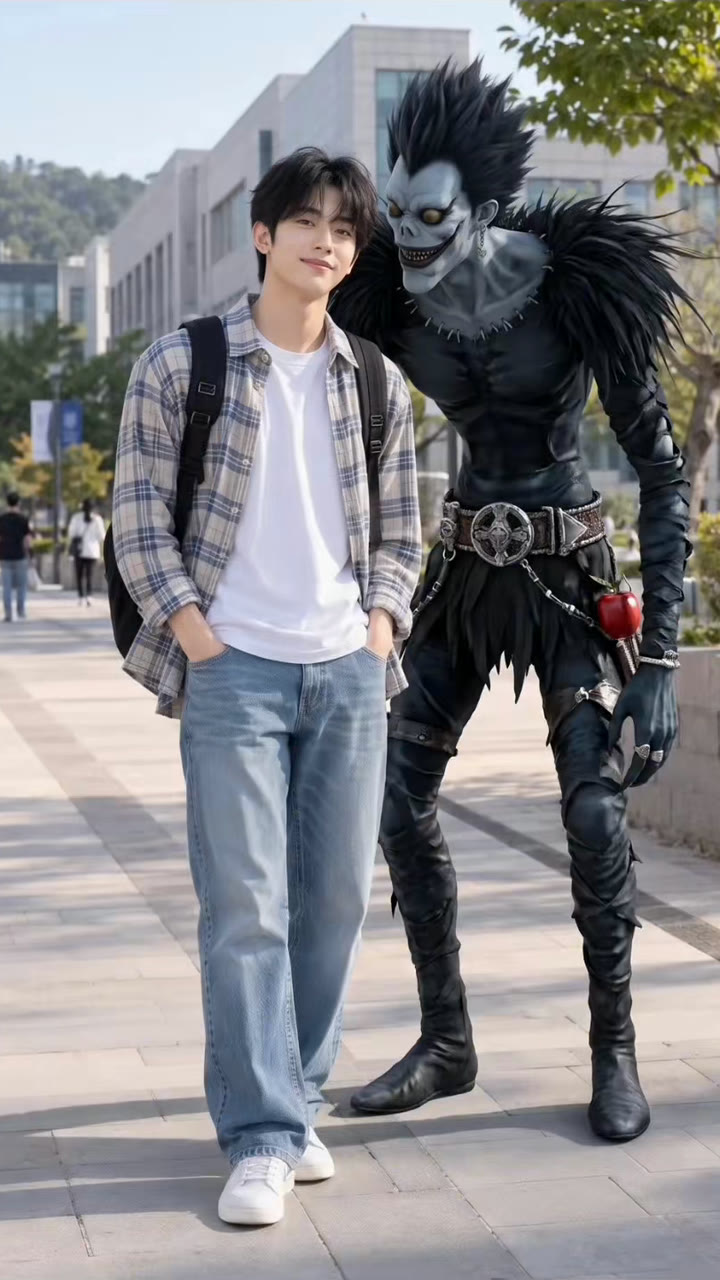
Upload your photo, and a towering death god with spiky black hair, dark feathers and a huge grin appears right beside you, matching your photo's lighting. Save the photo, or create a 5 second video where he takes a bite of an apple.

The original Ryuk AI reel by @jted1tOriginal reel
  • 1 photo you add
  • 2K photo you can turn into a video
  • 9:16 for TikTok, Reels, Shorts
  • No watermark

No prompt to write: Add your photo and tap once

Create your own

Ready in a few minutes · From 3 credits

The Ryuk AI trend inserts Ryuk, the grinning shinigami from Death Note, right into your photo, standing next to you or hovering behind your shoulder like a buddy. This started as a CapCut AI photo transformation called "Ryuk spotted" in October 2026. All you need is a clear photo of yourself with some space on one side.

Also called Ryuk spotted trend · Ryuk companion AI trend · Ryuk Spotter Portrait · Ryuk behind you trend · Shinigami photo · Ryuk selfie

Example

What a Ryuk AI photo looks like

Here's the reel that kicked off this trend. Your video will be a fresh clip created from your photo in this style, not a duplicate of these frames. Each generation is unique.

Original reel by @jted1t, 5 s
The AI output from the "Ryuk Companion AI Trend" tutorial by @jted1t (18 October 2026), created from a single photo using the creators' prompt: the grinning death god leans close beside a young man during a sunny campus walk. Cropped to frame the image.
Use this reference
Step by step

How to create the Ryuk AI photo on Smew AI

The whole process runs in your browser. No editing app needed, no prompt writing, no watermark.

  1. Upload your photo

    Click "Create your own" and upload your photo with some space beside you. Snap it with your camera or choose from your gallery.

  2. Click Generate

    The button displays the credit cost. Nano Banana 2.1 integrates your photo into the Ryuk AI scene and produces a single 2K photo. No prompt writing required.

  3. Download or share

    Your photo finishes in a few minutes as a 9:16 2K image. Download it, share it from your device, convert it to a video, or locate it later in your Library.

What kind of photo works best?

Choose one clear photo of yourself with your face plainly visible, from knees up or full body, leaving a bit of empty space on one side: the death god will appear there.

  • Streets, alleys, storefronts, campus paths or dim rooms at night all work well. The prompt preserves your photo's location and lighting.
  • Look toward the camera or angle yourself three-quarters. Avoid sunglasses or hats covering your eyes.
  • Vertical photos work best. Square or horizontal photos will have their backgrounds expanded.
  • Upload your own photo, or one of an adult who gave permission.

Where did the Ryuk AI trend begin?

Ryuk is the shinigami, a death god, in Death Note, the manga by Tsugumi Ohba and Takeshi Obata that launched in 2003 and became an anime in 2006. He tosses his notebook into the human world out of boredom, follows its new owner constantly and has a thing for apples. That's the humor in every Ryuk photo: a towering, grinning death god standing right behind someone, never leaving their side.

Fans have been placing him behind themselves for years. A cosplay video from April 2023, "Ryuk only wants your apples", reached 6.6 million TikTok views, and a CapCut tutorial from November 2025 for the "Ryuk behind you" shadow edit hit 4.2 million. Starting in late 2025, people began creating these photos using AI image tools.

The recent surge began on 8 October 2026, when @capcut.ed1t5 shared a tutorial "to turn a simple photo into a Ryuk Spotter Portrait" displaying the prompt on screen. AI template platforms added a "Ryuk spotted" template from 13 October, and on 18 October @jted1t shared the same prompt as the "Ryuk Companion AI Trend". With Halloween on 31 October 2026, it became a quick costume-free Halloween option.

  1. Death Note, the manga by Tsugumi Ohba and Takeshi Obata, debuts; the shinigami Ryuk, who loves apples, is among its main characters. Wikipedia

  2. @nycx.zz shares the cosplay video "Ryuk only wants your apples", reaching 6.6 million views by October 2026. TikTok

  3. A CapCut tutorial for the "Ryuk behind you" shadow edit by @pgummp0102857 is posted; it reaches 4.2 million views by October 2026. TikTok

  4. @sinkto5 shares a tutorial for AI shinigami photos with Ryuk next to you; it reaches 1.8 million views by October 2026. TikTok

  5. @capcut.ed1t5 shares the "Ryuk Spotter Portrait" tutorial displaying the prompt on screen: 131.2K views by 18 October 2026. TikTok

  6. @jted1t shares the same prompt as the "Ryuk Companion AI Trend", created with Nano Banana 2. TikTok

Copy and paste

The Ryuk AI prompts

You won't need this: the one-tap process handles it for you. The photo prompt integrates your photo into the scene. Want to modify it? Copy and adjust it in AI Photo.

Photo

1 photo: your photo, room beside youNano Banana 2.1Photo · 2K · 9:163 credits
Photo prompt

Add a tall, gaunt shinigami-like death god with black feathered wings, spiky black hair, a wide grin and yellow eyes into the uploaded photo, placing him next to or slightly behind the person like a close friend. Keep the original image completely unchanged: do not alter lighting, contrast, colors, camera angle, background, or the person's appearance in any way. The death god should appear as a highly realistic, ultra-detailed semi-realistic anime-human hybrid, naturally integrated into the real environment while staying instantly recognizable as the death god described here. Preserve his iconic features: tall and lean body proportions, spiky black hair, sharp glowing eyes, pale gray-blue skin texture, eerie grin with detailed teeth, dark feather-like clothing with layered textures, metallic accessories, and subtle supernatural details. Make the death god look more lifelike with realistic skin texture, natural shadows, detailed fabric materials, depth, subtle imperfections, and cinematic realism, while maintaining his mysterious death god identity. Match the photo's exact lighting direction, reflections, shadow softness, perspective, and scale perfectly. Pose the death god with a cool, confident, relaxed swagger as if casually hanging out with the person: playful smirk, slightly leaning in, teasing expression, natural hand gestures (peace sign, laughing pose, or playful interaction). Keep him friendly and charismatic rather than scary. Style: photorealistic anime blend, seamless real-world integration, as if an anime character truly exists and was captured naturally in a real camera photo. Final image should look like an authentic photo with anime friends casually standing with the person. Vertical 9:16: if the photo has another shape, extend the background naturally, with the death god's head and shoulders fully in the frame. Exactly the people from the photo plus this one death god: nobody else added. No notebook, no book, no weapon, no blood. No text, no captions, no logos, no watermark.

2025 characters

Photo + clip

1 photo: your photo, room beside youKling 3.05 s · 1080p · 9:1629 credits
Video prompt

Add a tall, gaunt shinigami-like death god with black feathered wings, spiky black hair, a wide grin and yellow eyes into the uploaded photo, placing him next to or slightly behind the person like a close friend. Keep the original image completely unchanged: do not alter lighting, contrast, colors, camera angle, background, or the person's appearance in any way. The death god should appear as a highly realistic, ultra-detailed semi-realistic anime-human hybrid, naturally integrated into the real environment while staying instantly recognizable as the death god described here. Preserve his iconic features: tall and lean body proportions, spiky black hair, sharp glowing eyes, pale gray-blue skin texture, eerie grin with detailed teeth, dark feather-like clothing with layered textures, metallic accessories, and subtle supernatural details. Make the death god look more lifelike with realistic skin texture, natural shadows, detailed fabric materials, depth, subtle imperfections, and cinematic realism, while maintaining his mysterious death god identity. Match the photo's exact lighting direction, reflections, shadow softness, perspective, and scale perfectly. Pose the death god with a cool, confident, relaxed swagger as if casually hanging out with the person: playful smirk, slightly leaning in, teasing expression, natural hand gestures (peace sign, laughing pose, or playful interaction). Keep him friendly and charismatic rather than scary. Style: photorealistic anime blend, seamless real-world integration, as if an anime character truly exists and was captured naturally in a real camera photo. Final image should look like an authentic photo with anime friends casually standing with the person. Vertical 9:16: if the photo has another shape, extend the background naturally, with the death god's head and shoulders fully in the frame. Exactly the people from the photo plus this one death god: nobody else added. No notebook, no book, no weapon, no blood. No text, no captions, no logos, no watermark.

2025 characters

How many credits does it cost?

You pay per photo using credits, and the create page displays the precise cost on the Generate button before you commit. The one-tap price includes one 2K photo, charged once. A single photo costs 3 credits, so the smallest one-time pack that covers it is $9.99 for 100 credits, without a subscription. A smaller 1K photo costs less if you execute the prompt manually in AI Photo.

ModelSettingsCredits
Photo: Nano Banana 2.1 (this template)2K photo, 9:16, one tap3
Photo + clip: Kling 3.0 (this template)5 s, 1080p + 1 scene photo, one tap29
Nano Banana 2.1 (by hand in AI Photo)1K photo, 9:16, same prompt2

One-time packs and plans are on the pricing page. A failed video gives its credits back.

What a Ryuk spotted photo looks like

Your photo remains your photo. The location, lighting, your face, clothing and stance all stay unchanged. Just one element is added: a tall, lean death god positioned right next to you or slightly behind, as though a friend snapped the photo of you both.

PartWhat it looks like
The death godExtremely tall and thin, sporting spiky black hair, pale gray-blue skin, glowing yellow eyes and a huge grin showing teeth
His clothesDark, layered feathers, black feathered wings, a metal belt and chains
The poseLeaning in with a playful smirk, perhaps a peace sign, friendly instead of frightening
The lightAligned with your photo: matching light direction, shadows and grain, making it look like a single picture

This combination of a creepy appearance and friendly pose is why people refer to it as "Ryuk spotted" or the Ryuk companion photo. Choose Photo for just the image, or Photo + clip for a 5 second video of that same image: he leans over your shoulder, takes a big crunchy bite from a red apple and throws a peace sign.

The prompt behind the Ryuk AI trend

This trend uses a shared prompt. On 8 October 2026, @capcut.ed1t5 displayed it on screen in the first tutorial, and @aimaangn posted the identical text in the comments that day. It begins with "Add Ryuk from Death Note into this exact photo, placing him next to or slightly behind me like a close friend. Keep the original image completely unchanged", then details his appearance, requests a "photorealistic anime blend" and concludes with "an authentic photo with anime friends casually standing with me".

Our Ryuk prompt retains those words and structure, with three adjustments. It describes the death god rather than naming the character or series, ensuring it functions the same across any image model. It includes a line specifying a tall 9:16 photo. And it blocks elements a model tends to add on its own: notebooks, letters, captions and logos. Smew AI then applies its face lock, preserving your face exactly. The prompt appears on this page for copying if you'd like to test it in another image tool, just as people use a shinigami AI prompt or a Death Note AI prompt in Gemini or ChatGPT.

The outcome is Death Note AI art styled like a real photo, not an illustration: a shinigami AI art piece generated from your own picture. Every Ryuk AI art or Death Note AI generated photo on this page is AI-made, not captured with a camera.

Ryuk behind you, the Ryuk shadow trend and earlier versions

The Death Note Ryuk trend has resurfaced on TikTok repeatedly. In April 2023 the popular clips were cosplay and fan edits. In 2025, the Ryuk shadow trend and the "Ryuk behind you" edit positioned him behind people using CapCut templates and green-screen footage, and numerous tutorials demonstrate how to edit Ryuk behind you or behind me. Around December 2025 and January 2026, AI shinigami photo tutorials for Gemini and similar tools became dominant, frequently set to the song "Work Hard, Play Hard".

The Ryuk AI trend of October 2026 is the AI take on that same concept, requiring no costume, green screen or editing work. That makes it a simple Ryuk Halloween post: one shinigami Ryuk photo, a caption such as "he follows me everywhere" and an apple emoji.

FAQ

Ryuk AI trend questions

What is the Ryuk AI trend?
It's an AI photo trend from October 2026: you upload a photo of yourself, and AI inserts Ryuk, the tall, grinning shinigami from Death Note, next to you or right behind you like a companion. People also refer to it as the Ryuk spotted trend, the Ryuk companion AI trend, the Ryuk photo trend or a Death Note Ryuk AI photo.
How do I do the Ryuk spotted trend?
Click "Create your own" on this page, upload a clear photo of yourself with some space beside you, and click Generate. The photo appears in your Library. You don't need CapCut, a green screen or your own prompt.
What is the Ryuk AI prompt?
The prompt the creators shared begins with "Add Ryuk from Death Note into this exact photo, placing him next to or slightly behind me like a close friend" and preserves your photo unchanged. Our version retains its wording, describes the death god rather than naming him and blocks notebooks, text and logos. You can copy it from this page.
Is there a Ryuk filter for Instagram or TikTok?
Not a live camera filter. This Ryuk filter is an AI transformation of a photo you already took, so the death god matches your photo's lighting and appears much more realistic than a sticker. People also search for a Ryuk Instagram filter or a Death Note Ryuk filter; the photo you create here works on both platforms, and on Ryuk TikTok posts.
Can I make a Ryuk AI video?
Yes. Select "Photo + clip". Smew AI generates the photo first, then a 5 second vertical video from it with Kling 3.0 Pro: he leans over your shoulder, bites a red apple and throws a peace sign. The clip includes its own audio, a crunchy bite and a spooky tune, without words.
Is this a good Halloween post?
Yes. Halloween is on 31 October 2026, and the Ryuk AI trend delivers a spooky yet friendly photo without needing a costume. Share it as a photo, or share the clip.
Is this the real Ryuk from Death Note?
No. The trend borrows its appearance from Death Note, but our prompts describe a tall death god with spiky black hair, black feathers and a huge grin. They never name the character or series, and the page doesn't use anime frames or manga panels. Smew AI has no connection to Death Note or its creators. Use the photos for fun posts, not commercial purposes.
Does the Ryuk AI trend cost credits?
Yes. The photo costs a few credits, and the photo plus clip costs more, since the video model is the pricey component. The create page displays the exact cost on the Generate button before you spend anything, and if a generation fails, the credits are refunded.
Why does my Ryuk photo not look like me?
The model reconstructs your face from a single photo, so a dim, blurry or profile photo leaves it guessing. A sharp photo with your face toward the camera in good lighting helps most. Each generation differs, so a second attempt may come out closer.
Is my photo safe?
Your result goes to your Library, not a public gallery. Smew AI doesn't publish it anywhere, and you can remove it from your Library whenever you want. Upload your own photo, or one of an adult who gave permission.
More trends

Other AI video templates

Template

You Look Lonely, I Can Fix That: The AI Hologram Video

A towering glowing hologram bends down through rainy neon skies toward a small person on a bridge and delivers: "You look lonely. I can fix that." Add your faces to both characters, or create a wallpaper.

Read more
Template

Ghostface AI Trend: Put Yourself in the 90s Horror Phone Call

Picture yourself lying on satin sheets with a chunky 90s telephone to your ear, while a hooded figure in a black robe and white ghost mask stands in the shadowy doorway. Upload a selfie and get a grainy film photograph, or a brief video where you look back.

Read more
Template

Cat in the Hat Trend: Create the AI Doorbell Cam Halloween Prank

A tall cat wearing a red and white striped top hat approaches your door on a grainy doorbell camera, waves, then performs a silly little dance. Or it peers up at your window, emerges from your doorway, or appears directly behind you in a selfie. Everything is AI, generated from one photo: a Halloween prank, not a real sighting.

Read more
Template

AI Halloween Costume Try-On: Preview Yourself in a Costume Before Buying

Upload a full-body photo, choose or type a costume, and view yourself wearing it at a Halloween party. Upload two photos for matching couple costumes, and create a quick transition video showing the costume change.

Read more
Template

AI Dog Costume: Put Your Dog or Cat in Any Halloween Costume

Take one picture of your dog or cat and choose a costume: pumpkin, hot dog, ghost or type your own idea. Include your photo for a matching outfit, or create a short video with audio.

Read more
Template

AI Ghost Photoshoot: The Sheet Ghost Trend From One Photo

Round black sunglasses on a white bedsheet, with your jeans and shoes visible underneath, set among orange autumn leaves. Solo, paired with a friend, or featuring your dog. Upload one photo, get a 2K ghost image.

Read more

Create your own Ryuk AI photo

Upload one photo and tap once. No prompt writing needed. 3 credits.

No watermark. A failed video gives its credits back. Secure checkout by Stripe.