smew.ai

AI Werewolf Transformation: See Yourself Transform Into a Wolf

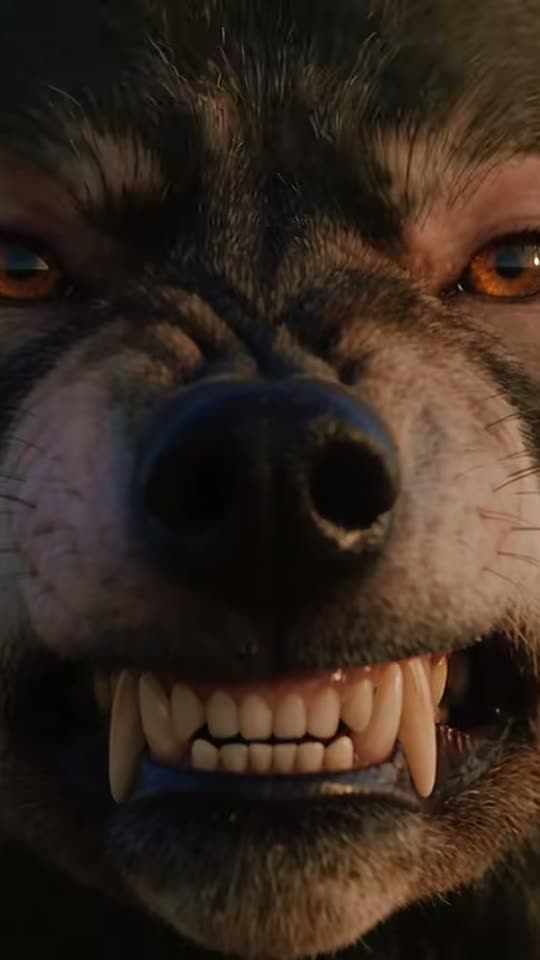
As the camera spins, your bones crack, your jaw extends into a muzzle and wild wolf fur spreads across your body until a dire wolf replaces you. Upload one photo of yourself or your pet for a 10-second video with growls and howling.

The original AI Werewolf reel by @coredrop2Original reel
  • 1 photo you add
  • 10 s clip with sound
  • 9:16 for TikTok, Reels, Shorts
  • No watermark

No prompt to write: Add your photo and tap once

Create your own

Ready in a few minutes · From 56 credits

The AI werewolf trend creates a 10-second transformation clip from a single photo: you collapse in agony, your jaw elongates into a muzzle, your frame expands and wild fur spreads until a dire wolf emerges. Pets can transform too, howling under a full moon. It became a Halloween hit on TikTok.

Also called Werewolf transformation trend · AI werewolf filter

Example

What the AI Werewolf video looks like

This is the reel that launched the trend. Your clip is a fresh take based on your photo in this style, not a duplicate of these frames. Every run produces different results.

Original reel by @coredrop2, 10 s
An AI werewolf video by @coredrop2 (9 October 2026): a woman winces, her nose morphs into a muzzle, fangs emerge and wolf fur spreads over her face. She is AI-generated, not real. The template creates the complete body transformation using your photo.
Use this reference
Original reel by @coredrop2, 15 s
"She starts losing control in public" by @coredrop2 (8 October 2026, 420,800 views): an AI-generated woman on a crowded street collapses to all fours and transforms into a wolf while her companion looks on.
Use this reference
Step by step

How to create the AI Werewolf video on Smew AI

It runs entirely in your browser. No editing software, no prompt writing, no watermark.

  1. Upload your photo

    Click "Create your own" and upload a photo showing your face clearly. Snap it with your camera or choose from your library.

  2. Click Generate

    The button displays the cost. Seedance 2.5 creates the AI Werewolf scene directly from your photo, no intermediate image needed, producing 10 seconds with authentic sound. No prompt required.

  3. Download or share

    Your video renders in minutes as a 9:16 MP4. Save it, post it directly from your device, or retrieve it later from your Library.

Which photo works best?

You need one clear photo: yourself for Human, your pet for Pet.

  • Human: face visible, well-lit, facing the camera, from waist up or full-length. The opening frames focus closely on your agonized face before fur appears, so facial clarity matters most. You keep your outfit until it rips.
  • Pet: entire animal visible, eyes showing, shot in daylight. Works for both dogs and cats. The wolf retains your pet's coloring and patterns.
  • One subject per photo. Upload your own image or one from a consenting adult. Never use celebrities, strangers or children.

Where did the AI Werewolf trend start?

AI werewolf videos existed since quality AI video emerged, but the transformation became a genuine trend in early October 2026. An AI content maker, @coredrop2, released several: a woman resisting the transformation under a full moon in a snowy forest (4 October, 287.2K views), a woman who "starts losing control in public" on a packed shopping street (8 October, 420.8K views) and a slow "head morph" from human face to wolf (9 October, 296.9K views). These women are AI creations.

The prompt powering this template originated from a creator guide: on 19 August 2026, @hencuy.cc published a complete Seedance 2.5 prompt for "a cinematic human-to-werewolf transformation": 360° camera rotation, dislocating bones, a jaw extending like a dire wolf's, fur growth, an emerging tail, 35 mm film aesthetic, set in a poorly lit washroom. Smew AI applies that prompt to your photo. US searches for "ai werewolf" jumped from 390 monthly in July to 880 in September, with Halloween falling on Saturday, 31 October 2026.

  1. @hencuy.cc shares a guide with a complete Seedance 2.5 prompt for a cinematic human-to-werewolf transformation in a dark washroom. TikTok

  2. US Google searches for "ai werewolf" hit 880 monthly, rising from 390 in July; "werewolf halloween" hits 2,400, up from 720.

  3. @coredrop2 shares an AI video of a woman transforming into a werewolf beneath a full moon in a snowy forest; it surpasses 287,000 views. TikTok

  4. @coredrop2's "She starts losing control in public", featuring an AI woman who becomes a wolf on a crowded street, surpasses 420,000 views. TikTok

  5. @coredrop2's "Head morph" video, showing a face gradually becoming a wolf's, surpasses 296,000 views and 22,000 likes. TikTok

  6. On TikTok, #werewolf contains 623,195 videos and 7.8 billion views; #werewolftransformation contains 1,581 videos. TikTok

Copy and paste

The AI Werewolf prompts

This isn't necessary: the single-tap workflow handles it automatically. [Image 1] is your photo: the video model uses it as reference and creates the scene directly from it, skipping any intermediate photo stage.

Human

1 photo: you, face clearSeedance 2.510 s · 720p · 9:16126 credits
Video prompt

The person in this clip is the person in [Image 1]: copy the exact face from [Image 1] (the face shape, eye color and eye shape, eyebrows, nose, mouth, skin tone, age, hair color, hair length and hairstyle, and any beard, moustache, glasses or freckles), and the clothes from [Image 1], so their friends recognize them at once. In the first 3 seconds the face is large, sharp and clearly the face from [Image 1]; the eye color stays theirs. If [Image 1] shows an animal, that animal is the one that transforms. A dramatic intense scene, camera spin 360° around the person in [Image 1], they are in pain as their bones dislocate and skin ripple, camera captures the intricate details as their body transforms gradually. Their jaws gradually elongate like a dire wolf, their body gradually grows bigger and muscular as their clothes rip while their body gets bulky and muscular, gradually their whole body gets covered with thick wild wolf fur and they transform into a majestic dire wolf. Camera captures their facial expressions while the camera dynamically orbits around them, crash zoom in and out focusing on their facial expressions and body, the growing furry tail, anamorphic lens, 35mm film, lens glare, a cinematic masterpiece, in a dimly lit environment of a washroom. Audio: heavy breathing, cracking bones, tearing cloth and a low growl that grows into a wolf's howl at the end. No music, no words. Exactly one person, who becomes one wolf. No nudity: the torn clothes and the growing fur always cover the body. No blood, no gore. No text, no subtitles, no logos, no watermark.

1590 characters

Pet

1 photo: your pet, whole bodyKling 3.010 s · 1080p · 9:1656 credits
Video prompt

Use the uploaded image as the base. 9:16 vertical photo, a dark cinematic film still: anamorphic lens, 35mm film, soft lens glare. The pet from the uploaded image stands on a dark backyard lawn at night under a huge, bright full moon, a wooden fence and black trees behind, cold blue moonlight, its whole body in view, facing the camera three-quarters, the moonlight on its fur. Exactly one animal and no people. No clothes on the pet. No text, no logos, no watermark.

468 characters

What's the credit cost?

Videos cost credits, with the exact amount displayed on the Generate button before you commit. The single-tap price includes both scene photo and video, charged once. Each version has different pricing: Human 126 credits, Pet 56 credits. Cheaper models are available if you manually run the prompts in AI Video.

Video modelSettingsCredits
Human: Seedance 2.5 (this template)10 s, 720p, direct from your photos, one tap126
Pet: Kling 3.0 (this template)10 s, 1080p + 1 scene photo, one tap56

One-time packs and plans are on the pricing page. A failed video gives its credits back.

What happens during the werewolf transformation, frame by frame?

The Human version uses the creator's prompt: an intense scene in a dark, grimy washroom, shot like horror cinema on 35 mm with anamorphic lenses.

TimeHumanPet
0-3 sYou, recognizably you, collapse in agony as the camera begins circling.Your pet appears in a shadowy backyard beneath a massive full moon, then recoils.
3-7 sYour bones crack, your skin ripples, your jaw elongates like a dire wolf's, your frame expands and your outfit rips. Rapid zooms on your face.Its bones crack, its jaw elongates, it grows larger and wild wolf fur spreads across it.
7-10 sWild, matted fur covers you, a tail emerges, and a dire wolf occupies your space.A dire wolf matching your pet's coloring raises its head toward the moon and howls.

Audio is generated with the video: labored breathing, bone cracks, fabric tearing, a growl and a howl. No music track, leaving you free to add your own when posting.

Is this a real-life werewolf transformation? No: it's AI-generated, so nobody needs makeup sessions. That's also why the transformation scene can unfold around a realistic version of you in 10 seconds.

Human or Pet, Standard or Best: what's the difference?

Human or Pet? Click "Create your own" and choose one.

HumanPet: Standard (default)Pet: Best
How it worksSeedance 2.5 creates the video directly from your photo, no intermediate image, so your face remains yours until fur appearsNano Banana 2.1 places your pet in a moonlit backyard as a still, then Kling 3.0 animates the transformationSame still generation, then Seedance 2.5 animates it
PlaceA dark washroom (the creator's setting)A backyard beneath a full moonSame
Length10 s10 s10 s
FrameVertical 9:16, 720pVertical 9:16, 1080pVertical 9:16, 720p
PriceDisplayed on the buttonLowerHigher

No prompt writing needed: the template already contains the creator's prompt, timestamped. The precise cost appears on the Generate button before you spend.

The Human version works for anyone: male or female werewolf transformation, any adult over 18. The examples above feature AI-generated women, and the prompt adapts to whoever's in your photo.

What can go wrong, and how do you fix it?

ProblemFix
Your face is barely visible before transformationThe prompt maintains your face large and sharp for the opening 3 seconds. Upload a close, sharp, well-lit photo, then regenerate.
You finish as a bipedal half-wolfThe prompt aims for a dire wolf ending, but some runs halt midway. Regenerate.
The camera rotation shows your head's back too longEach run is a fresh take. Regenerate.
Your pet's wolf shows wrong colorsThe prompt preserves your pet's coloring and markings. Upload a photo showing them clearly, or choose Best.
The transformation appears jerky on Pet StandardChoose Best: Seedance 2.5 animates the change more fluidly.
The video model rejects the photoSome photos get declined. Credits refund automatically; try a different photo.

Outcomes vary between runs, so a retry often resolves minor issues.

How should you share it for Halloween?

Halloween falls on Saturday, 31 October 2026, and October is when werewolf Halloween content peaks: US searches for "werewolf halloween" climbed from 720 monthly in July to 2,400 in September.

Captions that work: "When someone mentions a full moon tonight", "Me one hour past coffee time", "POV: dinner got skipped", "Halloween costume: done" or "Tell me you're a Scorpio without saying it". As a werewolf transformation meme, it performs best when your caption describes an ordinary situation that the wolf disrupts.

Hashtags: #werewolf (623,195 TikTok videos on 16 October 2026), #werewolftransformation (1,581) and #aiwerewolf. Maintain the platform's AI disclosure: the video is AI-generated.

More Halloween videos: cast your partner or pet in a zombie romance with the AI zombie trend, experiment with looks in AI Halloween costume, or appear in a 90s horror phone scene with the Ghostface trend.

FAQ

AI Werewolf trend questions

What is the AI werewolf trend?
It's a Halloween video trend where AI transforms a person or pet into a werewolf: the jaw elongates, the frame expands, fur spreads everywhere and a dire wolf remains. The trend exploded in October 2026 with AI videos by @coredrop2 that exceeded 420,000 views. Here you create your own AI werewolf transformation using one photo.
Can I become a werewolf from my own photo?
Yes. Select Human and upload one sharp photo of yourself. You transform into a werewolf on camera: you begin as yourself, in agony, then shift into a werewolf and finish as a dire wolf. It's a human to werewolf transformation in one 10-second shot.
Can I become a wolf rather than a half-wolf?
Yes, that's what the creator's prompt specifies: you become a wolf, a four-legged dire wolf, by the end. Some runs halt at a bipedal half-wolf; regenerate if you want the complete wolf.
What would I look like as a werewolf?
Create the video to find out: the opening frames show your actual face, then the wolf emerges. The fur color derives from the setting and your own hair, so each person gets a unique wolf.
Does it work for a female werewolf transformation?
Yes. The template adapts to whoever's in your photo: a woman gets a female werewolf transformation video, a man gets the male version. "Werewolf transformation female" receives 2,900 US monthly searches (September 2026), and both examples here feature AI-generated women. It's the same ai werewolf transformation for both female and male werewolf transformation videos.
Can my dog become a werewolf?
Yes. Select Pet and upload a photo of your dog. Your dog transforms into a werewolf, a dire wolf matching its own coloring, beneath a full moon, then howls. It creates an excellent dog werewolf meme, and it's the simplest way to see my dog as a werewolf without physical costumes: dog to wolf AI in one video.
Is this a werewolf filter or a wolf filter?
It's not a live camera werewolf filter or wolf filter like those on TikTok or Snapchat. It's a complete werewolf transformation video generated from one photo. You don't need a werewolf filter app: it's a werewolf filter online, in your browser, and unlike a werewolf face filter or a werewolf photo filter, your entire body transforms.
Is there a werewolf filter on TikTok?
TikTok offers werewolf filter TikTok effects (#werewolffilter contains 174 videos) and CapCut provides "my pet wolf" templates, a pet wolf filter that modifies a photo. This AI wolf filter alternative produces a 10-second video with actual transformation: a werewolf transformation filter that animates. Share it with the same hashtags as any wolf filter TikTok video.
Is this an AI werewolf generator?
Yes: a werewolf generator and a werewolf AI generator designed for one trend. It's an AI werewolf video maker: werewolf transformation AI from your photo. The video is werewolf AI generated, so maintain the AI disclosure when sharing. If you wanted a werewolf transformation AI generator video tool, this is it, with the prompt pre-written.
What prompt does the template use?
The werewolf AI prompt that @hencuy.cc published in a TikTok guide on 19 August 2026, designed for Seedance 2.5: a werewolf Seedance prompt featuring 360° camera rotation, dislocating bones, a dire wolf jaw, fur growth, an emerging tail, 35 mm film aesthetic and a dark washroom. Smew AI incorporates your photo, preserves your face for the opening frames and prohibits text and gore. You don't need to replicate the werewolf transformation prompt: it's pre-built.
Can I get a werewolf transformation GIF?
The template makes a video: a 10-second werewolf transformation video, MP4, with sound. A GIF maker can turn any part of it into a werewolf transformation GIF or a turning into a werewolf GIF for chats. Many people post it as a turning into a werewolf meme too.
Is it a real werewolf transformation video?
No. It's AI-generated, not a real werewolf transformation video or film recording, and the examples on this page are AI-created people. It resembles a wolf transformation video from horror cinema, so never present it as authentic.
Is it a Halloween AI video?
Yes. It's among our Halloween AI video templates for October 2026, designed for sharing before Halloween on Saturday, 31 October. Check the related templates below for additional options.
What's the video length, and does it include sound?
10 seconds, vertical 9:16, as an MP4 file: 720p for Human and Pet Best, 1080p for Pet Standard. It includes original audio: breathing, bone cracks, a growl and a howl. No music track.
Does the AI werewolf video require credits?
Yes. Each video requires credits, with the precise amount shown on the Generate button before you commit. Pet Standard (Kling 3.0) requires fewer credits than Pet Best (Seedance 2.5). Failed videos refund credits automatically.

More trends

Other AI video templates

Template

Bby Wow Guy AI: Insert Your Face Into the Guy Dancing at a Quince Meme

Groove toward the camera at a quinceañera, take a bite of the concha, lock eyes with the lens while chewing with stuffed cheeks, then groove back into the crowd. Upload one photo to star as the bby wow guy, complete with the song.

Read more
Template

Bad Times AI Trend: Turn One Photo Into the Viral Argument Video

The viral argument routine: hands to head, hip pose, stop gestures and that long camera stare, all set to Imael Angel's "Bad Times". Upload a single photo of yourself or your pet and get the complete video with music.

Read more
Template

Tecktonik Dance AI: Step onto the String-Light Stage

Wide arm swings, hands reaching toward the head, both arms shooting upward, followed by rapid, precise arm choreography on a compact stage lit by string lights: the electro dance from the 2000s that Cheba Man revived in 2026. Upload a single photo of yourself or your pet to generate the dance complete with its soundtrack.

Read more
Template

AI Zombie Trend: Create a Zombie Love Story With Your Partner or Pet

Your partner or pet has become a zombie. You point a gun with tears streaming down, then drop it and embrace them. The scene cuts sharply to a bright memory together. Upload two photos, get a 10-second video with audio.

Read more
Template

Ghostface AI Trend: Put Yourself in the 90s Horror Phone Call

Picture yourself lying on satin sheets with a chunky 90s telephone to your ear, while a hooded figure in a black robe and white ghost mask stands in the shadowy doorway. Upload a selfie and get a grainy film photograph, or a brief video where you look back.

Read more
Template

AI Halloween Costume Try-On: Preview Yourself in a Costume Before Buying

Upload a full-body photo, choose or type a costume, and view yourself wearing it at a Halloween party. Upload two photos for matching couple costumes, and create a quick transition video showing the costume change.

Read more

Create your own AI Werewolf video

Upload one photo and tap once. No prompt writing. 126 credits.

No watermark. A failed video gives its credits back. Secure checkout by Stripe.