smew.ai

AI Halloween Costume Try-On: Preview Yourself in a Costume Before Buying

Upload a full-body photo, choose or type a costume, and view yourself wearing it at a Halloween party. Upload two photos for matching couple costumes, and create a quick transition video showing the costume change.

The original Halloween Costume reelOriginal reel
  • 1 photo you add
  • 2K photo you can turn into a video
  • 9:16 for TikTok, Reels, Shorts
  • No watermark

No prompt to write: Add your photos and tap once

Create your own

Ready in a few minutes · From 3 credits

With an AI Halloween costume try-on, preview yourself wearing any costume on your actual body before buying or creating it. Upload a full-body photo, select or type a costume like witch, vampire or zombie bride, and receive a 2K image of yourself at a Halloween party. Upload two photos to create couple costumes.

Also called AI costume · AI Halloween costume try-on · Halloween costume try-on · AI costume changer · Costume transition · Halloween costume transition

Step by step

How to make the Halloween Costume photo on Smew AI

Everything runs in the browser. No editing app, no prompt to write, no watermark.

  1. Add your photo

    Press "Create your own" and upload your full-body photo. Capture it with the camera or select it from your library.

  2. Press Generate

    The button displays the price. Nano Banana 2.1 places your photo into the Halloween costume scene and creates one 2K photo. You don't write any prompt.

  3. Download or share

    Your photo is ready within a few minutes as a 9:16 2K image. Download it, share from your phone, convert it to video, or retrieve it later from your Library.

Which photo works best?

Upload one sharp, full-body photo, from head to shoes, so the model can see your height, build and posture. Since costumes cover mostly the body, a face-only selfie doesn't give enough information.

  • Stand straight facing the camera in good daylight. Any room is fine: the prompt relocates you to a Halloween party.
  • Fitted, simple clothes reveal your shape. Oversized coats conceal it.
  • Style your hair as you intend to wear it on the night.
  • For Couple costume, upload two photos with one person each. The first photo appears on the left and receives the first role in a pair, like the angel in "Angel and devil".
  • Upload your own photo, or a photo of an adult who gave permission. Never use celebrity photos. This template creates AI costumes for adults only.

Where did the Halloween Costume trend start?

Trying on Halloween costumes with AI isn't a single viral video. It's a growing practice every October. US Google searches for "ai halloween costume" rose from 1,900 in October 2024 to 2,900 in October 2025, and during the first week of October 2026 Google Trends shows "ai costume" approaching the same week in 2025, over double the 2024 numbers.

The National Retail Federation (NRF) tracks this too. In its 2025 survey, 6% of respondents planned to use AI tools like ChatGPT, Copilot or Gemini for costume selection. Its 2026 survey, released on 22 September 2026, asked a wider question: 47% said they use AI platforms and tools for Halloween shopping, primarily to brainstorm ideas (34%) and research products (32%). Costumes represent significant spending: $2 billion for adults this year, with the witch (4.8 million people) and vampire (4.2 million) topping the adult list.

For video content, the "costume transition", showing everyday clothes transforming to full costume in one cut, became a Halloween social media trend in 2025. The AI Halloween costume generator on this page creates both: the try-on photo and the Halloween costume transition video.

  1. The NRF finds that 6% of respondents plan to use AI tools like ChatGPT, Copilot or Gemini for costume inspiration; online search (37%) remains the primary source. NRF

  2. Perfect Corp. reports Halloween looks in its YouCam apps generated over 176,000 digital try-ons in one week. Perfect Corp. via Nasdaq

  3. marketing4ecommerce includes the costume transition video, showing everyday clothes changing to full costume in one cut, among the 8 Halloween social media trends for 2025. marketing4ecommerce

  4. The NRF's 2026 survey reveals that 47% of shoppers use AI platforms and tools for Halloween shopping; witch and vampire are the leading adult costumes. NRF

  5. US Google Trends for "ai costume" shows 31 for the week of 4 October 2026 (week incomplete), compared to 34 in the same week of 2025 and 14 in 2024. Google Trends

Copy and paste

The Halloween Costume prompts

You don't need this: the one-tap flow handles it for you. The photo prompt places your photo into the scene. Want to modify it? Copy and edit it in AI Photo.

Your costume

1 photo: your photo, whole bodyNano Banana 2.1Photo · 2K · 9:163 credits
Photo prompt

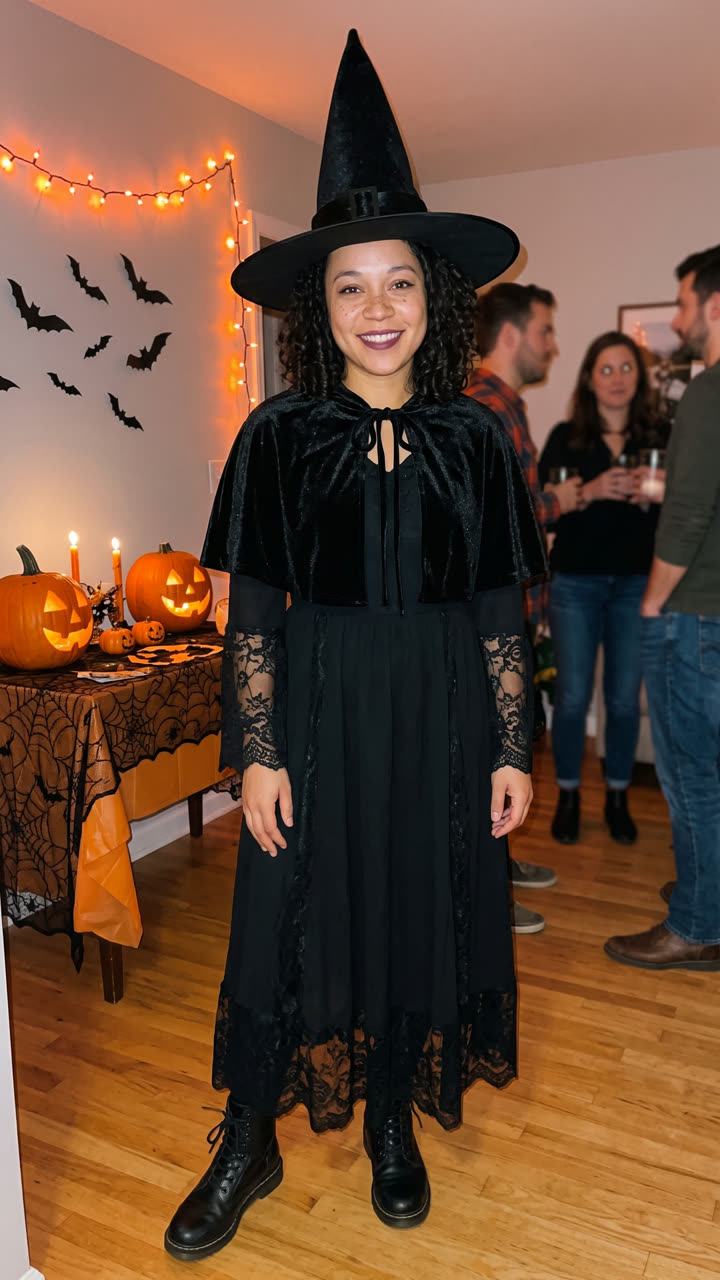
Use the uploaded image as the base. Keep the person's face, facial features, skin tone, hair color, hairstyle, age, height and body shape exactly the same as in the photo, so they see how the costume really looks on them. Do not slim, reshape or beautify the face or the body. Dress the person in a complete, high-quality Halloween costume made for an adult: a classic witch costume with a tall black pointed hat with a wide brim, a long black witch robe with lace sleeves, a short black cape and black boots, plus light, matching makeup that keeps the face fully recognizable. The costume fits the person well, like a good store-bought costume. The person stands full body, head to shoes, at a cozy Halloween house party at night and smiles at the camera in a relaxed pose: orange string lights, carved jack-o'-lanterns on a table, paper bats on the wall and a few friends blurred in the background. A real phone photo taken by a friend with the flash on, natural skin texture, slight grain. The face and the whole costume are sharp and in focus. Vertical 9:16. Exactly one person in focus. No camera app interface, no icons, no frames or overlays. No text, no logos, no brand marks.

1184 characters

Couple costume

2 photos: first person (left) + second person (right)Nano Banana 2.1Photo · 2K · 9:163 credits
Photo prompt

Use the two uploaded images as the base. The person in the first image stands on the LEFT. The person in the second image stands on the RIGHT. Keep each person's face, facial features, skin tone, hair, age, height and body shape exactly the same as in their own photo. Do not blend the two people, do not swap their faces, and do not slim or beautify anyone. Dress the two in a matching Halloween couple costume made for adults: an elegant vampire couple. Both wear dark Victorian-style outfits in black and deep red that suit each person, high-collared black capes with a blood-red lining, small fangs and pale vampire makeup with dark lips that keeps each face fully recognizable. The costumes fit well, like good store-bought costumes. The two stand side by side, full body, head to shoes, close together with an arm around each other, smiling at the camera at a cozy Halloween house party at night: orange string lights, carved jack-o'-lanterns on a table, paper bats on the wall and a few friends blurred in the background. A real phone photo taken by a friend with the flash on, natural skin texture, slight grain. Both faces and both costumes are sharp and in focus. Vertical 9:16. Exactly two people in focus. No camera app interface, no icons, no frames or overlays. No text, no logos, no brand marks.

1310 characters

How many credits does it cost?

You pay per photo using credits, and the create page displays the exact cost on the Generate button before any charge. The one-tap price includes one 2K photo, charged once. One photo is 3 credits, so the smallest one-time pack that covers this is $9.99 for 100 credits, without a subscription. A smaller 1K photo costs less if you manually run the prompt in AI Photo.

ModelSettingsCredits
Your costume: Nano Banana 2.1 (this template)2K photo, 9:16, one tap3
Couple costume: Nano Banana 2.1 (this template)2K photo, 9:16, one tap3
Costume reveal video: Seedance 2.0 Mini (this template)6 s, 720p + 1 scene photo, one tap17
Nano Banana 2.1 (by hand in AI Photo)1K photo, 9:16, same prompt2

One-time packs and plans are on the pricing page. A failed video gives its credits back.

What should I be for Halloween? Try three costumes before you buy one

"What should I be for Halloween" received approximately 33,100 US Google searches in October 2025. If you're wondering this year, a quiz or list of Halloween costume ideas provides names; an AI try-on shows you wearing them rather than a model on packaging. Create the same photo with three different costumes and select your favorite.

Press "Create your own", then enter a costume in Make it yours or select a quick pick. Leave blank for the classic witch. Witch and vampire lead the adult list in the NRF's 2026 survey, making them the safest picks for "what should I be for Halloween 2026". Each run produces one 2K photo.

Quick pickNotes
Witch (the default)The classic witch costume: a tall pointed hat, a long black witch robe with lace sleeves, a short cape and boots. Our first example.
VampireA vampire costume with a high-collared black cape, a red lining and a Victorian outfit. We tested it on an AI-made man.
Skeleton, Zombie bride, Angel, Devil, Pirate, MummyThe prompt asks for the classic adult version of each, with matching makeup and props.

You can also enter your own concept, like "80s aerobics instructor" or "bat". The prompt creates a generic version of the concept, without logos and without copying a famous character's specific design, so film or comic heroes appear as look-alike costumes, not exact replicas.

The photo displays how a costume appears on you, not its actual fit. For sizing, check the store's size chart.

Couple Halloween costume ideas you can try on together

Couple costumes represent the largest costume search category: "couples halloween costumes" received approximately 823,000 US Google searches in October 2025. The Couple costume version accepts two photos and dresses both people in one coordinated theme, side by side at the party. If you're browsing couples costume ideas or matching Halloween costumes, the AI displays them on both of you before any purchases.

Leave blank for an elegant vampire couple, or select one of the matching couple Halloween costumes: "Angel and devil", "Witch and black cat", "Skeleton pair", "Zombie bride and groom" or "Pirate captain and first mate". For pairs, the person in the first photo receives the first role. Swap photos to swap roles.

In our tests both faces remained identical, and people didn't merge together. The model preserves each body as uploaded, so couples with significant height differences maintain them. It creates two people per photo; for group costumes, create each pair separately.

The costume reveal video: the transition trend without the editing

The "costume transition" is the Halloween video where someone stands in everyday wear, spins or snaps, and appears in full costume. On TikTok it requires two shots and precise editing. The Costume reveal video version creates it with AI from one photo, as one seamless costume change:

  1. Nano Banana 2.1 places you, wearing your own clothes, at a Halloween party.
  2. Seedance 2.0 Mini animates 6 seconds at 720p: you smile, snap your fingers and spin, orange sparks swirl around, and you stop in costume, laughing, as friends cheer. The clip includes sound: the prompt requests party noise, a whoosh during the spin, cheering and an original spooky tune, without any recognizable song.

Enter a costume in Make it yours to transform the witch into anything else. We created 3 reveal clips from 2 AI-generated people using these prompts and all 3 changed only clothing, not faces. Seedance 2.0 Mini is the default (Standard). The Best option uses Seedance 2.5 for higher detail at increased cost; we didn't test it on this prompt.

What goes wrong with an AI costume try-on, and how do you fix it?

We tested these prompts on AI-generated adults before publishing. These are actual problems we encountered:

What goes wrongWhat the prompt does about itIf you still see it
A phone camera icon shows on the photoBans "camera app interface, icons, frames or overlays"It originated from "a real phone photo" in an earlier prompt. Run it again.
A man gets a witch dressThe default witch wears a robe, not a dressEnter "warlock" or "wizard" in Make it yours.
The makeup hides your faceAsks for light makeup that keeps the face "fully recognizable"Select a costume with less face paint, or add "no face paint" when typing it.
You look slimmer or tallerSays "do not slim, reshape or beautify"Use a straight, full-body photo. Wide-angle or close photos distort body proportions.
Half your body is made upThe model must invent what it cannot seeUse a photo showing head to shoes.
A famous character looks offMakes a generic costume with no logos on purposeThat is the rule, not a bug.
The video morphs the faceSays "only the clothes change, the face stays the same"It didn't occur in our 3 tests. Run it again, or select Best.
FAQ

Halloween Costume trend questions

What is an AI Halloween costume try-on?
It's a photo showing you wearing a Halloween costume, created by AI from your uploaded picture. You upload one full-body photo and choose or type a costume, and the AI dresses you in it at a Halloween party while preserving your face, skin tone, hair and body. People use it to select costumes before purchasing or making them.
How do I try on a Halloween costume with AI?
Press "Create your own", upload one full-body photo, then enter a costume in Make it yours or select a quick pick like Witch, Vampire or Zombie bride. Press Generate. Nano Banana 2.1 creates a 2K photo of you in the costume, typically within a few minutes, and it appears in your Library.
Can I type any costume I want?
Yes, up to 60 characters, like "pirate captain", "bat" or "80s aerobics instructor". The prompt always creates a generic version of your idea without logos and without copying a famous character's specific design. So film or comic heroes appear as look-alike costumes, not exact replicas.
Are there Halloween costumes AI cannot make?
A few restrictions apply here. Film or comic heroes appear as generic look-alikes without logos, each photo displays one or two people, and the template is designed for adults, not children.
Is it a Halloween costume AI generator or a try-on?
Both. A random Halloween costume generator only suggests an idea; this one displays the idea on you, created from your uploaded photo.
Where can you try on Halloween costumes?
In a costume shop's fitting room, if available, or at home using a virtual try-on like this one. You upload a photo, and the AI puts you in a Halloween outfit of your choosing, like a witch hat and black dress.
Can it give me AI costume ideas?
Yes. The quick picks are Halloween costume ideas you can view on yourself immediately, and you can enter your own. For women or men, witch and vampire are the two leading adult costumes in the NRF's 2026 survey.
Which AI Halloween costumes work best?
Costumes featuring light makeup, like the witch and vampire we tested on AI-generated adults, keep your face easily recognizable. Heavy face paint can obscure it; if that happens, add "no face paint" with the costume and run it again.
Can it make a Halloween outfit instead of a full costume?
Yes. Enter something simpler, like "black dress and witch hat", and the generator creates an AI Halloween outfit rather than a full costume. Your face, skin tone, hair and body stay yours.
What is the AI Halloween costume prompt?
It's on this page to copy. It preserves your face, skin tone, hair and body, dresses you in the costume you select or type, and places you at a Halloween party, without logos and without copying a famous character's design.
What are the most popular Halloween costumes in 2026?
In the NRF's 2026 survey, released on 22 September 2026, the leading adult costumes are witch (4.8 million people), vampire (4.2 million), Batman (2 million), Spider-Man (1.5 million) and ghost (1.4 million). Witch and vampire are quick picks on this page; for characters, the prompt creates a generic costume.
Does the AI show if the costume will fit me?
An AI costume try-on displays how the style appears on your body, not actual fit. The prompt maintains your height and body shape and doesn't slim you, but it can't determine a store's sizes or fabric. For sizing, check the store's size chart.
Can we try on a couple costume?
Yes. Select the "Couple costume" version and upload two photos with one person each. Leave the costume blank for a vampire couple, or choose a pair like "Angel and devil" or "Zombie bride and groom". The person in the first photo appears on the left and wears the first role in the pair.
Can I make a group or family costume?
Not in one photo. This template creates one person or two people per photo, because faces remain most accurate with fewer people. For groups, create each person or pair using the same costume concept. This template is designed for adults.
Can I make a costume transition video?
Yes. Select "Costume reveal video" and upload one full-body photo. You receive a 6-second vertical video with sound: you spin at a Halloween party and your everyday clothes transform into the costume. Enter a costume in Make it yours to change the witch to something else.
Which AI models does it use?
The photo versions use Nano Banana 2.1 at 2K. The reveal video uses Nano Banana 2.1 for the opening frame, then Seedance 2.0 Mini at 720p for 6 seconds, the default (Standard) option. The Best option uses Seedance 2.5 instead. We selected Mini after it produced 5 successful clips in 5 runs on this page and the pet costume page; Veo 3.1 Lite failed 4 of 5 runs with a server error during our testing day.
Does it cost credits?
Yes. A photo costs a few credits and the reveal video costs more; the create page displays the exact cost on the Generate button before any charge. If a run fails, credits are refunded.
Why does my costume photo not look like me?
The model reconstructs you from one photo. A dark, blurry, cropped or close-up photo doesn't provide enough information, and heavy costume makeup can obscure your face. Use a sharp full-body photo in daylight, choose a costume with lighter makeup, and run it again: each run produces different results.
Is there an AI costume generator app I need to install?
No. It's an online Halloween costume maker: Smew AI runs in the browser on phones or computers. The 2K photo appears in your Library, ready to download and post.
Can I post the photo or video on Instagram or TikTok?
Yes. There's no watermark, and the video includes original sound, so it's ready to post. Keep the platform's AI label on, and use your own photos or those of adults who gave permission.
Can I see my pet in a costume too?
Yes, on its dedicated page: the [AI pet Halloween costume](/templates/ai-pet-halloween-costume) template dresses your dog or cat as a pumpkin, hot dog, ghost or anything you enter, and can place you both in matching costumes.

More trends

Other AI video templates

Template

You Look Lonely, I Can Fix That: The AI Hologram Video

A towering glowing hologram bends down through rainy neon skies toward a small person on a bridge and delivers: "You look lonely. I can fix that." Add your faces to both characters, or create a wallpaper.

Read more
Template

AI Zombie Trend: Create a Zombie Love Story With Your Partner or Pet

Your partner or pet has become a zombie. You point a gun with tears streaming down, then drop it and embrace them. The scene cuts sharply to a bright memory together. Upload two photos, get a 10-second video with audio.

Read more
Template

Ghostface AI Trend: Put Yourself in the 90s Horror Phone Call

Picture yourself lying on satin sheets with a chunky 90s telephone to your ear, while a hooded figure in a black robe and white ghost mask stands in the shadowy doorway. Upload a selfie and get a grainy film photograph, or a brief video where you look back.

Read more
Template

Ryuk AI: Place a Grinning Death God in Your Photo

Upload your photo, and a towering death god with spiky black hair, dark feathers and a huge grin appears right beside you, matching your photo's lighting. Save the photo, or create a 5 second video where he takes a bite of an apple.

Read more
Template

AI Dog Costume: Put Your Dog or Cat in Any Halloween Costume

Take one picture of your dog or cat and choose a costume: pumpkin, hot dog, ghost or type your own idea. Include your photo for a matching outfit, or create a short video with audio.

Read more
Template

Pumpkin Head Photoshoot AI: Halloween Trend From a Single Photo

Keep your clothes, swap your head for a glowing carved pumpkin in a field at twilight, with film texture. Skip carving and location scouting. Solo, couple, or short video.

Read more

Make your own Halloween Costume photo

Upload one photo and tap once. No prompt to write. 3 credits.

No watermark. A failed photo gives its credits back. Secure checkout by Stripe.