smew.ai

Earth Zoom Out AI: Turn Your Selfie Into a Space Shot

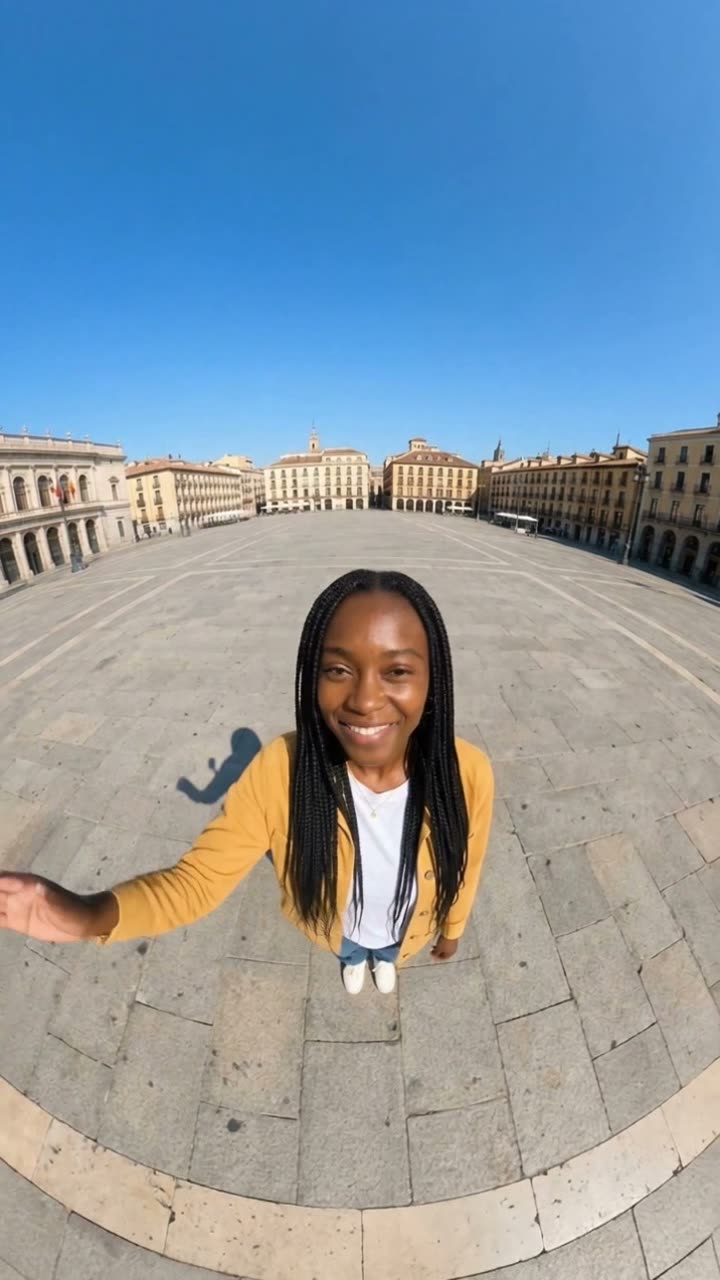
Begin with a wide 0.5x selfie as you wave. The view pulls back continuously: above your city, past the clouds, all the way to Earth floating in space.

The original Earth Zoom Out reelOriginal reel
  • 1 photo you add
  • 10 s clip with sound
  • 9:16 for TikTok, Reels, Shorts
  • No watermark

No prompt to write: Add your photo and tap once

Create your own

Ready in a few minutes · From 128 credits

An Earth zoom out video opens on a wide-angle selfie and continuously pulls away: you become a speck, the city expands below, clouds drift past, and the shot finishes with the planet hanging in the darkness. Making the AI version requires one clear photo of you.

Also called Zoom out from Earth · Zoom out of Earth · Earth zoom out to universe · Zoom out to space · Space zoom out

Step by step

Creating the Earth Zoom Out video with Smew AI

Everything happens in your browser. No editing software required, no manual prompts, no watermark added.

  1. Upload your photo

    Tap "Create your own" and upload your photo. Capture it with your camera or select one from your gallery.

  2. Tap Generate

    The button displays the cost. Smew AI assembles the Earth zoom out scene using your photo, then Seedance 2.5 renders it as a 10-second clip with original audio. No prompt writing needed.

  3. Save or post

    Your video renders in minutes as a 9:16 MP4. Save it, post from your device, or retrieve it later from your Library.

What kind of photo should I use?

Any clear image with a sharp, well-lit face will work. The photo stage rebuilds you as a 0.5x selfie in a bright outdoor plaza, so what's behind you in the source photo doesn't matter.

  • Look at the camera. The opening frame shows you gazing up at the lens.
  • One face only. Multiple faces may confuse the model or cause blending.
  • Avoid hats and large sunglasses if you want recognition in the opening moment, before you shrink away.
  • Even if you have a real 0.5x selfie shot from above, process it through the photo stage. This prepares the plaza and sky that the video prompt requires.
  • Only use photos of yourself or an adult who has given consent.

Origins of the Earth Zoom Out trend

The idea is much older than AI. Charles and Ray Eames made Powers of Ten in 1977: it opens on two people on a picnic blanket in Chicago and pulls back ten times farther every ten seconds, out past the Earth. The Library of Congress added it to the National Film Registry in 1998.

On social media the zoom out first went viral as a meme. A YouTube video from 16 September 2019 zoomed out from Germany through the Milky Way. In July and August 2022 TikTok users paired that kind of footage with text about their worries, to show how small they are next to the universe; the biggest one, posted on 1 August 2022, got about 11.5 million plays in two weeks, per Know Your Meme.

The AI version starts from your own photo instead of stock footage. It is an evergreen format rather than a new September 2026 trend: by 29 September 2026 at least three AI video template apps listed an Earth zoom preset. One of those apps claims more than 1.2 billion views on the hashtag; that is a vendor claim we could not check.

  1. Charles and Ray Eames debut Powers of Ten, a nine-minute work zooming from a lakeside picnic in Chicago to distant galaxies. Eames Foundation

  2. Powers of Ten is inducted into the US National Film Registry by the Library of Congress. Wikipedia

  3. A YouTube clip zooming from Germany through the galaxy is uploaded; it later inspires a TikTok meme format. Know Your Meme

  4. The top "zoom out to the universe" TikTok from the meme wave hits approximately 11.5 million views in fourteen days. Know Your Meme

  5. A minimum of three AI video template platforms introduce an Earth zoom preset that begins with a single photo.

Copy and paste

Earth Zoom Out prompts

No need to use these: the one-tap workflow handles them automatically. A photo prompt places you into the scene, then a video prompt brings it to life. Want to modify them? Copy and adjust them in AI Photo and AI Video.

Earth zoom out

1 photo: your photoSeedance 2.510 s · 720p · 9:16128 credits
Video prompt

Use the uploaded image as the base. Keep the subject's face, facial features, skin tone, and hair exactly the same. Turn the photo into an authentic ultra-wide 0.5x phone selfie taken from slightly above head height: the subject stands alone in the middle of a wide sunny city plaza, looking up into the lens with a relaxed smile. Strong wide-angle distortion, head large in the upper center, plaza and rooftops curving away, big blue sky. Vertical 9:16. No text, no logos.

473 characters

Credit cost breakdown

Videos are priced per render in credits, with the exact cost shown on the Generate button before you commit. The one-tap price includes both the scene photo and the video in a single charge. One video costs 128 credits, so the smallest one-time pack covering it is $14.99 for 150 credits, no subscription required. Cheaper models are available if you manually run the prompts in AI Video.

Video modelSettingsCredits
Seedance 2.5 (this template)10 s, 720p + 1 scene photo, one tap128
Seedance 2.0 Fast (by hand in AI Video)10 s, 720p + 1 photo68
Veo 3.1 Fast (by hand in AI Video)8 s, 720p + 1 photo14

One-time packs and plans are on the pricing page. A failed video gives its credits back.

Why begin with a 0.5x selfie?

A phone's 0.5x lens captures ultra-wide. Positioned overhead and tilted down, it enlarges your face at the top while bending the surroundings below. This style serves two purposes in the trend.

First, it feels authentic. The 0.5x selfie is familiar from everyone's camera roll, so the first second looks like a typical post, and the surprise hits when the pullback continues. Second, it gives the video model momentum. The frame already looks downward with ample sky and space, making upward movement the obvious progression. A standard, level portrait offers no clear direction, often causing the model to cut or drift sideways.

What creates the continuous shot, and why is it important?

The entire impact relies on an uninterrupted camera movement. If the video jumps from the plaza to an aerial view, it resembles two unrelated clips spliced together. When the ascent is unbroken, the viewer experiences the scale.

The video prompt achieves this through three techniques. It begins with "one continuous take with no cuts". It sequences the locations in progression: you, the plaza, the city, the shoreline and mountains, the clouds, the curved horizon, then space. And it specifies the camera "smoothly backward and up" as a single sustained motion the model can maintain for 10 seconds. If you modify the prompt, preserve the location order and keep each step vertically above the previous.

Common issues with AI Earth zoom out videos and solutions

ProblemFix
The video cuts to a new scene halfwayRun it again, keeping "one continuous take with no cuts" at the prompt's beginning.
The camera halts at cloud level and never reaches spaceTry 12 seconds rather than 10 in AI Video; the added duration allows the ascent to complete.
Your face shifts during the opening secondUse a crisper photo, and review the still before animating. The video replicates what the still presents.
The Earth appears flat or shows strange continentsTypical with rapid ascents. A second generation usually produces a better planet.
The opening frame isn't a 0.5x selfieRegenerate the still before spending credits on animation.

Extending the zoom to the universe

The default prompt concludes with Earth surrounded by stars, where most posts finish. To continue farther, as the 2022 "zoom out to the universe" meme did, append these steps to the video prompt's end in sequence: "the Earth diminishes to a blue speck, the Moon and Sun drift past, the planets turn into distant points, then the entire Milky Way spirals into view below".

Allocate more duration for the extended journey: 15 seconds instead of 10 on Seedance 2.5, which supports up to 30 seconds. More waypoints in the same timeframe causes each to flash by. For posting, place the punchline in on-screen text or the caption, not in the video itself: "me thinking about that thing I said in 2019" lands best over the final cosmic view.

FAQ

Earth Zoom Out trend FAQ

What is the Earth zoom out trend?
It's a video style that begins close on someone and continuously pulls away until Earth appears in space. The concept originates from the 1977 film Powers of Ten. AI versions now generate it from a single photo, typically opening with a 0.5x selfie.
How do I create an Earth zoom out AI video of myself?
Tap "Make this video" on this page. Upload one clear photo to AI Photo; the prompt converts it to a 0.5x selfie in a bright plaza. Review the still, then tap the film button. AI Video animates it over 10 seconds, ascending from you to the city, clouds and full Earth, with audio.
Can I use an actual 0.5x selfie instead of the photo step?
Yes. Open AI Video with the video prompt and upload your own ultra-wide selfie captured from above as the starting frame. It performs best when the selfie is outdoors with visible sky and ground. Indoor selfies force the model to rise through a ceiling, which often appears strange.
What's the ideal length for an Earth zoom out video?
The template defaults to 10 seconds, sufficient for the city, clouds and planet. Switch to 12 seconds if the ascent terminates early, and 15 seconds if you extend the prompt to the universe. Shorter durations rush the middle segment.
Can the zoom start from my hometown?
You can specify a location in the photo prompt, such as "a wide sunny plaza by the sea in a Mediterranean town", and the model constructs a matching scene. It invents the layout from general data, so it won't reproduce an actual map. Don't expect your specific street to appear.
What audio suits an Earth zoom out video?
The file includes its own original audio: plaza ambience, ascending wind, a deep rumble, then near-silence in space. Many creators overlay a slow, dramatic trending audio in their posting app, timing the peak as Earth appears. The platform's licensed music library avoids copyright issues.
More trends

Other AI video templates

Template

Bby Wow Guy AI: Insert Your Face Into the Guy Dancing at a Quince Meme

Groove toward the camera at a quinceañera, take a bite of the concha, lock eyes with the lens while chewing with stuffed cheeks, then groove back into the crowd. Upload one photo to star as the bby wow guy, complete with the song.

Read more
Template

Bad Times AI Trend: Turn One Photo Into the Viral Argument Video

The viral argument routine: hands to head, hip pose, stop gestures and that long camera stare, all set to Imael Angel's "Bad Times". Upload a single photo of yourself or your pet and get the complete video with music.

Read more
Template

Tecktonik Dance AI: Step onto the String-Light Stage

Wide arm swings, hands reaching toward the head, both arms shooting upward, followed by rapid, precise arm choreography on a compact stage lit by string lights: the electro dance from the 2000s that Cheba Man revived in 2026. Upload a single photo of yourself or your pet to generate the dance complete with its soundtrack.

Read more
Template

Storm AI Trend: Stay Still as the Crowd Bows

Picture yourself motionless at the center in white. A sea of figures in black suits surrounds you, snapping and bowing to a hard beat. Upload one photo, get a 10-second video with audio.

Read more
Template

AI Cinema Breakout Video: The Train Comes Out of the Screen

Picture yourself in the front row of a dark theater. A steam train on screen crashes through into the audience and hovers over you. You scream, then break into laughter. Upload a photo, get an 8-second video with audio.

Read more
Template

Giant Bed AI Trend: Create "The Bed of My Dreams" Video

You hop onto an enormous white bed that takes up the whole room, crawl for what feels like forever, then collapse into the pillows. Upload one photo of yourself or your pet, get a 10-second video with audio.

Read more

Build your Earth Zoom Out video

Upload one photo and tap once. No manual prompts. 128 credits.

No watermark. A failed video gives its credits back. Secure checkout by Stripe.