
smew.ai

Elsa AI Trend: Transform Into the Ice Queen, Starring Your Child

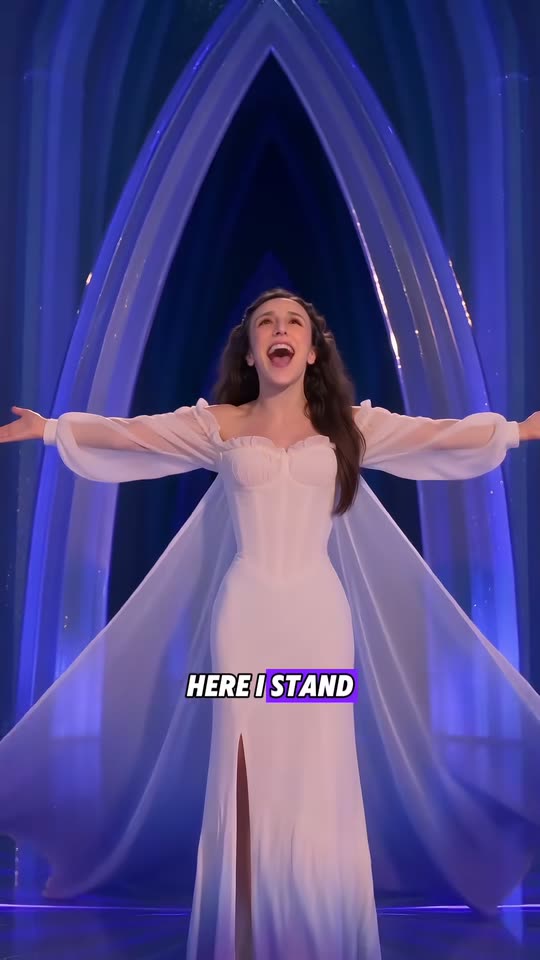
Watch your child, yourself or your pet perform in a crystal ice palace: arms rise up, a flowing cape appears, the dress transforms to frost as the melody continues. Upload one photo, receive a 14-second video with the original audio.

The original Elsa AI Trend reel by @mer1pao.usOriginal reel
  • 1 photo you add
  • 14 s clip with sound
  • 9:16 for TikTok, Reels, Shorts
  • No watermark

No prompt to write: Add your photo and tap once

Create your own

Ready in a few minutes · From 213 credits

The Elsa AI trend transforms your child, or yourself, into the ice queen from Frozen performing the iconic song: they sing in a crystal palace while a flowing cape and frosted dress materialize. Your photo replaces the performer in an actual viral AI video of this trend. Just one clear photo required.

Also called ai elsa · frozen ai · frozen ai trend · let it go ai trend · frozen trend tiktok · elsa transformation · elsa dress transformation · mini elsa ai

Example

Preview of the Elsa AI Trend video

Here's the source reel. Your photos swap in for the performers, creating your version with identical scenes and your faces. Each generation produces unique results.

Original reel by @mer1pao.us, 14 s
Source reel from @mer1pao.us: Paola, the mother, inserted herself using AI. She performs in a glowing crystal hall, raises her arms, a flowing cape emerges, the dress hem turns purple with frost, finishing in an ice archway. Your photo replaces her, keeping the original audio.
Use this reference
Original reel by @user268785799501, 14 s
Source reel from @user268785799501: an AI-generated tabby performs on an ice terrace beneath the aurora, strikes a pose in a crystal hall and twirls through magical swirls. Your pet replaces the cat, with the original audio intact.
Use this reference
Step by step

Steps to create the Elsa AI Trend video on Smew AI

Everything happens in your browser. No editing software needed, no prompt writing, no watermark added.

  1. Upload your photo

    Click "Create your own" and upload a photo of your child or yourself. Capture with your camera or select from your gallery.

  2. Click Generate

    The button displays the cost. Seedance 2.5 places your photos into the Elsa AI trend video and recreates it scene by scene for 14 seconds, including the original audio. No prompt required.

  3. Download or share

    Your video arrives within several minutes as a 9:16 MP4. Download it directly, share from your device, or access it later through your Library.

What makes a good photo?

Upload one clear photo of the performer: your child, yourself, or your pet for Pet.

  • Facing camera directly, eyes visible, in natural light. No sunglasses, hats, or face filters. The opening shows a waist-up view, making facial clarity most important.
  • Waist-up or full-body shots work best. The dress and cape are taken from the reel, so any clothing is acceptable.
  • Include only one person or pet per photo. Multiple subjects may confuse the model.
  • Hair matters: long hair will blow in the reel's wind effects, short hair remains short.
  • For children, only use photos of your own child, never others.
  • For Pet, choose a clear photo showing the entire animal with visible facial features.

Origins of the Elsa AI Trend

The scene is "Let It Go", the song the ice queen Elsa sings as she builds her ice palace in Disney's Frozen (2013). In 2026, AI video turned it into a family trend.

On 5 August 2026 the TikTok account @mer1pao.us (MPRA.Family, "Real family, unreal worlds") posted their two daughters in the film's scenes, made with AI: "Recreating the ENTIRE iconic Frozen movie scene with your daughters using AI". It had 191,200 views by 12 October. Their 25 August clip of the younger girl's ice-gown transformation passed 265,000 views, and fans noticed that the AI voice changes the words of the chorus. Then the rest of the family took a turn: Mom Paola in a white ice gown on 22 September, then Dad in warrior armor and an aunt in a pink gown.

In late September, AI video apps started to sell the format as a one-photo "Frozen trend with your kid" template, with Facebook and Instagram ads from 28 September, and AI pet creators made their cats sing in ice palaces. The Human version on this page copies Paola's reel; the Pet version copies an AI cat reel.

  1. Disney releases Frozen. The ice queen's performance while building her crystal palace becomes the film's most memorable sequence. Wikipedia

  2. @mer1pao.us shares their daughters in AI-recreated Frozen scenes. By 12 October: 191,200 views and 1,565 likes. TikTok

  3. The family posts the younger daughter's AI ice-gown transformation: "Your toddler hits the ultimate high note". By 12 October: 265,500 views and 2,872 likes. TikTok

  4. Mom Paola's turn: "The kids had their turn, now Mom is unleashing full Elsa energy". The Human version replicates this reel (12,900 views and 164 likes by 12 October). TikTok

  5. @user268785799501 shares an AI tabby cat performing and spinning in an ice palace beneath the aurora, tagged #letitgo #aicat. By 12 October: 19,400 views and 1,214 likes. TikTok

  6. An AI video platform launches Facebook and Instagram ads for a "Frozen trend with your kid" template: transforming a child's photo into the ice queen in the performance scene.

Copy and paste

Prompts for the Elsa AI Trend

You won't need these: the single-tap workflow runs them automatically, along with the trend video. [Image 1] and [Image 2] represent your two photos, and [Video 1] represents the trend video being replicated.

Human

1 photo: your kid or youSeedance 2.514 s · 720p · 9:16213 credits
Video prompt

Recreate the reference video [Video 1] shot for shot: the same glowing blue ice hall with tall ice pillars and a shiny dark-blue ice floor with reflections, the same white gown with long sheer sleeves, the long sheer cape that forms and the purple frost that rises at the hem, the same shot from high above, the same low shot behind the trailing cape, the same tall pointed ice archway at the end, the same cold blue light, the same camera moves, cuts, framing and timing. The ONLY change: the singer is now the person in [Image 1]. The singer = the person in [Image 1], in every frame where the head is visible: copy the exact face from [Image 1] - face shape, eye color and eye shape, eyebrows, nose, mouth, skin tone, age, hair color, hair length and hairstyle, and any beard, moustache, glasses or freckles exactly as in the photo. The same real person in every frame, from the first close-up to the last shot under the archway, so their family instantly recognizes them. Never morph, never drift back to the original singer's face, never add or remove facial hair. No long dark curly hair unless [Image 1] shows it. If [Image 1] shows a child, the singer is that same child at the same age, with a child's height and body, in a child-size version of the gown. Only the face, the hair and the body size change: the singer always wears the white gown of the reference with its own long sheer white sleeves, never the clothes from [Image 1] (no shirt, sweater or colored sleeves under the gown). Shots, matching the reference: 0-2 s: close-up, the singer sings with joy. 2-4 s: throws both arms up, the sheer sleeves stream out. 4-7 s: spins on the ice floor, the cape sweeps out, frost spreads up from the hem. 7-9.5 s: the shot from high above, then the low shot behind the trailing cape. 9.5-12 s: walks toward the camera singing. 12-14 s: under the ice archway with both arms wide open. Anatomy rules: one head only, on the singer's shoulders. Two arms and two hands. One singer only. No crown, no tiara. Keep the white lyric captions exactly as in the reference. No other text, no logos, no watermark, no extra people.

2128 characters

Pet

1 photo: your petSeedance 2.514 s · 720p · 9:16213 credits
Video prompt

Recreate the reference video [Video 1] shot for shot: the same ice balcony with an ice railing under the northern lights and a starry night sky, the same glowing white ice hall, the same white houses, the same sparkles and swirls of magic, the same camera moves, cuts, framing and timing. The ONLY change: the tabby cat who sings and dances is now the pet in [Image 1]. The singer = the pet in [Image 1], whole body, in every frame and in every close-up: the same species and breed, head shape, muzzle, eyes, eye color, ears, fur colors, fur length and markings as in [Image 1], so its owner instantly recognizes it. Never drift back to the tabby cat of the original video: no tabby stripes, no green eyes and no silver chain collar with a heart pendant unless [Image 1] shows them. If [Image 1] shows a dog or another animal, that animal takes the same place and does the same moves: it sits up, raises its front paws, stands on its hind legs and spins. Shots, matching the reference, the pet from [Image 1] in all three: 1. 0-3.5 s, the balcony: the pet from [Image 1] sits up and sings, raises both front paws, sparkles fly. 2. 3.5-7.4 s, the white ice hall: the SAME pet from [Image 1], never the tabby cat, sits with its back to the camera, turns its head, then a close-up of its face as it hugs itself with the front paws - clearly the pet from [Image 1], with its own fur colors and markings. 3. 7.4-14 s, the balcony again: the pet from [Image 1] sings with the paws out, stands on its hind legs and spins in a swirl of magic, and ends close to the camera. No tabby cat appears anywhere in the video. Anatomy rules: one head only. Four legs, no extra legs or paws, no human hands. No text, no logos, no watermark, no people, no extra animals.

1753 characters

Credit cost breakdown

Videos cost credits, with the exact amount displayed on the Generate button before any purchase. The single-tap price includes the complete video, generated in one step from your photos and the trend video, billed once. Each video requires 213 credits, so the smallest one-time package covering this is $39.99 for 450 credits, no subscription required. Lower-cost models are available if you manually run the prompts in AI Video.

Video modelSettingsCredits
Seedance 2.5 (this template)14 s, 720p, copies the trend clip, one tap213

One-time packs and plans are on the pricing page. A failed video gives its credits back.

Scene-by-scene breakdown of the Elsa AI video

Each version is a viral AI reel of the trend, edited to its strongest 14 seconds, with your photo replacing the original performer. The crystal palace, movements and camera angles come from the reel.

Human (the @mer1pao.us reel):

TimeWhat happens
0-3 sWaist-up view in a hall with glowing blue ice columns, performing the song, then both arms rise and sheer sleeves flow outward.
3-7 sWide angle: arms spread, a long flowing cape appears and the white dress hem turns purple with frost as the performer spins on the ice surface.
7-9.5 sCamera perspective from directly overhead looking down, then from low behind the trailing cape.
9.5-12 sThe performer approaches the camera, continuing the song, with dress and cape in motion.
12-14 sArms spread wide beneath a tall pointed ice archway: final lyric moment.

Pet (the AI cat reel):

TimeWhat happens
0-3.5 sYour pet sits upright on an ice terrace beneath the aurora and performs, front paws raised amid sparkles.
3.5-7.5 sIn a glowing ice hall it faces the camera and crosses its paws, close-up view.
7.5-14 sReturns to the terrace, spreads its paws, rises on hind legs and spins through magical swirls, then walks toward the camera.

Audio. Your video includes the reel's original performance audio, edited to match the 14 seconds. The Human reel also displays the lyrics as karaoke text. The audio in the reel is a fan interpretation, not the theatrical recording: it even changes some lyric phrases.

Choosing between Human or Pet, and the generation model

Click "Create your own" and select Human for children or adults, or Pet for cats or dogs. No prompt writing needed: just one photo.

HumanPet
ModelSeedance 2.5 integrates the performer into the actual reelSeedance 2.5 integrates your pet into the actual reel, including close-up shots
Length14 s14 s
FrameVertical 9:16, 720pVertical 9:16, 720p
SoundThe reel's audio, restored after generationThe same
Photos11

The exact cost appears on the Generate button before any charges. Videos can take up to several minutes and appear in your Library when complete.

Why a fan reel instead of the theatrical version? The theatrical scene is Disney's property. This template replicates an AI reel that a fan created and shared publicly, and no prompt references the film title, song name or character name. Smew AI has no affiliation with Disney.

Creating videos with your child: important information

The trend mainly features parents transforming their children into the ice queen, which works here: upload a clear photo of your own child to Human, and you'll receive a Frozen AI video featuring your kid.

  • The original reel features an adult. The model extracts facial features, hair and age from your photo, and the prompt requests a child-sized performer in child-sized clothing when a child appears in the photo. If a child appears older or taller than expected, use a photo where the child's face and proportions are clearly visible, then generate again.
  • Works for boys too. The dress and cape come from the original reel, regardless of the performer.
  • Only use photos of your own child, never photos of other people's children.
  • Before sharing publicly, consider your audience. A private account or family group chat is a safer starting point. Leave the platform's AI label visible.

Hashtags: as of 12 October 2026, #frozenletitgo had 1,308 TikTok videos and 5.7 million views, #minielsa 210 videos and 1.5 million views, and #elsaai 254 videos and 11.7 million views. The larger #letitgo tag had 740,619 videos. Caption examples in the trend style: "Mini Elsa hits the high note", "My little ice queen", "The cold never bothered her anyway".

Looking for other children's templates? Transform your child into a courageous little knight with the baby knight video, or preview costumes with the AI Halloween costume.

Troubleshooting common issues and solutions

ProblemFix
The face doesn't match the photo wellUpload a clearer photo in natural light, facing the camera directly, with eyes visible. Generate again.
The performer retains the long dark curly hair from the original reelUse a photo where the hair is clearly visible. Generate again.
A child appears older or taller than expectedThe original reel features an adult. Upload a photo where the child's face and proportions are clearly visible, then generate again.
Lyric text appears on the videoThe source reel includes karaoke text, which remains in your video, synchronized with the audio.
Your pet gets tabby markings or a heart collar (Pet)These details come from the cat in the source reel. Upload a clearer photo showing the entire pet, then generate again.
The model rejects your photoCertain photos may be rejected. Your credits are refunded; try a different photo.

Each generation creates a fresh take, so results vary slightly between runs.

FAQ

Elsa AI Trend frequently asked questions

What is the Elsa AI trend?
It's a 2026 AI video trend on TikTok and Instagram. Parents transform their children into the ice queen from Frozen's iconic scene: performing in a crystal palace as a frosted dress and long cape materialize. Adults and pets participate too. This page lets you replace the performer in a viral AI reel of the trend with your photo.
Where did the Frozen AI trend originate?
The earliest major posts came from @mer1pao.us, a family account creating AI short dramas with real family members. On 5 August 2026 they shared their daughters in theatrical scenes (191,200 views by 12 October), and on 25 August the younger daughter's ice-gown transformation (265,500 views). From late September, AI video platforms began selling the format as a single-photo "Frozen trend with your kid" template.
How do I create the Elsa AI video of my child?
Click "Create your own", select Human, upload one clear photo of your child and click Generate. The button displays the cost first. You'll receive a 14-second vertical video with the original audio, available in your Library when ready. No prompt writing required.
Can I create this with myself, or with a boy?
Yes. The reel on this page features an adult, the mother from the family that popularized the trend. Anyone can be the performer: the model extracts facial features, hair and age from your photo. The white dress and flowing cape come from the original reel, regardless of the performer.
Can I create this with my cat or dog?
Yes. Select Pet. It replicates a viral AI cat reel and substitutes your pet for the tabby cat: performing on an ice terrace beneath the aurora and spinning through magical swirls. Upload a clear photo showing the entire animal.
Does the video include the song audio?
It includes the reel's original performance audio, which is restored after generation, and you can mute it on the result screen. It's a fan interpretation of the song, not the theatrical recording. To use the official audio instead, add it from the TikTok sound library when posting. The song is owned by its rights holders, and Smew AI grants you no license to it.
Is this an official Disney or Frozen template?
No. Smew AI has no affiliation with Disney. The template replicates an AI reel that a fan created and shared publicly, not the theatrical version, and the prompts don't reference the film title, song name or character name.
What are the video length and format specifications?
14 seconds, vertical 9:16, delivered as a 720p MP4 file with the original audio, generated using Seedance 2.5.
Does the Elsa AI video require credits?
Yes. Each video requires credits, and the create page displays the exact cost on the Generate button before any charges. If generation fails, credits are refunded.
Do I need a separate app or filter for this trend?
No. You create the Elsa AI video here, in your browser, from one photo. Smew AI is unrelated to the English learning app with a similar name.
Can I transform my daughter into Elsa?
Yes. That's the Frozen trend with your child: one photo of your child becomes the ice queen in the transformation sequence. The template features one performer, so it creates Elsa alone, not the Anna und Elsa trend with two people.
What is the Let It Go AI trend?
It's an alternative name for the same trend: an AI version of yourself or your child performing in a crystal palace. The Frozen trend on TikTok began with a family account in August 2026.
More trends

Other AI video templates

Template

Bby Wow Guy AI: Insert Your Face Into the Guy Dancing at a Quince Meme

Groove toward the camera at a quinceañera, take a bite of the concha, lock eyes with the lens while chewing with stuffed cheeks, then groove back into the crowd. Upload one photo to star as the bby wow guy, complete with the song.

Read more
Template

Bad Times AI Trend: Turn One Photo Into the Viral Argument Video

The viral argument routine: hands to head, hip pose, stop gestures and that long camera stare, all set to Imael Angel's "Bad Times". Upload a single photo of yourself or your pet and get the complete video with music.

Read more
Template

Tecktonik Dance AI: Step onto the String-Light Stage

Wide arm swings, hands reaching toward the head, both arms shooting upward, followed by rapid, precise arm choreography on a compact stage lit by string lights: the electro dance from the 2000s that Cheba Man revived in 2026. Upload a single photo of yourself or your pet to generate the dance complete with its soundtrack.

Read more
Template

Mom and Baby Knight AI Video: Turn You and Your Child into Knights

Picture your child in small armor gripping a big sword in the wind. You enter, kneel down, take the blade and pass them a teddy bear. Dads can use this too.

Read more
Template

AI Halloween Costume Try-On: Preview Yourself in a Costume Before Buying

Upload a full-body photo, choose or type a costume, and view yourself wearing it at a Halloween party. Upload two photos for matching couple costumes, and create a quick transition video showing the costume change.

Read more
Template

AI Dog Dancing Video: Turn Your Pet Into a Dancer

Watch your dog or cat rise up on two legs and perform a joyful, energetic dance at home. Upload one pet photo, get back a 10-second video with its own beat.

Read more

Create your own Elsa AI Trend video

Upload one photo and click once. No prompt writing. 213 credits.

No watermark. A failed video gives its credits back. Secure checkout by Stripe.