Times Square Billboard AI Video: See Yourself on the Giant Screen
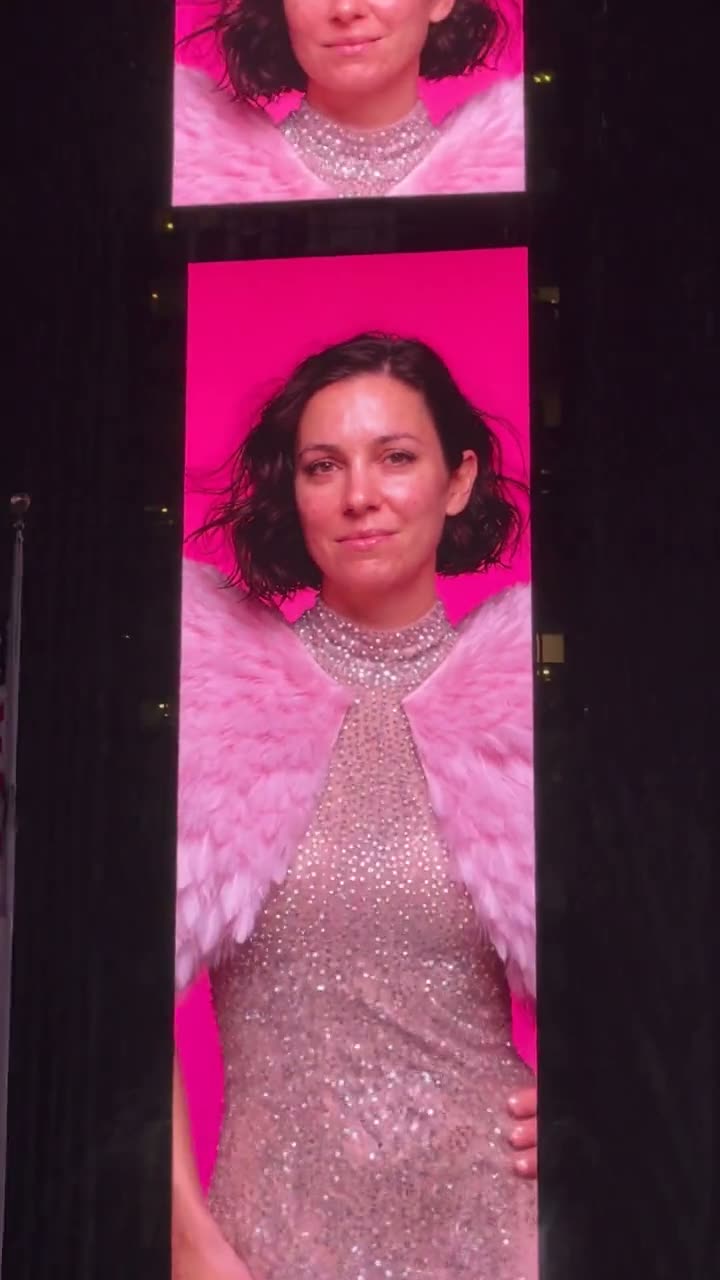
Watch your portrait shine as the centerpiece of a fashion poster displayed on a towering Times Square screen, captured on a rainy night. The shot begins with your face and zooms out across the glistening pavement, yellow taxis and umbrellas below. Upload a single photo of yourself, or your pet.
The Times Square billboard AI trend places you on New York's most famous screens without the rental fee: you appear as the centerpiece of a fashion poster on a towering display after dark, while the camera zooms out over rain-soaked streets. All you need is one good photo of yourself, or your pet.
Also called AI billboard · Fashion billboard Times Square · Billboard surprise
Step by step
Steps to create the Times Square Billboard video on Smew AI
The entire process happens in your browser. No editing software needed, no prompt writing required, no watermark added.
Upload your photo
Click "Create your own" and upload a clear face shot. Capture it with your camera or select from your gallery.
Click Generate
The button displays the cost. Seedance 2.5 creates the Times Square Billboard scene directly from your photo, skipping intermediate images, producing 10 seconds with original audio. No prompt needed.
Save or post
Your video renders in minutes as a 9:16 MP4. Save it, post from your device, or retrieve it later from your Library.
What kind of photo works best?
Upload one photo: yourself for You, or your pet for Pet.
Direct camera view, in focus and properly lit, without sunglasses. The video begins with a close-up of the massive screen, putting your face front and center: use a clear shot.
Head and shoulders or waist up produces the best results. The poster dresses you in a glittering evening look with pink feathered wings; your facial features and hair remain authentic.
One subject per photo, ensuring the AI features the correct face on the display.
For pets: entire head in focus, eyes visible, photographed in natural light. Furry animals look especially striking with the pink wings.
Upload your own image, or one from a friend with permission. Never use celebrities or strangers.
Origins of the Times Square Billboard trend
Displaying yourself on a Times Square billboard is an actual service people purchase. Multiple screens offer brief time slots, and couples, families and small businesses record the experience for TikTok. The most popular Times Square billboard surprise post we located, featuring a woman who surprised her boyfriend on his birthday, reached 713,800 views (24 October 2024). Pet owners participate too: Doug the Pug shared his Times Square billboard in December 2024.
AI brought down the cost. Starting in September 2025, AI template platforms offered "your photo on a billboard" effects, and in January 2026 a CapCut post introduced a "Fashion billboard Times Square" AI filter: transforming your photo into a fashion advertisement on a tower, set on a wet street with yellow cabs. In September 2026 guides for a social media billboard AI effect (placing your profile on a massive roadside display) exceeded a million views. Then on 19 October 2026, one day following a major fashion show, an AI video application launched ads for the animated version: a single selfie transforms into the focal point of a "Fashion Show 2026" poster on a Times Square screen, at night in the rain. On TikTok, #timessquarebillboard contains 555 videos and 13.2 million views (21 October 2026).
A TikTok creator shares how she surprised her boyfriend with a birthday billboard in Times Square; the post reaches 713,800 views by October 2026. TikTok
Doug the Pug posts gratitude to Santa for his Times Square billboard appearance, among many pet billboard posts. TikTok
A CapCut post demonstrates a "Fashion billboard Times Square" AI filter: converting one photo into a fashion advertisement on a tower screen overlooking a wet street with yellow cabs. TikTok
A guide for a social media billboard AI effect, displaying your profile on a massive roadside screen, is shared; it reaches 1.1 million views by October 2026. TikTok
An AI video application begins advertising the animated version: transforming one selfie into the star of a fashion show poster on a massive Times Square screen at night, in the rain.
On TikTok, #timessquarebillboard contains 555 videos and 13.2 million views, and #aibillboard holds 49 videos.
Copy and paste
The Times Square Billboard prompts
You don't need this: the single-tap workflow handles it for you. [Image 1] is your photo: the video model uses it as reference and creates the scene directly from it, skipping the photo generation step.
You
1 photo: you, face clearSeedance 2.510 s · 720p · 9:16126 credits
Video prompt
An ultra-realistic 9:16 fashion show advertising campaign displayed on a massive digital billboard on the front of a tall skyscraper in Times Square, New York, at night after rain, filmed in one continuous shot with no cuts, like a real handheld phone video from the street.
THE BILLBOARD features a breathtaking high-fashion portrait of the person in [Image 1], from the waist up, presented as the star of the fashion show: copy the exact face from [Image 1] (the face shape, eye color and eye shape, eyebrows, nose, mouth, skin tone, age, hair color, hair length and hairstyle, and any beard, moustache, glasses or freckles), so their friends recognize them at once. Luminous natural skin with visible realistic texture, glamorous fashion show makeup, and a confident, elegant expression directed toward the viewer. They wear an elegant sparkling evening outfit, with huge soft pink feathered wings rising behind the shoulders. Behind the portrait, a rich hot-pink gradient with dramatic luxury-editorial lighting, making the campaign appear enormous and larger than life. The LED display is seamlessly integrated into the building façade, with realistic screen perspective, subtle pixel structure, reflections, and brightness falloff. The person in [Image 1] appears ONLY on the screen, never in the street. If [Image 1] shows an animal, the portrait shows that animal.
0-3 s: close on the screen from the street, looking up: the portrait fills most of the frame, the face large and sharp: exactly the face from [Image 1]. The portrait moves like a video advert: a subtle breeze lifts several strands of hair, a slow blink, a small confident smile. Fine rain falls through the light.
3-8 s: the camera slowly pulls back and tilts down, showing the immense scale of the billboard against Times Square in New York at night after rain: towering glass skyscrapers with other glowing screens that show only soft abstract color, illuminated storefronts, the wet street shining with pink reflections, yellow taxis rolling past, steam rising from a street vent, pedestrians with umbrellas, some stopping to film the screen with their phones.
8-10 s: a wide view of the square: the gigantic portrait high on the tower above the dense crowd.
The face on the screen stays the same from the first frame to the last; never morph.
Audio: a slow, glamorous original electronic beat, like a fashion show intro, under the city sounds after rain: wet tyres, light rain, a distant horn, the murmur of the crowd. No singing, no words.
Avoid distorted facial features, duplicate subjects, additional faces on the billboard, malformed anatomy, cartoon or anime aesthetics, obvious CGI rendering, plastic skin, excessive saturation, random illegible text, watermarks, pixelated signage, or unrealistic billboard integration. No words, letters, numbers, brand names or logos on the poster or on any other screen, sign or taxi, unless a later line names words for the poster. No real person's face on any other screen. No subtitles.
1 photo: your pet, face clearKling 3.010 s · 1080p · 9:1656 credits
Video prompt
Create an ultra-realistic 9:16 fashion show advertising campaign displayed on a massive digital billboard on the front of a tall skyscraper in Times Square, New York, at night after rain. Use the uploaded image as the sole visual reference for the pet, preserving the pet's recognizable face, fur colors, markings, ear shape, proportions, and overall identity while translating the look into a world-class fashion show campaign. The billboard features a breathtaking high-fashion portrait of the pet, from the waist up, presented as the star of the fashion show. The pet keeps its own face, fur colors, markings and natural body shape, with glossy, well-groomed fur, a sparkling jeweled collar, and huge soft pink feathered wings rising behind it, looking toward the viewer with a proud, confident face. Exactly one animal on the screen and no people on it. Behind the portrait, use a rich hot-pink gradient with dramatic luxury-editorial lighting, making the campaign appear enormous and larger than life. Photograph the scene from the wet street, close to the tower and looking up, so the screen fills the upper two thirds of the frame and the face on it is large and sharp; at the bottom of the frame, the edge of the dark building façade, other glowing screens with soft abstract color, wet reflections, yellow taxis and pedestrians with umbrellas. The LED display must be seamlessly integrated into the building façade, with realistic screen perspective, subtle pixel structure, reflections, and brightness falloff. The contrast between the gigantic portrait and the dense New York streetscape should create a powerful sense of scale and prestige. The campaign should feel like a world-class fashion show launch, combining premium commercial photography, high-fashion editorial styling, cinematic night light after rain, architectural realism, pink and neon color grading, and polished global fashion art direction. Photorealistic detail, physically accurate LED signage, high dynamic range, cinematic depth, premium advertising photography. Avoid distorted facial features, duplicate subjects, additional faces on the billboard, malformed anatomy, cartoon or anime aesthetics, obvious CGI rendering, plastic skin, excessive saturation, random illegible text, watermarks, pixelated signage, or unrealistic billboard integration. No words, letters, numbers, brand names or logos on the poster or on any other screen, sign or taxi, unless a later line names words for the poster. No real person's face on any other screen. No subtitles.
Videos are priced per generation in credits, with the exact cost displayed on the Generate button before any charge. The single-tap price includes both the scene photo and video, billed once. Each version has separate pricing: You 126 credits, Pet 56 credits. Lower-cost models are available if you manually run the prompts in AI Video.
Video model
Settings
Credits
You: Seedance 2.5 (this template)
10 s, 720p, straight from your photos, one tap
126
Pet: Kling 3.0 (this template)
10 s, 1080p + 1 scene photo, one tap
56
One-time packs and plans are on the pricing page. A failed video gives its credits back.
Timeline of the Times Square billboard AI video, moment by moment
Time
What you see
0 to 3 s
Close view of a massive screen on a building, seen from street level: your image dominates a fashion show poster, featuring pink feathered wings and a vibrant pink glow. It animates like a video advertisement: wind through your hair, a gentle blink, a subtle smile. Light rain drifts through the illumination.
3 to 8 s
The camera zooms out and angles downward: revealing the entire building, surrounding glowing displays, the wet pavement reflecting pink light, yellow cabs passing by, steam rising from a street vent, pedestrians with umbrellas pausing to photograph your screen.
8 to 10 s
A panoramic view of the square after dark, your image towering above the crowd.
How it works: the You version generates directly from your photo using premium AI video models, including Seedance 2.5, without intermediate images, preserving your facial features. The Pet version first creates the poster image of your pet on the screen, then animates it; Best employs the most powerful model for that stage. You receive 10 seconds, vertical orientation, with audio: a stylish original soundtrack beneath urban ambience. The precise cost appears on the Generate button before any charge.
You or Pet: choosing your version
You (1 photo): the classic "my face on a billboard" fantasy: you become the centerpiece of the fashion show poster, dressed in a shimmering evening ensemble with soft pink feathered wings. It matches the aesthetic of the AI billboard advertisements from October 2026, with no brand visible on the screen.
Pet (1 photo): your dog or cat receives the same spotlight treatment: lustrous fur, a glittering collar and pink wings on the massive screen. Standard offers the lower-cost option; Best maintains sharper detail on the screen and your pet as the camera pulls back.
The poster displays only your image by default, with no text. Actual Times Square billboard surprise posts frequently include a name or "Happy Birthday"; for birthdays, include the message in your caption, or enter brief text on the create page if a field is provided.
Common issues and solutions
Problem
Fix
The face on the screen looks like someone else
Upload a focused, forward-facing photo with good lighting, no sunglasses, and regenerate.
You also appear in the street
The prompt restricts you to the screen only, but this can occur. Regenerate.
Strange letters appear on the poster or another screen
The prompt specifies no text or logos anywhere; AI may still generate some. Regenerate.
The face gets soft in the wide shot
This results from the zoom-out: the screen becomes smaller. The opening close-up showcases your face best.
Your pet's markings change
Upload a sharp photo of the complete head, or choose Best.
The model refuses a photo
Some photos get rejected. Credits are refunded; try a different photo.
Caption and hashtag suggestions for the Times Square billboard trend
Caption ideas: "POV: your face is on a Times Square billboard", "Manifesting this", "Mom, I made it", "Star of NYC". Or compose your own.
Hashtags: on TikTok, #timessquarebillboard contains 555 videos and 13.2 million views (21 October 2026). Include #aibillboard, #timessquare and #aivideo, and maintain the platform's AI label.
Honesty: this is an AI video, not an actual advertisement. Don't claim you rented the screen, and never use it to market a product as though it appeared in Times Square. Smew AI has no affiliation with Times Square or any screen operator, and the video features no actual brands or advertisements.
FAQ
Times Square Billboard trend questions
What is the Times Square billboard AI trend?+
It's a viral AI video showing your face as the centerpiece of a fashion show poster on a massive Times Square screen, at night after rain, with the camera pulling back across the street and crowd. It mimics actual billboard surprise posts, where people rent Times Square screen time, and AI applications began offering the video version in October 2026.
How do I put my face on a Times Square billboard with AI?+
Select You or Pet, click "Create your own" and upload one photo. Click Generate; the button displays the cost first. You receive a 10-second vertical video of your face on the massive screen, stored in your Library when complete. You need no separate Times Square billboard generator, Times Square billboard maker or AI billboard video generator: this page creates the video, the AI billboard Times Square aesthetic from one photo. It's the simple method to put your face on a billboard, and your face on Times Square, without a reservation.
Is it a real Times Square billboard?+
No. It's an AI billboard video generated from your photo; no actual screen displays it. A genuine slot costs money and is reserved through screen operators: search how to get your face on a billboard in Times Square if you want the authentic experience. The AI version serves for a post, entertainment or vision board, not to claim you reserved a screen.
Can I get my picture on a real billboard in Times Square?+
Yes. Multiple screen operators sell brief slots, and you can place your picture on a Times Square billboard for a birthday or surprise; pricing varies by screen and timing. If your search was "put my picture on a billboard" and a video for your feed suffices, one photo accomplishes it here, with no reservation.
Is there a Times Square billboard filter or mockup?+
Yes. CapCut has offered a Times Square billboard filter for photos since early 2026, and numerous sites provide a Times Square billboard mockup or a fake billboard generator for static images. This template produces a moving video instead: the Times Square AI billboard animates, with rain, cabs and camera movement.
Can I put my dog or cat on a Times Square billboard?+
Yes, with Pet. Upload one photo of your pet, and it becomes the centerpiece of the fashion show poster with pink feathered wings and a glittering collar. Actual dog billboard posts from Times Square, like Doug the Pug's in 2024, inspired this concept; this is the pet billboard version created by AI.
Can I add my name or Happy Birthday on the screen?+
The poster displays no text by default, so your face dominates and no random letters appear. Times Square billboard birthday posts typically include a name or "Happy Birthday", so place it in your caption. When the create page provides a field for screen text, keep it brief; a Times Square birthday billboard video works best with two or three words.
What prompt does the AI billboard video use?+
No creator published a video prompt for this trend, so the template begins from an AI template site's Times Square billboard image prompt, preserved in its structure, with the fashion show aesthetic, a night after rain and specifications that preserve your face and maintain every screen free of brands and logos. You compose no AI billboard prompt yourself; the billboard AI prompt is integrated.
Is this the AI billboard meme from TikTok?+
It's the latest evolution of it. The AI billboard meme originated with photo filters and the social media billboard guides from September 2026; the Times Square billboard meme on TikTok now animates, with the camera drawing back from your face on the screen. Some users share it as an AI billboard prank on friends; maintain the AI label so nobody is genuinely misled.
What about the Times Square billboard surprise and TikTok videos?+
The authentic Times Square billboard surprise videos on TikTok capture a partner or parent witnessing their face displayed on a screen. The Times Square billboard TikTok posts, the Times Square billboard video and the Times Square billboard photo all originate from that concept. This template delivers the AI billboard NYC aesthetic, an AI billboard New York scene after dark, from home.
Is it a fashion billboard or a fashion show billboard?+
Both. Your image is styled like a fashion billboard, in an evening ensemble with pink feathered wings, and the screen functions as a fashion show billboard, resembling the AI advertisements that appeared following the major fashion show of 18 October 2026. It's the fashion billboard Times Square AI aesthetic, without any brand.
Can I make it with a green screen or another AI tool?+
Creators employed a Times Square billboard green screen, billboard AI generator applications and the billboard generator AI platforms for photos. An AI billboard generator or AI billboard maker produces a static image; billboard AI video and billboard AI video generator tools require a prompt. Here you only upload a photo.
How long is the video and what format is it?+
10 seconds, vertical 9:16, with audio: a stylish original soundtrack beneath the urban sounds of a rainy night. It works on TikTok, Reels and Shorts, and includes no watermark.
Can I put a celebrity or someone else on the screen?+
No. Upload your own photo, or a friend with permission. Never a celebrity or stranger.