smew.ai

2016 vs 2026: Your 2016 Self Steps Through a Portal to Meet You

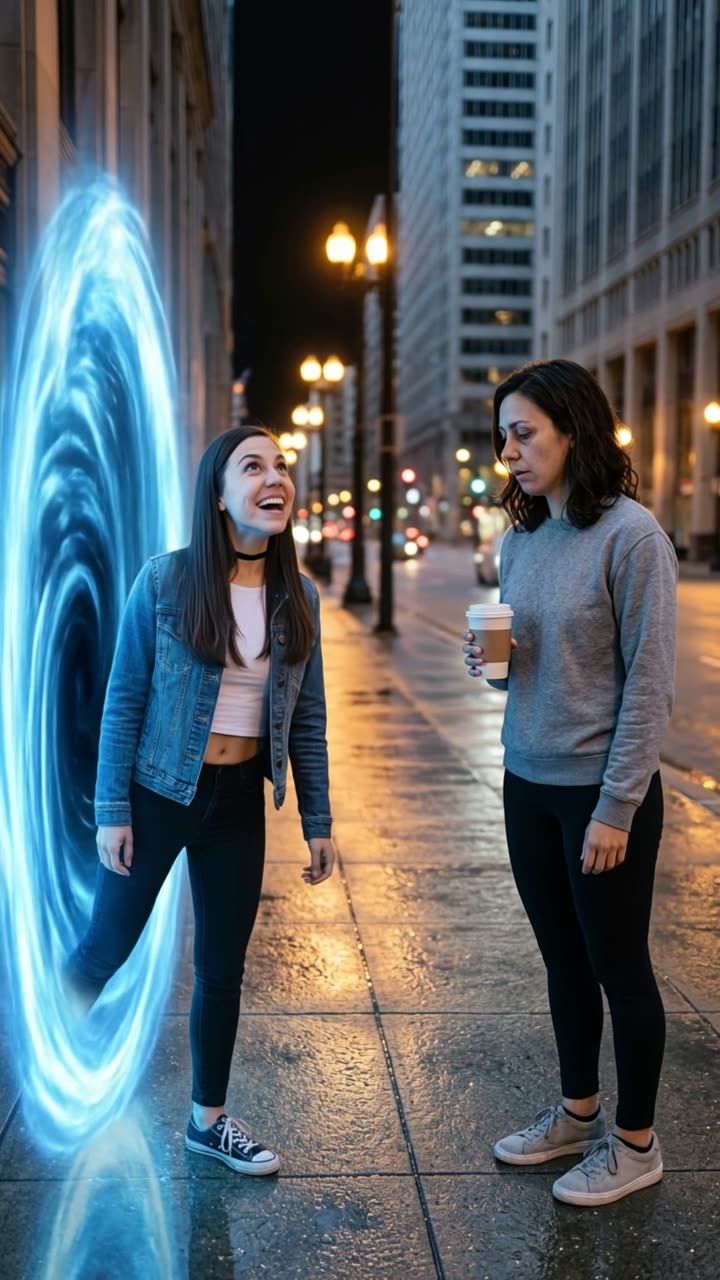
Your younger self from 2016 steps in, sizes you up and wonders why you look worn out. Choose the location and the ending, write custom dialogue. One old photo and one new photo become a 10-second video with voices. Works for your pet as well.

The original 2016 vs 2026 reelOriginal reel
  • 2 photos you add
  • 10 s clip with sound
  • 9:16 for TikTok, Reels, Shorts
  • No watermark

No prompt to write: Add your photos and tap once

Create your own

Ready in a few minutes · From 56 credits

The 2016 vs 2026 AI trend brings your past into your present in one video: your younger self from 2016 shows up in 2026, approaches you and wants to know what went wrong. It came from the "2026 is the new 2016" nostalgia movement. You provide two photos: one from years ago and one from now.

Also called 2026 is the new 2016 · 2016 me meets 2026 me · 2016 me vs 2026 me · 2016 and 2026 trend · talking to my 2016 self · younger me vs older me

Example

See the 2016 vs 2026 video in action

Created using the prompts shown here. The faces and animals are AI-generated, not actual people, and the audio is unique. Results vary each time you run it.

Original reel by @aicontentps, 10 s
The original reel by @aicontentps: an upbeat 2016 character emerges from a time portal and encounters the tired 2026 version. Two AI-generated clay figures; the opening 10 seconds, with unique audio.
Use this reference
Step by step

Create the 2016 vs 2026 video on Smew AI

All processing happens in your browser. No editing software, no prompt writing, no watermark.

  1. Upload the two photos

    Tap "Create your own" and upload a photo of you from around 2016 (the older image), followed by a current photo. Upload them in this sequence, as the order determines which is which in the scene. Capture them with your camera or select from your gallery.

  2. Tap Generate

    The button displays the cost. Smew AI creates the 2016 vs 2026 scene using your photos, then Kling 3.0 brings it to life for 10 seconds with unique audio. No prompt writing needed.

  3. Download or post

    Your video arrives in minutes as a 9:16 MP4. Download it, post directly from your device, or retrieve it anytime from your Library.

What photos work best?

Choose two photos of yourself, showing one person each: an older image from around 2016 (any photo from roughly ten years back works) and a current one. The prompt preserves the face, hair and clothing from each photo, so your 2016 outfit returns too.

  • Waist up or knees up gives the best results. A tight face crop forces the model to guess your body and clothing.
  • Clear, forward-facing faces with good lighting. Photograph old prints flat, avoiding glare.
  • The more noticeable the difference between photos (hair, glasses, fashion), the funnier the encounter.
  • One person per photo. Crop friends out of the older image.
  • Only use your own photos. Never a famous person, an ex or someone you don't know.

For the Pet version, choose a young puppy or kitten photo of your pet and a current photo, each showing the full body.

How did the 2016 vs 2026 trend begin?

The nostalgia arrived first. In late December 2025, "2026 is the new 2016" took off on TikTok: on 31 December, @taybrafang shared a montage of 2016 highlights, and through January people revived 2016 filters, music and images. By March 2026, creators shared videos "talking to my 2016 self", addressing who they were a decade earlier.

The AI format transforms that conversation into an encounter. On 13 and 14 September 2026, the TikTok profile @aicontentps released AI videos where a lively, optimistic 2016 character exits a glowing time portal and discovers a tired 2026 version: "Wait, I jumped 10 years? Is this really 26?" ... "Why do you look so exhausted?" The 14 September video reached 160,900 views by 11 October. On 9 October, an AI video of a celebrity's 2006 self encountering her 2026 self, created with Seedance, received over 2,100 upvotes on Reddit's r/aivideo.

By 12 October, #2016vs2026 counted 18,241 TikTok videos. On this page your own images fill both roles: you in 2016 and you today.

  1. @taybrafang shares a TikTok montage of 2016 highlights, the earliest entry Wikipedia cites for the "2026 is the new 2016" trend. Wikipedia

  2. "Talking to my 2016 self" videos gain traction on TikTok: creators address who they were a decade earlier. One shared that day surpasses 781,000 likes. TikTok

  3. @aicontentps shares "2016usa VS 2026usa", an AI video where an upbeat 2016 character exits a time portal and encounters a tired 2026 version. TikTok

  4. The creator's follow-up 2016 vs 2026 video begins with the same portal encounter. It reaches 160,900 views and 6,153 likes by 11 October. TikTok

  5. An AI video of a celebrity's 2006 self encountering her 2026 self, created with Seedance, receives over 2,100 upvotes and 293 comments on r/aivideo. Reddit

  6. #2016vs2026 reaches 18,241 TikTok videos and 106.3 million views; #2026isthenew2016 reaches 14,550 videos and 196.1 million views.

Copy and paste

The 2016 vs 2026 prompts

You don't need these: the single-tap workflow handles them automatically. A photo prompt places your image into the scene, then a video prompt brings it to life. Want to modify them? Copy and adjust them in AI Photo and AI Video.

Human

2 photos: you around 2016 (old photo) + you nowKling 3.010 s · 1080p · 9:1656 credits
Video prompt

Use the two uploaded images as the base. They show the same person about ten years apart. The person in the first image is the younger version, from twenty sixteen: keep that face, facial features, skin tone, hair, age, body and the outfit from the first image exactly. The person in the second image is today's version: keep that face, facial features, skin tone, hair, age, body and the outfit from the second image exactly. Do not blend the two, do not swap their faces and do not make them the same age. An ordinary, unedited smartphone photo, taken by a friend at chest height. The place: "Living room at home", a real, everyday place in natural light, with ordinary details and a little everyday clutter, like a snapshot from someone's camera roll. The younger version is on the left. The younger version has just walked into the scene from the left, as if they simply arrived, with no effects. The younger version looks fresh, curious and full of energy, and looks at today's version. A few steps away on the right, today's version looks tired, with slumped shoulders, holding a plain paper coffee cup and looking back at the younger version. Both from the knees up, both faces clear and sharp, turned three-quarters toward the camera. Photorealistic, natural skin and natural colors: no cinematic lighting, no color grading, no soft dreamy glow, no blurred bokeh background, not CGI, not a cartoon. Vertical 9:16. Exactly two people, nobody else close by. No flags, no signs, no name tags, no text, no logos, no watermarks.

1531 characters

Pet

2 photos: your pet when young + your pet nowKling 3.010 s · 1080p · 9:1656 credits
Video prompt

Use the two uploaded images as the base. They show the same pet years apart. The animal in the first image is the younger version: keep its species, breed, face, eye color, fur color, fur length, markings, young age and small size exactly as in the first image. The animal in the second image is today's version: keep its species, breed, face, eye color, fur color, fur length, markings, age and body size exactly as in the second image. Do not blend the two and do not make them the same age or size. An ordinary, unedited smartphone photo, taken at pet height. The place: "Living room at home", a real, everyday place in natural light, with ordinary details, like a snapshot from someone's camera roll. The younger version is on the left. The younger version has just walked into the scene from the left, as if they simply arrived, with no effects. The younger version is playful, bright-eyed and full of energy, ears up, looking at today's version. A few steps away on the right, today's version sits looking tired and unimpressed, with sleepy, half-closed eyes, looking back at the younger one. Both whole bodies in frame, both faces clear and sharp. Photorealistic, natural fur detail and natural colors: no cinematic lighting, no color grading, no soft dreamy glow, not CGI, not a cartoon. Vertical 9:16. Exactly two animals, no people, no clothes. No flags, no signs, no text, no logos, no watermarks.

1408 characters

What's the credit cost?

Videos are priced in credits, and the create page displays the exact cost on the Generate button before you commit. The single-tap price includes both the scene photo and the video, billed once. A single video is 56 credits, so the smallest one-time pack covering it is $9.99 for 100 credits, no subscription required. The less expensive models are available if you manually run the prompts in AI Video.

Video modelSettingsCredits
Kling 3.0 (this template)10 s, 1080p + 1 scene photo, one tap56
Seedance 2.0 Fast (by hand in AI Video)10 s, 720p + 1 photo68
Veo 3.1 Fast (by hand in AI Video)8 s, 720p + 1 photo14

One-time packs and plans are on the pricing page. A failed video gives its credits back.

What unfolds in the 2016 vs 2026 video, moment by moment?

Your video is one uninterrupted shot that resembles a casual phone recording, filmed by someone nearby. Using default settings:

TimeWhat happens
0-2 sYour younger self from 2016 enters and pauses.
2-5 sYour younger self glances around, approaches you and sizes you up.
5-8 s"Wait... is this really 2026? Why do you look so exhausted?"
8-10 sYou shrug, raise your coffee and reply "Welcome to 2026." Your younger self freezes in disbelief.

Personalize it. On the create page you can modify every element: write custom dialogue for your younger self and your response (in any language), select where the encounter happens (your living room, kitchen, workplace, a coffee shop, a city street at night or any place you describe), how your younger self shows up (walks in, a glowing blue time portal, from the mirror or from an old photo), the conclusion (a stunned stare, a hug, a high five, a selfie together or both laughing) and the year of your older photo.

The audio captures the scene: the room or street sounds and your two spoken lines. There's no background music, so you can layer your preferred audio when sharing.

The Pet version stages the same encounter wordlessly: the puppy or kitten enters, sniffs its adult self from head to tail, and the older pet exhales and settles down. You can select the location and how it arrives.

Why is it effective? Everyone has a 2016 photo showing them more rested. The humor targets yourself, making it simple to share, and the comments overflow with people relating to the feeling.

How does Smew AI build it, and what's the price?

The template operates in two stages:

  1. The still. Nano Banana 2.1 takes your two images and positions both versions of you in your chosen location, like a casual phone snapshot: your 2016 self on the left, your current self holding coffee on the right. Each face, hairstyle and clothing remains as shown in its source photo.
  2. The video. A video model brings the still to life for 10 seconds: the entrance, the approach, the once-over, your two spoken lines and the conclusion.
Standard (default)Best
Video modelKling 3.0Seedance 2.5
Length10 s10 s
FrameVertical 9:16, 1080pVertical 9:16, 720p
SoundYour two spoken lines and the sound of the placeThe same
PriceLowerHigher

The precise cost appears on the Generate button before you commit. No prompt writing required.

Is this the original trend's prompt? The creators behind the viral videos didn't release their prompts. Ours replicate the structure of the September videos that launched the format: the entrance, the once-over and the "Why do you look so exhausted?" line. Seedance, the model powering the viral celebrity version, is available as the Best option.

What can go wrong, and how do you correct it?

ProblemFix
Both versions appear the same ageSelect photos with a bigger time gap, or an older photo where your hair or fashion was noticeably different. Then generate again.
The two faces appear on opposite sidesVerify the sequence: photo 1 is your 2016 self, photo 2 is current you. Then generate again.
The incorrect person speaks a line, or they talk simultaneouslyTwo-person dialogue challenges AI. Generate again or choose Best.
The video jumps to a different angleThe prompt specifies one continuous shot. Generate again or choose Best.
Your face resembles your photo lessSelect a sharper, forward-facing photo with better lighting.
A line you entered sounds incorrectKeep each line brief and straightforward, then generate again.
The video model rejects the photoCertain photos get blocked. Your credits are refunded; attempt a different photo.

Each generation is a fresh take, so timing and faces vary between runs.

Is this identical to "hug my younger self" or "Your next opponent is you"?

No. They're related, but each stands as its own trend:

  • AI hug: you embrace your younger self, frequently your childhood self. It's tender and sentimental, without dialogue.
  • "Your next opponent is you": an intense showdown with your younger self in a shadowy arena, with a voice announcing "your next opponent is... you". Know Your Meme links it to a TikTok by @shannon__cahill on 12 May 2026.
  • 2016 vs 2026: a comedy bit. Your self from a decade back shows up in 2026, examines you and demands an explanation for what went wrong.

Sharing suggestions. Captions that work: "2016 me would never", "she trusted me with this", or "I'm sorry, 2016 me". Include #2016vs2026 (18,241 TikTok videos on 12 October 2026) and #2026isthenew2016 (14,550). Maintain the platform's AI disclosure. Craving more nostalgia? Explore the 80s AI trend or the AI school photo.

FAQ

2016 vs 2026 trend questions

What is the 2016 vs 2026 AI trend?
It's an AI video where you encounter your younger self: your 2016 self shows up in 2026, approaches you, examines you and asks why you look worn out. It gained popularity in September and October 2026 as part of the "2026 is the new 2016" nostalgia movement. You provide an older photo and a current one.
What does "2026 is the new 2016" mean?
It's a nostalgia movement that launched on TikTok in late December 2025. People revived the images, filters, music and fashion of 2016, a year many view as less complicated. The 2016 vs 2026 videos belong to it: they contrast the two years directly.
How do I create a video of my 2016 self encountering me?
Tap "Create your own", upload an older photo of you from around 2016 as photo 1 and a current photo as photo 2, and tap Generate. Smew AI builds a photo showing both of you in your chosen location, then a 10-second video with the approach, the once-over and the two spoken lines. No prompt writing needed, but you can enter custom dialogue.
Can I use a photo from 2014 or 2018 instead of 2016?
Yes. Select the year of your older photo on the create page (2006, 2010, 2013, 2016 or 2019). The prompts preserve the age and appearance from each photo, so any older photo functions, and a span of roughly ten years produces the most obvious change.
Can I enter my own dialogue?
Yes. On the create page, expand Make it yours and enter what your younger self says and your response, in any language, up to 90 characters per line. Years like 2026 get spoken as words. Leave the fields blank for the signature lines.
Can my pet encounter its younger self?
Yes. Choose the Pet version and upload a puppy or kitten photo of your pet, followed by a current photo. The young pet enters and sniffs its older self, and the older pet exhales and settles down. No dialogue, just pet noises and the location's ambient sound.
Did the trend's creators release their prompt?
Not as of 12 October 2026. The viral videos arrived without a prompt, so ours follow the same structure: the entrance, the once-over and the "Why do you look so exhausted?" line from the September videos by @aicontentps.
What's the video length, and does it include audio?
10 seconds, vertical 9:16, as an MP4 file: 1080p with Standard, 720p with Best. It includes unique audio: your two spoken lines and the location's ambient sound, no background music.
Does the 2016 vs 2026 video require credits?
Yes. Each video requires credits, and the create page displays the exact cost on the Generate button before you commit. Standard (Kling 3.0) costs less than Best (Seedance 2.5). If a video fails, credits are refunded.
Can I create one with a celebrity's old and new photos?
Don't. A fabricated video of an actual person can violate platform policies and that person's rights, and many video models block famous faces. Use your own images: the humor lands best when it's about you.
Why do my two versions appear identical?
The model recognizes two images of the same face and can merge them. Older and newer photos with greater differences in hair, glasses or fashion help, as does generating again. Verify the sequence too: photo 1 is your 2016 self, photo 2 is current you.
Is 2016 vs 2026 a TikTok or an Instagram trend, and does a template exist?
Both platforms. The 2016 vs 2026 TikTok videos and the 2016 vs 2026 Instagram trend share one concept: the old you and current you side by side, as a 2016 vs 2026 image or video. This page functions as a template for both: upload two photos and receive the video.
What makes a good caption for the 2016 vs 2026 trend?
Brief lines directed at yourself work well, like "2016 me would never" or "I'm sorry, 2016 me". The same caption suits TikTok and Instagram; include #2016vs2026 and maintain the AI disclosure.
What is the 2016 trend, and is 2016 vs 2026 a meme?
The 2016 trend is the nostalgia movement where people share their 2016 images, music and filters. On social platforms, a 2016 vs 2026 meme typically shows two images side by side. This page produces a 2016 vs 2026 me video with AI: your younger self encounters your older self, via a time portal if desired, and there's a 2016 vs 2026 pet version available too.

More trends

Other AI video templates

Template

La Tormenta de Arena AI Trend: Te He Perdido Entre la Gente

Someone gazes down from a balcony overlooking a crowded club, the view shifts to the dance floor below, and a bright spotlight reveals another person looking upward. Upload two photos or pet images to generate your video with its soundtrack.

Read more
Template

Hotel Lobby AI: Create the Hotel Lobby Trend Video

Place yourself and a friend, or your two pets, in a bright orange booth where they rap back and forth into a single hanging microphone. Use the actual footage or the popular cat version with authentic audio, or create a fresh 10-second clip with a new beat.

Read more
Template

Gas Station Dance AI: Drop You and Your Friends Into the Viral Road Trip Video

Someone dances in golden hour on an empty lot, another films themselves, and a third climbs from the car with hair blowing in the wind—just like the road trip video that went viral again in 2026. Upload three photos, or use one to fill every role. 15 seconds with the song included.

Read more
Template

AI School Photo: Picture Day Portraits From One Phone Snapshot

Snap a picture of your kid at home. Smew AI transforms it into a traditional portrait day shot: cloudy blue background, gentle studio lighting, shoulders up. Their face remains identical.

Read more
Template

80s AI Trend: Your 1985 Photo and Home Video

A single selfie transforms into a vintage 1985 photograph with period hair and a date stamp. Keep just the image, or bring it to life as a 10-second VHS-style clip with audio.

Read more
Template

AI Hug Video: Create a Heartfelt Hug from Two Photos

In a bright park, two people walk up to one another and embrace warmly. Upload two images, get an 8-second video with soft original audio.

Read more

Create your own 2016 vs 2026 video

Upload two photos and tap once. No prompt writing. 56 credits.

No watermark. A failed video gives its credits back. Secure checkout by Stripe.