smew.ai

AI School Photo: Picture Day Portraits From One Phone Snapshot

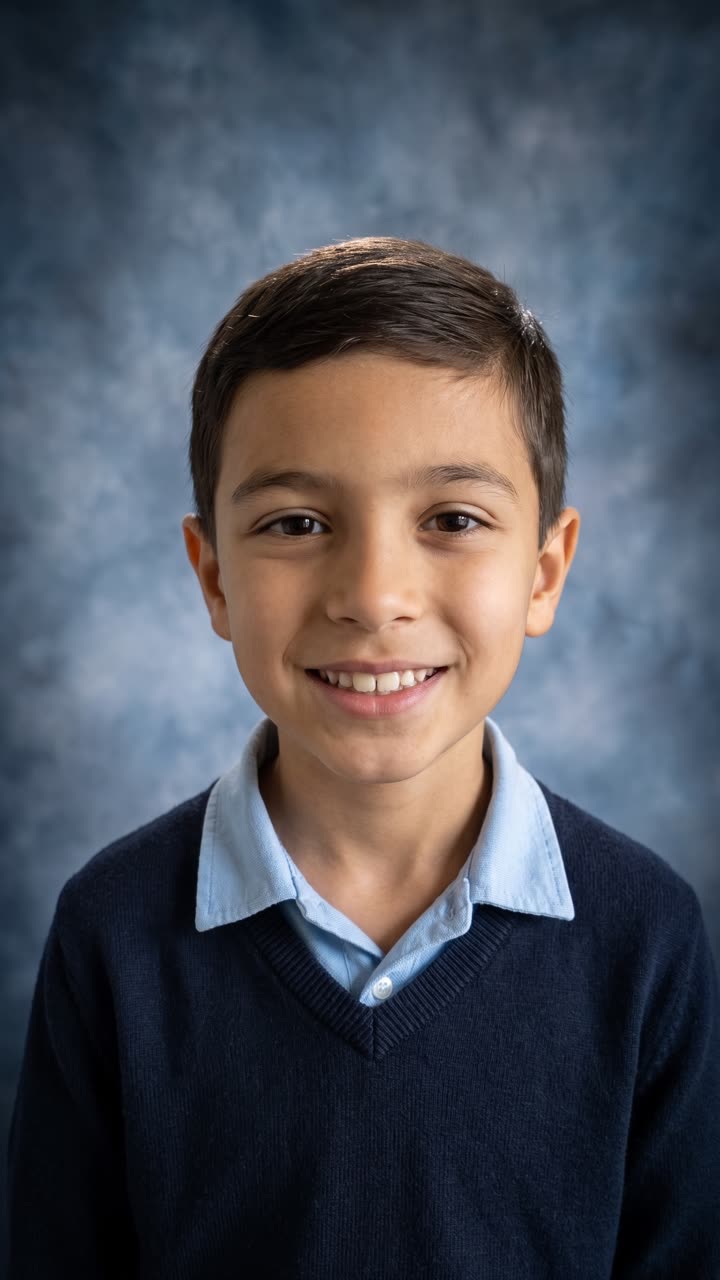
Snap a picture of your kid at home. Smew AI transforms it into a traditional portrait day shot: cloudy blue background, gentle studio lighting, shoulders up. Their face remains identical.

The original School Photo reelOriginal reel
  • 1 photo you add
  • 2K photo you can turn into a video
  • 9:16 for TikTok, Reels, Shorts
  • No watermark

No prompt to write: Add your photo and tap once

Create your own

Ready in a few minutes · From 3 credits

The AI school photo trend—sometimes called ChatGPT school pictures—has parents converting casual home snapshots of their kids into traditional picture day portraits: cloudy blue background, gentle studio lighting, shoulders and head. Upload one snapshot, choose your background, and tap once to generate. Their face, expression and age remain unchanged.

Also called ChatGPT school pictures · AI picture day · AI school portrait · Gemini school photos

Step by step

Creating the School Photo on Smew AI

Everything happens in your browser. No editing software needed, no prompt writing, no watermark added.

  1. Upload your snapshot

    Tap "Create your own" and upload your child's photo, chest and up. Capture it with your camera or choose from your gallery.

  2. Tap Generate

    The button displays the credit cost. Nano Banana 2.1 places your snapshot into the School photo setting and creates one 2K image. No prompt writing needed.

  3. Save or post

    Your image appears in minutes as a 9:16 2K file. Save it, post from your device, convert to video, or access later in your Library.

What kind of photo works?

Upload one clear snapshot of your child, chest and up, facing the camera. The prompt preserves their face, expression, head position and clothing from your original, changing just the background, lighting and framing. Your input snapshot determines your school portrait result.

  • Dress for portrait day. Their clothing appears as-is in the result, so have them wear the shirt or sweater you want.
  • Position them before a plain wall, standing a step away, close to a window during daytime. The viral trend started this way, with kids on stools facing white walls. Busy kitchens work, but plain walls produce the sharpest hair edges.
  • Position your phone at eye level, roughly an arm's distance away. Shooting from above distorts proportions.
  • Disable beauty features and filters in your camera settings. The prompt preserves skin as photographed, so filtered inputs stay filtered.
  • Capture the expression you want. AI doesn't alter expressions, so a genuine laugh creates a genuine-laugh school portrait.
  • One child only, no hats, no sunglasses. Regular glasses are fine and remain.
  • Use your personal snapshot, not a professional proof. Proofs belong to the photographer, and the prompt preserves any existing watermarks.
  • Photograph only your own child, or one whose parent requested this.

Origins of the School Photo trend

This trend exploded on TikTok in late September 2026. Mom of four Carlie Bond (@carlieb0nd) posted on 24 September showing school portraits she created at home: she seated her children on a stool before a white wall, photographed them herself, and prompted ChatGPT to "keep them exactly the same but make it look like a school picture". Results appeared with cloudy blue backgrounds. Her post, captioned "School pictures x3 kids?? In this economy?", reached 914,600 views by 8 October.

The trend then diverged. A second wave involved using AI to strip watermarks from professional proofs, which drew media coverage. USA Today wrote about it on 28 September and Fast Company on 29 September; by 7 October, The Guardian, Dexerto and PetaPixel had reported on it, and school photographers in the US and UK had criticized the watermark removal. AI school portraits existed earlier: the 90s AI yearbook photo craze hit No. 1 on the US App Store in October 2023.

  1. 90s AI yearbook trend peaks: Epik app's AI Yearbook hits No. 1 on the US App Store. PetaPixel

  2. Carlie Bond shares her children's ChatGPT-created school portraits on TikTok; by 8 October the video has 914,600 views and 75,100 likes. TikTok

  3. USA Today covers parents using ChatGPT to avoid costly school portraits, with legal experts noting that watermark removal violates copyright. USA Today

  4. Fast Company reports on the trend with the headline "'ChatGPT for the win': Parents are using AI to skip out on kids' school photos". Fast Company

  5. A UK school photographer urges parents to stop removing watermarks with AI, and UK press picks up the story. Galway Beo

  6. The Guardian questions "Is this the end of the British school photo?" citing £20 pricing for single school photos. The Guardian

  7. PetaPixel covers parents creating AI school photos instead of purchasing from photographers, including photographer reactions. PetaPixel

Copy and paste

The School Photo prompt

No need to use this directly: the one-tap workflow runs it automatically. This photo prompt places your snapshot into the setting. Want to modify it? Copy and edit in AI Photo.

Classic school photo

1 photo: your child, chest upNano Banana 2.1Photo · 2K · 9:163 credits
Photo prompt

Use the uploaded image as the base. This is a careful photo edit of a real child, not a new portrait. Keep the child's face exactly as it is in the photo: the same face shape, eyes, eye color, eyebrows, nose, lips, teeth (keep any gaps, missing teeth, crooked teeth or braces), freckles, moles, skin texture, skin tone, hairline, hairstyle, hair color, glasses and expression. Keep the exact face width, cheeks and jaw line: do not make the face rounder, fuller, slimmer or more symmetric. Keep the head angle and the exact shape of the smile, even if it is uneven or lopsided. Keep the child's real age: do not make the child look older or younger. No beauty filter: do not smooth the skin, do not slim or reshape the face, do not enlarge the eyes, do not whiten the teeth, no makeup. Keep the child's own clothes from the photo. Turn the photo into a classic school picture day portrait taken by a professional school photographer. Crop it head and shoulders, from the middle of the chest up, with the face centered in the upper half of the frame and a little space above the hair. Replace the background with a traditional mottled blue studio backdrop: a soft, cloudy, painted blue canvas texture, a little lighter behind the head and darker toward the edges, slightly out of focus. Light it like a school portrait studio: a large soft key light from the front left, gentle fill light, a soft hair light from behind, a small catchlight in each eye, even and flattering light with no harsh shadows. True, natural skin color. Sharp focus on the eyes, 85mm portrait lens look, clean professional print quality. Vertical 9:16. Exactly one child. If the uploaded photo already shows a watermark, a studio logo or the word proof, keep it exactly where it is and never remove or cover it. Do not add any text, logo, watermark, school name, frame or border.

1852 characters

Credit cost

Payment is per photo in credits, with the exact cost shown on the Generate button before you proceed. The one-tap cost covers one 2K image, billed once. One image requires 3 credits, so the minimum one-time purchase covering it is $9.99 for 100 credits, no subscription. A smaller 1K image costs fewer credits if you run the prompt manually in AI Photo.

ModelSettingsCredits
Nano Banana 2.1 (this template)2K photo, 9:16, one tap3
Nano Banana 2.1 (by hand in AI Photo)1K photo, 9:16, same prompt2

One-time packs and plans are on the pricing page. A failed video gives its credits back.

Choosing your school picture background

Portrait day offers a limited selection of traditional backgrounds, and you can select one in "Make it yours" before tapping Generate. Face, clothing and lighting stay constant; only the backdrop changes.

BackdropWhat it looks likeGood for
Mottled blue (default)Gentle, cloudy, painted blue canvas typical of traditional school portraits, brighter around the headThe viral original appearance, and what most envision with "school photo"
Mottled greySame painted canvas in neutral greyA quieter, contemporary print matching any clothing color
90s laserDark backdrop with bright neon pink, purple and blue laser streaksA nostalgic yearbook throwback, or "before and after" pairing with a parent's vintage school photo
Fall leavesGentle, unfocused autumn foliage in warm late-day sunlightAn autumn appearance; some studios offer seasonal autumn backgrounds on portrait day as well
Library shelvesUnfocused school library with wooden bookcases of colorful volumesA gentler, more intimate portrait

The laser backdrop has its own history: it was widespread on US portrait day in the 1980s, and the internet revived it as a meme in the late 2000s. If you recall it from your own 80s or 90s school portraits, share a before-and-after pairing with your vintage school photo. For a quieter backdrop, blue is traditional and grey (gray in US spelling) is contemporary.

Tip: coordinate backdrop with outfit. Blue backgrounds blend with blue shirts, so choose grey or fall foliage for blue clothing, and blue for red, yellow, green or white.

Face accuracy in AI results

It shouldn't change faces, and that's the trickiest aspect of AI school portraits. Parents using general AI chat platforms report this frequently: under Fast Company's 29 September 2026 article one commented that "it changes how the person looks no matter what I tell it", and on 6 October The Guardian cautioned that AI school portraits produce whiter teeth and glossier hair than reality. Common issues include children appearing several years older, artificial-looking smooth skin, flawless teeth where a tooth is missing, or simply a different child with similar hair.

Our prompt approaches this as precise photo editing, not fresh portrait generation. It instructs the model to preserve face shape, eyes, eyebrows, nose, mouth, teeth (including gaps, missing teeth and braces), freckles, birthmarks, skin texture, hair, glasses, head angle and expression exactly as photographed, to maintain the child's actual age, and to skip all beauty filtering: no smoothing, no face slimming, no eye enlarging, no teeth whitening, no makeup. Only background, studio lighting and framing change.

We validated it before publication on three AI-generated children, measuring facial similarity with a face recognition model (ArcFace). Different children score 0.08 to 0.32; identical faces score near 1.

Test child (AI-made)What we watchedWhat happened
6 years old, missing front tooth, freckles, pigtails, plain hallway wallThe gap and the frecklesBoth preserved across all runs. Face match 0.89 at 1K and 0.77 at 2K, same child with slightly altered lighting.
9 years old, round glasses, uneven closed-mouth smile, cluttered kitchenGlasses, the smile, the backgroundKitchen removed, glasses kept. Our initial prompt evened his smile and filled his face slightly (0.82). The final prompt specifies preserving face width and exact smile "even if it is uneven": 0.84, with his authentic smile.
13 years old, metal braces, box braids, earringsBraces, braids, earringsAll preserved. 0.72 with initial prompt, 0.89 with final version.
The 9-year-old with grey, fall leaves and library backgroundsThe face when backdrop varies0.74 to 0.84; glasses and smile maintained.
An AI-made proof with PROOF watermarkDoes the watermark survive?Yes. Output preserved the PROOF mark and studio name.

If output looks incorrect, generate again: each run varies slightly. A sharp, well-lit snapshot taken at eye level helps most.

AI school portrait vs. school photographer

School photos aren't inexpensive, which drove the trend's popularity. In September 2026, USA Today reported actual US packages at $43, $60 and $65, and school photo provider Capturely estimates most families spend $25 to $60 per child for print packages. In the UK, The Guardian cited £20 for a single image in October 2026. With multiple children, costs accumulate quickly.

However, they serve distinct purposes:

  • The school photographer's image typically appears in the yearbook and on student ID cards, with schools establishing those requirements. An AI portrait is school-style, not official school documentation, so confirm with your school before submitting one.
  • An AI school portrait is a keepsake: for family messages, grandparents, a shelf frame, or a portrait day your child couldn't attend. It helps when the official image went poorly (closed eyes, bad hair) and retake day is weeks out.
  • Proofs remain photographer property. Never use AI, or any tool, to strip the watermark from an unpurchased proof: legal experts quoted by USA Today say it violates copyright. Smew AI doesn't provide this, and our prompt preserves any existing watermark. Purchase the print you want, or request a retake.

Many families choose both: one small official package for school, plus extra looks, like the 90s laser background, created at home.

Child photo privacy and safety

Children's privacy was a primary concern in press coverage of this trend, so here's precisely what occurs with your snapshot.

  • Nobody else views it. Smew AI doesn't publish your child's snapshot or the output anywhere and doesn't display them to other users. The school portrait goes to your private Library.
  • You can remove it. Delete the output from your Library anytime. To permanently erase the uploaded snapshot and output from our storage, email [email protected].
  • Only your own child, or a child whose parent or guardian requested you create it. Never a snapshot from another person's account.
  • It's an AI image. Consider who will view your child's face before posting publicly; a family message or private account is appropriate too.
  • The child on this page is AI-generated. Our example began from an AI-generated snapshot, not an actual child.
FAQ

School Photo trend questions

What is the AI school photo trend?
Parents photograph their child at home, typically before a plain wall, and use AI to convert it into a traditional school portrait with studio background. It went viral on TikTok in late September 2026, after a mom shared her kids' ChatGPT school portraits on 24 September, and USA Today, Fast Company, The Guardian and PetaPixel reported on it by 7 October.
How do I create an AI school picture of my child?
Tap "Create your own", upload one snapshot of your child from chest up, select a background if desired, and tap Generate. Smew AI preserves face, expression and clothing and converts the snapshot into a traditional school portrait with studio background and gentle lighting. The image appears in your Library.
Will AI alter my child's face or age them?
The prompt instructs the model to preserve face, teeth (including gaps and braces), freckles, glasses, expression and actual age exactly as in your snapshot, applying no beauty filtering. We validated it on AI-generated children of various ages before publication. If a run looks incorrect, generate again; a sharp snapshot at eye level helps most.
Is an AI school photo an official school photo?
No. It's a school-style portrait created from your personal snapshot. Schools typically use their photographer's images for yearbooks and student ID cards, so keep the AI portrait for family, frames and posting, and confirm with your school before using it officially.
Can AI strip watermarks from school picture proofs?
Don't do that. A proof is the photographer's copyrighted image, and legal experts quoted by USA Today in September 2026 say stripping the watermark violates copyright. Smew AI doesn't provide this, and our prompt preserves any existing watermark. Create a fresh image from your personal snapshot instead, or purchase the print you want.
What do school pictures cost?
It varies by school and studio. USA Today's September 2026 examples of US packages cost $43, $60 and $65, and school photo provider Capturely estimates most families spend $25 to $60 per child on print packages. In the UK, The Guardian cited £20 for a single image in October 2026.
When is picture retake day?
Retake day is a follow-up photo session weeks after portrait day, for children who were absent, new to school, or whose parents weren't satisfied with the initial photo. Dates vary by school; in two US school notices we reviewed, retakes occurred in November, in one case six weeks after portrait day. Some schools request you return the initial photo packet.
Which AI do parents use for school photos?
Most viral posts involved ChatGPT school photos; the initial one asked it to "keep them exactly the same but make it look like a school picture". People also search for a Gemini school photo prompt. General chat platforms often alter faces, which parents noted in comments. On this page, Smew AI uses Nano Banana 2.1, Google's image model, with a prompt written and validated specifically for this task.
What is the AI school photo prompt?
It appears on this page to copy: it preserves your child's face, expression, age and clothing exactly while changing only background, studio lighting and framing. It's longer than the ChatGPT prompt from the initial viral post, because a brief prompt leaves the face to chance. You can paste this school picture AI prompt into AI Photo and modify it yourself, but the one-tap workflow runs it automatically.
Is this an AI school photo generator or app?
It's an online creator for AI school pics: it runs in your browser, so no app installation required. With any school picture generator, verify that outputs preserve your child's face.
Can I photograph school pictures at home?
Yes, that's the trend: parents create homemade school portraits with a phone. Photograph against a plain wall (see photo tips), and AI adds background and studio lighting, so homeschool children can have a DIY portrait day too.
Is this the AI yearbook photo trend?
No, it's a newer variation. The 90s AI yearbook photos of 2023 transformed adults into retro yearbook images; this template preserves your child's actual age and appearance for a current-day school portrait. For a retro yearbook appearance, select the 90s laser background.
What backgrounds do school pictures use?
The traditional one is a mottled blue or blue-grey painted canvas, slightly brighter around the head. Studios also use mottled grey, seasonal autumn backgrounds, and in the 1980s the neon laser background. All options appear under "Make it yours" on the create page.
Can I get the 90s laser background?
Yes. Select "90s laser" under "Make it yours": a dark backdrop with bright neon pink, purple and blue laser streaks, the retro yearbook appearance. Mottled grey, fall leaves and library shelves are available too.
Does it work for toddlers, preschool and kindergarten pictures?
It should: the prompt preserves the child's actual age and small stature. Our test children were 6 to 13 years old, so with a toddler take several snapshots and use the sharpest one with face toward camera, because a blurry snapshot is the most frequent reason a face outputs incorrectly. Same applies for a kindergarten portrait day snapshot, and for AI high school pictures of older teens.
Can I create a sibling photo with two children?
Not in this template yet: it accepts one child per snapshot, because facial preservation works best with one face. Create one image per child with matching backdrop, and they'll coordinate side by side.
Can I convert it to a short video?
Yes. Under your completed school portrait, tap "Make it a video": it opens AI Video with your image as the opening frame, and you select the model and action, such as a smile becoming a laugh. Video costs its own credits.
Can I print the AI school photo?
Yes. The image is 1536 x 2752 pixels (2K, tall 9:16), sufficient for a sharp 4x6 or 5x7 print and for wallets at approximately 300 dpi; an 8x10 appears softer. Crop to print dimensions first, because school prints are wider than phone screens.
Is my child's snapshot private?
Yes. Smew AI doesn't publish it or display it to other users, and output goes to your private Library. You can delete output there anytime, and [email protected] permanently erases the uploaded snapshot and output from our storage.
Do AI school photos cost credits?
Yes. The create page displays exact cost on the Generate button before you spend anything. A photo costs far fewer credits than video, and if a run fails, credits are refunded.

More trends

Other AI video templates

Template

Mom and Baby Knight AI Video: Turn You and Your Child into Knights

Picture your child in small armor gripping a big sword in the wind. You enter, kneel down, take the blade and pass them a teddy bear. Dads can use this too.

Read more
Template

You Look Lonely, I Can Fix That: The AI Hologram Video

A towering glowing hologram bends down through rainy neon skies toward a small person on a bridge and delivers: "You look lonely. I can fix that." Add your faces to both characters, or create a wallpaper.

Read more
Template

Ghostface AI Trend: Put Yourself in the 90s Horror Phone Call

Picture yourself lying on satin sheets with a chunky 90s telephone to your ear, while a hooded figure in a black robe and white ghost mask stands in the shadowy doorway. Upload a selfie and get a grainy film photograph, or a brief video where you look back.

Read more
Template

Ryuk AI: Place a Grinning Death God in Your Photo

Upload your photo, and a towering death god with spiky black hair, dark feathers and a huge grin appears right beside you, matching your photo's lighting. Save the photo, or create a 5 second video where he takes a bite of an apple.

Read more
Template

80s AI Trend: Your 1985 Photo and Home Video

A single selfie transforms into a vintage 1985 photograph with period hair and a date stamp. Keep just the image, or bring it to life as a 10-second VHS-style clip with audio.

Read more
Template

Pumpkin Head Photoshoot AI: Halloween Trend From a Single Photo

Keep your clothes, swap your head for a glowing carved pumpkin in a field at twilight, with film texture. Skip carving and location scouting. Solo, couple, or short video.

Read more

Create your own School Photo

Upload one snapshot and tap once. No prompt writing. 3 credits.

No watermark. A failed photo gives its credits back. Secure checkout by Stripe.