
smew.ai

Bob Filter Prank: AI Cuts Your Long Hair Into a Bob

Upload one photo with long hair. AI creates a phone video showing you cutting it into a blunt, chin-length bob with scissors, or gives you a photo with the new bob to share. Your hair stays intact, so let people know it's AI when you post.

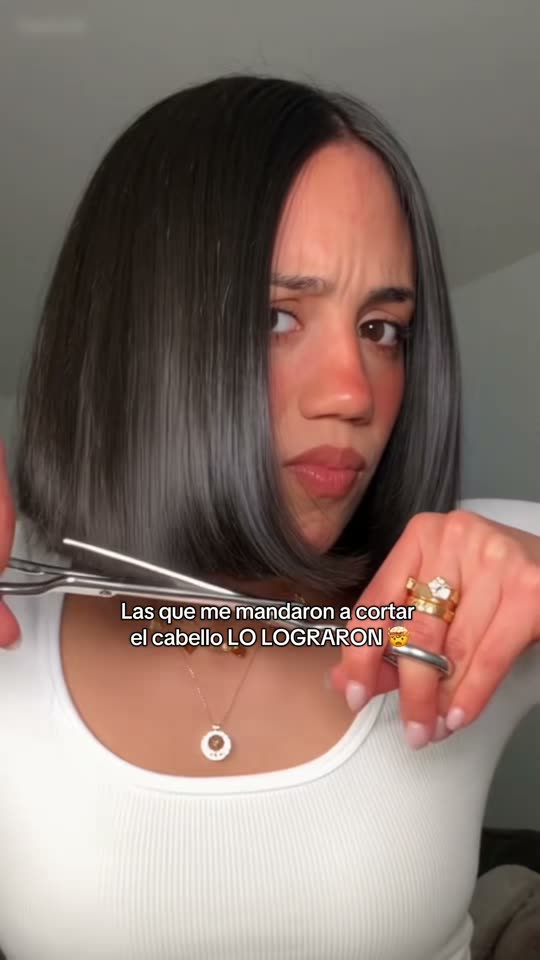
The original Bob Filter Prank reel by @gracielazaihairOriginal reel
  • 1 photo you add
  • 10 s clip with sound
  • 9:16 for TikTok, Reels, Shorts
  • No watermark

No prompt to write: Add your photo and tap once

Create your own

Ready in a few minutes · From 3 credits

The bob filter prank is a TikTok trend using an AI template to turn a single photo into a video showing you cutting your long hair into a sleek, blunt bob. People send these to partners or parents, or share them as "Pranking my friends with the bob filter". Here, AI creates it from just one photo.

Also called bob haircut filter · ai bob haircut filter · ai bob haircut · ai haircut filter · ai haircut prank · ai haircut filter prank · bob haircut prank · trend do cabelo por IA

Example

What the Bob Filter Prank video looks like

This is the original reel that launched the trend. Your video will be a fresh clip created from your own photo in this style, not a duplicate of these frames. Each generation is unique.

Original reel by @gracielazaihair, 8 s
The original reel by @gracielazaihair: she frowns at the camera, snips her long hair at jaw level, revealing a sleek, blunt bob; then a water spray and a satisfied hair flip. An AI template created it from a single photo of her: no actual cutting happened. The template watermark is blurred out.
Use this reference
Original reel by @_kat_120, 10 s
The prank version, from the original reel by @_kat_120: "Pranking my husband with the ai haircut filter". The scissors, her shocked expression and the finished bob are all AI-generated from one photo.
Use this reference
Step by step

How to make the Bob Filter Prank video on Smew AI

Everything happens in your browser. No editing software, no prompt writing, no watermark.

  1. Add your photo

    Click "Create your own" and upload your photo with hair below the chin. Snap one with the camera or choose from your library.

  2. Press Generate

    The button displays the cost. Seedance 2.5 creates the Bob Filter Prank scene directly from your photo, with no intermediate steps, as a 10-second video with original sound. You write nothing.

  3. Download or share

    Your video finishes in a few minutes as a 9:16 MP4. Download it, share from your phone, or access it later in your Library.

Which photo works best?

Upload one photo of one person with hair down. Works for both options.

  • Hair below the chin, loose and visible over the shoulders. The cut requires length: short hair won't show much change.
  • Face the camera in good light, chest-up framing. No sunglasses, hats or hair covering the face.
  • Haircut video: shoot the photo in the location where you want the video set, like your bedroom or car, showing some background. The video preserves that location and your outfit, which makes the prank convincing.
  • Bob photo: any clear photo works. Only the hairstyle changes.
  • Use your own photo or a friend's photo with their permission. Never a child, celebrity or stranger.

Where did the Bob Filter Prank trend start?

The bob filter isn't actually a camera filter—it's an AI template. In early August 2026, CapCut template creators launched templates that transform a single photo into a short vertical video: you pick up scissors, snip your long hair at jaw level, and end up with a sharp bob. On 9 August, @_kat_120 shared hers as "Pranking my husband with the ai haircut filter", and another template, called "Ai bob haircut filter" in CapCut, went live the same day; by 14 October the audio appeared in 7,800 TikTok videos.

The trend exploded in mid-August when videos that appeared to show actual haircuts racked up millions of views. @gracielazaihair's video, the first example on this page, reached 5.2 million views and 231,200 likes. By early September it arrived in Brazil as the "trend do cabelo por IA". In the US, tutorial videos called "Pranking my friends with the bob filter" sustained the momentum: the most popular, posted by @rich82809 on 13 September, crossed 2.6 million views, and fresh ones continue appearing daily in October.

  1. In Brazil's AI hair trend, bnews São Paulo reports the Gemini prompt people used: modify the photo without altering the face and adjust only the hair, choosing from a list including "Classic bob" and "French bob". bnews São Paulo

  2. @_kat_120 shares "Pranking my husband with the ai haircut filter", created with a CapCut AI template. That same day, another template debuts; its audio features in 7,800 TikTok videos by 14 October. TikTok

  3. @gracielazaihair shares her AI haircut clip; it reaches 5.2 million views and 231,200 likes by 14 October. TikTok

  4. VIVA Notícias covers the "trend do cabelo por IA" in Brazil: creators share AI videos showing themselves cutting their hair short, generated from a single photo. VIVA Notícias

  5. @rich82809 shares a tutorial for the "Pranking my friends with the bob filter" trend; it reaches 2.6 million views and 73,400 likes by 14 October. TikTok

  6. US Google searches for "bob filter" hit their 90-day peak, following an initial spike on 10 August; from 30 September onward, searches occur daily. Google Trends

Copy and paste

The Bob Filter Prank prompts

You don't need this: the one-tap process handles it for you. [Image 1] is your photo: the video model uses it as reference and creates the scene directly from it, skipping any intermediate photo step.

Haircut video

1 photo: your photo, hair down below the chinSeedance 2.510 s · 720p · 9:16126 credits
Video prompt

A viral AI haircut prank video: the person from [Image 1] cuts their own long hair into a blunt bob with scissors, filmed like a real front-camera phone video. Photorealistic, natural light, fine phone-camera grain, vertical 9:16. The person is the one in [Image 1], in every frame: copy the exact face from [Image 1] (the face shape, eye color and eye shape, eyebrows, nose, mouth, skin tone, age, and any beard, moustache, glasses, piercings or freckles), and the clothes and any jewelry from [Image 1]. The same face from the first frame to the last, so their friends recognize them at once, also while they frown, gasp and laugh. Never morph, never beautify, never change the age. THE HAIR. Before the cut: exactly the hair from [Image 1], with the same color, highlights, texture and parting, hanging long over the shoulders. After the cut: the same hair color and parting, cut into a sleek, blunt, chin-length bob with one straight, even edge at the jaw line, the ends just touching the jaw, full and glossy. No bangs unless [Image 1] shows bangs. The hair color never changes. If the hair in [Image 1] is already at the chin or shorter, the cut makes it a neat blunt bob at that length. The place is the room or the place behind the person in [Image 1], with the same walls and light; if [Image 1] shows little of it, a plain, bright bedroom wall. The camera is the phone's front camera held at arm's length, framed from the chest up, the face large and sharp. 0-2 s: the person looks into the camera with a doubtful frown and lifts a pair of silver hair-cutting scissors beside the long hair. 2-4 s: they pull a long section of hair to the side and cut straight across at the jaw line; the long locks drop out of the frame, with crisp scissor snips. 4-6 s: a jump cut to a close-up: they cut the other side at the same height, and cut hair falls on the shoulders. The blunt bob is done; their eyes go wide and they cover the mouth with one hand in shock. 6-7.5 s: a jump cut: a quick mist of water from a plain spray bottle over the new bob, eyes closed. 7.5-10 s: they run both hands through the bob, give it a shake and smile proudly into the camera. Audio: the crisp snip of the scissors, a small gasp, the hiss of the spray and a short, happy laugh. No music, no lyrics, no talking. The scissors touch only the hair, never the face, the eyes or the skin. Anatomy rules: one head, two hands, five fingers on each hand. Exactly one person: no hairdresser, nobody else. No text, no captions, no logos, no watermark, no brand names on the scissors or the bottle.

2576 characters

Bob photo

1 photo: your photo, hair downNano Banana 2.1Photo · 2K · 9:163 credits
Photo prompt

Please edit my photo without changing my face and change only the hair, leaving it in the style: Classic bob. The hair is cut into a sleek, blunt, chin-length bob with one straight, even edge at the jaw line, the ends just touching the jaw, full and glossy, with the same hair color, highlights and parting as in the photo. No bangs unless the photo already shows bangs. Keep everything else exactly as in the photo: the face, the expression, the skin, the makeup, the glasses, the jewelry, the clothes, the pose, the background and the light, like a real phone photo taken right after a haircut. Vertical 9:16: if the photo is wider, extend the background naturally. Nobody added. No hair clips, no hat, no text, no logos, no watermark, no filter look. The only change is the haircut: the identity rules below apply to the face and the hair color, and the hairstyle is the new bob described above.

898 characters

How many credits does it cost?

You pay per video in credits, with the exact cost displayed on the Generate button before you commit. The one-tap price includes both the scene photo and the video, charged once. Each option has its own cost: Haircut video 126 credits, Bob photo 3 credits. Lower-cost models are available if you run the prompts manually in AI Video.

Video modelSettingsCredits
Haircut video: Seedance 2.5 (this template)10 s, 720p, straight from your photos, one tap126
Bob photo: Nano Banana 2.1 (this template)2K photo, 9:16, one tap3

One-time packs and plans are on the pricing page. A failed video gives its credits back.

What happens in the bob filter video, second by second?

Haircut video creates a new 10-second phone video from your photo, set in your photo's location, showing your face and outfit. The sequence follows the template clips that define the trend:

TimeWhat happens
0-2 sYou glance at the front camera with an uncertain frown and raise scissors beside your long hair.
2-4 sYou gather a long section to one side and snip straight across at jaw level. The cut hair falls away.
4-6 sYou trim the opposite side. A blunt, chin-length bob appears, and you gasp in surprise, hand covering your mouth.
6-7.5 sA brief spray of water over the fresh bob.
7.5-10 sYou sweep your hands through the bob, toss it and smile at the camera.

How Smew AI makes it: your photo feeds directly into Seedance 2.5, ByteDance's video model, with no intermediate image, preserving facial accuracy. Hair color and part stay the same; only length is altered. The output is vertical, 720p, with its own audio: scissor sounds, a gasp and laughter, no background music.

Bob photo feeds your photo to Nano Banana 2.1, Google's image model, modifying only the hairstyle. You receive one 2K vertical image of yourself sporting a fresh bob.

The create page displays the exact cost on the Generate button before you commit, and each generation produces a unique result.

Haircut video or Bob photo: which one should you make?

  • Haircut video matches the trend as people share it: the cutting, the surprise and the big reveal. Choose it for TikTok or Reels, or to send to someone familiar with your hair.
  • Bob photo is the subtle approach: one image of you with a fresh bob, as though you just left the salon. Send it with "Thoughts?" and wait for their response. It's also an affordable way to preview whether a bob flatters you before scheduling a real appointment. Under the top tutorial, someone commented: "No joke this is actually a great way to see how you look with short hair".

Caption ideas: "Pranking my friends with the bob filter", "Pranking my mom with the AI haircut filter", "He didn't fall for it", or "Should I actually do it?". To share it trend-style, pair it with a trending sound from the template videos on TikTok.

The templates behind the trend also offer a bowl cut and a buzz cut with clippers. This page produces the blunt bob. For another prank based on phone video, check out the ghost filter prank.

How do you do the bob filter prank without hurting anyone?

A fake haircut ranks among gentler pranks, but it still plays with trust. Keep it fun for everyone:

  • Use your own photo, or a friend's with permission. Never create a haircut video of someone who didn't agree, and never of a child.
  • Choose the right person. A partner or friend who enjoys jokes, not someone who'd be genuinely distressed.
  • Reveal it quickly. Explain it's AI immediately after their reaction.
  • Disclose it's AI when posting. Nothing was actually cut: the entire video is AI-generated. Keep the platform's AI label visible, and never present it as a real salon transformation.

What goes wrong, and how do you fix it?

ProblemFix
Not much changesYour hair was already short. The cut requires hair below the chin: choose a photo with hair down past the shoulders.
The bob comes out in another colorThe prompts preserve your hair color. Choose a photo in daylight where the color appears accurate.
You get bangs you do not haveThe prompts add bangs only when visible in your photo. Generate again.
The place is not your room (Haircut video)The AI works only with what's visible in your photo. Take the photo showing more background space.
Your face looks different in the close-upChoose a sharp, forward-facing photo in good lighting, without sunglasses. Each generation is a new attempt.
A run fails, or the model refuses a photoCredits are refunded. Try a different photo.
FAQ

Bob Filter Prank trend questions

What is the bob filter prank?
It's a TikTok trend from August 2026: an AI template converts one photo into a short video showing you cutting your long hair into a blunt, chin-length bob with scissors. People send it to partners or parents for their reaction, or share it with captions like "Pranking my friends with the bob filter".
Where does the bob filter come from?
From AI templates on CapCut. The first appeared in early August 2026, with the major surge mid-August when clips from creators like @gracielazaihair gained millions of views. Brazil developed its own "trend do cabelo por IA" in early September, and US tutorials titled "Pranking my friends with the bob filter" sustained momentum through October.
How do I do the bob filter prank?
Click "Create your own", select Haircut video or Bob photo, upload one photo with long hair and hit Generate. Smew AI produces the video or picture and saves it to your Library. No CapCut template or prompt needed.
Is it a real filter? Does anything get cut?
Nothing is actually cut. The bob filter is an AI-generated video made from a still photo: the scissors, falling hair and finished bob are all computer-generated. That's why you should disclose it's AI when sharing.
Is this the CapCut bob filter?
No. Smew AI has no connection to CapCut. Our Haircut video is generated by Seedance 2.5 from your photo, using a prompt based on the trend's signature moments, and the Bob photo by Nano Banana 2.1.
Is there a bob filter prompt?
The CapCut templates are proprietary, and no creator or tutorial we reviewed shares a prompt for the video. So the Haircut video prompt is our creation, crafted from analyzing the trend videos frame by frame. The Bob photo uses the haircut prompt shared during Brazil's AI hair trend: modify the photo preserving the face while changing only the hair, styled as a classic bob, plus rules preserving your hair color and other photo elements.
Can I prank my mom or my boyfriend with it?
Yes, as a harmless joke with someone who'll find it funny. Send the video or photo, catch their reaction, then quickly explain it's AI. Avoid anyone who might be genuinely upset.
Can I use a photo of my friend?
Only with your friend's permission. Never use photos of children, celebrities or strangers, and disclose it's AI when posting the output.
Does it work with short hair, or on men?
The cut requires hair below the chin, flowing over the shoulders. Short hair shows minimal change. Anyone with long hair can use it: the template preserves face, gender and hair color from the photo.
Does the video have sound?
Yes. The Haircut video includes original audio: scissor snips, a soft gasp and laughter, without music. To share it trend-style, add a trending sound from the template videos on TikTok.
Does the bob filter cost credits?
Yes. The Bob photo costs a few credits, while the Haircut video costs more as it's a video. The create page shows the exact cost on the Generate button before you commit, and failed runs refund your credits.
Is my photo private?
Yes. Smew AI never posts your photo or the output anywhere or displays them to other users. The output goes to your private Library, where you can delete it anytime.
Is the bob filter the same as the AI haircut filter?
Yes. People call it the bob filter, the AI haircut filter or the AI bob haircut. It originated as CapCut templates and spread through TikTok; here you create it from one photo, without CapCut.
What would I look like with a bob? Is there a haircut filter for that?
Yes. Choose Bob photo, an AI hair transformation that modifies only your hairstyle, like a short hair filter. Requires hair below the chin in your photo.
What is a fake haircut prank?
A haircut prank where nothing is actually cut: you send a video or photo showing a new bob, and the recipient believes you cut your hair. Reveal it's AI promptly after, and keep it lighthearted.
Can I try the bob filter online, on Snapchat or on Instagram?
You can try it online here: upload one photo with long hair, and AI generates a haircut video or bob photo. It's not a Snapchat lens or Instagram effect, but you can share the result on Instagram or TikTok.
What captions do people use for the bob filter prank?
The US tutorials use titles like "Pranking my friends with the bob filter". For your own post, try "Pranking my mom with the bob filter" or "Cutting my hair, AI trend edition".
More trends

Other AI video templates

Template

Bby Wow Guy AI: Insert Your Face Into the Guy Dancing at a Quince Meme

Groove toward the camera at a quinceañera, take a bite of the concha, lock eyes with the lens while chewing with stuffed cheeks, then groove back into the crowd. Upload one photo to star as the bby wow guy, complete with the song.

Read more
Template

Bad Times AI Trend: Turn One Photo Into the Viral Argument Video

The viral argument routine: hands to head, hip pose, stop gestures and that long camera stare, all set to Imael Angel's "Bad Times". Upload a single photo of yourself or your pet and get the complete video with music.

Read more
Template

Tecktonik Dance AI: Step onto the String-Light Stage

Wide arm swings, hands reaching toward the head, both arms shooting upward, followed by rapid, precise arm choreography on a compact stage lit by string lights: the electro dance from the 2000s that Cheba Man revived in 2026. Upload a single photo of yourself or your pet to generate the dance complete with its soundtrack.

Read more
Template

Ghost Prank Filter: A Spooky Ghost Appears Behind You

A grey ghost with long hair, big white eyes and a creepy smile slowly appears behind you as you face the camera, vanishing when you turn around. This is the ghost prank that went viral on TikTok. AI creates it from a single photo, so make sure to tell people it's AI-generated when posting.

Read more
Template

South Park Filter: You as a Paper Cut-Out Cartoon

Upload a photo of yourself, friends or your pet. The AI transforms it into a flat paper cut-out cartoon with a large round head and oval eyes, placed in a snowy small mountain town. Your hairstyle, beard, glasses and clothing transfer over.

Read more
Template

Opa Opa Opa Trend AI: Make Your Hair Bounce to the Viral Beat

Watch yourself bounce as your hair moves to each beat of "slysh ty zalip, opa opa op". Upload a single selfie to create the viral video with your face and the audio, or transform into an anime character.

Read more

Make your own Bob Filter Prank video

Upload one photo and click once. No prompt writing. 126 credits.

No watermark. A failed video gives its credits back. Secure checkout by Stripe.