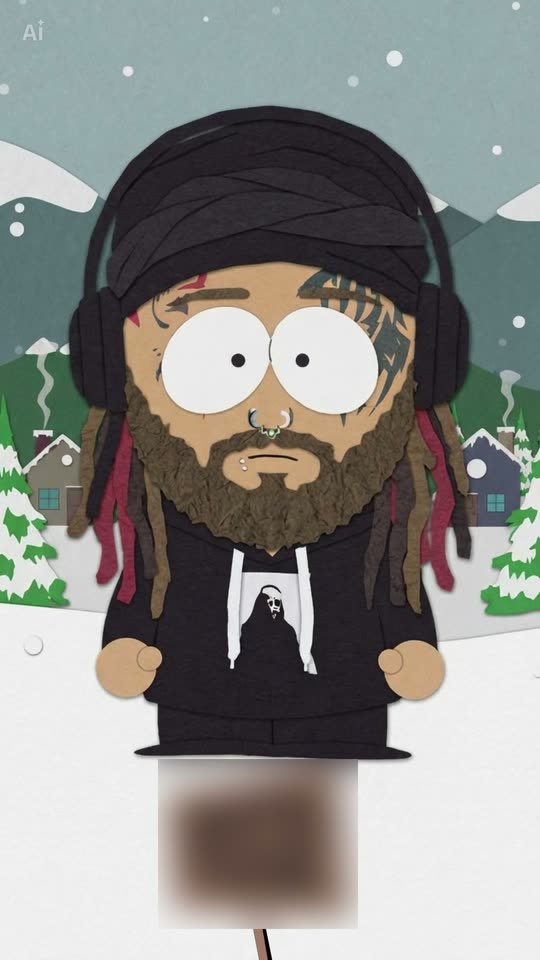
Upload a photo of yourself, friends or your pet. The AI transforms it into a flat paper cut-out cartoon with a large round head and oval eyes, placed in a snowy small mountain town. Your hairstyle, beard, glasses and clothing transfer over.
The South Park filter is a TikTok trend that transforms one photo into a flat construction-paper cartoon resembling the animated show's style: large round heads, big oval eyes, mitten hands and a snowy mountain town backdrop. Upload one photo of yourself, friends or a pet here.
Also called South Park AI filter · South Park me · South Park yourself · South Park version of me · South Park photo filter · South Park character filter · South Park cartoon filter
Example
What the South Park Filter photo looks like
This is the original reel that launched the trend. Your video is a fresh clip created from your photo in the same style, not a duplicate of these shots. Every run produces unique results.
Original reel by @generationalbrandrisk, 10 s
The original post by @generationalbrandrisk: his real photo, followed by the paper cut-out version. His dreadlocks, beard, face tattoos, nose rings, headphones and hoodie print all transferred to the cartoon. The sign showing the show's name is blurred.
The Pet version, from the original post by @blazeofcuteness: "Mavis goes to South Park". A black cat transforms into a paper cut-out cat with large oval eyes in the snow. The sign is blurred.
How to make the South Park Filter photo on Smew AI
Everything runs in the browser. No editing app, no prompt writing, no watermark.
Add your photo
Press "Create your own" and upload an image of yourself, waist up or full body. Take it with the camera or choose from your library.
Press Generate
The button displays the price. Nano Banana 2.1 transforms your photo into the South Park filter scene and creates one 2K photo. No prompt needed.
Download or share
Your photo is ready in a few minutes as a 9:16 2K image. Download it, share it from your phone, convert it into a video, or retrieve it later from your Library.
Which photo works best?
Upload one sharp photo: for Human, a solo photo of yourself, waist up or full body if available; for Friends, a group photo with 2 to 4 people; for Pet, your pet showing its entire body.
Face the camera in good light. The cartoon preserves visible details: your hairstyle, beard, glasses, piercings and tattoos.
Wear what you want in the cartoon. Your clothing, colors and patterns transfer over. Close selfies work too; the AI then adds basic trousers and shoes.
Friends: all faces visible, no one cropped at the edge, maximum four people.
Pets: ears, fur patterns and any collar or bandana visible.
Use your own photo, or photos of friends with permission. Never a celebrity or stranger.
Where did the South Park Filter trend start?
The trend exploded on TikTok during the last week of September 2026. CapCut template creators built AI templates that transform photos into the flat, construction-paper aesthetic of South Park, the long-running animated show. The earliest how-to video we located appeared on 26 September: @jord627__x8's "south park ai filter tutorial" reached 594,100 views by 14 October. Later that same day, @sophiebennett0303 posted the version featured in the biggest tutorials: a wooden sign drops over your photo, then a cartoon of you wipes in, standing in a snowy small mountain town. By 14 October, 6,942 TikTok videos had used that post's sound.
Posts display the original photo first and the cartoon second, typically captioned "Nah why'd they do me like that". How-to videos amplified its reach: one by @wudishaoxia from 2 October surpassed 1.8 million views and 64,300 likes, and US Google searches for "south park filter" peaked on 7 October. The concept predates the templates: in August 2025, German tech site GIGA shared ChatGPT prompts that convert a portrait into a figure in the show's style.
German tech site GIGA publishes three ChatGPT prompts that convert an uploaded portrait into a figure in the show's style; the first prompt places it against snowy mountains and a small town. GIGA
@jord627__x8 posts the earliest "south park ai filter tutorial" we discovered, for a CapCut template; it reaches 594,100 views and 10,000 likes by 14 October. TikTok
@sophiebennett0303 posts the sign-drop template, where a wooden sign falls over the photo and the cartoon wipes in. Its sound appears in 6,942 TikTok videos by 14 October. TikTok
A how-to video by @wudishaoxia goes live; it surpasses 1.8 million views and 64,300 likes by 14 October, the most viewed trend post we found. TikTok
US Google searches for "south park filter" hit their peak. Google Trends
Another how-to video, by @ciqingyongcun22, surpasses 1.1 million views and 34,900 likes by 14 October. TikTok
Copy and paste
The South Park Filter prompts
You do not need this: the one-tap workflow runs it automatically. The photo prompt places your photo into the scene. Want to modify it? Copy it and edit in AI Photo.
Human
1 photo: you, waist up or full bodyNano Banana 2.1Photo · 2K · 9:163 credits
Photo prompt
Use the uploaded image as the base. Turn the person in the photo into a flat construction-paper cut-out cartoon character. Keep their hairstyle, skin tone, and outfit recognizable, redrawn with a round head, big, simple eyes, thick black outlines, and flat construction paper cutout shading. Use a construction paper appearance, simple shapes, small bodies with large heads, and minimalist facial features. Keep the paper cutout aesthetic with simple geometric shapes, flat colors, a snowy mountain town background, a plain deadpan expression, clean outlines, and an authentic TV animation style. The character looks cut from colored construction paper and laid flat: an oversized, almost round head that is about half of the whole height, two big white oval eyes side by side that touch in the middle, each with a small black dot pupil, a short flat line for the mouth, no nose, a small rounded body, stubby arms with round mitten-shaped hands in the skin tone, short legs and simple flat shoes. A soft paper texture on the hair, any facial hair and the clothes; no 3D, no gradients, no realistic skin. It keeps everything that makes the person recognizable, as simple paper shapes: the exact hairstyle, hair length and hair color, any beard, moustache or stubble, glasses, piercings, earrings, tattoos and freckles, any hat, cap, hood, headphones or jewelry, the skin tone, the gender, and the clothes with their colors and prints from the photo. If the photo shows only the upper body, add plain trousers and shoes that go with the outfit. Add nothing else: no knitted winter hat, scarf, gloves or parka unless the photo shows one. The character stands alone in the middle of a snowy street, facing the camera, arms down at the sides, full body from the top of the head to the shoes, in the lower two thirds of the picture. Behind, in the same flat paper style: a quiet small mountain town in winter, with snow on the ground, snowy pine trees, a few small wooden houses with smoke from the chimneys, power lines, big grey-green mountains with white snowy peaks under a pale blue sky, and light snowfall. Vertical 9:16. Exactly one character: an original cartoon of this person, not an existing cartoon character. No sign, no signpost, no text, no letters, no logos, no watermark, no frame. The face is always the flat paper cartoon face described above, never a photo face: the identity rules below apply to the cartoon's hair, facial hair, glasses, piercings, tattoos, skin tone, gender and clothes.
1 photo: your group photo, 2 to 4 peopleNano Banana 2.1Photo · 2K · 9:163 credits
Photo prompt
Use the uploaded image as the base. Turn every person in the photo into a flat construction-paper cut-out cartoon character. Keep each person's hairstyle, skin tone, and outfit recognizable, redrawn with a round head, big, simple eyes, thick black outlines, and flat construction paper cutout shading. Use a construction paper appearance, simple shapes, small bodies with large heads, and minimalist facial features. Keep the paper cutout aesthetic with simple geometric shapes, flat colors, a snowy mountain town background, a plain deadpan expression, clean outlines, and an authentic TV animation style. Draw exactly as many characters as there are people in the photo, side by side in the same order as in the photo, from left to right, each about as tall as the others are in the photo. Each one looks cut from colored construction paper and laid flat: an oversized, almost round head that is about half of the whole height, two big white oval eyes side by side that touch in the middle, each with a small black dot pupil, a short flat line for the mouth, no nose, a small rounded body, stubby arms with round mitten-shaped hands in the skin tone, short legs and simple flat shoes. A soft paper texture on the hair, any facial hair and the clothes; no 3D, no gradients, no realistic skin. Each character keeps everything that makes that one person recognizable, as simple paper shapes: the exact hairstyle, hair length and hair color, any beard, moustache or stubble, glasses, piercings, earrings, tattoos and freckles, any hat, cap, hood, headphones or jewelry, the skin tone, the gender, and the clothes with their colors and prints from the photo. Never blend two people, never swap hair, glasses or clothes between them, and never add or drop a person. If the photo also shows a pet, it becomes a flat paper cut-out cartoon animal with its own fur colors, standing with them. If the photo shows only their upper bodies, add plain trousers and shoes that go with each outfit. Add nothing else: no knitted winter hats, scarves, gloves or parkas unless the photo shows them. They stand together in the middle of a snowy street, facing the camera, arms down at the sides, full bodies from the tops of the heads to the shoes, in the lower two thirds of the picture. Behind, in the same flat paper style: a quiet small mountain town in winter, with snow on the ground, snowy pine trees, a few small wooden houses with smoke from the chimneys, power lines, big grey-green mountains with white snowy peaks under a pale blue sky, and light snowfall. Vertical 9:16. Original cartoons of these people, not existing cartoon characters. No sign, no signpost, no text, no letters, no logos, no watermark, no frame. Every face is the flat paper cartoon face described above, never a photo face: the identity rules below apply to each cartoon's hair, facial hair, glasses, piercings, tattoos, skin tone, gender and clothes.
You pay per photo in credits, and the create page displays the exact price on the Generate button before you spend. The one-tap price covers one 2K photo, charged once. One photo is 3 credits, so the smallest one-time pack covering it is $9.99 for 100 credits, with no subscription. A smaller 1K photo costs less if you run the prompt manually in AI Photo.
Model
Settings
Credits
Nano Banana 2.1 (this template)
2K photo, 9:16, one tap
3
Nano Banana 2.1 (by hand in AI Photo)
1K photo, 9:16, same prompt
2
One-time packs and plans are on the pricing page. A failed video gives its credits back.
What does the South Park AI filter keep, and what does it change?
The filter preserves the details your friends recognize and redraws everything else in paper. In the original post at the top of this page, dreadlocks, beard, face tattoos, nose rings, headphones and the hoodie print all transferred to the cartoon.
Stays from your photo
Becomes paper cut-out
Hairstyle, hair length and hair color
Your head: large, nearly round, roughly half your height
Your eyes: two large white ovals with small black dots
Hats, caps, hoods, headphones, jewelry
Your hands: round mittens with no fingers
Your clothes, with their colors and prints
Your body: compact and stubby, with short legs
Your skin tone and gender
The place: a snowy small mountain town with pine trees, wooden houses and large mountains
How Smew AI makes it: your photo goes to Nano Banana 2.1, Google's AI image model, with a prompt built on the photo prompt from CapCut's own Dreamina "South Park character maker" page, since the template itself reveals no prompt. We incorporated the template's aesthetic and scene, describe the style in words rather than naming the show, and exclude the sign. You receive one 2K vertical picture (9:16) with no sign, no text and no watermark. The create page displays the exact price on the Generate button, and each run draws you slightly differently.
South Park filter, character maker or pfp: what is the difference?
A South Park character creator, or avatar editor, is a build-your-own tool: you select hair, eyes and clothes from menus, so South Park character creation requires several minutes of clicking. Most sites labeled a South Park character maker or South Park character generator operate this way. The AI filter works in reverse: it begins from your photo, so you create your own South Park character without selecting anything, and it preserves your actual hair, beard, glasses and clothes.
The result also functions as a South Park pfp: the cartoon crops cleanly to a square, like art from a South Park avatar creator or pfp maker. The AI draws in the flat South Park art style of construction paper, round heads and mitten hands, but never replicates a character from the show. For South Park pfp matching sets, use Friends, or create one each and post them together.
Human, Friends or Pet: which version should you pick?
All three accept one photo and deliver one picture in the same snowy town.
Human is the trend as most post it: you alone, standing in the snow with a deadpan stare. A waist-up or full-body photo gives the cartoon your actual outfit.
Friends converts everyone in one group photo into cartoons, side by side in the same sequence as in the photo. The first template tutorial on 26 September already featured a group selfie transformed into a row of characters. Up to four people produces the best results.
Pet converts your dog or cat into a paper cut-out animal with its own fur colors, markings and ears, like the black cat Mavis in the second clip above (29,600 views on TikTok).
A pet in a group photo transfers too: it becomes a cartoon animal beside the people.
What goes wrong with the South Park filter, and how do you fix it?
The same complaints surface repeatedly under the template tutorials, and our prompt addresses them.
What goes wrong
What people said
What our prompt does, and what you can do
You come out as the other gender
"they turned me into a girl" (256 likes under the 1.8 million view tutorial)
The prompt preserves the gender of the person in your photo
The beard or the hair is off
"they missed the beard and to much hair"
The prompt specifies the exact hairstyle, hair length and facial hair. Use a sharp photo where both are visible
Glasses or jewelry look odd
"Idk why it did my glasses like that", "just got the necklace wrong"
Glasses and jewelry are on the keep list. Run it again: each run draws slightly differently
It does not look like the show
"Mine does NOT look like South Park"
The prompt details the aesthetic: flat paper, a round head, large oval eyes, mitten hands, flat colors
Extra winter clothes
No complaint yet: a risk of the snowy style
The prompt includes no winter hat, scarf, gloves or parka unless your photo contains one
If a result appears off, run it again with a brighter, sharper photo taken facing the camera. If a run fails, credits are refunded.
How do you post it like the trend?
Trend posts display the real photo first and the cartoon second. Smew AI delivers the cartoon as a picture, so post both as a two-photo carousel on TikTok or Instagram: your photo, then the cartoon.
Caption: "Nah why'd they do me like that", or "Why'd it make me look like that". Both appear throughout the trend's posts.
Sound: most posts use the template's "original sound" by Sophie Bennett, which appeared in 6,942 TikTok videos on 14 October 2026. Tap the sound on any template post to use it.
Hashtags: #southparkfilter (3,081 videos on 14 October 2026), #southparkcharacter and #southpark. Keep the platform's AI label visible.
Profile picture: the cartoon crops well to a square, so it functions as a profile picture or an avatar for your friend group's chat.
FAQ
South Park Filter trend questions
What is the South Park AI filter?+
It is a TikTok trend from late September 2026: an AI template transforms a photo of you into a flat, construction-paper cartoon in the style of the animated show South Park, placed in a snowy small mountain town. People post the original photo first, then the cartoon, typically captioned "Nah why'd they do me like that".
How do I do the South Park filter?+
Press "Create your own", choose Human, Friends or Pet, add one photo and press Generate. Smew AI converts it into a paper cut-out cartoon in a snowy mountain town and stores the picture in your Library. No CapCut template and no prompt needed.
Is this the official South Park filter?+
No. Smew AI has no connection to South Park or its creators. The trend uses the show's name as a label for the aesthetic. Our template creates an original cartoon of you in a paper cut-out style, not a character from the show, and displays no logo or sign.
Is there a South Park AI filter prompt?+
The CapCut templates behind the trend are closed, and none of the tutorials we reviewed shares a prompt. So our prompt begins from the photo prompt on CapCut's own Dreamina "South Park character maker" page and incorporates the template's aesthetic: a round head, large oval eyes, mitten hands, flat paper colors and a snowy mountain town. It preserves your hair, facial hair, glasses, skin tone and clothes.
Can I make a South Park character of me and my friends?+
Yes. Choose Friends, the group version of the South Park filter, and add one group photo with 2 to 4 people. Everyone becomes a paper cut-out cartoon, side by side in the same sequence as in the photo, each with their own hair and clothes.
Does the South Park filter work on dogs and cats?+
Yes. Choose Pet and add a photo of your dog, cat or other pet with its entire body visible. It appears as a paper cut-out animal with large oval eyes and its own fur colors, markings and ears, in the snowy town. The second clip on this page is a cat from the trend.
Why did the filter turn me into a girl, or a boy?+
It is the most liked complaint under the biggest tutorial: "they turned me into a girl" (256 likes). Our prompt instructs the model to preserve the gender of the person in your photo. A clear photo with your face toward the camera helps most.
Can I make a South Park-style character without AI?+
Yes. Build-your-own character makers on the web let you select hair, eyes and clothes from menus, and many trend commenters created theirs that way. The AI filter operates in reverse: it begins from your photo and preserves your real appearance.
Can AI turn me into a South Park character?+
Yes. Add one photo and press Generate, and the AI converts you into a paper cut-out cartoon. This way you create yourself as a South Park character from a real photo, with your own hair, glasses and clothes.
Is there a South Park filter app?+
The trend operates on CapCut templates and spread on TikTok; it is not an Instagram filter. Smew AI requires no app: it operates in the browser and delivers a South Park AI photo to post anywhere, as a meme or a profile picture. In Spanish people call it the filtro South Park.
Can I use it as a profile picture?+
Yes. The picture is 2K and vertical, and the cartoon stands in the center, so it crops cleanly to a square for a profile picture or a group chat avatar.
Can I turn it into a video?+
Yes. Under your finished picture, press "Make it a video": it opens AI Video with the cartoon as the first frame, and you decide what happens. The video costs its own credits.
Does the South Park AI filter cost credits?+
Yes, a few. A picture costs far fewer credits than a video, the create page displays the exact price on the Generate button before you spend, and if a run fails, credits are refunded.
Is my photo private?+
Yes. Smew AI does not post your photo or the result anywhere or display them to other users. The picture goes to your private Library, and you can delete it there anytime.