smew.ai

Hair Dye Filter: AI Creates Your Burgundy Hair Transformation From One Photo

Upload a single photo. AI generates a phone video showing you applying burgundy dye from a bowl to your hair, followed by long, shiny, straight burgundy hair and voluminous curls, or just a photo with burgundy hair. It's all digital, so mention it's AI when sharing.

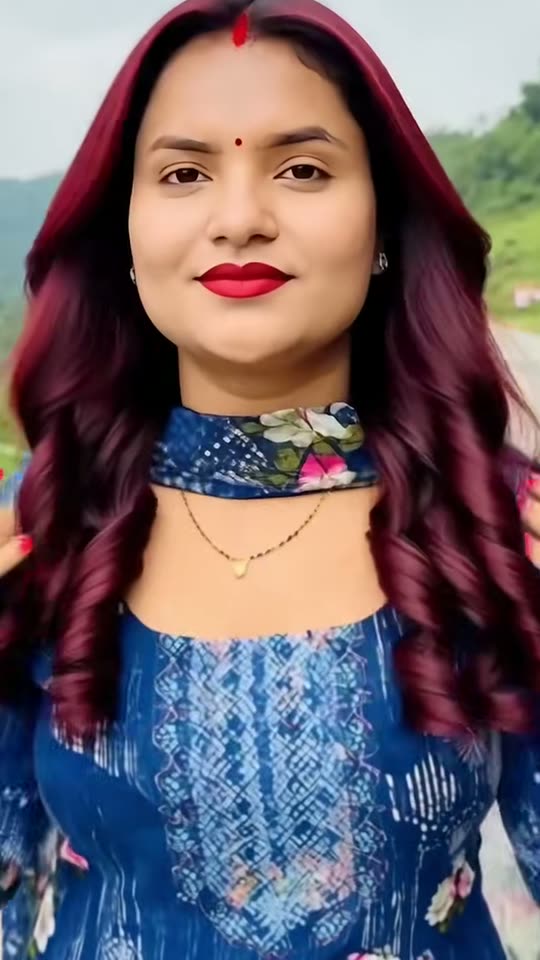
The original Hair Dye Filter reel by @bipanabhattarai279Original reel
  • 1 photo you add
  • 10 s clip with sound
  • 9:16 for TikTok, Reels, Shorts
  • No watermark

No prompt to write: Add your photo and tap once

Create your own

Ready in a few minutes · From 3 credits

The hair dye filter is a TikTok sensation where AI creates a video from a single photo, showing you applying burgundy dye from a bowl, then revealing long, straight burgundy hair, a flat iron gliding through, and finishing with voluminous, shiny curls. It became popular in October 2026. Now, AI creates your version from your photo.

Also called AI hair dye effect · AI hair color change effect · hair color transition video · AI DIY hair dye · red cherry hair trend · burgundy hair trend

Example

Preview of the Hair Dye Filter video

Here's the original reel that launched the trend. Your video will be a fresh clip created from your photo following the same format, not a duplicate of these frames. Each result is unique.

Original reel by @bipanabhattarai279, 11 s
The initial viral clip of this trend, posted by @bipanabhattarai279 (11 October 2026): she applies burgundy dye from a bowl to her hair, a flat iron smooths the newly straightened hair, and the video concludes with large, shiny curls. An AI template created it from a single photo: no actual dyeing occurred. Text has been cropped out.
Use this reference
Step by step

Creating the Hair Dye Filter video on Smew AI

All processing happens in your browser. No editing software needed, no prompt writing required, no watermark added.

  1. Upload your photo

    Click "Create your own" and upload your photo showing your face and hair. Capture it with your camera or select from your gallery.

  2. Click Generate

    The button displays the cost. Seedance 2.5 creates the AI Hair Dye Filter scene directly from your photo, without intermediate images, as a 10-second clip with original audio. No prompt needed.

  3. Download or share

    Your video will be ready in minutes as a 9:16 MP4. Download it, share directly from your device, or access it later in your Library.

What kind of photo works best?

Upload one photo of one person showing your face and hair clearly. Works with all versions.

  • Face the camera with good lighting, from chest level up. No sunglasses or face coverings.
  • All hair types work: straight, curly, braided, in a bun, or short. The video applies dye to your current hair, then shows you with long, straight burgundy hair. The photo version maintains your hairstyle while changing just the color.
  • No hat, scarf, or head covering over your hair: the dye application requires visible hair.
  • For the dye video: photograph yourself in the location where you want the video set, such as your backyard or bedroom. The video preserves that setting and your outfit.
  • Upload your own photo, or one of a friend with their permission. Never use photos of children, celebrities, or strangers.

Origins of the Hair Dye Filter trend

The AI hair dye filter isn't a camera filter but rather an AI template within CapCut: it converts a single photo into an 11-second vertical video. You appear holding a bowl of dark red dye, brushing it through your hair, then the scene transitions to long, straight, shiny burgundy hair, a flat iron smoothing it, and concludes with bouncy curls and a confident smile.

The trend's first viral clip originated in Nepal. On 11 October 2026, during Dashain festival celebrations, @bipanabhattarai279 shared hers, featured first on this page, which reached 268,000 views; Nepali tutorials appeared that same day. The major surge came from Nigeria and West Africa: @harmie_273's 14 October clip reached 2.2 million views and 221,900 likes, with its top comment, "haters go think say na AI", capturing the trend's humor: the transformed hair appears genuine. On 16 October, an English tutorial, "How to Use AI Hair Dye Filter", surpassed 250,000 views. A separate CapCut template featuring cherry red hair circulated in the US during September.

  1. The "original sound" used in most trend clips debuts on TikTok. Multiple CapCut AI hair templates incorporate it, and by 17 October it appears in 20,000 videos. TikTok

  2. Nepal's @bipanabhattarai279 shares her AI hair dye clip for the Dashain festival. It reaches 268,000 views, with Nepali tutorials demonstrating the template that same day. TikTok

  3. Nigeria's @harmie_273 shares her version. By 17 October it reaches 2.2 million views and 221,900 likes, becoming the trend's most popular clip. TikTok

  4. Additional Nigerian clips reach 974,000 and 638,000 views as the trend spreads throughout West Africa. TikTok

  5. An English tutorial, "How to Use AI Hair Dye Filter", surpasses 250,000 views. The #hairdyefilter hashtag contains 407 TikTok videos with 6 million views. TikTok

Copy and paste

Hair Dye Filter prompts

You don't need these: the one-tap process handles everything. [Image 1] is your photo: the video model uses it as reference and creates the scene directly, without generating an intermediate photo first.

Dye video

1 photo: your photo, face and hair in viewSeedance 2.510 s · 720p · 9:16126 credits
Video prompt

A viral AI hair dye video: the person from [Image 1] dyes their own hair burgundy from a bowl, then shows it off sleek and straight, then curled, filmed like a real phone video. Photorealistic, natural daylight, fine phone-camera grain, vertical 9:16. The person is the one in [Image 1], in every frame: copy the exact face from [Image 1] (the face shape, eye color and eye shape, eyebrows, nose, mouth, skin tone, age, and any beard, moustache, glasses, piercings, freckles or face marks), and the clothes and any jewelry from [Image 1]. The same face from the first frame to the last, so their friends recognize them at once, also when the head tilts down and the hair falls around the face. Never morph, never beautify, never change the age or the skin tone. THE HAIR. Before the dye: exactly the hair from [Image 1], with the same color, texture, length and style (braids, a bun, curls or short hair stay as they are). After the dye: long, straight, sleek, glossy burgundy hair: a deep wine red with a brighter cherry-red shine at the roots and along a neat middle part, falling well past the shoulders. Later: big, bouncy, glossy burgundy curls from the cheeks down, full and soft, in the same deep wine red. The new color is always this burgundy: never bright red, pink or orange. The place is the place behind the person in [Image 1], with the same light; if [Image 1] shows little of it, a bright yard outdoors in daylight. The camera is a phone held at arm's length, framed from the waist up, the face large and sharp. 0-3 s: the person looks into the camera with a cool, serious face, a round bowl full of thick, dark burgundy hair dye in one hand and a flat dye brush in the other. They dip the brush and paint the dye onto the hair from the parting down; every stroke turns the strands deep burgundy. 3-4.5 s: a quick cut: the dye is done and the hair is now the long, straight, sleek burgundy hair described above. The bowl and the brush are gone; they run both hands through it. 4.5-6.5 s: a flat iron glides slowly down the long straight hair from the roots to the ends, with a thin wisp of steam, and the hair shines. 6.5-8 s: a quick cut: the hair is now in big, bouncy burgundy curls; they lift the curls with both hands and let them drop. 8-10 s: they flip the hair back over one shoulder, lift the chin and smile proudly into the camera, the glossy curls framing the face. Audio: soft brush strokes, the hiss of the flat iron, a small happy laugh and a light, upbeat original instrumental beat. No lyrics, no talking. The dye stays on the hair and in the bowl: never on the face or the skin. Anatomy rules: one head, two hands, five fingers on each hand. Exactly one person: no hairdresser, no other hands. No text, no captions, no logos, no watermark, no brand names on the bowl, the brush or the flat iron.

2834 characters

Burgundy photo

1 photo: your photo, face and hair in viewNano Banana 2.1Photo · 2K · 9:163 credits
Photo prompt

Using the uploaded photo, generate a 9:16 vertical image featuring one hair color applied to the same person: burgundy, a deep wine red with a brighter cherry-red shine at the roots and along the parting, glossy and fresh, as if just dyed. Keep the person's face, expression, skin tone, lighting, outfit, and background identical to the original photo: only the hair color should change, with the same hairstyle, length, texture, parting and volume. Ensure the hair color looks realistic and blends naturally with the person's hairstyle, with natural shine and darker depth underneath, on every strand, braid or curl in view, and none on the skin. If the photo is wider, extend the background naturally. Nobody added. No hat, no hair clips, no text, no logos, no watermark, no filter look. The only change is the hair color: the identity rules below apply to the face, the hairstyle and the hair length, and the hair color is the new burgundy described above.

959 characters

Credit cost breakdown

You purchase videos using credits, with the exact cost shown on the Generate button on the creation page before any charges. The one-tap price includes both the scene photo and video, billed once. Each version has individual pricing: Dye video 126 credits, Burgundy photo 3 credits, Blonde photo 3 credits, Red photo 3 credits, Black photo 3 credits, Brown photo 3 credits, Pink photo 3 credits. The lower-cost models are available if you manually run prompts in AI Video.

Video modelSettingsCredits
Dye video: Seedance 2.5 (this template)10 s, 720p, straight from your photos, one tap126
Burgundy photo: Nano Banana 2.1 (this template)2K photo, 9:16, one tap3
Blonde photo: Nano Banana 2.1 (this template)2K photo, 9:16, one tap3
Red photo: Nano Banana 2.1 (this template)2K photo, 9:16, one tap3
Black photo: Nano Banana 2.1 (this template)2K photo, 9:16, one tap3
Brown photo: Nano Banana 2.1 (this template)2K photo, 9:16, one tap3
Pink photo: Nano Banana 2.1 (this template)2K photo, 9:16, one tap3

One-time packs and plans are on the pricing page. A failed video gives its credits back.

Second-by-second breakdown of the hair dye filter video

Dye video creates a fresh 10-second vertical video from your photo, set in your photo's location, featuring your face and outfit. The sequence follows the trend template's pattern:

TimeWhat happens
0-3 sYou gaze at the camera with a composed expression while applying dark burgundy dye from a bowl to your hair using a flat brush.
3-4.5 sQuick transition: the application is complete, revealing long, straight, shiny burgundy hair with lighter red highlights near the roots.
4.5-6.5 sA flat iron glides smoothly down the straightened hair, releasing a small puff of steam.
6.5-8 sNext transition: large, voluminous burgundy curls appear.
8-10 sYou toss your hair back and smile toward the camera.

Smew AI's process: your photo feeds directly into Seedance 2.5, ByteDance's video model, without creating an intermediate image, preserving facial accuracy. The clip is vertical, 720p, featuring original audio: brushing sounds, flat iron hiss, and a subtle beat without vocals.

Burgundy photo processes your photo through Nano Banana 2.1, Google's image model, modifying only hair color: one 2K vertical image of you with burgundy hair in your original style. It functions as an AI hair color modifier, similar to a filter, useful as a preview before actual dyeing.

The creation page displays the exact cost on the Generate button before charging, and every generation produces a unique result.

Choosing between Dye video and Burgundy photo

  • Dye video delivers the full trend experience: the bowl, brush, reveal, flat iron, and curls. Choose it for TikTok or Reels. In Nigeria, the joke beneath popular clips is "haters go think say na AI": the result looks authentic enough that viewers question its origin.
  • Burgundy photo offers a simpler alternative: a hair color preview tool for a single image. Preview yourself with burgundy hair before purchasing dye, or share it asking "Thoughts?" to gauge reactions.

Caption suggestions: "New hair, who dis?", "Haters go think say na AI", "Burgundy is my color", or "Should I actually dye it?". For trend-style posting, include a trending sound from TikTok trend videos.

Similar CapCut templates also feature haircuts. For the template showing long hair cut into a bob, check the bob filter prank.

Is the AI hair dye filter authentic? Sharing it responsibly

No actual dyeing occurs: the bowl, brush, new color, and curls are entirely AI-generated from one static photo. The burgundy hair color shown doesn't represent how actual dye would appear on your hair.

  • Use your own photo, or one from a consenting friend. Never use photos of children, celebrities, or strangers.
  • Disclose it's AI when posting. Retain the platform's AI label. Jokes like "haters go think say na AI" work because the audience understands the context.
  • Never present it as salon or product results. It's not an authentic before-and-after.
  • For pranks, keep it gentle. If you send it to your mom as genuine, reveal it's AI immediately after her reaction.

Common issues and solutions

ProblemFix
The face looks different when the head tilts downUpload a clear, forward-facing photo with good lighting and no sunglasses. Each generation creates a new version.
The new color is too bright, pink or orangeThe prompts specify deep wine-red burgundy. Generate again; photos taken in daylight produce better results.
The hair looks patchy after the dye (Dye video)Upload a clear photo with visible hair, not obscured by hands, hoods, or coverings.
Dye on the face or the handsThe prompts confine dye to hair and bowl. Generate again.
The place is not yours (Dye video)The AI uses only what your photo displays. Photograph yourself with more background visible.
The hairstyle changed (Burgundy photo)The photo preserves your hairstyle while changing only color. Generate again with clearer hair visibility.
A run fails, or the model refuses a photoCredits are refunded. Upload a different photo.
FAQ

Hair Dye Filter trend questions

What is the hair dye filter?
It's a TikTok trend from October 2026: an AI template converts one photo into a brief video showing you applying burgundy dye from a bowl to your hair, then displaying long, straight, shiny burgundy hair, a flat iron, and voluminous curls. Users share it as if genuinely dyed, often joking "haters go think say na AI".
Where does the AI hair dye filter come from?
From a CapCut AI template. The first viral clip appeared from Nepal on 11 October 2026, during Dashain festival. The major wave originated from Nigeria and West Africa starting 14 October, when @harmie_273's clip exceeded 2 million views, followed by English tutorials on 16 October.
How do I do the hair dye filter?
Click "Create your own", select Dye video or Burgundy photo, upload one photo showing your face and hair, and click Generate. Smew AI produces the AI video or image and saves it to your Library. No CapCut template, app, or prompt required.
Is this the CapCut hair dye filter?
No. Smew AI is independent of CapCut. The CapCut hair dye template, like all their hair color templates, is proprietary. Our Dye video uses Seedance 2.5 with your photo, following a prompt based on the trend's structure, and Burgundy photo uses Nano Banana 2.1.
Is there a hair dye filter prompt?
No creator or tutorial we found shares one: the CapCut template is proprietary. Our Dye video prompt is original, crafted by analyzing the trend's clips frame by frame. The Burgundy photo uses a standard AI hair color prompt (preserve face, expression, skin, clothing, and background while modifying only hair color), configured for burgundy.
Is the hair dye filter real? Does my hair get dyed?
No dyeing happens. The video is AI-generated from a still image: the bowl, brush, color, and curls are all digitally created. Disclose it's AI when sharing.
What would I look like with burgundy hair? Is there a hair color filter for that?
Select Burgundy photo. It functions as an AI hair color modifier and virtual preview tool: it alters only hair color in your photo while preserving your face, hairstyle, and outfit. Think of it as an online burgundy hair color filter, one result per generation.
Can I try other colors, like red or cherry red?
Yes. Burgundy photo provides the trend's color, a deep wine red similar to maroon. Alongside it, choose Blonde photo, Red photo, Black photo, Brown photo, or Pink photo. Each modifies only hair color while preserving your face, hairstyle, and outfit, letting you preview blonde, red, black, brown, or pink hair before actual dyeing. The Dye video remains burgundy. For cherry red or custom shades, use the AI photo tool with your specified color.
Is there a hair dye filter app, or can I use it online?
You can use it online here in your browser, no app required: upload one photo and AI creates the dye video or burgundy photo. These hair dye and color filters aren't Snapchat lenses or Instagram effects, but you can share results on Instagram, TikTok, or Snapchat.
Is the hair dye filter on TikTok?
Yes. The trend exists on TikTok, where users share their AI hair dye clips with burgundy hair, using the template's audio and hashtags #hairdyefilter and #hairdyetrend. Some call it a hair color filter or red hair filter. Create your video here and share on TikTok with trending audio.
Can I use it as a hair dye prank?
Yes, for lighthearted fun. Share the video or photo with your mom or friend as if you actually dyed your hair burgundy, capture their reaction, then promptly reveal it's AI. A fake hair dye prank, red hair prank, or any color prank works when everyone ends up laughing.
Is there an AI hair dye simulator to try a color first?
Burgundy photo serves that purpose: an AI hair dye preview, simulator, and generator combined, a color modifier for burgundy. It changes only hair color in your photo, showing the result before any real changes. The Dye video produces an AI video of the complete dyeing process.
Does it work with braids, short hair or on men?
Yes. The Dye video applies dye to whatever hair your photo shows, including braids and short hair, then displays long, straight burgundy hair, creating a complete AI transformation: new color and length, beyond a simple filter. The Burgundy photo maintains your original hairstyle and length. Anyone can use it: the template preserves the face and gender from your photo.
Does the video have sound?
Yes. The Dye video includes original audio: gentle brush strokes, the flat iron's hiss, and a light, cheerful beat without lyrics. For trend-style posting, add trending audio from TikTok trend videos.
Can I use a photo of my friend?
Only with your friend's permission. Never use photos of children, celebrities, or strangers, and disclose it's AI when sharing results.
Does the hair dye filter cost credits?
Yes. The Burgundy photo requires a few credits, while the Dye video costs more due to being a video. The creation page shows exact pricing on the Generate button before charging, and failed generations refund credits.
Is my photo private?
Yes. Smew AI doesn't publish your photo or results anywhere or display them to other users. Results save to your private Library, and you can delete them anytime.

More trends

Other AI video templates

Template

Bby Wow Guy AI: Insert Your Face Into the Guy Dancing at a Quince Meme

Groove toward the camera at a quinceañera, take a bite of the concha, lock eyes with the lens while chewing with stuffed cheeks, then groove back into the crowd. Upload one photo to star as the bby wow guy, complete with the song.

Read more
Template

Bad Times AI Trend: Turn One Photo Into the Viral Argument Video

The viral argument routine: hands to head, hip pose, stop gestures and that long camera stare, all set to Imael Angel's "Bad Times". Upload a single photo of yourself or your pet and get the complete video with music.

Read more
Template

Tecktonik Dance AI: Step onto the String-Light Stage

Wide arm swings, hands reaching toward the head, both arms shooting upward, followed by rapid, precise arm choreography on a compact stage lit by string lights: the electro dance from the 2000s that Cheba Man revived in 2026. Upload a single photo of yourself or your pet to generate the dance complete with its soundtrack.

Read more
Template

Bob Filter Prank: AI Cuts Your Long Hair Into a Bob

Upload one photo with long hair. AI creates a phone video showing you cutting it into a blunt, chin-length bob with scissors, or gives you a photo with the new bob to share. Your hair stays intact, so let people know it's AI when you post.

Read more
Template

Opa Opa Opa Trend AI: Make Your Hair Bounce to the Viral Beat

Watch yourself bounce as your hair moves to each beat of "slysh ty zalip, opa opa op". Upload a single selfie to create the viral video with your face and the audio, or transform into an anime character.

Read more
Template

Glitch Makeup AI Transition: From Paint Swipe to Cyber Look

Upload a single photo of yourself. AI creates the 10-second transition: green stripes paint across your face, the image glitches when the beat hits, and you emerge with neon circuit-line makeup and a platinum wig.

Read more

Create your own Hair Dye Filter video

Upload one photo and tap once. No prompt writing. 126 credits.

No watermark. A failed video gives its credits back. Secure checkout by Stripe.