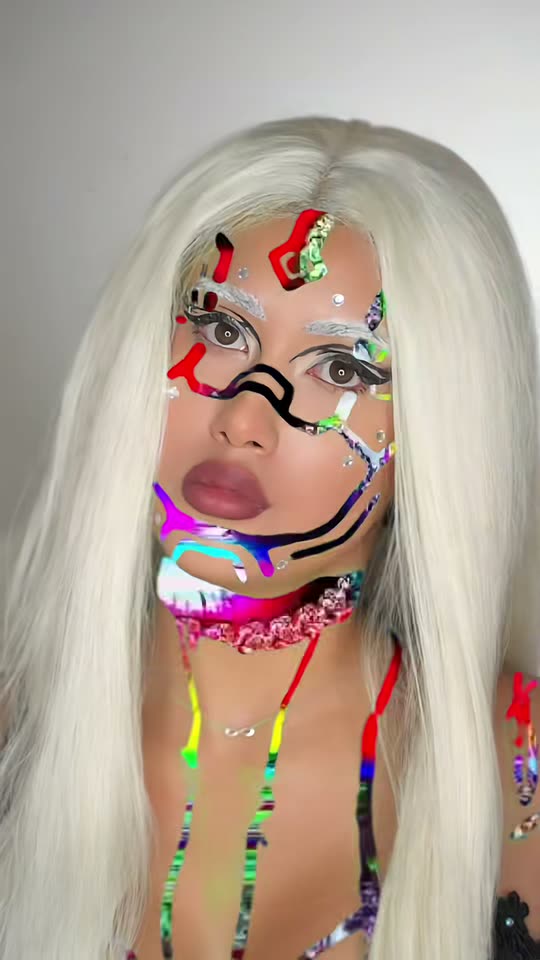
Glitch Makeup AI Transition: From Paint Swipe to Cyber Look
Upload a single photo of yourself. AI creates the 10-second transition: green stripes paint across your face, the image glitches when the beat hits, and you emerge with neon circuit-line makeup and a platinum wig.
Glitch makeup is a TikTok transition where bright green paint stripes appear on your face, glitch colors flash inside the paint, and when the beat hits you jump to a complete cyber look. The manual version requires hours of makeup work and editing. Upload one photo here, and AI creates the entire glitch makeup transition for you.
Also called Glitch Transition Makeup · Green screen glitch makeup · Cyber glitch makeup · Paint to glitch makeup · Glitch paint swipe makeup
Example
What the Glitch Makeup video looks like
Here's the original reel that launched the trend. Your clip is a fresh creation made from your photo in the same style, not a duplicate of these frames. Every run produces unique results.
Original reel by @noeminikita, 14 s
@noeminikita's original reel (5.6 million views): green paint across her face, then the jump to the complete glitch look with platinum wig and shifting circuit lines. Real makeup and editing; our template creates an AI version from your photo.
Everything runs in the browser. No editing app, no prompt to write, no watermark.
Add your photo
Tap "Create your own" and upload your face, from chest up. Capture it with the camera or choose from your library.
Press Generate
The button displays the price. Seedance 2.5 creates the Glitch Makeup scene directly from your photo, with no intermediate image, for 10 seconds with original sound. You don't write a prompt.
Download or share
Your video arrives in a few minutes as a 9:16 MP4. Download it, share from your phone, or locate it later in your Library.
Which photo works best?
Upload one sharp photo of your face, from chest up, facing the camera. AI applies the stripes, creates the glitch and adds the makeup, so you don't need makeup in the photo.
Face the camera in even light. Window light or ring light works best. The makeup lines follow your face, so clear visibility gives better results.
Keep your face clear. No sunglasses, no hat, no hand covering the face. Regular glasses are fine and remain on.
A plain wall behind you matches the trend's videos most closely, but any background works.
Hair doesn't matter much. It remains as is in the first section, and the wig covers it after the jump.
One person per photo.
Use your own photo, or one of a friend who gave permission. Never a celebrity or stranger.
Where did the Glitch Makeup trend start?
The glitch makeup transition began with TikTok makeup artists in late August 2026. They apply chroma-green paint to the face, and during editing the green becomes flickering glitch colors, resembling a broken screen. A hard jump on the beat reveals the final look: a platinum-white wig, thin neon lines resembling circuit traces across the face, and a metallic top. Creators attribute the concept to makeup artist Valeriya Eros (@maddylj, 22 August: "Inspo @Valeriya Eros").
The trend expanded through September. @lisabarcelox's "results glitch makeup" from 28 August reached 2.1 million views, @noeminikita's results reel from 10 September hit 5.6 million, and @deanpenttio97's glitch and cyberpunk look from 19 September earned 9.5 million views and 1.9 million likes. Starting in early September, CapCut AI templates labeled "Glitch Transition Makeup" produce the same transition from a single photo, without paint. A fresh template tutorial from 15 October accumulated 63,400 views one day later, and its sound appeared in 47 new videos within one day (our trend pulse, 16 October).
@maddylj shares her glitch makeup transition with "Inspo @Valeriya Eros", among the earliest copies of the green-screen glitch look we discovered. TikTok
@lisabarcelox shares "results glitch makeup": platinum wig and neon circuit lines following the green paint. It reached 2.1 million views by 16 October, and its sound powers many subsequent versions. TikTok
The hashtag #glitchmakeuptransition launches; it contains 1,058 videos by 16 October. The first CapCut "glitch makeup AI" tutorial videos appear the same day. TikTok
@noeminikita shares her results reel, the first example on this page; it achieves 5.6 million views and 221,700 likes by 16 October. TikTok
@deanpenttio97's glitch and cyberpunk makeup achieves 9.5 million views and 1.9 million likes, the largest post of the trend we discovered. TikTok
A fresh CapCut template tutorial for the AI version appears; one day later it has 63,400 views, and its sound appears in 47 videos, all posted in one day. TikTok
Copy and paste
The Glitch Makeup prompt
You don't need this: the one-tap workflow runs it for you. [Image 1] is your photo: the video model uses it as a reference and creates the scene directly from it, with no intermediate photo step.
Human
1 photo: your face, chest upSeedance 2.510 s · 720p · 9:16126 credits
Video prompt
A glitch makeup transition clip, like a real vertical makeup video filmed on a phone on a tripod: the person faces the camera from the chest up in front of a plain light grey wall, in soft, even beauty light. Photorealistic.
The person in the clip is the person in [Image 1], in every frame: copy the exact face from [Image 1] (the face shape, eye color and eye shape, eyebrows, nose, mouth, skin tone, age, and any beard, moustache, glasses or freckles), so their friends recognize them at once. The face stays the same from the first frame to the last, also under the makeup and after the cut: never a different person, never morph.
0-4.5 s, BEFORE: the person, with their own hair from [Image 1] pulled back off the face and the clothes from [Image 1], holds a flat makeup brush loaded with bright chroma-green face paint and paints quick, bold strokes across the forehead, down one cheek and along the jaw, while looking calmly into the lens. Inside every green stroke, glitchy digital color bars in red, blue, magenta and cyan flicker and slide sideways, like a broken screen showing through the skin.
4.5-4.8 s: the beat drops and the whole picture glitches for a moment: an RGB split, horizontal tearing bands and pixel blocks. This is the only cut.
4.8-10 s, AFTER: the same person with the same face, now in full cyber glitch makeup: thin graphic lines like circuit traces in white, black and neon magenta, cyan, lime and violet that run over the forehead, around the eyes, down the nose, along the cheekbones and the jaw and down the neck, a small geometric diamond on the forehead, a few short bars and a few tiny silver rhinestones, glossy lips; the bare skin between the lines stays clear, and the colors of the lines shift and flicker like a glitching screen. They wear a long, straight platinum-white wig with a center part and a silver metallic top. The eyes keep their own natural color from [Image 1]: no white or colored contact lenses. They turn the head slowly from one side to the other with a cool, serious stare, a short glitch flash runs through the lines on each beat, and they end on a still pose looking straight into the lens. The face stays large, sharp and well lit.
Audio: a punchy original electronic beat with digital glitch sounds and a heavy bass drop at 4.5 s, no words, no singing. Exactly one person. No text, no subtitles, no numbers, no logos, no watermark.
You pay per video in credits, and the create page displays the exact price on the Generate button before you commit. The one-tap price includes the scene photo and the video, charged once. One video is 126 credits, so the smallest one-time pack covering it is $14.99 for 150 credits, with no subscription. The less expensive models are available if you run the prompts manually in AI Video.
Video model
Settings
Credits
Seedance 2.5 (this template)
10 s, 720p, straight from your photos, one tap
126
One-time packs and plans are on the pricing page. A failed video gives its credits back.
What does the glitch makeup AI transition make?
You receive a 10-second vertical video with sound, in two sections, matching the trend's reels.
Time
What happens
0 to 4.5 s
You apply quick, bold stripes of bright green paint across your forehead, cheek and jaw. Within the paint, glitch color bars in red, blue, magenta and cyan flash sideways
4.5 s
The beat hits and the entire image glitches: an RGB split, tearing bands and pixel blocks
4.8 to 10 s
You again, now wearing full cyber glitch makeup: thin neon and white lines resembling circuit traces across your face and neck, a small diamond on your forehead, tiny rhinestones, a platinum-white wig and a silver top. You turn your head with a cool stare
How Smew AI makes it: your photo feeds directly to Seedance 2.5, ByteDance's AI video model, with no intermediate image, so your face remains yours, including under the makeup. Your eyes retain their own color. The model generates its own electronic beat with glitch sounds and the bass drop on the jump. No one has shared a prompt for this trend (the CapCut templates are closed), so our prompt derives from the trend's most viewed reels. The create page displays the exact price on the Generate button.
Real glitch makeup vs the AI version
The real glitch makeup trend is a green screen makeup technique. Makeup artists apply chroma-green face paint to their skin, record it, and key out the green in an editor so glitch colors appear through. That's why it's also called green screen glitch makeup. They then spend hours on the final look: a wig, liner and paint lines, rhinestones, sometimes white contact lenses. A green screen makeup transition like that requires paint, a wig, a stable camera and an editing app.
The AI makeup transition eliminates all of that. Similar to the glitch transition CapCut templates, it begins from one photo, but it also generates the paint section, so the complete makeup transition is one video. It's an AI makeup transformation, not a glitch filter. TikTok filters simply overlay glitch bars on your face, while this alters the makeup and hair after the jump.
Glitch makeup looks: cyberpunk, robot, cyborg or glitchy glam
The final look falls between cyberpunk makeup, robot makeup and cyborg makeup: thin circuit lines rather than metal plates, neon colors rather than grey. Pinterest identified "glitchy glam" as one of its beauty trends for 2026 in January, and the glitch makeup trend represents the most extreme version of that glitchy glam makeup.
For Halloween (31 October 2026): the glitch makeup look functions as robot, android or cyborg makeup look without a costume. Share the transition as your Halloween reveal.
For a glitch makeup tutorial or ideas: pause the AFTER section of your video to observe where the lines appear: forehead, around the eyes, down the nose, along the cheekbones and jaw. Many makeup artists recreate a look like that manually.
For the glitch eye makeup or glitch face makeup alone: the AI version always covers the full face and neck.
What goes wrong, and how do you fix it?
What goes wrong
What our prompt does, and what you can do
The face after the cut looks less like you
The prompt preserves your face, eye color and skin tone under the makeup. A sharp, front-facing photo helps most
White or colored contact lenses
The prompt excludes them: your eyes maintain their own color
The paint covers the whole face
The prompt requests stripes, and thin lines with visible skin after the cut
A second cut or a different person
The prompt permits one cut only, at the beat drop, with the same person on both sides
Text or numbers in the glitch bars
The prompt excludes text, numbers, logos and watermarks
If a result still appears off, run it again with a brighter photo captured facing the camera. If a run fails, the credits return.
FAQ
Glitch Makeup trend questions
What is the glitch makeup trend?+
It's a TikTok makeup transition from late August 2026. You paint bright green across your face, glitch colors flash inside it, and when the beat hits you jump to a complete cyber look: platinum wig and thin neon lines resembling circuit traces. Makeup artists popularized it; CapCut AI templates and Smew AI create it from one photo.
How do I do the glitch makeup transition with AI?+
Tap "Create your own", upload one sharp photo of your face and tap Generate. Smew AI creates the 10-second video, the paint section, the glitch jump and the cyber makeup, with an electronic beat, and places it in your Library. You need no paint, no wig and no CapCut template.
Who started the glitch makeup trend?+
Creators credit makeup artist Valeriya Eros: copies from 22 August 2026 say "Inspo @Valeriya Eros". The largest reels appeared later: @lisabarcelox (2.1 million views), @noeminikita (5.6 million) and @deanpenttio97 (9.5 million).
Is there a glitch makeup AI prompt?+
No creator has released one: the CapCut "Glitch Transition Makeup" templates are closed, and the tutorials only demonstrate the CapCut steps. Our prompt derives from the trend's most viewed reels: the green stripes with glitch colors, the jump on the drop, the circuit lines, the platinum wig and the silver top.
Is there a glitch makeup filter or a glitch filter on CapCut?+
A glitch makeup filter in the traditional sense doesn't exist: a glitch filter on TikTok or CapCut only overlays a glitch effect on your video. The trend's AI version operates on CapCut templates. Smew AI requires no app: it creates the glitch makeup transition in the browser from one photo.
How do you do the green screen makeup transition for real?+
Apply chroma-green face paint to your face, record it on a tripod, and key out the green in an editing app so glitch colors appear through; then record the finished look and jump on the beat. That's a glitch makeup green screen technique, and a real glitch makeup transition tutorial takes hours. The AI version creates both sections from one photo.
Can I use it for Halloween?+
Yes. Glitch makeup for Halloween appears as robot, android or cyborg costume without purchasing a costume. Halloween falls on 31 October 2026: share the transition as your reveal.
Does the AI glitch makeup change my face?+
It shouldn't. The prompt preserves your face shape, eyes, eye color, nose, mouth and skin tone in every frame, including under the makeup and after the jump. Only the makeup, wig and top change. A sharp, front-facing photo maintains the face most accurately.
Does the video have sound?+
Yes. The model generates its own electronic beat with glitch sounds and a bass drop on the jump, at approximately 4.5 seconds. You can also overlay a trending sound when you share it on TikTok.
What do people call this trend?+
Glitch makeup trend TikTok posts use various names: glitch makeup transition, glitch transition makeup, green screen glitch makeup, cyber glitch makeup, paint to glitch makeup and the glitch trend. Some search it as glitch make up. They all refer to the paint swipe that jumps to a cyber look.
Can I make an AI makeup transformation into other looks?+
This template creates one look, the glitch makeup look of the trend. For other makeup transformation AI trends, check the related templates below, such as the Day of the Dead makeup.
Does the glitch makeup AI transition cost credits?+
Yes. A 10-second video costs credits, the create page displays the exact price on the Generate button before you commit, and if a run fails, the credits return.
Is my photo private?+
Yes. Smew AI doesn't share your photo or the video anywhere or display them to other users. The video goes to your private Library, and you can remove it there at any time.