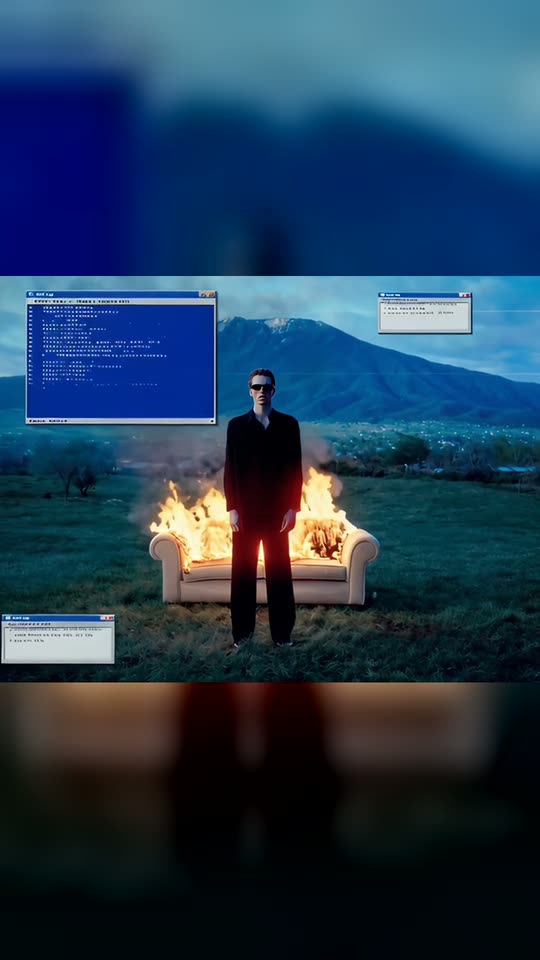
Blue Screen Glitch AI Trend: You, a Burning Couch and a System Error
Stay still in a black suit in a field at sunset, a couch on fire behind you, while old error pop-ups appear and a blue error screen flickers across the scene. Upload one photo, get a 6-second glitch video with sound.
Blue Screen Glitch is an AI trend that transforms one photo of you into a retro computer error: you're motionless in a black suit in a field at dusk, an old couch burns behind you, error pop-ups appear, and a blue screen flicker covers the scene. It's a glitch video created from one full-body photo.
Also called Blue Screen Glitch AI · Retro System Crash Video · Blue Screen Glitch trend · Blue Screen Glitch effect
Example
What the Blue Screen Glitch video looks like
This is the trend's template clip, not a Smew AI result. Your video is a new clip created from your photo in the same style. Every run produces different results.
The trend's template clip, 5 s
The trend's template clip (AI-generated, not made with Smew AI): a man in sunglasses and a black suit stays still in front of a burning couch while old error pop-ups appear and a blue error screen flickers over the field. Your video places you in the same scene, generated from your photo.
How to create the Blue Screen Glitch video on Smew AI
Everything runs in the browser. No editing app, no prompt needed, no watermark.
Add your photo
Press "Create your own" and add yourself, full body. Take it with the camera or choose from your library.
Press Generate
The button displays the price. Seedance 2.5 creates the Blue Screen Glitch scene directly from your photo, with no intermediate picture, for 6 seconds with original sound. You don't write a prompt.
Download or share
The video is ready in a few minutes as a 9:16 MP4. Download it, share from your phone, or find it later in your Library.
Which photo works best?
You need one clear photo of yourself, full body or at least from the knees up.
Stand straight facing the camera, arms down. The clip shows you motionless, so a calm, front-facing pose works best.
Your face must be visible and uncovered, in good, even light. No sunglasses, unless you want them in the video.
Your clothes don't matter: the template puts you in a black suit with a white shirt.
One person per photo. Use your own photo or a photo of an adult who agreed. Never a celebrity or a stranger.
Where did the Blue Screen Glitch trend start?
The Blue Screen Glitch didn't start as a creator's reel. It first appeared on 9 October 2026 as a template on an AI video site: a 5-second clip of a man in a black tuxedo motionless in a green field at dusk, a large mountain behind him and a cream couch on fire a few steps back. Old grey error pop-ups appear around him, a cursor clicks, the picture tears and a blue error screen flashes. On 15 October another AI template site added the same clip as a "retro system crash" video. The text in the pop-ups is scrambled, so the base clip itself is AI-generated.
We found no original reel and no shared prompt on TikTok, YouTube or the web (checked 16 October), so Smew AI wrote the scene from scratch. The aesthetic builds on a much older glitch trend: on TikTok, #glitcheffect has 25,208 videos and #bluescreen 14,433. And people search for the concept itself: US searches for "fake blue screen" rose from 590 a month in July 2026 to 1,900 in September.
US Google searches for "fake blue screen" are at 590 a month; they hit 1,000 in August and 1,900 in September 2026.
An AI video site lists a "Blue Screen Glitch" template: a man in a black tuxedo stays still in front of a burning couch while error pop-ups appear and a blue screen flashes.
A second AI template site adds the same clip with the person replaced and calls it a retro system crash video.
On TikTok, #glitcheffect has 25,208 videos and 615.4 million views, #bluescreen 14,433 videos and 315.1 million views, and #bsod 11,978 videos. TikTok
Copy and paste
The Blue Screen Glitch prompt
You don't need this: the one-tap flow runs it for you. [Image 1] is your photo: the video model uses it as a reference and creates the scene directly from it, with no photo step first.
Blue Screen Glitch
1 photo: you, full bodySeedance 2.56 s · 720p · 9:1676 credits
Video prompt
A retro system-crash clip in one continuous, locked-off shot with no cuts: the camera never moves. Vertical 9:16, photorealistic, cool blue dusk light and the warm glow of the fire.
The person in the clip is the person in [Image 1], in every frame: [Image 1] is the only source of their identity and look, not a style reference. Copy the exact face from [Image 1] (the face shape, eye color and eye shape, eyebrows, nose, mouth, skin tone, age, hair color, hair length and hairstyle, and any beard, moustache, glasses or freckles), so their friends recognize them at once. Show the whole body, from the head to the shoes. The face stays the same from the first frame to the last, also while the picture glitches; never blend it with any other face. They wear a sharp black suit with a crisp white shirt, never the clothes from [Image 1]. No sunglasses unless [Image 1] shows them. If [Image 1] shows an animal, the performer is that animal sitting upright in the same spot, with its own face, fur and markings, not a person.
The place: a wide, open green meadow at dusk with long grass, low wild bushes and a few small bare trees; behind it, a huge, broad mountain with a little snow on its peak under a cloudy, deep-blue evening sky. A few steps behind the person stands an old cream-white armchair that burns with tall orange flames and grey smoke. The person stands perfectly still in the center of the frame, in front of the burning armchair, facing the camera, arms down by the sides, with a calm, blank face.
0-1 s: stillness. Only the flames, the smoke and the grass move. The person blinks once.
1-3 s: small old-style computer error windows (plain light-grey boxes with a blue title bar, a few short lines of tiny text that cannot be read and a small OK button, laid flat over the picture like a screen overlay) pop up one after another around the person, each with a short beep. A white arrow cursor slides in and clicks one of them.
3-4 s: the whole picture glitches: horizontal tearing lines, color shifts and a short flicker. For a moment a plain blue error screen with rows of tiny white text that cannot be read flashes over the frame, and the person and the fire show through it, tinted blue.
4-6 s: the field comes back, with more error windows stacked in the corners and one bigger blue error window at the top left. The person still stands perfectly still, staring into the lens, the armchair still burning.
Audio: the crackle of the fire, a soft wind over the grass, short generic computer beeps as each window pops up, and a burst of digital glitch noise at the blue flash. No music, no voice; the person never speaks.
Exactly one person. The person never burns and never touches the fire. No logos of any kind, no flag or window logo, no brand names, no sad face on the blue screen, no readable words anywhere, no subtitles, no watermark.
You pay per video in credits, and the create page displays the exact price on the Generate button before you spend anything. The one-tap price includes the scene photo and the video, charged once. One video is 76 credits, so the smallest one-time pack that covers it is $9.99 for 100 credits, with no subscription. The cheaper models are available if you run the prompts manually in AI Video.
Video model
Settings
Credits
Seedance 2.5 (this template)
6 s, 720p, directly from your photos, one tap
76
One-time packs and plans are on the pricing page. A failed video gives its credits back.
What happens in the Blue Screen Glitch video, second by second?
The template recreates the aesthetic of the trend in one static shot: a wide green meadow at dusk, a large mountain with a bit of snow on top under a cloudy blue sky, and an old cream-white couch on fire a few steps behind you.
Time
What you see
0-1 s
Stillness. You're centered in the frame in a black suit, staring at the lens. Only the flames, the smoke and the grass move.
1-3 s
Small old-style error pop-ups appear around you one by one, each with a beep. A white cursor moves in and clicks one.
3-4 s
The whole picture glitches: tearing lines, color shifts, a flicker, and a plain blue error screen flashes across the frame.
4-6 s
The field returns with more error pop-ups stacked in the corners. You still haven't moved. The couch is still burning.
The sound is created with the clip: the crackle of the fire, wind across the grass, short computer beeps and a burst of glitch noise at the blue flash. There's no song.
Why does it work? It's the calm person in front of a burning couch, the "everything is broken and I'm fine" vibe, transformed into a computer crash. The deadpan expression, the fire and the error pop-ups make a perfect reaction clip for a bad day, a failed plan or a full inbox.
How it works, and what it costs
There's one version. Seedance 2.5 creates the video directly from your photo, with no intermediate picture, so your face stays yours. It generates the field, the burning couch, the pop-ups and the blue flash around you.
Blue Screen Glitch
Photos
1, full body or from the knees up
Model
Seedance 2.5 from your photo
Length
6 s
Frame
Vertical 9:16, 720p
Sound
Fire crackle, wind, beeps, glitch noise
Price
Displayed on the Generate button
You don't write a prompt: the template includes the whole scene, second by second. The exact price appears on the Generate button before you spend anything.
What goes wrong, and how do you fix it?
Problem
Fix
The error pop-ups show strange letters that look like words
The prompt requests tiny text that can't be read, but AI text can turn out half-readable. Generate again.
The pop-ups appear inside the field instead of over the picture
Every run is a new take. Generate again.
Your face changes during the blue flash
It returns when the field reappears. Use a sharp, close photo with your face in good light, then generate again.
You move, walk or wave
The prompt keeps you still, but motion can appear. Generate again.
The fire gets too close to you
The prompt keeps the fire on the couch behind you. Generate again if it concerns you.
The video model rejects the photo
Some photos get rejected. The credits return; try another photo.
Results vary from run to run, so a second attempt often fixes the small issues.
How should you post it?
Your clip includes its own fire crackle, beeps and glitch noise, so it's ready to post. It works as a reaction: the moment your plans fail, your code breaks or Monday begins. You can also add a song on top in the TikTok or Instagram editor.
Captions that work: "Me when the group project is due tomorrow", "Brain.exe has stopped working", "Everything is fine", "Monday, 9:01 am" or "My last two brain cells after the exam". It functions as a BSOD meme, a computer error meme or an error message meme.
Hashtags: #bluescreen (14,433 TikTok videos on 16 October 2026), #glitcheffect (25,208 videos) and #bsod (11,978 videos). If you post it as a blue screen of death meme on TikTok, keep the platform's AI label on: the video is AI, not a real crash or a real fire.
More deadpan AI clips: stay still while a crowd bows to you in the Storm AI trend, watch your card get declined in Chat GTT Lookin' Ahh, or zoom out from your selfie to space in Earth Zoom Out.
FAQ
Blue Screen Glitch trend questions
What is the blue screen glitch trend?+
It's an AI clip from October 2026: a person in a black suit stays still in a field at dusk, a couch burns behind them, old error pop-ups appear and a blue screen glitch flashes across the picture. It's a blue screen trend created from one photo, and some sites call it a retro system crash video.
Is this a fake blue screen prank?+
It's a fake blue screen in a video, not on your computer: a fake blue screen of death, or a fake BSOD, that flashes across a clip of you. You can share it as a blue screen prank or a blue screen error prank in a chat, but it never affects anyone's device. Say it's AI if someone asks.
Is it a glitch effect video or a glitch video effect I add in an editor?+
It's a complete glitch effect video, generated by AI from your photo, not a glitch video effect you overlay on your own clip. The glitches, the pop-ups and the blue flash are part of the clip.
Is this a glitch filter?+
Not a live camera glitch filter. You upload one photo, press Generate, and the AI creates a 6-second video of you in the glitch scene. It functions as a filter-style reaction clip once it's done.
Is this an AI glitch video generator?+
For this one trend, yes: it's an AI glitch video generator and an AI glitch effect in one template. One photo in, an AI glitch video out, with the field, the fire, the pop-ups and the blue screen. A glitch effect AI video like this takes a few minutes.
Is there a glitch effect generator online, with no app?+
Yes, this one. Smew AI is a glitch effect generator that runs online in your browser: upload your photo, press Generate and download the MP4. You don't need CapCut or another app.
Is there a CapCut template for the glitch effect?+
CapCut has many glitch effect templates that you overlay on your own clip. This trend is different: the burning couch, the field and the pop-ups are generated from your photo by AI, not assembled in CapCut. If you want a glitch transition, you can place this clip between two of your own clips in any editor.
Can I use it as a blue screen effect video?+
Yes. The clip is a blue screen effect video on its own: the blue error screen flashes over you at about 3 seconds, then the field returns. Use the moment of the blue flash as a cut point if you edit it into a longer video.
Is it the real Windows blue screen?+
No. The template uses generic old-style grey pop-ups with a blue title bar and a plain blue error screen, with no logo, no real error text and no readable words. It resembles a classic Windows XP error effect or a Windows error meme from a distance, but it's not a copy of any real system screen, so it's not a Windows blue screen effect or a Windows error video effect taken from the real thing.
Can I make fake error message pop-ups with it?+
Not with your own words. It's not an error pop up maker or a fake error message generator: the error pop-ups and the error screen effect come with the scene, and their text is made unreadable on purpose. For a joke error message, add your own caption on top when you post.
Can I make a retro system crash effect with my own photo?+
Yes, that's what the template does: your photo becomes a retro system crash, with you calm in the middle of it. The system crash effect, the burning couch and the sound are all generated in one run.
How long is the video, and does it have sound?+
6 seconds, vertical 9:16, 720p, as an MP4 file. It includes its own sound: the crackle of the fire, wind, short computer beeps and a burst of glitch noise at the blue flash. There's no music, so you can add your own song when you post.
Can I use a photo of a friend or a celebrity?+
Use your own photo or a photo of an adult who agreed. Never a celebrity or a stranger. The clip shows a fire, so never post it as real footage.
Does the Blue Screen Glitch video cost credits?+
Yes. Each video costs credits, and the create page displays the exact price on the Generate button before you spend anything. If a video fails, the credits return.