Car Roof Backflip AI Video: Jump From Car to Car With a Backflip
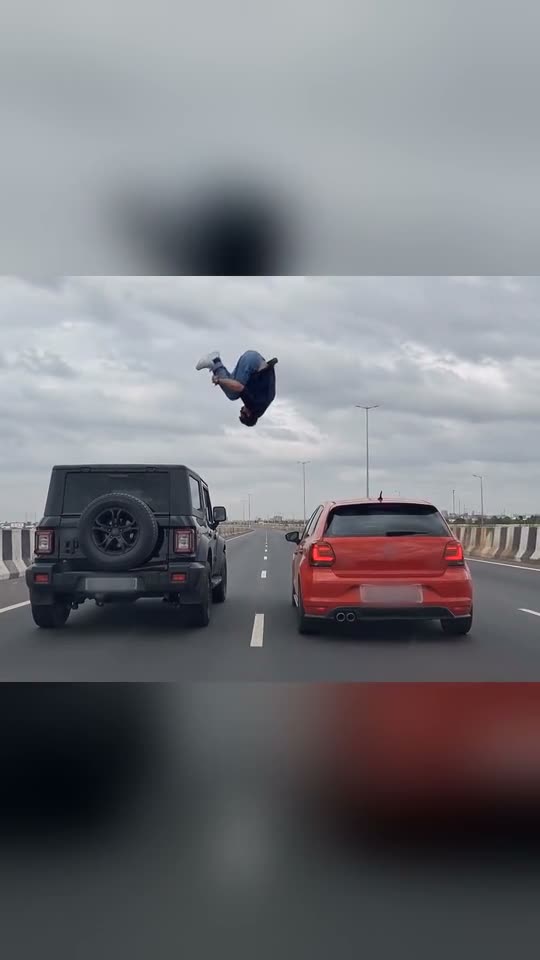
Step through the roof of a black SUV on the highway, get up on top, perform a slow backflip over the gap, and touch down crouched on the red hatchback alongside. Upload one photo. This is an AI effect—never attempt this stunt.
The car roof backflip AI video places you in the trend's highway scene: step out through the black SUV's roof, get to your feet, backflip over the space separating two cars in motion, and land both feet on the red hatchback roof. Upload one clear photo. This is an AI effect: don't attempt this in real life.
Also called car roof jump
Example
What your Car Roof Backflip video shows
Here's the source reel. Your photo swaps in for the person, so your version follows identical shots with your face. Each generation is unique.
Source reel by @kabirkk1, 10 s
The highway clip from the trend, in the version the Telegram channel Kabirkk posted as the reference video (original creator unknown). Someone emerges from a black SUV, backflips over the space, and touches down on a red hatchback roof. Your photo replaces that person. Car logos and plates are blurred out.
How to create the Car Roof Backflip video on Smew AI
All processing happens in your browser. No editing software, no prompt writing, no watermark.
Upload your photo
Tap "Create your own" and upload your photo, showing waist up or full body. Capture with your camera or choose from your gallery.
Tap Generate
The button displays the credit cost. Seedance 2.5 inserts your photo into the Car Roof Backflip trend scene and recreates it frame by frame for 10 seconds, using the reel's soundtrack. No prompt needed.
Download or post
Your video renders in several minutes as a 16:9 MP4. Download it, post from your device, or retrieve it later from your Library.
What kind of photo should you use?
Upload one photo of yourself, an adult.
Waist up or full body, looking at the camera. You appear small in the wide highway frame, so clothing and hair matter as much as facial features. Your outfit from the photo stays.
Clear and well-lit, no sunglasses. The person in the clip wears sunglasses at one point; the AI only adds them if your photo includes them.
Solo in the frame, so the AI identifies the correct person.
Use your own photo or one from a consenting friend. Never use celebrities, strangers, or minors.
Where did the Car Roof Backflip trend begin?
The trend uses a single short clip, shot from a vehicle trailing two cars on a multi-lane highway beneath overcast skies. Someone emerges through a black SUV's roof, rises to standing, winds up with arm swings, and executes a slow backflip over the space between vehicles, then crouches on landing atop a red hatchback in the adjacent lane. Copies don't credit an original creator. Prompt blogs promoting the trend describe it as an AI-generated stunt.
On 4 October 2026 multiple Indian prompt blogs and a YouTube tutorial published a "car roof backflip AI video" prompt for Google Flow and Gemini: a view from behind of a black SUV and red hatchback traveling side by side, with a young man appearing from the SUV roof and backflipping onto the hatchback. Additional tutorials appeared, and on 6 October a Telegram channel for AI editing posted the actual clip as the "reference video" for inserting your photo. Starting 5 October AI video platforms began offering dedicated pages combining a photo with that clip.
Indian prompt blogs publish "car roof backflip AI video editing" prompts for Google Flow and Gemini, the earliest dated mentions we located. Blogger Rohan
A YouTube tutorial includes the trend's widely copied prompt in its description; identical wording appears on another prompt blog by 6 October. YouTube
AI video platforms begin providing dedicated car roof backflip pages accepting a photo and the trend clip.
The Telegram channel Kabirkk posts the source clip as the "reference video" alongside a Gemini tutorial; the post reaches 20,200 views by 14 October. Telegram
Copy and paste
The Car Roof Backflip prompt
These aren't required: the one-tap workflow handles them automatically, combined with the trend clip. [Image 1] and [Image 2] are your photos, [Video 1] is the trend clip being recreated.
Just you
1 photo: your photo, waist up or full bodySeedance 2.510 s · 720p · 16:9152 credits
Video prompt
Use the reference video [Video 1] for the scene, vehicles, timing, jump trajectory, and camera movement. Replace the stunt performer throughout with the adult person in [Image 1], including airborne and back-facing views. Follow the preparation, takeoff, one backward somersault, and feet-first landing on the second roof. Keep both cars upright and consistent. No identity changes, teleportation, extra limbs, or hidden landing.
Recreate the reference video [Video 1] shot for shot: a rear-view, wide-angle cinematic shot on a wide highway under an overcast sky. A black SUV driving on the left lane and a red hatchback driving parallel on the right lane at medium speed. A young man emerges from the roof of the black SUV, stands up, and performs a dramatic acrobatic backflip through the air across the gap between the vehicles, successfully landing on top of the roof of the red hatchback. Photorealistic, high-octane action sequence, realistic lighting and the same camera tracking behind the cars as in [Video 1]: the same framing, timing and moves, one continuous shot with no cuts. The ONLY change: the young man is now the person in [Image 1].
The stunt performer = the person in [Image 1], in EVERY frame: copy the exact face from [Image 1] - face shape, eye color and eye shape, eyebrows, nose, mouth, skin tone, age, hair color, hair length and hairstyle, and any beard, moustache, glasses or freckles exactly as in the photo. They wear the clothes from [Image 1]; if [Image 1] shows only the head or the upper body, invent the rest so it matches naturally. The same real person in every frame, from the first second to the last, so their friends instantly recognize them: while climbing out of the roof, standing on the black SUV, upside down in the air and crouching on the red hatchback at the end. Never morph, never drift back to the original young man's face, never add or remove facial hair. NO sunglasses: no glasses of any kind unless [Image 1] shows glasses. No black t-shirt, no light-blue jeans and no white sneakers unless [Image 1] shows them.
The two cars stay as in [Video 1]: the matte black boxy SUV with the spare wheel on its tailgate in the left lane and the red hatchback in the right lane, side by side at the same steady speed with the same gap, both upright the whole time. No badges, emblems, model names or lettering on either car and no readable number plates.
The moves, matching the reference second by second:
0-1.8 s: climbs up out of the black SUV's roof and crouches on top of it, holding on.
1.8-3.0 s: stands up on the roof, knees bent, balancing, and looks across at the red hatchback.
3.0-3.8 s: swings both arms back, then forward, and pushes off the SUV's roof.
3.8-8.2 s: one slow backward somersault high above the gap between the cars: the body arches back, goes horizontal, tucks the knees, turns upside down at the top and comes around over the red hatchback.
8.2-10 s: lands feet first on the red hatchback's roof in a low crouch, hands near the roof, and stays there, balanced, while both cars drive on.
Anatomy rules: one head only, on the performer's own shoulders. Two arms, two hands and two legs, also upside down in the air. Exactly one backward somersault and a landing you can see. Nobody else on the cars. No text, no logos, no watermark, no extra people.
Videos cost credits, and the create page displays the exact amount on the Generate button before you commit. The one-tap price includes the complete video, produced in a single step from your photo and the trend clip, billed once. One video costs 152 credits, so the smallest one-time package covering it is $39.99 for 450 credits, no subscription required. The less expensive models are available if you execute the prompts manually in AI Video.
Video model
Settings
Credits
Seedance 2.5 (this template)
10 s, 720p, recreates the trend clip, one tap
152
One-time packs and plans are on the pricing page. A failed video gives its credits back.
What happens in the car roof backflip AI video, moment by moment?
Smew AI inserts you into the trend's source clip. The highway, both vehicles, the stunt, and the camera angle remain identical to the clip:
Time
What happens
0 to 1.8 s
You emerge up through the black SUV's roof and crouch on its surface.
1.8 to 3 s
You rise to your feet on the roof, knees slightly bent, and glance toward the red hatchback.
3 to 3.8 s
You swing both arms backward then forward and launch yourself.
3.8 to 8.2 s
A slow backflip high over the space: you go horizontal, pull your knees in, rotate upside down, and complete the rotation above the red car.
8.2 to 10 s
You touch down feet first on the red hatchback roof in a deep crouch and hold position as both vehicles continue forward.
How it works: Seedance 2.5 modifies the actual clip and replaces the performer with the person from your photo, matching your face and clothing. You receive 10 seconds at 720p, landscape orientation matching the source, with the clip's soundtrack restored after processing. Sound can be muted on the result screen. Processing takes 5 to 15 minutes, and the exact credit cost appears on the Generate button before you spend. Each generation produces a fresh take, so outputs vary.
What can go wrong and how do you solve it?
Problem
Solution
The face doesn't match you
You appear small in the frame. Upload a sharp, front-facing photo in good light, waist up or full body, no sunglasses. Generate again.
The performer's sunglasses, black t-shirt, or light jeans reappear
The prompt excludes them unless present in your photo. Generate again.
Your body looks strange while inverted
Each generation is different: generate again.
Car logos or plates are fuzzy or missing
Intentional: we blurred them in the clip, and the prompt specifies no badges, text, or legible plates.
The model rejects a photo
Certain photos get declined. Credits return automatically; upload a different photo.
What captions and hashtags work, and how do you share it safely?
Caption suggestions: "Late for work, took a shortcut", "Switching lanes", "My carpool has rules". Or create your own.
Hashtags: #carroofbackflip, #carbackflip and #aivideo. Leave the platform's AI label visible.
Sound: the clip includes its own audio track, matching the video duration, so it's share-ready. You can mute it on the result screen and add a different sound when posting.
Safety: this is an AI effect created from a still photograph. Leaping between moving vehicles is deadly. Never attempt this, never stand on a vehicle in motion, and never film anything similar on an actual road.
Yes. It's an AI backflip video: the backflip car stunt from the trend clip, created from one photo of you. You never perform the jump in reality.
Can I make a car backflip AI video of myself?+
Yes. Upload one photo and you'll appear backflipping from one car roof to another in the trend's highway clip. It's a car roof stunt nobody should attempt in real life.
What is the car roof backflip AI trend?+
It's an AI video showing you emerging through a black SUV's roof on a highway, executing one backflip over the space between two vehicles in motion, and landing on a red hatchback roof in the next lane. Prompts for it circulated via Indian prompt blogs and YouTube tutorials starting 4 October 2026.
Who started the car roof backflip trend?+
Unknown. All copies use identical highway footage as their reference, and none credit an original creator. The earliest dated posts we located are prompt blogs and a YouTube tutorial from 4 October 2026, plus a Telegram post of the clip from 6 October 2026.
What prompt does the car roof backflip AI video use?+
The trend's tutorials shared a brief prompt for Google Flow and Gemini: a rear view of a black SUV and red hatchback traveling side by side on a highway, with a young man appearing from the SUV roof and backflipping onto the hatchback. This template uses those scene details with a reference-clip prompt designed for this swap (your photo replaces the performer, including while inverted mid-air, with one backward rotation and a feet-first touchdown), plus instructions that preserve your facial features. You don't write any prompt.
How do I make the car roof backflip AI video with my photo?+
Tap "Create your own", upload one clear photo of yourself, and tap Generate; the button displays the credit cost first. You receive a 10-second clip with the clip's soundtrack, and it appears in your Library when complete.
Is the stunt real, and can I try it?+
No. Your video is AI-generated from a still photograph, and the prompt blogs promoting the trend describe the source as an AI-created stunt as well. Jumping between vehicles in motion is fatal: never attempt this, and keep the AI label when you post.
Why is the video landscape and not vertical?+
The source clip is landscape format, and the AI preserves its frame so both vehicles and the complete jump fit in view. You can share it as is or crop it in your editing app.
Will the car logos or number plates show?+
No. We blurred the logos and plates in the clip, and the prompt specifies no badges, text, or legible plates.
Can I use a photo of my pet or my kid?+
No. This template works for one adult person. Upload your own photo or one from a consenting friend.
Can I put a celebrity in it?+
No. Upload your own photo or one from a consenting friend. Never celebrities or strangers.