
smew.ai

Barbie and Raquelle AI Trend: Become a 3D Doll Cartoon

Upload a posed photo of yourself or you with your friend. AI transforms it into a shiny 3D fashion-doll cartoon matching your pose, then places it above your original photo like the trend's split slides.

The original Barbie and Raquelle reel by @lelav_leloOriginal reel
  • 1 photo you add
  • 2K photo you can turn into a video
  • 9:16 for TikTok, Reels, Shorts
  • No watermark

No prompt to write: Add your photo and tap once

Create your own

Ready in a few minutes · From 3 credits

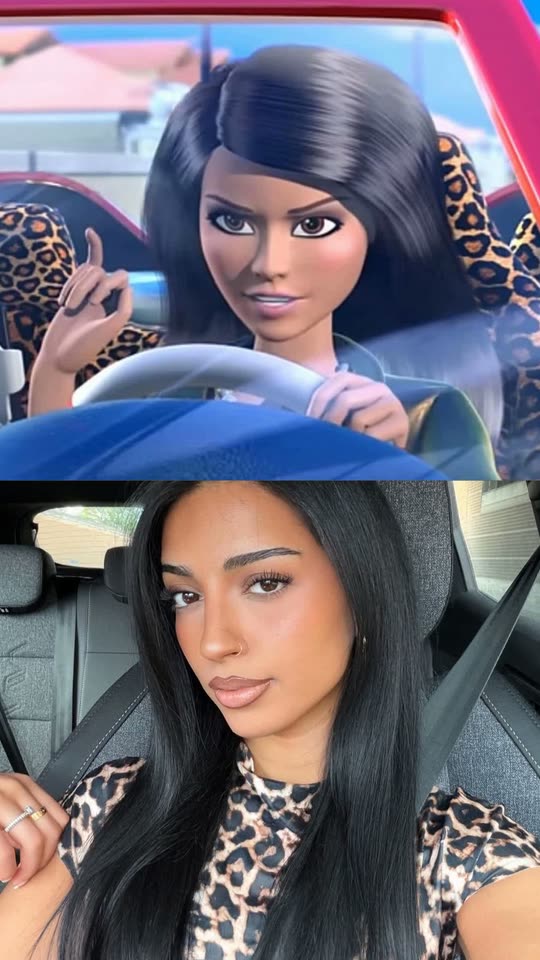
The Barbie and Raquelle trend is a TikTok slideshow format showing a 3D cartoon doll in the top half and you in the same pose below. The AI version transforms you into the doll: your photo becomes a split image with a glossy doll cartoon on top and your actual photo underneath. Create it by yourself or with a friend.

Also called Barbie and Raquelle trend · Raquelle Barbie trend · Barbie slideshow trend · Raquelle trend · Barbie and Raquelle slideshow · Barbie slides · Real life Raquelle · Barbie lookalike trend

Example

What the Barbie and Raquelle photo looks like

Here's the original reel that launched the trend. Your video becomes a fresh clip made from your own photo in this style, not a duplicate of these frames. Every run produces unique results.

Original reel by @lelav_lelo, 10 s
The original post from @lelav_lelo (246,500 views): three of nine slides, each showing the brunette doll above and her matching pose below. The AI version here creates a doll cartoon of you for the top half.
Use this reference
Step by step

How to create the Barbie and Raquelle photo on Smew AI

Everything happens in your browser. No editing app needed, no prompt writing, no watermark.

  1. Upload your photo

    Tap "Create your own" and upload a posed selfie or photo, waist up. Capture it with your camera or choose from your library.

  2. Tap Generate

    The button displays the cost. Nano Banana 2.1 transforms your photo into the Barbie and Raquelle scene and creates one 2K photo. No prompt writing needed.

  3. Download or share

    Your photo arrives in a few minutes as a 9:16 2K image. Download it, share from your phone, convert it to video, or retrieve it later from your Library.

What kind of photo works best?

Upload one clear, posed photo: for Solo, just you from waist up; for Besties, you and your best friend in one photo.

  • Strike a pose. The doll mirrors it precisely: hand in hair, a pout, a wink, mirror selfie or hand under chin. The pose drives the trend's humor.
  • Face the camera with good lighting. The doll preserves visible details: face shape, eye color, skin tone, hair, glasses and piercings.
  • Wear what you want on your doll. Your outfit, accessories and their colors transfer over, along with your background.
  • Besties: both faces visible, close together, nobody cropped at edges.
  • Use your own photo or a friend's with permission. Never a celebrity or stranger.

Where the Barbie and Raquelle trend began

The trend launched on TikTok in early October 2026 as photo slideshows. Each slide places a frame of Raquelle, the glamorous brunette rival from the animated web series Barbie: Life in the Dreamhouse (2012 to 2015), above a photo of the creator mimicking her pose, outfit and expression. Best friends create pairs: the blonde becomes Barbie, the brunette becomes Raquelle. @67mrvee's slideshow from 6 October reached 75,600 views by 16 October, and the largest post we tracked, a bestie pair from @kenz_delong on 13 October, hit 1.3 million views and 324,600 likes.

The AI version appeared afterward. On 11 October @xgk5o9 shared a tutorial: maintain your pose, hand gestures, camera angle, background and outfit, then use an AI image model to convert your selfie into the show's 3D cartoon style, making the top doll you. CapCut "Barbie slides" templates arrived within a day. US Google searches for "barbie and raquelle" and "raquelle barbie" peaked on 12 October.

  1. Barbie: Life in the Dreamhouse, a web series of CGI-animated shorts, debuts on YouTube; it runs until 27 November 2015 and provides the trend's two dolls. Wikipedia

  2. @67mrvee shares a nine-slide Raquelle slideshow: a frame of the brunette doll above, herself mimicking the pose below. It reaches 75,600 views by 16 October. TikTok

  3. @xgk5o9 reveals the AI method: maintain your pose and convert your selfie into the show's 3D cartoon style using an image model, then share as a slideshow. TikTok

  4. US Google searches for "barbie and raquelle" and "raquelle barbie" hit their 30-day peak; @amela.jez's bestie post from that day surpasses 368,900 views. Google Trends

  5. @kenz_delong shares a bestie pair beneath a frame of both dolls; it hits 1.3 million views and 324,600 likes by 16 October, the largest post we found. TikTok

Copy and paste

The Barbie and Raquelle prompts

You don't need this: the one-tap flow handles it automatically. The photo prompt integrates your photo into the scene. Want to modify it? Copy and edit in AI Photo.

Solo

1 photo: your posed selfie or photo, waist upNano Banana 2.1Photo · 2K · 9:163 credits
Photo prompt

Use the uploaded image as the base. Keep the original pose, hand gestures, camera angle, background and clothing, and turn the ordinary selfie in the uploaded image into the classic 3D cartoon style of a 2010s computer-animated fashion-doll TV series: a glossy 3D CGI fashion doll with smooth, flawless, slightly shiny doll skin, slim doll proportions and a long slim neck, a small neat nose, big glossy almond-shaped eyes with thick long lashes and soft eyeshadow, full glossy lips, thick shiny hair sculpted into smooth glossy locks, bright saturated colors and soft, even, cinematic studio light. Same pose, same background, a bold, glamorous doll style. Make ONE vertical 9:16 picture split into two equal halves, one above the other, with a clean straight horizontal seam across the middle and no border, no gap and no frame. TOP HALF: the person from the uploaded image as that 3D cartoon fashion doll, in exactly the same pose, head tilt, hand gestures, expression, camera angle and framing as in the photo, with the same clothes, jewelry and accessories and the same background, all redrawn in the same glossy 3D cartoon look. The doll is clearly this person: the same face shape, eye color, skin tone, eyebrows, hairstyle, hair color and hair length, and any beard, moustache, glasses, piercings, tattoos and freckles. Keep the person's gender: a man becomes a male fashion doll. BOTTOM HALF: the uploaded photo itself, exactly as it is: the same real person, face, pose, clothes, background, colors and light, photorealistic, not a cartoon, not retouched. Only scale and crop it to fill the half. Both halves show the same crop of the scene, centered on the face and upper body, so the two poses line up one above the other. Exactly one doll in the top half. No logos, no brand names, no letters or initials on necklaces, clothes or walls unless the photo has them, no doll box or packaging, no text, no captions, no watermark, no third panel. In the top half the face is a 3D doll-cartoon face of this person (big glossy doll eyes and doll makeup are the style there): the identity rules below apply in full to the real person in the bottom half, and to the doll's face shape, eye color, skin tone, hair, facial hair, glasses and age.

2245 characters

Besties

1 photo: one photo of you and your bestie togetherNano Banana 2.1Photo · 2K · 9:163 credits
Photo prompt

Use the uploaded image as the base. Keep the original pose, hand gestures, camera angle, background and clothing of every person, and turn the ordinary selfie in the uploaded image into the classic 3D cartoon style of a 2010s computer-animated fashion-doll TV series: a glossy 3D CGI fashion doll with smooth, flawless, slightly shiny doll skin, slim doll proportions and a long slim neck, a small neat nose, big glossy almond-shaped eyes with thick long lashes and soft eyeshadow, full glossy lips, thick shiny hair sculpted into smooth glossy locks, bright saturated colors and soft, even, cinematic studio light. Same pose, same background, a bold, glamorous doll style. Make ONE vertical 9:16 picture split into two equal halves, one above the other, with a clean straight horizontal seam across the middle and no border, no gap and no frame. TOP HALF: every person from the uploaded image as that 3D cartoon fashion doll: exactly as many dolls as there are people in the photo, side by side in the same order, the same poses, head tilts, hand gestures, expressions and closeness as in the photo (cheek to cheek stays cheek to cheek), with the same camera angle and framing, their own clothes, jewelry and accessories and the same background, all redrawn in the same glossy 3D cartoon look. Each doll is clearly that one person: the same face shape, eye color, skin tone, eyebrows, hairstyle, hair color and hair length, and any beard, moustache, glasses, piercings, tattoos and freckles. Never blend two people, never swap hair, glasses or clothes between them, never add or drop a person. Keep each person's gender: a man becomes a male fashion doll. BOTTOM HALF: the uploaded photo itself, exactly as it is: the same real people, faces, poses, clothes, background, colors and light, photorealistic, not a cartoon, not retouched. Only scale and crop it to fill the half. Both halves show the same crop of the scene, centered on the faces and upper bodies, so the poses line up one above the other. The same people in both halves, nobody else. No logos, no brand names, no letters or initials on necklaces, clothes or walls unless the photo has them, no doll box or packaging, no text, no captions, no watermark, no third panel. In the top half every face is a 3D doll-cartoon face of that person (big glossy doll eyes and doll makeup are the style there): the identity rules below apply in full to the real people in the bottom half, and to each doll's face shape, eye color, skin tone, hair, facial hair, glasses and age.

2528 characters

What's the credit cost?

You pay per photo using credits, and the create page displays the exact cost on the Generate button before you commit. The one-tap price includes one 2K photo, charged once. One photo requires 3 credits, so the smallest one-time pack covering it is $9.99 for 100 credits with no subscription. A smaller 1K photo costs less if you manually run the prompt in AI Photo.

ModelSettingsCredits
Nano Banana 2.1 (this template)2K photo, 9:16, one tap3
Nano Banana 2.1 (by hand in AI Photo)1K photo, 9:16, same prompt2

One-time packs and plans are on the pricing page. A failed video gives its credits back.

What does the Barbie and Raquelle AI trend create?

You receive one vertical 2K Barbie AI photo divided into two halves, resembling a trend slide. The top shows an AI Barbie version of you: a shiny 3D doll cartoon. The bottom displays your actual photo. Since the doll maintains your pose down to each finger, the halves align perfectly, and that alignment is what stops scrollers.

Stays from your photoBecomes 3D doll cartoon
Your pose, hand gestures, head tilt and expressionYour skin: smooth, perfect and slightly shiny, doll-like
Your hairstyle, hair color and hair lengthYour hair: thick, shiny, sculpted strands
Your face shape, eye color, skin tone, glasses and piercingsYour eyes: large and shiny, with long lashes
Your clothes, jewelry and backgroundYour look: vibrant colors and gentle studio lighting

How Smew AI creates it: your photo feeds into Nano Banana 2.1, Google's AI image model, using the prompt the trend's creator posted on 11 October: preserve your original pose, hand gestures, camera angle, background and outfit, and convert your everyday selfie into the classic 3D cartoon style. We describe that style with words instead of citing the show, incorporate the split layout and preserve your actual photo for the lower half. The image has no logo, no doll box, no text and no watermark. The create page displays the exact cost on the Generate button.

Solo or Besties: which option to choose?

Both accept one photo and deliver one split image.

  • Solo is the Raquelle version most creators share: just you in your signature pose. Create one image per pose and share multiple as a Barbie slideshow.
  • Besties is the classic Barbie and Raquelle together pairing: one photo of you and your best friend, and both transform into dolls positioned side by side in the same order and poses. It also works for Barbie and Raquelle matching pfp sets.
  • Couples: the same Besties option handles the Barbie and Ken trend, the couple version some tutorials call the Barbie and Ken filter. A man transforms into a male fashion doll; the prompt preserves everyone's gender.

The doll preserves your actual hair. A blonde remains blonde, and nobody needs to be the brunette: the Black Barbie trend posts and real life Barbie trend posts function identically.

How to share it like the trend?

The trend thrives on TikTok as photo slideshows. Create several images in different poses and share them together as one Barbie slideshow, matching how the Barbie slides trend posts appear on TikTok and Instagram.

  • Caption: "the Raquelle to my Barbie" for a bestie pairing, or "it's the Raquelle era for me" for a solo slideshow.
  • Sound: many trend slideshows feature the "som original" sound by Larissa. Tap the sound on any trend post to apply it.
  • Hashtags: #barbieandraquelle (2,672 videos on 16 October 2026), #raquelle and #barbietrend. Maintain the platform's AI label.
  • Profile picture: crop the upper half and you have a Raquelle pfp of yourself.

What can go wrong and how to fix it?

The AI creates the entire split image in one pass, so a few details can drift. Our prompt addresses each issue.

What goes wrongWhat our prompt does, and what you can do
The halves don't alignBoth halves use identical cropping, centered on face and upper body. A waist-up photo aligns best
The actual photo below appears editedThe prompt requests your photo precisely as is, only cropped. Regenerate if it changes
The doll gets different hairThe doll maintains your actual hairstyle and hair color, never the show's
You appear as the wrong genderThe prompt maintains the gender of every person in your photo
A name, initial or logo appearsThe prompt prohibits logos, brand names, jewelry initials, a doll box and all text

If a result still appears incorrect, regenerate with a brighter, sharper photo taken facing the camera. If a run fails, credits are refunded.

FAQ

Barbie and Raquelle trend questions

What is the Barbie and Raquelle trend?
It's a TikTok slideshow trend from October 2026. Each slide divides in two: a 3D cartoon doll on top from the animated series Barbie: Life in the Dreamhouse, and the creator below mimicking the pose. Best friends share it as a pair, one as Barbie and one as Raquelle. In the AI version, the top doll is you.
How do I create the Barbie and Raquelle AI trend?
Tap "Create your own", select Solo or Besties, upload one posed photo and tap Generate. Smew AI converts it into a split image, your 3D doll cartoon above and your actual photo below, and saves it in your Library. No CapCut template or prompt required.
Is there a Barbie and Raquelle AI prompt?
Yes. The creator @xgk5o9 posted the core on 11 October 2026: preserve your original pose, hand gestures, camera angle, background and outfit, and convert your everyday selfie into the classic 3D cartoon style of the show. Our template applies those instructions, describes the style without naming the show, and includes the split layout.
Is this the official Barbie filter?
No. Smew AI has no connection to the Barbie brand or the show's creators. The trend borrows the dolls' names as a label for the aesthetic. Our template generates an original doll cartoon of you, not a show character, with no logo and no doll box.
Can I do the Barbie and Raquelle trend with my best friend?
Yes. Select Besties and upload one photo of both of you together. Both transform into 3D dolls positioned side by side, in the same order and poses as your photo, each keeping your own hair and outfit. It works as the Barbie and Raquelle together TikTok post and as matching pfp pairs.
Can AI turn me into a Barbie doll?
Yes. To transform yourself into a Barbie doll cartoon, upload one photo and tap Generate. The AI maintains your face shape, eye color, skin tone, hair and outfit and redraws them as a shiny 3D doll. Many people search "turn me into a Barbie AI" or seek a filter that does exactly this.
Is there a Barbie filter app or a Barbie AI filter on TikTok?
The trend relies on CapCut templates and photo slideshows, not one official Barbie filter app or TikTok effect. Smew AI requires no app: the Barbie AI filter operates in your browser and produces a photo to share on TikTok or Instagram.
Is this a Barbie AI generator or a Barbie cartoon filter?
Both, effectively. It functions as a Barbie cartoon filter and a 3D Barbie filter on your photo, and as a Barbie AI generator that maintains your actual pose. Unlike a basic Barbie doll filter or doll AI filter, it also preserves your actual photo in the lower half, matching the Barbie split screen trend posts.
What do people search for this trend?
The names vary across posts: Barbie and Raquelle tiktok trend, Raquelle slideshow, Barbie Raquelle trend, Barbie trend slides, Barbie Dreamhouse trend, the Barbie Life in the Dreamhouse trend or Barbie Life in the Dreamhouse AI, the Barbie bestie trend and the Barbie photo trend. They all refer to the same split image of a doll over a real photo.
Which poses work best for Barbie and Raquelle pictures?
The poses from images of Barbie and Raquelle: hand in hair, a pout or wink, mirror selfie, hand beneath chin, or two besties cheek to cheek. A clear Barbie and Raquelle selfie or photo, waist up, provides the doll most detail to replicate. The Barbie and Raquelle tiktok picture posts and the Barbie and Raquelle meme posts feature the same poses.
How do I make a Barbie and Raquelle mirror pic or selfie?
Capture a mirror pic or selfie in a Raquelle pose, waist up, well-lit, with your face visible and not obscured by the phone, and upload it as your photo. The AI converts it into the trend's split image: your doll cartoon above, the same photo below. For a pair, use Besties with one Raquelle and Barbie selfie of you and your friend. Create several and share your Barbie and Raquelle photos together as a slideshow. Her name is Raquelle, though many people spell it Raquel.
Does the Barbie and Raquelle AI make a cartoon of a man?
Yes. The prompt maintains the gender of every person in your photo, so a man transforms into a male fashion doll. That's the Barbie and Ken trend: use Besties with a photo of both of you.
Can I convert the picture into a video?
Yes. Below your completed picture, tap "Make it a video": it launches AI Video with the image as the first frame, and you decide what happens next. The video requires its own credits.
Does the Barbie and Raquelle AI trend cost credits?
Yes, a few. A picture requires far fewer credits than a video, the create page shows the exact cost on the Generate button before you commit, and if a run fails, credits are refunded.
Is my photo private?
Yes. Smew AI doesn't share your photo or the result anywhere or display them to other users. The image saves to your private Library, and you can delete it there anytime.
More trends

Other AI video templates

Template

You Look Lonely, I Can Fix That: The AI Hologram Video

A towering glowing hologram bends down through rainy neon skies toward a small person on a bridge and delivers: "You look lonely. I can fix that." Add your faces to both characters, or create a wallpaper.

Read more
Template

Ghostface AI Trend: Put Yourself in the 90s Horror Phone Call

Picture yourself lying on satin sheets with a chunky 90s telephone to your ear, while a hooded figure in a black robe and white ghost mask stands in the shadowy doorway. Upload a selfie and get a grainy film photograph, or a brief video where you look back.

Read more
Template

Ryuk AI: Place a Grinning Death God in Your Photo

Upload your photo, and a towering death god with spiky black hair, dark feathers and a huge grin appears right beside you, matching your photo's lighting. Save the photo, or create a 5 second video where he takes a bite of an apple.

Read more
Template

AI Ghost Photoshoot: The Sheet Ghost Trend From One Photo

Round black sunglasses on a white bedsheet, with your jeans and shoes visible underneath, set among orange autumn leaves. Solo, paired with a friend, or featuring your dog. Upload one photo, get a 2K ghost image.

Read more
Template

South Park Filter: You as a Paper Cut-Out Cartoon

Upload a photo of yourself, friends or your pet. The AI transforms it into a flat paper cut-out cartoon with a large round head and oval eyes, placed in a snowy small mountain town. Your hairstyle, beard, glasses and clothing transfer over.

Read more
Template

80s AI Trend: Your 1985 Photo and Home Video

A single selfie transforms into a vintage 1985 photograph with period hair and a date stamp. Keep just the image, or bring it to life as a 10-second VHS-style clip with audio.

Read more

Create your own Barbie and Raquelle photo

Upload one photo and tap once. No prompt writing. 3 credits.

No watermark. A failed photo gives its credits back. Secure checkout by Stripe.