
smew.ai

Anime Face Trend: See Your Anime Twin in the Star Eye Photo

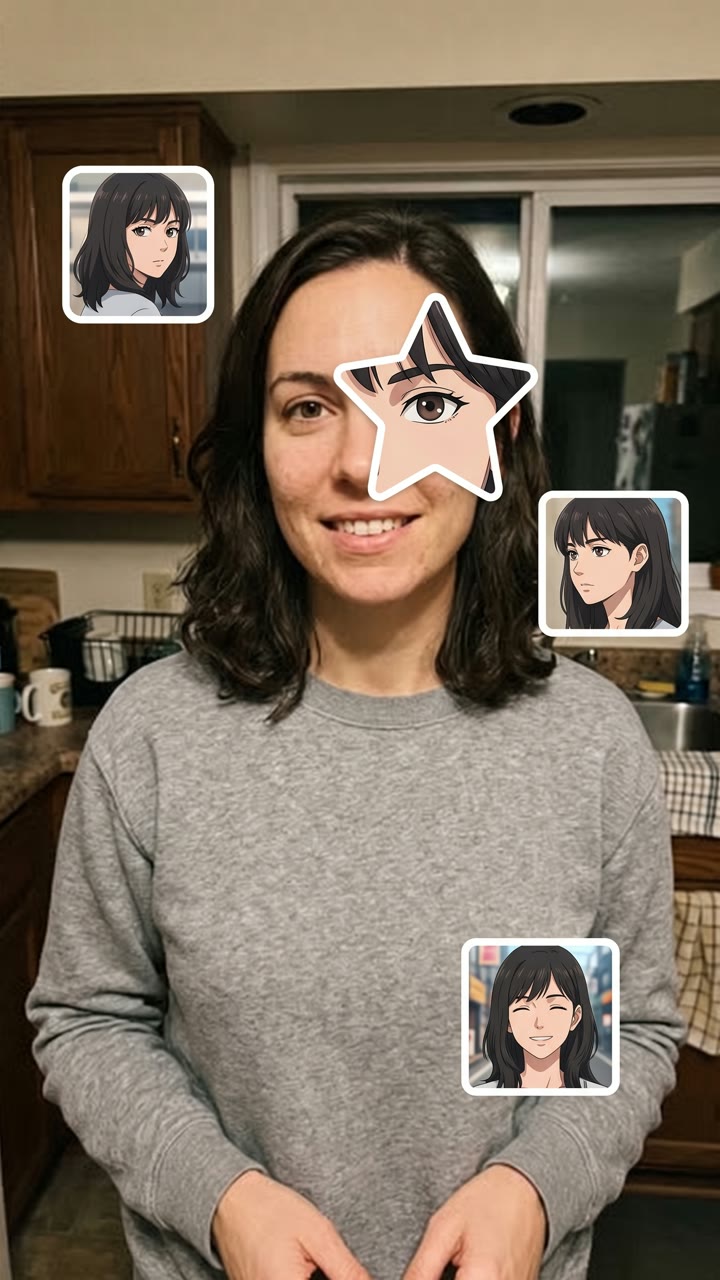
Upload a single selfie. AI creates an anime version of you, carves out a star from its face, places it over your eye and surrounds you with three to four anime stickers of your twin.

The original Anime Face Trend reelOriginal reel
  • 1 photo you upload
  • 2K photo you can convert to video
  • 9:16 for TikTok, Reels, Shorts
  • No watermark

No prompt to write: Add your photo and tap once

Create your own

Ready in a few minutes · From 3 credits

The anime face trend, sometimes known as the anime eye trend, is a TikTok selfie style from October 2026: a star-shaped piece of an anime eye appears over your actual eye, surrounded by small anime stickers. With this tool, AI creates your unique anime twin from a single selfie and builds the complete picture.

Also called My anime look alike trend · Anime star eye photo · Anime eye sticker trend · Star eye anime trend

Step by step

How to create the Anime Face Trend photo with Smew AI

Everything happens in your browser. No editing app needed, no prompt writing, no watermark.

  1. Upload your photo

    Click "Create your own" and upload your selfie, face visible up close, with one eye showing. Capture it with your camera or select from your library.

  2. Click Generate

    The button displays the cost. Nano Banana 2.1 places your photo into the Anime Eye Trend scene and produces one 2K photo. No prompt required.

  3. Download or share

    Your photo arrives in minutes as a 9:16 2K image. Download it, share from your device, convert it to video, or access it later in your Library.

What kind of photo works best?

Upload a selfie of yourself, the image you plan to share. The system preserves it and layers the anime elements on top.

  • Face near the camera. Head and shoulders, or tighter. The star covers one eye, so that eye needs to be large and in focus.
  • Obscure part of your face, following the trend. Wear a hood, cover your mouth with your hand or sleeve, or let hair fall across one side. Leave at least one eye visible.
  • Dim lighting works well. Evening glow, window light, a dark room with a single lamp. Simple backgrounds provide room for the stickers.
  • Your hair and clothing shape your anime twin: it adopts your hair shade and cut, your eye color and what you're wearing.
  • Use your own image. Adults only: no children, celebrities or other people's photos.

How did the Anime Face Trend trend begin?

The anime face trend is an edited photo. You capture a moody selfie that conceals part of your face, beneath a hood, behind your hand or your hair. You then overlay a star-shaped piece of an anime eye precisely on top of one actual eye, plus three or four tiny anime screenshots around you: "the anime character I look like".

The audio is "original sound" by TikTok user The One LSR, shared on 29 August 2026 with a bike video. In early October, Vietnamese posts used it for images with anime faces layered over friends' faces, and one surpassed 1.8 million views on 10 October. The star eye cutout originated in Kazakhstan: the earliest selfies in this format appeared on 16 and 17 October, and on 17 October a post there exceeded 1.3 million views and 430,000 likes. Additional posts from Kazakhstan reached 850,000 to 900,000 views over the following two days. English tutorial videos named it the anime star eye trend and "my anime look alike" from 19 October, and by 20 October the audio had roughly 39,000 videos, with 18,500 new ones daily.

  1. TikTok user The One LSR shares the audio, "original sound", with a fixed-gear bike video. TikTok sound

  2. A Vietnamese photo with anime faces layered over three friends' faces surpasses 1.8 million views on the audio, followed by more anime sticker photos. TikTok sound

  3. The star eye variant, a hooded selfie with an anime eye in a star positioned over the actual eye plus three anime stickers, exceeds 1.3 million views from Kazakhstan, the earliest post in this format crossing a million. TikTok sound

  4. English CapCut tutorial videos begin: "anime face trend photo tutorial", "anime star eye trend", "my anime look alike". The hashtag #animestareyetrend emerged a day prior. TikTok

  5. The audio has roughly 39,100 videos and increases by about 18,500 daily. 12 of its 30 top posts are from the past three days, totaling 6.4 million views. TikTok sound

Copy and paste

The Anime Face Trend prompts

You don't need this: the one-tap workflow handles it for you. The photo prompt integrates your photo into the scene. Want changes? Copy and modify it in AI Photo.

Star eye

1 photo: your selfie, face close, one eye in viewNano Banana 2.1Photo · 2K · 9:163 credits
Photo prompt

Use the uploaded image as the base: it is the real selfie and it stays a real, unchanged photo. Keep the photo exactly as it is: the same person, face, skin, pose, camera angle, light, background, hood, hands and hair. Do not redraw, retouch, slim or stylize the real person: only add the stickers on top. First design this person's anime twin: an ORIGINAL anime character who looks like them, in a clean modern anime style (crisp ink lines, soft cel shading, large expressive eyes with bright highlights). The twin has the same hair color, hair length and hairstyle (with the same fringe), the same eye shape and eye color, the same eyebrows, skin tone and age, and the same clothes in the same colors as the person in the photo. It is an original design, not any existing anime, manga, cartoon or game character, and not copied from any series or studio. Then make the anime star eye edit on top of the photo: a large five-pointed STAR-shaped cut-out of the anime twin's face is pasted over ONE of the person's eyes (the one on the left of the picture when both show), at exactly the same place, size and angle, so the anime eye sits right where the real eye is and lines up with the real eyebrow, nose and cheek. The star shows a close-up of the twin's eye, eyebrow, a bit of its fringe and its cheek. The star has soft rounded points and a clean flat edge, like a cut paper sticker, with no border and no shadow. The other real eye stays visible and real. Three or four small sticker portraits of the same anime twin sit around the person, on the background and on the clothes, never on the real face: each one a different still of the twin like a frame from an anime episode (a look back over the shoulder, a side view, a calm stare at the camera, a small smile), with soft simple anime backgrounds (a classroom window, a pale sky, a blurred street). They have slightly different sizes and sit straight or a little tilted, like stickers in a phone photo collage. The stickers are squares with rounded corners. Exactly one real person, and every sticker shows only the anime twin of that person: no other characters, no famous anime, manga, cartoon or game character. Any logo or writing on the clothes becomes plain. Vertical 9:16; if the photo is wider, extend the background naturally. No text, no captions, no letters, no speech bubbles, no watermark, no app interface, no frame.

2387 characters

Heart eye

1 photo: your selfie, face close, one eye in viewNano Banana 2.1Photo · 2K · 9:163 credits
Photo prompt

Use the uploaded image as the base: it is the real selfie and it stays a real, unchanged photo. Keep the photo exactly as it is: the same person, face, skin, pose, camera angle, light, background, hood, hands and hair. Do not redraw, retouch, slim or stylize the real person: only add the stickers on top. First design this person's anime twin: an ORIGINAL anime character who looks like them, in a clean modern anime style (crisp ink lines, soft cel shading, large expressive eyes with bright highlights). The twin has the same hair color, hair length and hairstyle (with the same fringe), the same eye shape and eye color, the same eyebrows, skin tone and age, and the same clothes in the same colors as the person in the photo. It is an original design, not any existing anime, manga, cartoon or game character, and not copied from any series or studio. Then make the anime heart eye edit on top of the photo: a large HEART-shaped cut-out of the anime twin's face is pasted over ONE of the person's eyes (the one on the left of the picture when both show), at exactly the same place, size and angle, so the anime eye sits right where the real eye is and lines up with the real eyebrow, nose and cheek. The heart shows a close-up of the twin's eye, eyebrow, a bit of its fringe and its cheek, with a clean flat edge like a cut paper sticker, no border and no shadow. The other real eye stays visible and real. Three or four small sticker portraits of the same anime twin sit around the person, on the background and on the clothes, never on the real face: each one a different still of the twin like a frame from an anime episode (a look back over the shoulder, a side view, a calm stare at the camera, a small smile), with soft simple anime backgrounds (a classroom window, a pale sky, a blurred street). They have slightly different sizes and sit straight or a little tilted, like stickers in a phone photo collage. The stickers are a mix of shapes: one circle, one small heart and one or two squares with rounded corners. Exactly one real person, and every sticker shows only the anime twin of that person: no other characters, no famous anime, manga, cartoon or game character. Any logo or writing on the clothes becomes plain. Vertical 9:16; if the photo is wider, extend the background naturally. No text, no captions, no letters, no speech bubbles, no watermark, no app interface, no frame.

2399 characters

What's the credit cost?

You pay in credits per photo, and the create page displays the precise cost on the Generate button before you commit. The one-tap rate includes one 2K photo, billed once. A single photo costs 3 credits, so the smallest one-time package covering it is $9.99 for 100 credits, no subscription needed. A smaller 1K photo costs less if you execute the prompt manually in AI Photo.

ModelSettingsCredits
Nano Banana 2.1 (this template)2K photo, 9:16, one tap3
Nano Banana 2.1 (manual in AI Photo)1K photo, 9:16, same prompt2

One-time packs and plans are on the pricing page. A failed video gives its credits back.

What does the anime eye trend template produce?

One fresh picture, your anime face trend photo, in three styles:

VersionThe cut-out over your eyeThe stickers around you
Star eyeA large five-pointed star featuring your anime twin's eye, eyebrow and fringe3 or 4 rounded square frames of your twin
Heart eyeA heart shape containing your twin's eyeA combination of a circle, a tiny heart and rounded squares
MangaA black-and-white manga star eyeBlack-and-white manga frames of your twin, over a black-and-white photo

Your selfie remains a genuine photo: identical face, identical pose, identical lighting. Only the anime additions are fresh. The AI initially designs your personal anime twin, an original character featuring your hair color and cut, your eye shape and shade, your skin tone and what you're wearing, then positions it in the star and on each sticker. It never borrows an existing anime character, so the image genuinely displays the anime character you resemble.

How Smew AI creates it: your photo is processed by Nano Banana 2.1, Google's image model, and returns as one 2K vertical image. The create page displays the precise cost on the Generate button before you commit, and each run produces a fresh interpretation.

How to share your anime star eye trend photo

  1. Create the image here from your selfie. Run again if you want a different anime twin or alternative poses on the stickers.
  2. Share it as a TikTok photo post. A single slide works: that's how the anime face trend tiktok posts appear. Include the trend's audio: "original sound" by The One LSR. Tap the audio beneath any anime eye post and click Use this sound.
  3. Add a brief caption. Creators keep it brief: "my anime look alike", "who do I look like?" or just some emojis. The image speaks for itself.
  4. Want additional slides? Create the Star eye and Heart eye on the same selfie and share both, or one from a second selfie.

The tutorials you find on TikTok, the anime face trend tutorial and anime eye trend tutorial videos, demonstrate a CapCut template where you manually cut out the eye and layer screenshots. Here you don't need a template or screenshots: one selfie in, complete photo out.

What's the source of the prompt?

The trend uses a closed CapCut template, so no one published a prompt. We studied the captions and comments from the largest post and the English tutorial videos, and the tutorials only display the template controls. So our prompt is crafted from what the posts demonstrate: a star-shaped cutout (or heart, or circle) of an anime face positioned precisely over one actual eye, at the matching angle, plus 3 or 4 small anime frames around the person. The one modification is intentional: creators layer screenshots of well-known anime characters, and we create an original anime version of you instead, so the image is yours to share.

What can go wrong, and how do you solve it?

ProblemFix
The star doesn't align with your eyeUpload a tighter selfie where one eye is large, focused and open. Try again.
The anime twin doesn't resemble youIts hair, eye shade and clothing derive from your photo: upload a photo with your hair and outfit clearly visible. Each run creates a new twin.
Your actual face appears retouchedThe prompt preserves the photo as is. A very dim or unfocused selfie may return smoothed: upload a sharper one.
The stickers obscure your faceTry again, or upload a photo with some clear background surrounding you.
A run fails, or the model rejects a photoThe credits are refunded. Try a different photo.
FAQ

Anime Face Trend trend questions

What is the anime face trend?
It's a TikTok photo style from October 2026, sometimes called the anime eye trend and the anime star eye trend. You share a selfie with a star-shaped piece of an anime eye positioned over your actual eye and small anime stickers surrounding you, to reveal the anime character you resemble.
Where does the anime eye trend come from?
The audio is "original sound" by TikTok user The One LSR from 29 August 2026. Anime sticker photos using it gained traction in Vietnam in early October, and the star eye selfie emerged from Kazakhstan: the earliest post in this format exceeding a million views was uploaded there on 17 October 2026. English tutorials appeared from 19 October.
How do I make the anime face trend photo? Is there an anime face trend tutorial?
Click "Create your own", select Star eye, Heart eye or Manga, upload one selfie and click Generate. You receive the complete picture. The anime face trend tutorial videos on TikTok demonstrate a CapCut template where you manually cut the star and layer screenshots; here you don't need a tutorial, template or screenshots.
Is there an anime face trend app or anime look alike app?
This page serves that purpose. Most users create the anime face trend photo in a CapCut template. On Smew AI you upload a selfie and AI builds the complete picture, the star eye and the stickers, with an anime twin created from your actual photo. It operates in the browser; no additional app required.
Who is my anime look alike? Can AI find my anime look alike?
Here AI doesn't select a well-known character. It creates an original one from your photo: your personal anime look alike, featuring your hair, eye color and outfit. Ask "whos my anime look alike" here and the result is a character created from you. It functions as an anime look alike generator and an anime look alike ai combined, and the anime look alike photo is ready to share.
Can I use a real anime character, like in the trend posts?
Not here. The trend posts layer screenshots of well-known anime characters, which are owned by their studios. Our template creates an original anime twin of you instead, so the image is yours and safe to share. If you want a well-known character, you would need to edit that in manually, at your own risk.
What is the anime eyes photo trend for a girl or a boy?
The identical picture. For the anime eyes photo trend girl posts frequently use the heart and circle stickers, and the anime eyes photo trend boy posts the hooded star eye selfie, the star eye anime trend appearance. The anime face trend photo girl and anime face trend photo boy variants only differ in the selfie: your anime twin mirrors your photo.
Does my hair color matter? Black hair, brown hair, curly hair?
Yes, in a positive way. Your anime twin adopts your actual hair color, length and cut. The anime face trend black hair posts are most widespread, but the anime face trend brown hair and anime face trend curly hair appearances function the same: AI renders your hair in anime style.
Can AI make an anime version of yourself without the trend layout?
This page creates the trend image: the anime version of you appears inside the star and on the stickers, and your actual selfie stays authentic. To create an anime version of yourself as a complete portrait, or an anime version of me ai picture with no selfie in it, compose your own prompt in the Nano Banana 2 image tool.
Is it an anime eye filter or an anime sticker selfie?
It's nearer to an anime sticker selfie than a filter. An anime eye filter or an anime look alike filter, like the anime eyes filter tiktok effects, alters your actual eyes in real time. This trend preserves your actual face and layers an anime eye in a star on top, plus anime stickers for photos surrounding you, like the anime star face trend on TikTok.
Who can use it?
Adults, with their own selfie. Never use an image of a child, a celebrity or another person without their permission. The image is AI-generated: maintain the platform's AI label when you share.
Does it cost credits?
Yes, a few credits per image, because it's one AI image. The create page displays the precise cost on the Generate button before you commit, and if a run fails, the credits are refunded.
Is my photo private?
Yes. Smew AI doesn't share your photo or the output anywhere or display them to other users. The output goes to your private Library, and you can remove it there anytime.
More trends

Other AI video templates

Template

You Look Lonely, I Can Fix That: The AI Hologram Video

A towering glowing hologram bends down through rainy neon skies toward a small person on a bridge and delivers: "You look lonely. I can fix that." Add your faces to both characters, or create a wallpaper.

Read more
Template

Ghostface AI Trend: Put Yourself in the 90s Horror Phone Call

Picture yourself lying on satin sheets with a chunky 90s telephone to your ear, while a hooded figure in a black robe and white ghost mask stands in the shadowy doorway. Upload a selfie and get a grainy film photograph, or a brief video where you look back.

Read more
Template

Ryuk AI: Place a Grinning Death God in Your Photo

Upload your photo, and a towering death god with spiky black hair, dark feathers and a huge grin appears right beside you, matching your photo's lighting. Save the photo, or create a 5 second video where he takes a bite of an apple.

Read more
Template

South Park Filter: You as a Paper Cut-Out Cartoon

Upload a photo of yourself, friends or your pet. The AI transforms it into a flat paper cut-out cartoon with a large round head and oval eyes, placed in a snowy small mountain town. Your hairstyle, beard, glasses and clothing transfer over.

Read more
Template

Perdon Trend: AI Creates Your Perfect Photo, Then You Say "Perdón"

Upload one casual photo of yourself or your pet. AI transforms it into perfection: dream location, salon-fresh hair, professional lighting. Share the AI version first, then drop your real photo with just one word: perdón.

Read more
Template

Crochet Filter: AI Transforms Your Picture Into an Amigurumi Doll

Upload one picture. AI creates a handmade amigurumi version in yarn: your hair, outfit and pose, set in a crocheted version of your location. Create it solo or with someone special.

Read more

Create your own Anime Face Trend photo

Upload one photo and click once. No prompt needed. 3 credits.

No watermark. A failed photo gives its credits back. Secure checkout by Stripe.